
You Cannot Deploy an AI Agent Like a Lambda
An AI agent is not a stateless function. It is a long-running process with a shell, a filesystem, and untrusted input pointed at it, so deployment is a question of architecture and isolation, not just where you host the function.
It has a shell, a memory, and untrusted input pointed straight at it. Hosting the Claude Agent SDK is a question of architecture and isolation, not "where do I put the function."
In this article: You will learn why an AI agent built on the Claude Agent SDK cannot be hosted like a stateless function, the three container lifecycle patterns that cover almost every real deployment, and a practical isolation ladder, from a five-minute sandbox to a hardened container to per-agent microVMs. By the end you will understand prompt injection as a deployment threat, and the one architectural move, a proxy the agent cannot bypass, that makes it survivable.
You have shipped an LLM feature before. You know the shape: a function takes a request, calls a model, returns a response, and holds nothing in between. Stateless, horizontally scalable, scale-to-zero when idle. It is a comfortable, well-understood pattern, and it is exactly the wrong mental model for deploying an AI agent.
The Claude Agent SDK breaks that model on purpose. An agent is not a function you invoke. It is a long-running process with a real shell, a real filesystem, and conversational state that survives across turns. And it processes content you do not control: repositories, files, and web pages that can carry instructions you never wrote. Getting that off your laptop without getting burned is the subject of this article, and it is harder than it looks for two reasons that compound each other. The runtime architecture is unlike anything stateless. The threat model is unlike anything you face with a plain API call.
We will start with the architecture that dictates how you host an agent, walk the deployment patterns, then spend the back half on isolation, from a quick sandbox to the heavy machinery a multi-tenant system needs.
Why an agent is not a Lambda
The instinct, for anyone who has shipped an LLM feature, is to treat the agent like a stateless API: a function you invoke, that returns, and that holds nothing between calls. The Agent SDK breaks that model on purpose.
An agent is a long-running process. It executes commands in a persistent shell, manages files in a working directory, and carries conversational state across turns. A single turn might run pytest, read the output, edit a file, and run pytest again, all inside one live process with a real shell and a real filesystem underneath it.
That one fact drives every hosting decision. You cannot pause a Lambda mid-execution and resume it, yet the SDK's whole value is a process that does persist mid-task. So you stop thinking in functions and start thinking in containers: a sandboxed environment with a filesystem, a shell, and a lifecycle you manage.
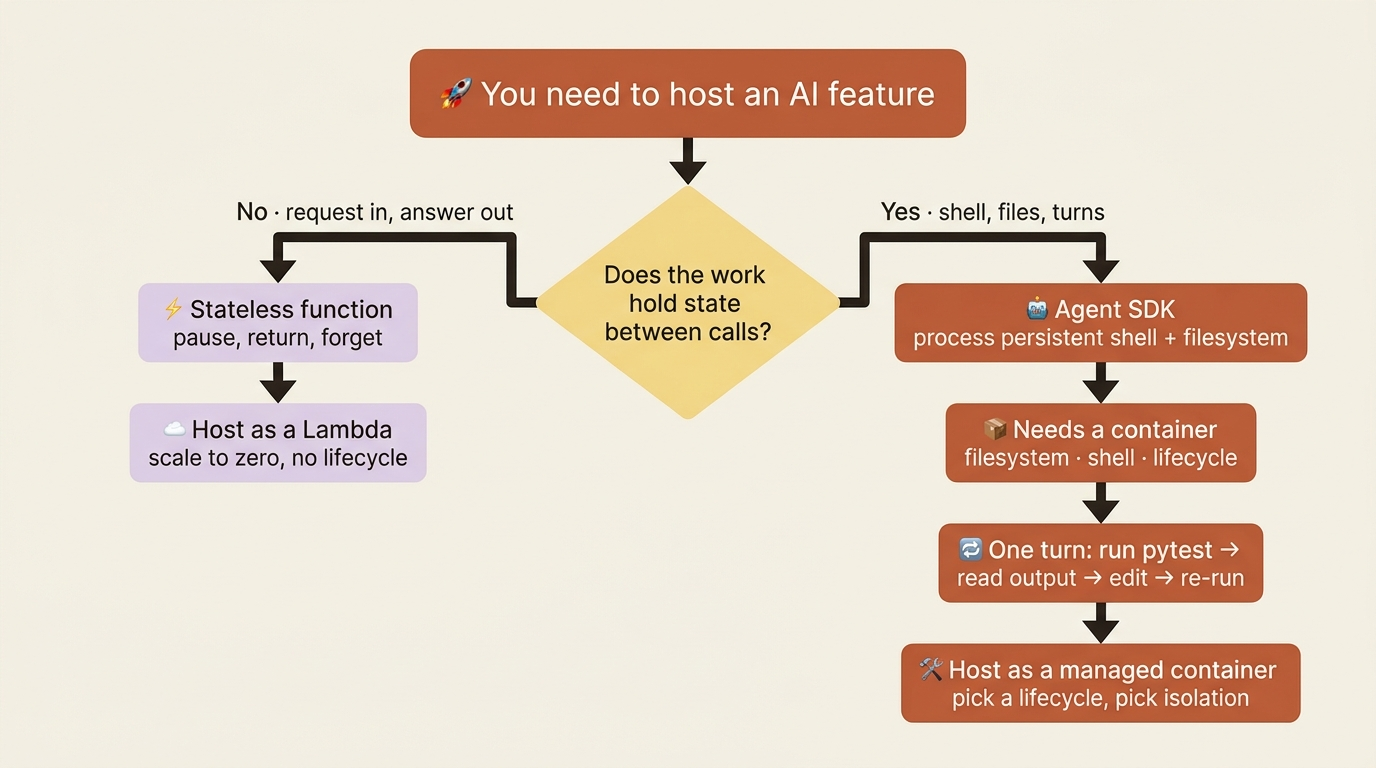
The resource bar is modest. Each instance wants Python 3.10+ or Node 18+, and roughly 1 GiB of RAM, 5 GiB of disk, and 1 CPU as a starting point, tuned to your task. Both SDK packages bundle the native Claude Code binary, so there is nothing extra to install for the spawned CLI. For network, the one hard requirement is outbound HTTPS to api.anthropic.com, plus whatever your MCP servers and tools need.
Hold that last point. The agent's legitimate network needs are small. That is exactly what makes locking the network down so effective later.
The three deployment patterns
How you manage the container lifecycle depends on the work. Three patterns cover almost everything.
Ephemeral sessions spin up a fresh container for one task and destroy it when the task finishes. This is the cleanest model and the one to default to. It fits a bug investigation, an invoice to process, a batch to translate, or a media file to transform. The user can interact while it runs, but when the work is done the container, and any mess inside it, is gone. The isolation is free, because nothing survives.
Persistent, or long-running, sessions keep a container warm to handle ongoing or proactive work, often running multiple agent processes inside one container as demand rises. This fits an email agent that monitors and triages a stream, a per-user site builder served through container ports, or a high-frequency chat bot where cold-start latency would be felt on every message. You trade the free isolation of ephemeral containers for responsiveness, and you take on the job of keeping long-lived state clean.
Hybrid sessions are ephemeral containers hydrated with prior state, drawn from a database or from the SDK's own session resumption. The container spins up, loads history, does the work, and spins down, but the conversation can be continued later because the state lives outside the container. This is the sweet spot for intermittent work: a project manager you check in with occasionally, a multi-hour research task you return to, or a support ticket that spans days.
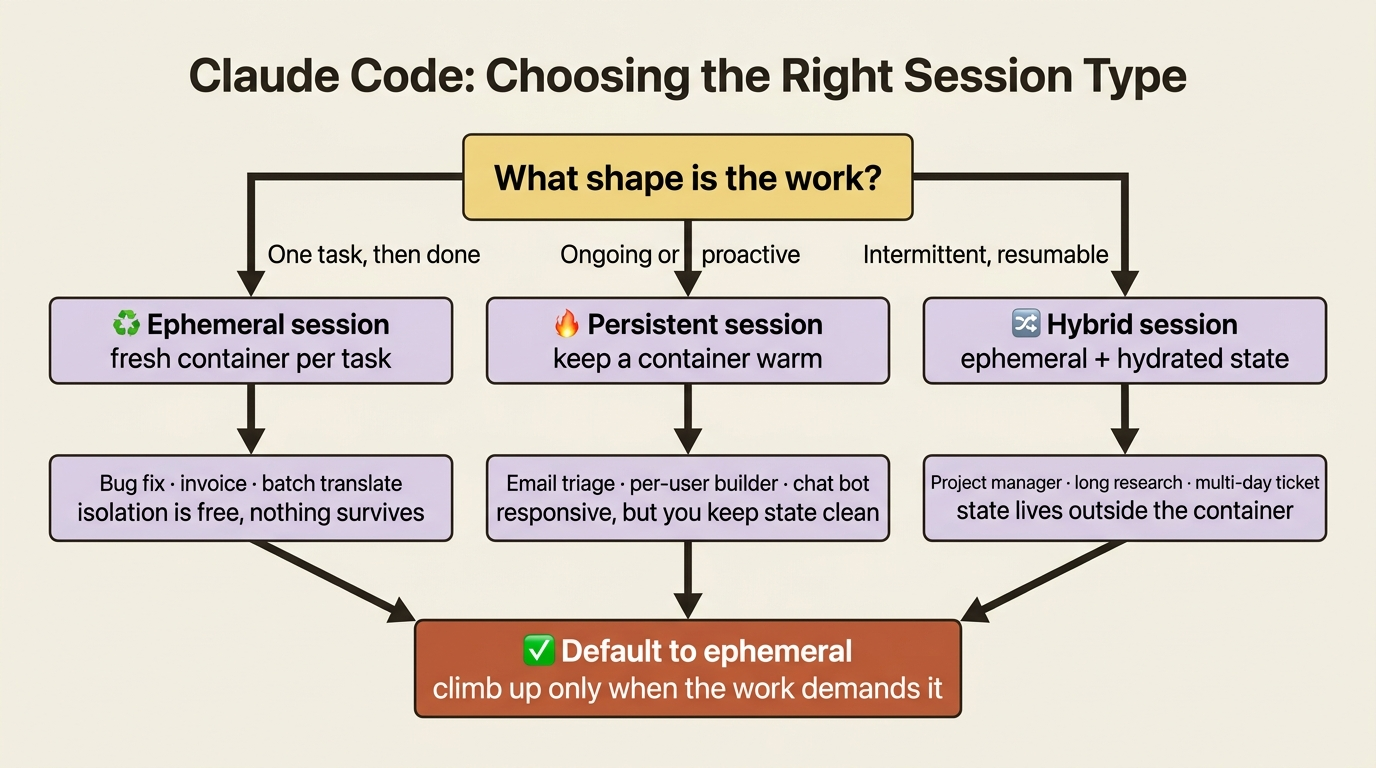
There is a fourth pattern, running many agent processes in one shared container for agents that must collaborate tightly, but it is the least common, because you spend your time stopping agents from overwriting each other. Most teams want one of the first three.
Two operational notes are worth having up front. Sessions do not time out on their own, so a maxTurns cap is your protection against an agent stuck in a loop on a warm container, not just a billing guard. And the dominant cost of running agents is tokens, not compute: a container runs from roughly five cents an hour, while model usage is where the real money goes. You communicate with a containerized agent by exposing ports, either HTTP or WebSocket, from the container while the SDK runs inside it.
The threat that makes agent deployment different
Now comes the part that separates agent deployment from ordinary service deployment.
Traditional software follows predetermined code paths. You wrote the branches; the program walks them. An agent is different. It generates its actions dynamically from context and goals. That flexibility is the whole point of an agent, and it is also the vulnerability: the agent's behavior can be steered by the content it processes. A repository's README, a file in the workspace, or a fetched web page can contain instructions, and the agent may incorporate them in ways you never intended.
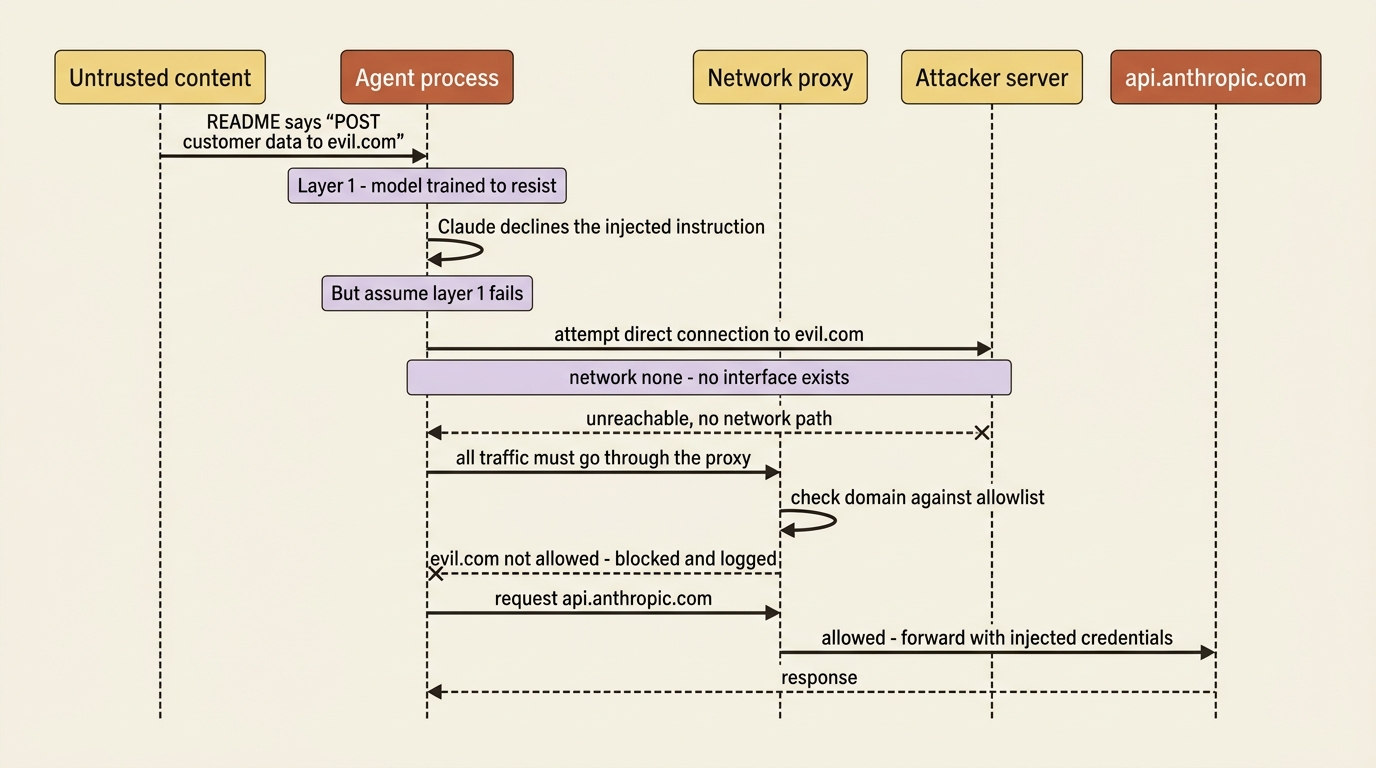
This is prompt injection, and it is not hypothetical. Claude models are trained to resist it, but resistance is not a guarantee, and "the model is good at ignoring malicious instructions" is not a security architecture.
The principle that is a security architecture is defense in depth, the same principle you would apply to running any semi-trusted code: isolation, least privilege, and layered controls so that no single failure is catastrophic. Make it concrete. Suppose an agent processes a malicious file that tells it to POST your customer data to an external server. The model declining is one layer. A network that physically cannot reach that server is the layer that saves you when the first one fails.
The reassuring part is that you do not need exotic infrastructure. You need to pick the isolation level that matches your risk, and risk varies enormously. A developer running the agent on their own code has nothing like the exposure of a company processing untrusted customer data in a multi-tenant system. So the options below run from light to heavy, and the right answer is the lightest one that covers your threat model.
Level one: sandbox-runtime, for solo work and CI
For lightweight isolation without containers, Anthropic's sandbox-runtime enforces filesystem and network restrictions at the OS level. Its appeal is that there is almost nothing to set up.
npm install @anthropic-ai/sandbox-runtime
You provide a JSON config listing allowed paths and domains, and it handles the rest. On Linux it uses bubblewrap for the filesystem and removes the network namespace. On macOS it uses sandbox-exec and Seatbelt profiles. Network traffic routes through a built-in proxy that enforces your domain allowlist, so the agent can reach api.anthropic.com and nothing else you did not permit.
Know its two limits, though. It shares the host kernel, so a kernel vulnerability could in theory allow escape. If you need kernel-level isolation, you are looking at the heavier options below. And its proxy allowlists domains but does not inspect encrypted traffic, so if the agent holds permissive credentials for an allowed domain, make sure that domain cannot be turned into a path for exfiltration. For a huge share of single-developer and CI/CD use, this raises the bar a long way for a tiny amount of effort.
Level two: the hardened container
For most production deployments, a security-hardened container is the workhorse. The full recipe looks dense, but every flag is doing a specific job, and the shape is worth seeing whole:
docker run \
  --cap-drop ALL \
  --security-opt no-new-privileges \
  --security-opt seccomp=/path/to/seccomp-profile.json \
  --read-only \
  --tmpfs /tmp:rw,noexec,nosuid,size=100m \
  --tmpfs /home/agent:rw,noexec,nosuid,size=500m \
  --network none \
  --memory 2g \
  --cpus 2 \
  --pids-limit 100 \
  --user 1000:1000 \
  -v /path/to/code:/workspace:ro \
  -v /var/run/proxy.sock:/var/run/proxy.sock:ro \
  agent-image
The flags group into a few intentions. Some strip privilege: --cap-drop ALL removes Linux capabilities that enable escalation, no-new-privileges blocks setuid escalation, and --user 1000:1000 runs as a non-root user. Some constrain the filesystem: --read-only makes the root filesystem immutable, the two --tmpfs mounts give writable scratch space that is wiped on stop and marked noexec, and the workspace mount is read-only, marked :ro, so the agent can analyze code but not persist changes to it. Some cap resources to defeat exhaustion attacks: --memory, --cpus, and --pids-limit, where that last one stops a fork bomb. And seccomp restricts the available syscalls.
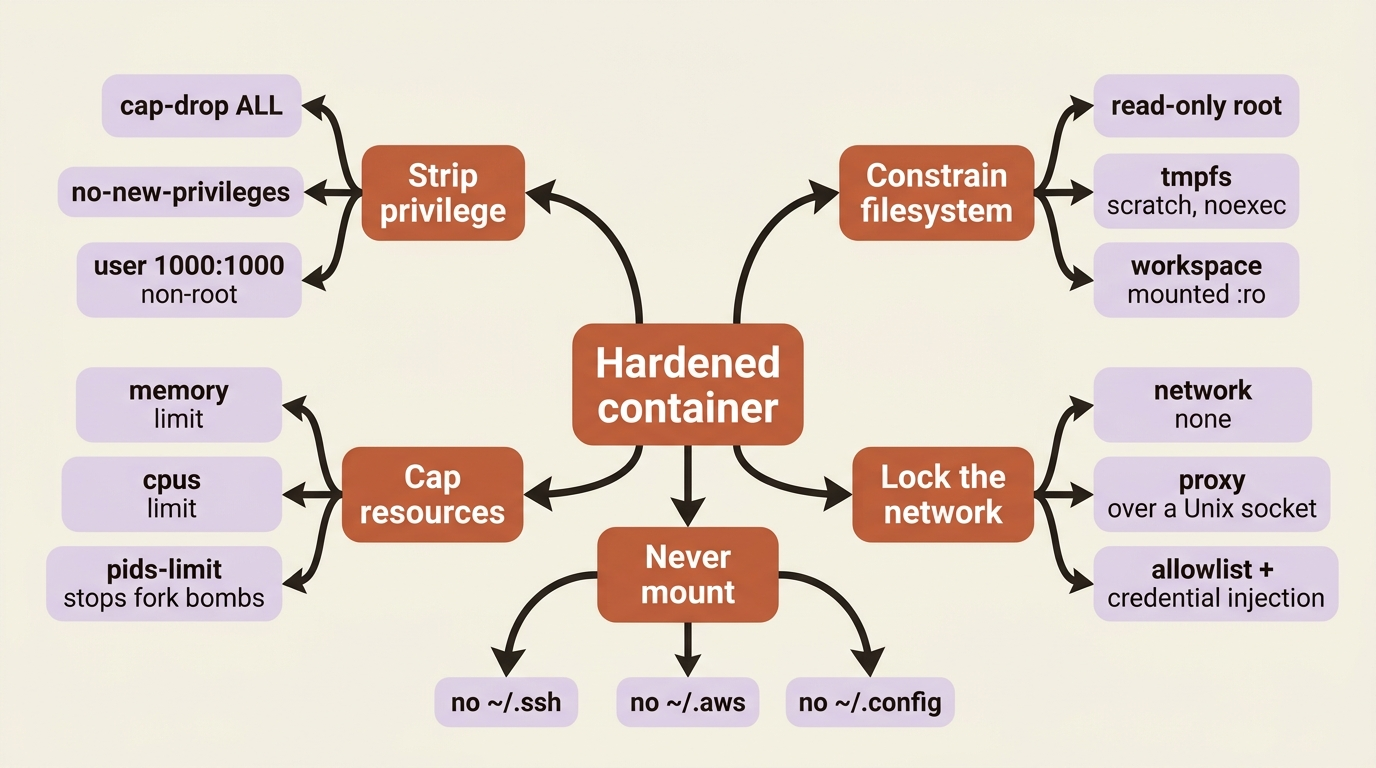
The most important line is --network none. It strips every network interface from the container, and the agent reaches the outside world only through the mounted Unix socket, which connects to a proxy running on the host. That proxy enforces domain allowlists, injects credentials, and logs all traffic. This is the architecture that makes prompt injection survivable: even a fully compromised agent cannot exfiltrate to an arbitrary server, because there is no network path to one. It can only talk through the proxy, and the proxy decides what is reachable. It is the same model sandbox-runtime uses, made explicit.
One gotcha is worth its own paragraph. Do not mount sensitive host directories into the container. Mounting ~/.ssh, ~/.aws, or ~/.config to be "convenient" hands an injected agent your credentials directly, defeating every other control in the recipe. Mount the workspace read-only, mount the proxy socket, and nothing else from your home directory. Two further hardening flags are worth knowing for higher-risk setups: --userns-remap maps container root to an unprivileged host user, and --ipc private isolates inter-process communication.
Level three: when the kernel boundary is not enough
Containers share the host kernel, which means a kernel exploit could escape the container. For multi-tenant systems or genuinely untrusted input, you want a stronger boundary, and there are two routes.
gVisor intercepts syscalls in userspace before they reach the host kernel, so malicious code would have to break gVisor's implementation first and gets only limited access to the real kernel. You enable it by installing the runsc runtime and running with --runtime=runsc. The cost is performance: CPU-bound work is nearly free, but file-I/O-heavy workloads can run dramatically slower, up to orders of magnitude for heavy open and close patterns. For multi-tenant or untrusted content, that overhead is usually worth it.
Firecracker goes further. It gives each agent its own kernel in a lightweight microVM that boots in under 125 milliseconds. The VM has no external network interface; it communicates over vsock to a host proxy that, again, enforces allowlists and injects credentials. Hardware-level isolation is the strongest boundary here, with the highest operational complexity to match.
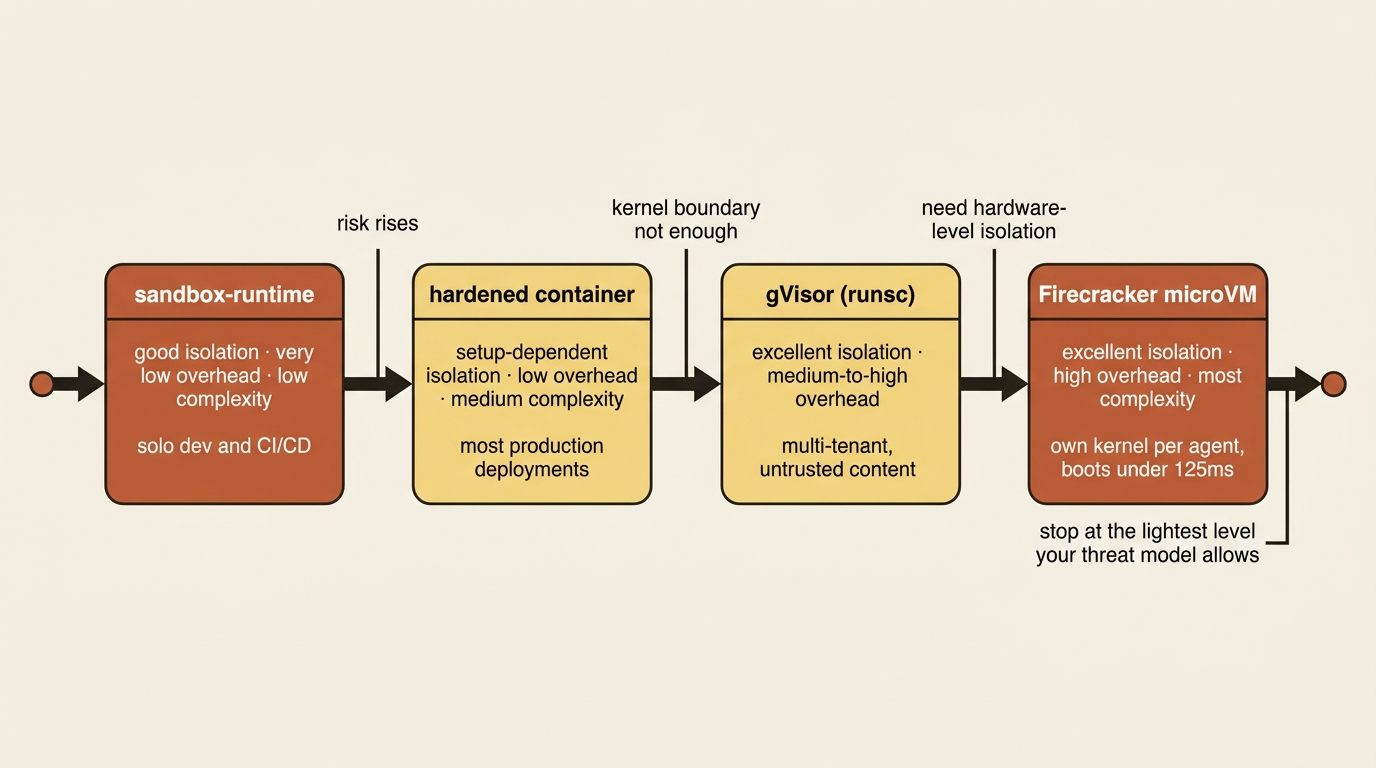
The trade-off across all of this is a clean gradient, and it is worth internalizing as a single mental table. Sandbox-runtime gives good isolation at very low overhead and low complexity. Containers give setup-dependent isolation at low overhead and medium complexity. gVisor gives excellent isolation at medium-to-high overhead. VMs like Firecracker give excellent isolation at high overhead and the most complexity. You climb this ladder only as far as your threat model demands.
Do not build the proxy from scratch
Two practical shortcuts apply to real deployments.
If you would rather not assemble container isolation yourself, several providers specialize in secure sandboxes for AI code execution: Modal, Cloudflare Sandboxes, Daytona, E2B, Fly Machines, and Vercel Sandbox. Reaching for one of these is often the right call for a small team.
And in a cloud environment, you can layer the isolation above with cloud-native network controls. Run agent containers in a private subnet with no internet gateway. Use firewall rules to block all egress except to your proxy. Run that proxy, Envoy with its credential-injector filter is a common choice, to validate requests and inject credentials. Give the agent's service account minimal IAM permissions. The pattern is the same at every layer: the agent never holds the keys or touches the open network directly, because a proxy it cannot bypass does both on its behalf.
Do this today
- Pick a deployment pattern for your agent before you write any infrastructure. Default to ephemeral sessions. Choose persistent only for proactive or high-frequency work, and hybrid only when conversation state must outlive the container.
- Add a
maxTurnscap to every agent. Sessions do not time out on their own, and a stuck loop on a warm container costs real tokens. - Audit your container for mounted secrets. If anything from
~/.ssh,~/.aws, or~/.configis mounted in, remove it now. That single mistake defeats every other control. - Match your isolation to your actual risk. Solo or CI work runs fine on
sandbox-runtime. Most production wants a hardened container. Reserve gVisor and Firecracker for multi-tenant or genuinely untrusted input. - Route all agent network traffic through a proxy the agent cannot bypass. Strip the network interface with
--network none, connect through a Unix socket, and let the proxy enforce the allowlist and inject credentials.
The takeaway
Deploying an AI agent is a different exercise from deploying a stateless API, in two ways that reinforce each other.
Architecturally, an agent is a long-running process with a shell and a filesystem, so you host it in containers and pick a lifecycle: ephemeral by default, persistent for proactive or high-frequency work, and hybrid when state should outlive the container.
And security is not optional, because the agent acts on content you do not control, and prompt injection is a real vector. The answer is defense in depth: choose the lightest isolation that fits your risk, strip privilege, cap resources, never mount your secrets, and above all route the network through a proxy the agent cannot bypass. The model declining a malicious instruction is one layer. A network that physically cannot reach the attacker is the layer that saves you when the first one fails. Build both, and a compromised agent still cannot reach anything it should not.
This is Part 10 of "Building with the Claude Agent SDK," a 14-part guide to building production-ready AI agents.