
You Built a Test Tool, a Reviewer, and an Audit Hook. Stop Wiring Them by Hand.
Custom tools, subagents, hooks, and MCP servers do not have to stay scattered across your code. A Claude Agent SDK plugin bundles all four into one portable directory that loads with a single line of config.
How Claude Agent SDK plugins bundle the custom tools, subagents, hooks, and MCP servers you have scattered across your code into one portable directory that loads in a single line of config.
In this article: You will learn what a Claude Agent SDK plugin actually is, how it differs from on-disk config, and how to load one correctly. We cover the canonical plugin layout, the one verification step that saves you an afternoon of confusion, the namespace rule that makes skills look broken when you miss it, and a worked example that packages a real agent's tools into a single portable unit. By the end, your whole agent travels as one directory.
Picture an agent you have been building for a while. It has a custom run_tests tool you wrote yourself. It has a reviewer subagent that critiques diffs. It has an audit-logging PostToolUse hook. It has a CLAUDE.md and a skill that captures a debugging workflow. Each of those is genuinely useful. And each of them lives somewhere different.
The tool sits in your application code. The hook and the subagent sit under .claude/. The skill sits somewhere else again. All of them get wired into your options object by hand, every single time you start the agent. It works. It also does not travel. Hand this agent to a teammate, or stand it up in a second repository, and you re-wire everything from scratch.
This article is the fix, and it is a packaging story, not a new-capability story. Claude Agent SDK plugins bundle the four extension types you already know, namely skills, agents, hooks, and MCP servers, into one directory with a manifest. The whole kit then loads with a single line of config and moves wherever you need it. We will define what a plugin is, load one, learn the verification step that catches most failures, and then package a real agent's tools into a single portable plugin.
What a plugin actually is
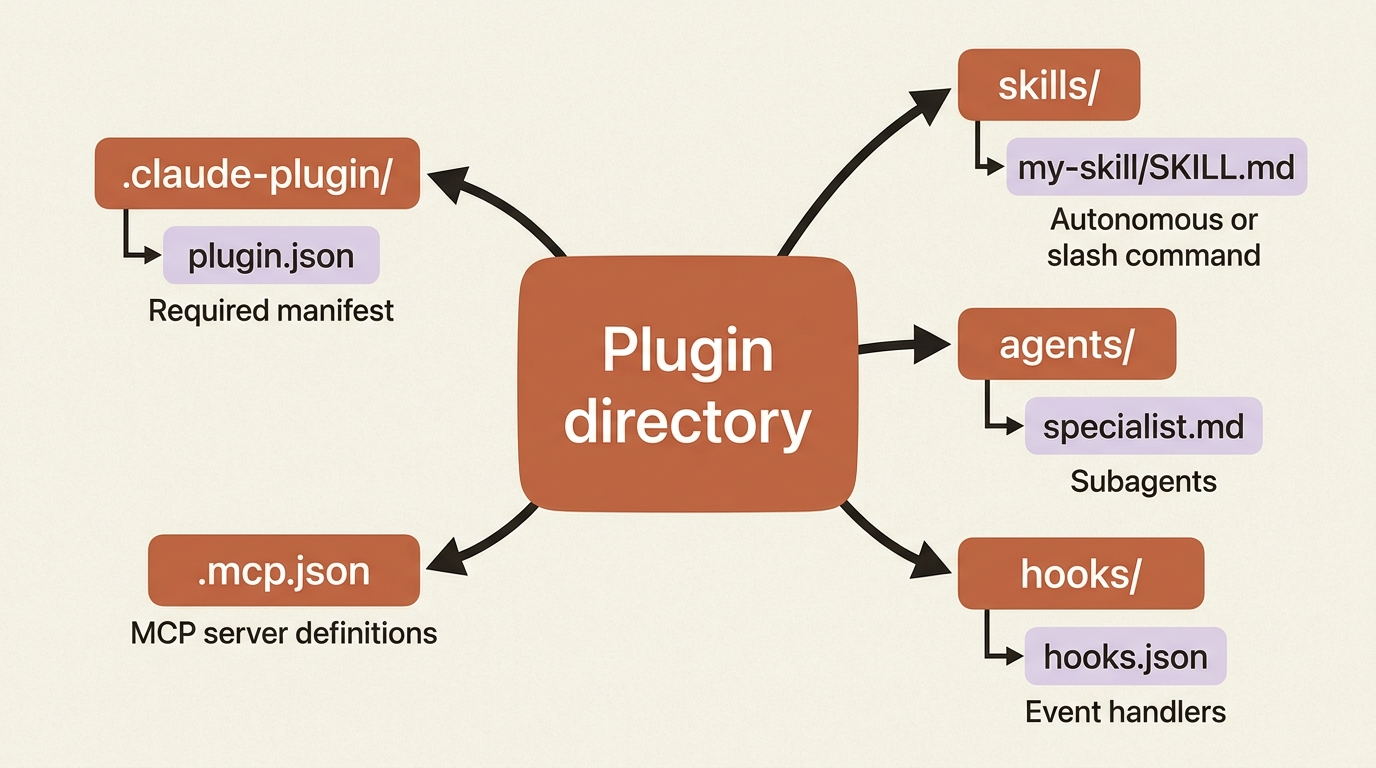
A plugin is a directory with a manifest and some optional, familiar contents. The manifest is a .claude-plugin/plugin.json file, and it is the one required piece. Around it sit the four extension types, each in its own conventional folder. Here is the canonical layout, which is worth seeing whole because the folder names are load-bearing:
my-plugin/
├── .claude-plugin/
│   └── plugin.json        # required: the manifest
├── skills/                # Agent Skills (autonomous or /skill-name)
│   └── my-skill/
│       └── SKILL.md
├── agents/                # subagents
│   └── specialist.md
├── hooks/                 # event handlers
│   └── hooks.json
└── .mcp.json              # MCP server definitions
Nothing here is new. It is the same skills, agents, hooks, and MCP servers you have likely used as standalone extensions, just collected in one place instead of scattered. One note worth carrying forward: a commands/ folder still loads for backward compatibility, but skills/ is the format to use. A skill works both autonomously and as a /name slash command, while a legacy command only does the latter.
Loading a plugin: discovered versus loaded
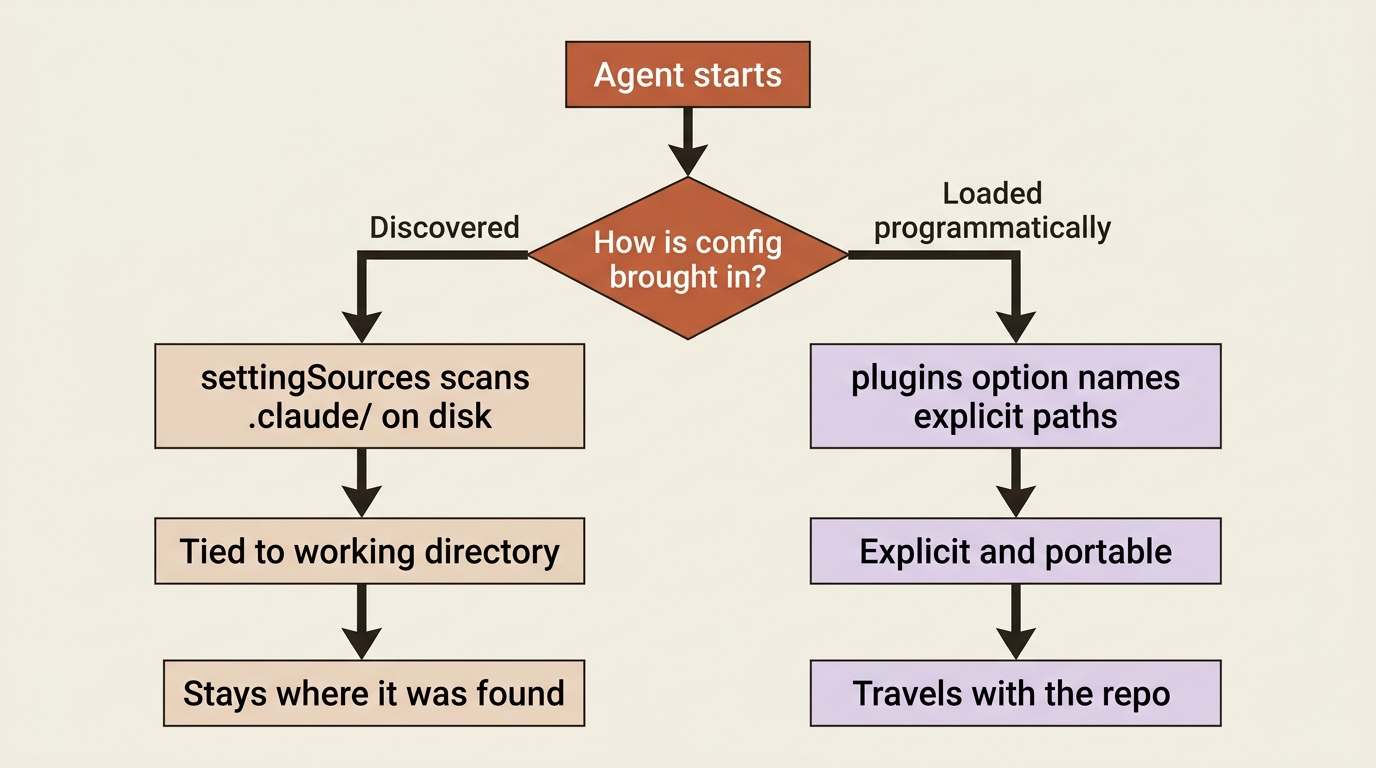
Here is where plugins diverge from ordinary on-disk config. The .claude/ directory is discovered automatically: the SDK scans it through the settingSources option. Plugins are different. They are loaded programmatically, through the plugins option, and each entry is an object naming a local path. That difference is the point. Plugins are explicit and portable, not tied to whatever directory you happen to be running in.
Here is the load itself, in both languages:
import asyncio
from claude_agent_sdk import query, ClaudeAgentOptions


async def main():
    options = ClaudeAgentOptions(
        plugins=[  # ①
            {"type": "local", "path": "./buggy-shop-tools"},  # ②
            {"type": "local", "path": "/absolute/path/to/shared-plugin"},  # ③
        ],
    )
    async for message in query(prompt="Fix the failing tests in buggy-shop.", options=options):  # ④
        print(message)


asyncio.run(main())
① The plugins option is the explicit, programmatic load surface, distinct from the settingSources discovery that scans .claude/.
② A relative path is resolved from your current working directory, so it depends on where you launch the process.
③ An absolute path travels reliably, since it does not depend on the launch directory.
④ The query loop is unchanged; once the plugins are wired in, the agent runs exactly as before, now with the bundled extensions available.
Note: The full extracted listing at code/claude_agent_sdk/part-11-plugins/listings/01-load-plugins.py is the complete runnable program.
import { query } from "@anthropic-ai/claude-agent-sdk";

for await (const message of query({
  prompt: "Fix the failing tests in buggy-shop.",
  options: {
    plugins: [  // ①
      { type: "local", path: "./buggy-shop-tools" },  // ②
      { type: "local", path: "/absolute/path/to/shared-plugin" },
    ],
  },
})) {
  console.log(message);
}
① Same plugins option as Python; it is passed inline on the options object rather than through a separate ClaudeAgentOptions constructor.
② Each entry is the same { type: "local", path } object shape, relative or absolute, exactly as in Python.
Note: The full extracted listing at code/claude_agent_sdk/part-11-plugins/listings/02-load-plugins.ts is the complete runnable program.
Each entry is { type: "local", path }. Paths can be relative, resolved from your current working directory, or absolute. Absolute paths are more reliable, since they do not depend on where you launched the process. You can load several plugins from different locations in one config, as shown.
Gotcha: the path must point to the plugin's root directory, the one that contains .claude-plugin/. It must not point to the plugin.json file itself, and it must not point to the .claude-plugin/ folder. This is the single most common loading mistake. If you point at the manifest, the plugin silently fails to load, and you are left wondering why your tools vanished.
Verify what loaded before you debug anything else
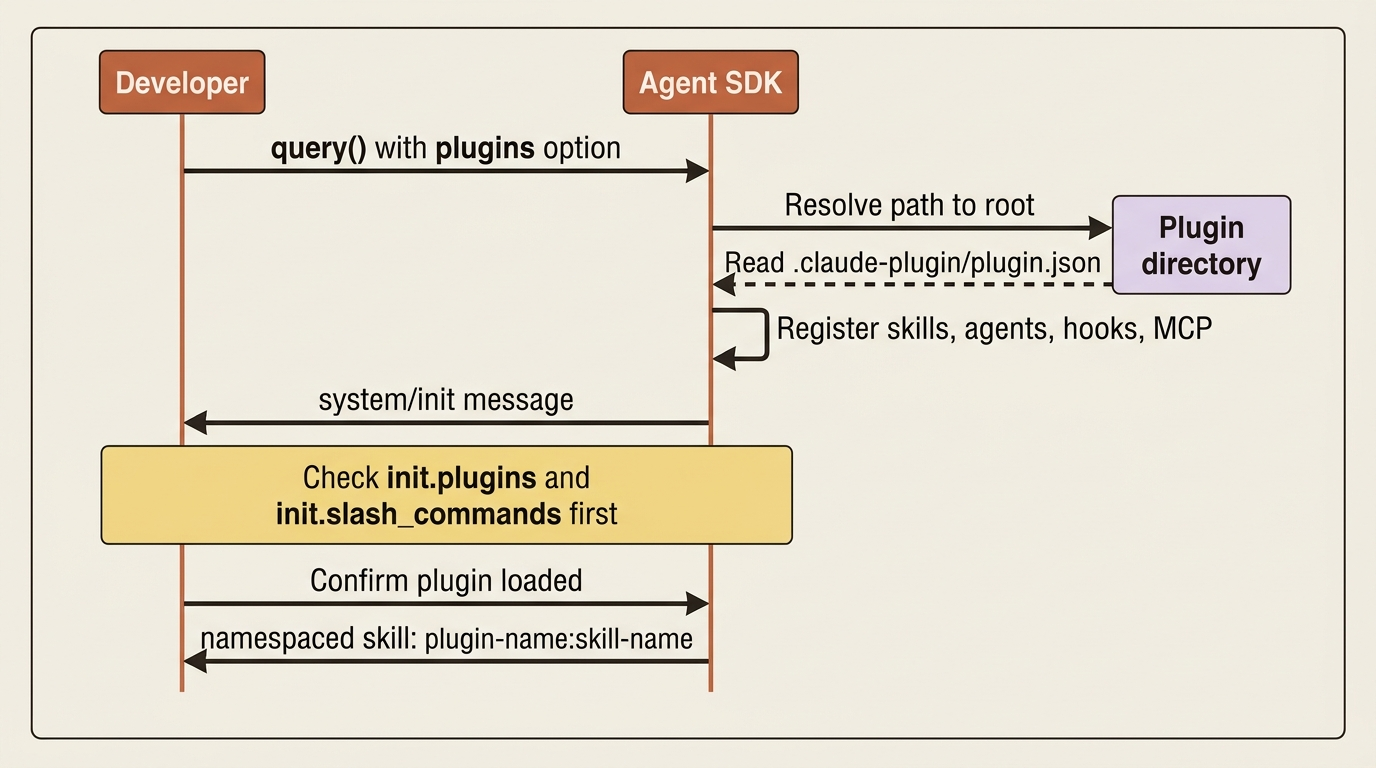
This is the step that separates ten minutes of confusion from an hour of it. When a plugin loads successfully, it shows up in the system/init message, the first message of every run. Before you debug why a skill "is not working," inspect that message and confirm the plugin and its commands actually loaded. Nine times out of ten the answer is right there.
async for message in query(prompt="Hello", options=options):
    if message.type == "system" and message.subtype == "init":  # ①
        # What plugins actually loaded
        print("Plugins:", message.data.get("plugins"))  # ②
        # e.g. [{"name": "buggy-shop-tools", "path": "./buggy-shop-tools"}]

        # What commands they exposed
        print("Commands:", message.data.get("slash_commands"))  # ③
        # e.g. ["/help", "/compact", "buggy-shop-tools:triage-failing-test"]
① Filter to the init subtype of the system message, the first message of every run, which carries the load report.
② The plugins field lists what actually loaded; an empty list here is your first sign a path was wrong.
③ The slash_commands field shows the namespaced command names the plugins exposed, the place to confirm a skill is reachable.
This shows the fields in Python only. In TypeScript the same fields are message.plugins and message.slash_commands directly on the init message, with no .data wrapper. Either way, the habit is the same: check init first.
That command list reveals the other thing developers trip on. Notice the loaded command is buggy-shop-tools:triage-failing-test, not just triage-failing-test. Plugin skills are namespaced as plugin-name:skill-name. This is how two plugins can each ship a skill called review without colliding, and it is also why a skill can look broken. Invoke it as /triage-failing-test without the namespace and nothing happens, because that is not its name. The full namespaced form is. Autonomous invocation by the model still works without you typing the namespace. The namespace matters when you call it as a slash command.
Packaging an agent's tools into one plugin
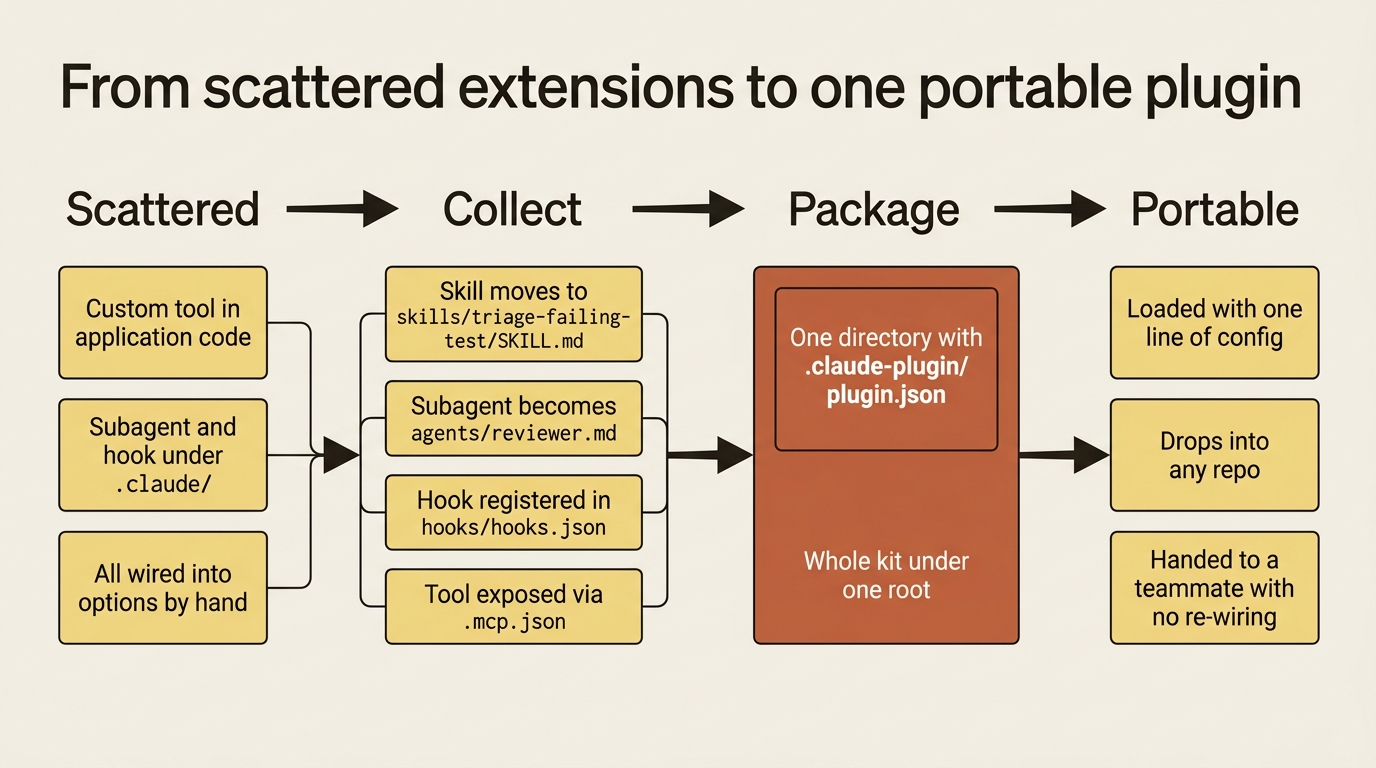
Now the payoff. Consider an agent, call it buggy-shop, that has accumulated a debugging skill, a reviewer subagent, an audit-logging hook, and a custom run_tests tool. Each one is collected into a single buggy-shop-tools plugin. The skill moves to skills/triage-failing-test/SKILL.md. The reviewer subagent becomes agents/reviewer.md. The audit hook is registered in hooks/hooks.json. The custom run_tests tool, since it is code, is exposed through an MCP server declared in .mcp.json. The directory ends up looking like this:
buggy-shop-tools/
├── .claude-plugin/
│   └── plugin.json
├── skills/
│   └── triage-failing-test/
│       └── SKILL.md          # the debugging workflow
├── agents/
│   └── reviewer.md           # the reviewer subagent
├── hooks/
│   └── hooks.json            # the audit-logging hook
└── .mcp.json                 # the run_tests tool's MCP server
And the wiring that used to sprawl across your options object collapses to one line:
options = ClaudeAgentOptions(plugins=[{"type": "local", "path": "./buggy-shop-tools"}])
That is the same agent, with the same tool, subagent, hook, and skill, now loaded as one portable unit. Drop buggy-shop-tools/ into another repository, point one line of config at it, and the entire kit comes along. Hand it to a teammate, and they get exactly what you have, with no re-wiring.
When to reach for a plugin, and what to check when it breaks
Three situations make a plugin worth the packaging effort. The first is local development: loading your extensions during development without installing anything globally, with just a path to a folder in your repository. The second is team consistency: committing a plugin into the project repository so everyone, and your CI, runs the identical tool set. The third is composition: combining plugins from multiple sources, your own plus a shared one, in a single config.
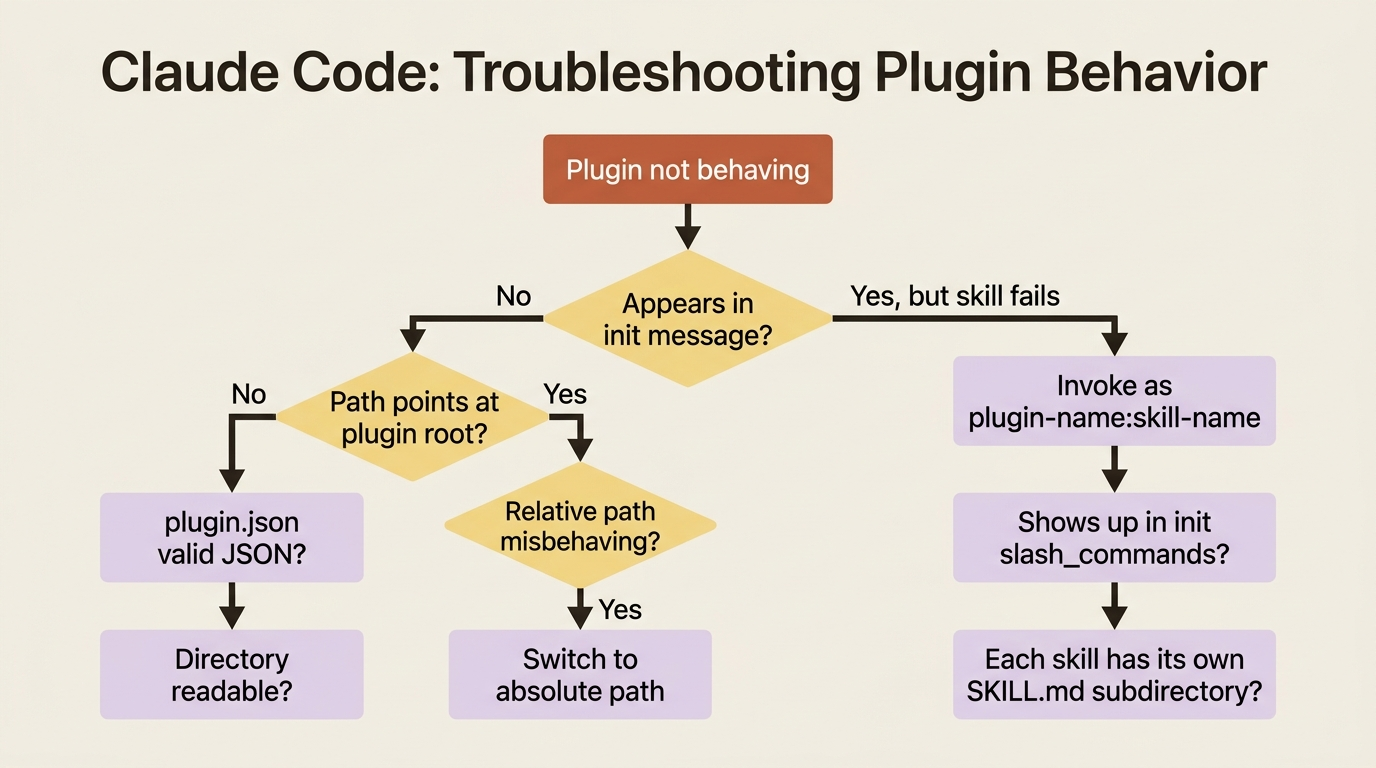
When something does not load, the checklist is short and almost always sufficient. If the plugin does not appear in the init message, confirm the path points at the plugin root, the directory with .claude-plugin/, validate that plugin.json is syntactically valid JSON, and check that the directory is readable. If the plugin loads but a skill does not work, you have almost certainly hit the namespace. Invoke it as plugin-name:skill-name, verify it shows up that way in the init message's slash_commands, and confirm each skill has its own SKILL.md in its own subdirectory under skills/. If relative paths misbehave, remember that they resolve from your working directory, and switch to an absolute path when in doubt.
Do this today
- Take one custom tool, subagent, or hook you currently wire into an options object by hand, and move it into a plugin directory under its conventional folder.
- Write a minimal
.claude-plugin/plugin.jsonmanifest and point yourpluginsoption at the plugin's root directory, not at the manifest file. - Print the
system/initmessage on your next run and read itspluginsandslash_commandsfields. Make checkinginitfirst a permanent habit. - Invoke any plugin skill by its full
plugin-name:skill-namenamespace, and confirm that exact name appears in the init message'sslash_commands. - Commit the plugin into your project repository so your team and CI run the identical tool set with one line of config.
The takeaway
Plugins are the natural step once you have things worth packaging. A plugin is a directory with a .claude-plugin/plugin.json manifest and the four familiar extension types beside it: skills, agents, hooks, and MCP servers. It is loaded explicitly through the plugins option rather than discovered from disk, and verified through the system/init message before you debug anything downstream.
Keep the two traps in mind. Point the path at the plugin root, not at the manifest. Call plugin skills by their plugin-name:skill-name namespace. Get those right and your whole agent travels as one unit.
The deeper lesson is about where the hard part of agent engineering actually lives. The loop, the streaming, the permissions, the observability, and the isolation are not the hard part anymore, because the SDK carries them. What is left for you is the interesting part: deciding what your agent should do, what it is allowed to do, and how to hand it to someone else. A plugin is how you make that last decision portable. Package the kit, hand it over, and let the next person start from where you finished.
This is Part 11 of "Building with the Claude Agent SDK," a 14-part guide to building production-ready AI agents.