
Claude Code Routines: Running Your Agent on Anthropic's Clock, Not Yours
Routines are the one Claude Code surface that runs in Anthropic's cloud, so the work that should happen without you finally has a place to live when your laptop is closed.
Every other way to automate Claude Code needs your machine on. Routines run in Anthropic's cloud, which means the work finally happens at 3am whether you are awake or not.
In this article: You will learn what a Claude Code Routine actually is, how it runs in the cloud without your laptop, and how to wire it to schedule, API, and GitHub triggers. We cover connector and permission scoping, the daily run cap, when to pick Routines over GitHub Actions or local scheduled tasks, and the pitfalls that turn a helpful routine into an unsupervised liability. By the end you will have one routine running a real recurring task in your workflow.
Last week your dependency audit was supposed to run Sunday night. It did not, because your laptop was asleep. The week before, an alert fired at 3am that needed someone to read the stack trace and open a draft PR. Nobody did, because nobody was awake.
Both failures share one root cause. Almost every way to automate an AI coding agent still depends on your machine being on. A local script needs the laptop awake. A polling loop needs an open session. A desktop scheduled task needs the desktop running. The moment you close the lid, the automation stops.
Claude Code Routines break that dependency. A routine is a saved Claude Code configuration that runs on Anthropic-managed cloud infrastructure. It fires even when your laptop is closed, your terminal is shut, and you are completely unreachable. This article is about how to put the work that should happen without you into the one place that can reliably handle it.
What a routine actually is
A routine is a saved configuration: a prompt, one or more repositories, a set of connectors, and one or more triggers. When a trigger fires, Anthropic provisions a fresh Claude Code session in the cloud, clones the routine's repositories, connects the configured MCP services, and runs the prompt autonomously.
That cloud session can run shell commands, read files, edit code, push branches, open pull requests, call connector tools, and send messages through any integrations you give it. When the work is done, the session ends. You see the result in your session list the next time you open claude.ai/code.
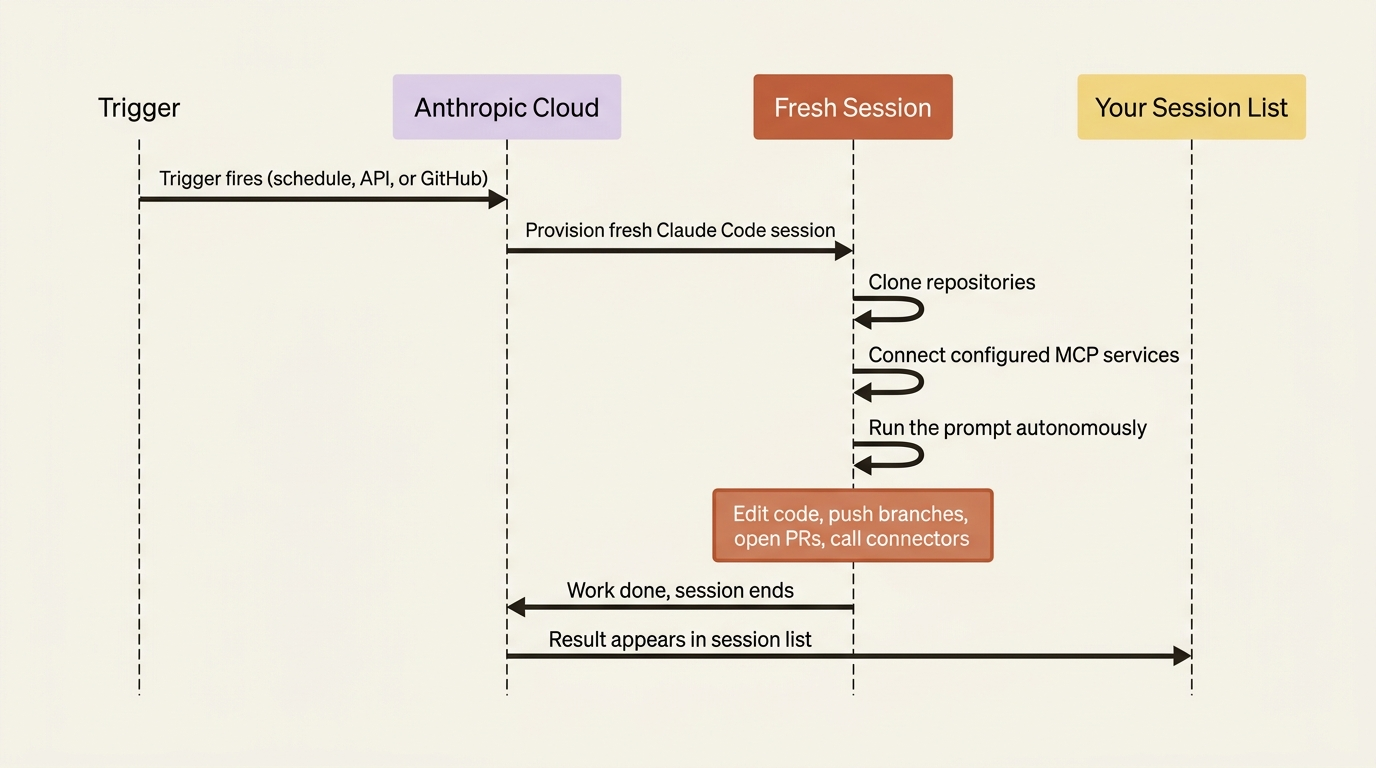
Three properties are worth internalizing before you create one.
Routines run autonomously, with no approval prompts. There is no permission-mode picker. Once a routine is triggered, the session has full permission to use everything you configured. Whatever the prompt says, Claude does. No human is in the loop. This is the trade-off for running without your machine: there is nobody to ask for approval.
A fresh cloud session sees only what you configure. No .claude/settings.local.json, no local skills, no local hooks, no local MCP servers. The session sees only the repository contents on the cloned branch, the connectors you explicitly include, and the environment's network access settings. Scope what the routine can reach to exactly what it needs.
Routines belong to your individual account, not your team. A routine you create is not shared with teammates, and each one counts against your account's daily run allowance. Team and Enterprise admins can disable Routines for all members with an admin toggle, but they cannot share a routine across users.
Routines are in research preview, available on Pro, Max, Team, and Enterprise plans with Claude Code on the web enabled. Create and manage them at claude.ai/code/routines, in the Desktop app under Routines (choose Remote for a cloud routine), or from the CLI with /schedule.
What goes into a routine
The creation form, in the web UI or the CLI conversation, configures six things.
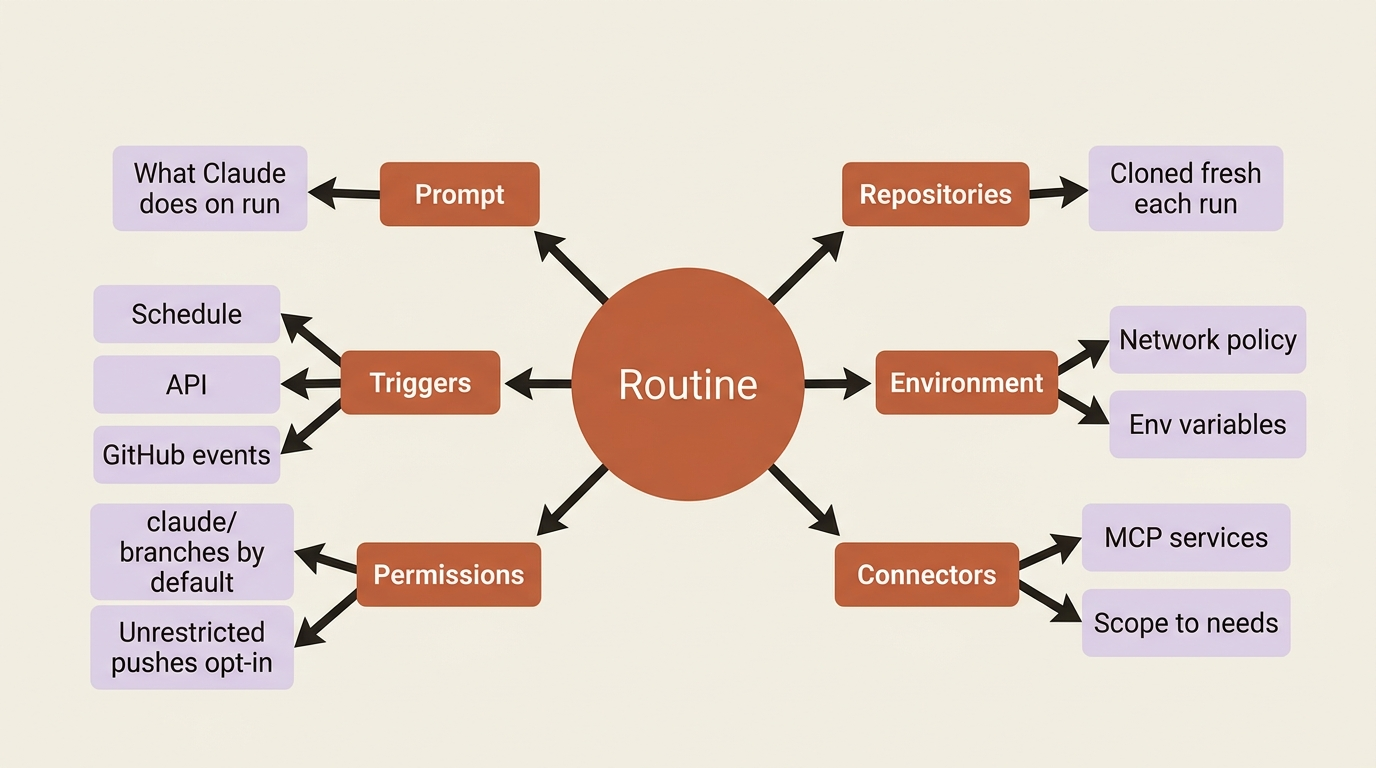
The prompt. What Claude should do when the routine runs. Specific prompts produce useful routines; vague prompts waste runs. A bad prompt: "check the issue tracker." A good prompt: "List all open issues in our GitHub project untouched for more than 14 days. For each, post a comment asking the assignee whether the issue should be closed, snoozed, or escalated. If no assignee is set, label the issue 'needs-triage' and add it to the weekly review board."
Repositories. Which repos Claude can clone. Each is cloned fresh on every run, starting from the default branch unless your prompt says otherwise.
The environment. Network policy, environment variables, and custom setup. The default environment reaches common package managers (npm, pip, cargo, GitHub) but blocks arbitrary outbound traffic. If your routine needs your own services or external APIs, add their domains to the allowlist.
Connectors. Your MCP connectors. All connected MCPs are included by default; remove any the routine does not need. The routine can use every tool from every included connector without asking.
Permissions. One toggle matters: Allow unrestricted branch pushes. By default, routines push only to branches prefixed with claude/, so they cannot clobber main, production, or your active feature branches. Enable unrestricted pushes deliberately, per repository.
Triggers. One or more of schedule, API, and GitHub event. A single routine can carry all three at once, which is how you get patterns like "runs nightly, and on any deploy webhook, and when a PR opens."
The three trigger types
A trigger is what wakes a routine up. Every routine has at least one, and the three types cover most of the ways work arrives.
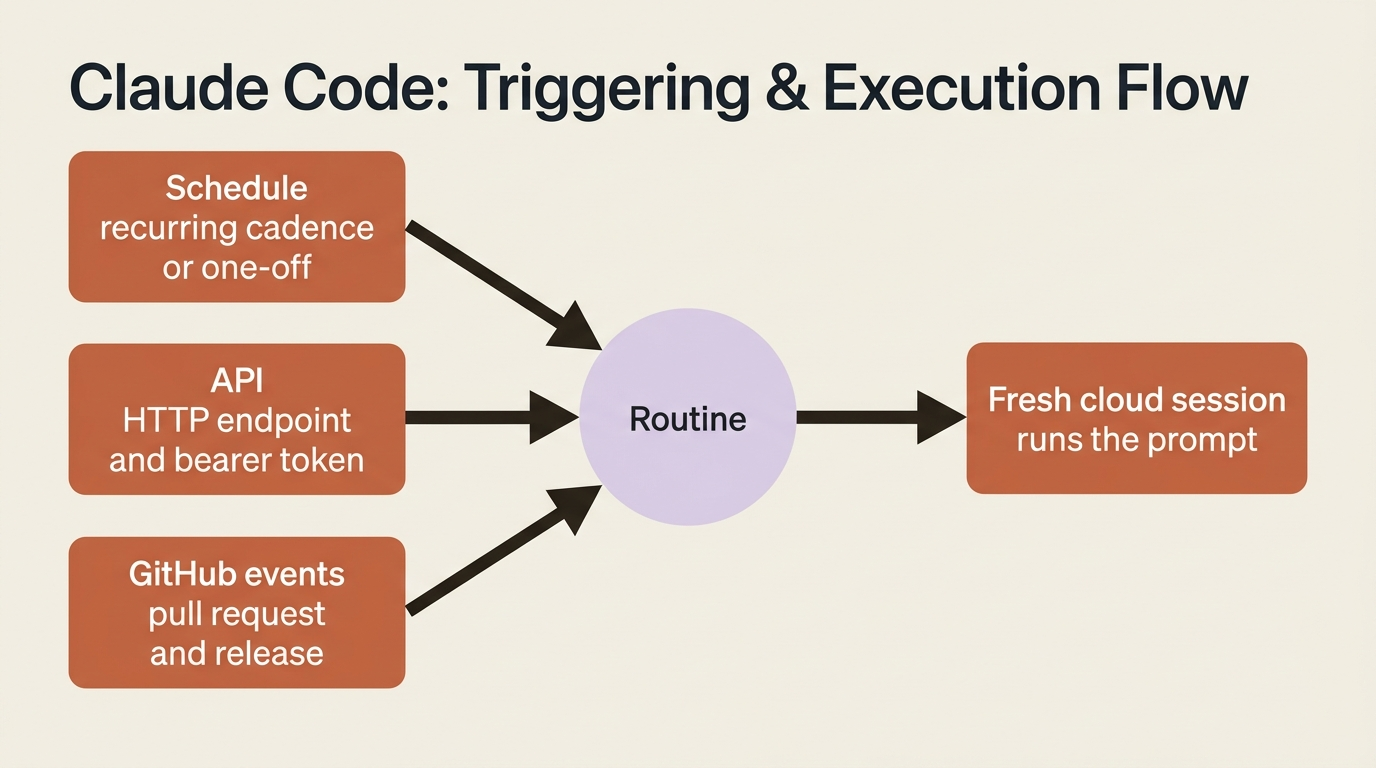
Schedule
The simplest trigger. The routine runs on a recurring cadence (hourly, daily, weekdays, weekly) or once at a specific future timestamp. Times are entered in your local timezone and converted automatically. Runs may start a few minutes after the scheduled time due to stagger, but the offset is consistent, so a daily 9am run happens around 9am every day.
For a custom cadence such as every two hours or the first of each month, pick the closest preset, then run /schedule update in the CLI to set a cron expression. The minimum interval is one hour; anything more frequent is rejected.
Scheduled routines excel at recurring maintenance (nightly issue grooming, weekly dependency audits), time-anchored cleanup ("open a PR that removes the feature flag" scheduled two weeks out), and periodic checks ("scan the docs for deprecated APIs every Monday"). A one-off scheduled run does not count against the daily routine cap; it draws from your regular subscription usage like any other session. That makes it perfect for "remind me to do this in three weeks" without spending your routine budget.
API
An API trigger gives a routine a dedicated HTTP endpoint and a bearer token. POST to the endpoint, the routine fires, and you get a session ID back.
curl -X POST https://api.anthropic.com/v1/claude_code/routines/<trigger-id>/fire \
  -H "Authorization: Bearer <routine-token>" \
  -H "anthropic-beta: experimental-cc-routine-2026-04-01" \
  -H "anthropic-version: 2023-06-01" \
  -H "Content-Type: application/json" \
  -d '{"text": "Error budget exceeded for service X. Stack trace attached. Investigate."}'
A successful request returns the new session ID and URL:
{
  "type": "routine_fire",
  "claude_code_session_id": "session_01HJKLMNOPQRSTUVWXYZ",
  "claude_code_session_url": "https://claude.ai/code/session_01HJKLMNOPQRSTUVWXYZ"
}
Open the session URL to watch the run live, review changes, or continue the conversation by hand.
API triggers are the integration point between Claude Code and the rest of your operational stack. Your error tracker hits a threshold and calls /fire; the routine pulls the stack trace, correlates it with recent commits, and opens a draft PR with a proposed fix. On-call wakes up to a PR instead of a blank terminal. Your deploy pipeline calls the routine after a production deploy to run smoke checks and post go or no-go to the release channel. An internal admin tool button becomes a POST behind the scenes. Any service that can call an authenticated HTTP endpoint can fire a routine.
A few details:
- API triggers are configured from the web UI only. Set them up, copy the URL and token, then use them programmatically.
- The
/fireendpoint runs under a beta header,experimental-cc-routine-2026-04-01, that may change while routines are in research preview. Breaking changes ship behind new dated headers, with the two previous versions still working so you have time to migrate. - The body field
textis appended to the routine's saved prompt as additional context. Use it to pass per-call specifics (alert content, deploy version, customer ID) into a routine whose base prompt is the general instruction.
GitHub events
A GitHub trigger starts a new session when a matching event occurs on a connected repository. The Claude GitHub App must be installed on the repo; the setup prompts you to install it if needed.
Two event categories. Pull request events fire when a PR is opened, closed, assigned, labeled, synchronized, or otherwise updated. Pick a specific action like pull_request.opened, or react to all of them. Release events fire when a release is created, published, edited, or deleted, which is useful for "after every release, port the changes to a parallel SDK" workflows.
PR triggers can be narrowed with filters. Each filter pairs a field with an operator (equals, contains, starts with, is one of, matches regex):
| Filter | Matches |
|---|---|
| Author | PR author's GitHub username |
| Title | PR title text |
| Body | PR description text |
| Base branch | Branch the PR targets |
| Head branch | Branch the PR comes from |
| Labels | Labels applied to the PR |
| Is draft | Whether the PR is in draft state |
| Is merged | Whether the PR has been merged |
The matches regex operator tests the entire field, not a substring. To match titles containing hotfix, write .*hotfix.*; for literal substrings, use contains instead. A few useful combinations: base branch main plus head branch contains auth-provider sends authentication changes to a focused reviewer; is draft false skips drafts; labels include needs-backport triggers only when a maintainer tags the PR.
Each matching event starts a new, independent session. Two PR updates produce two sessions, so a routine reacting to every commit on an active PR can burn through runs fast. During the research preview, GitHub webhook events carry per-routine and per-account hourly caps; events beyond the limit are dropped until the window resets.
Five routines that earn their keep
Here is what real routines look like, each pairing a trigger type with the work it covers.
Backlog maintenance (schedule). A weeknight midnight run against your issue tracker via the Linear connector: "Read issues opened since the last run. Apply area labels based on which directory the referenced code touches. Assign to the right engineer based on CODEOWNERS. Post a Slack summary to #engineering of new issues, labels, and assignees." The team starts the day with a groomed queue instead of seventy un-triaged issues.
Alert triage (API). Your monitor POSTs when error rates spike, with the stack trace in the body: "Correlate the alert against commits in the last 24 hours. If a likely culprit is found, open a draft PR with a proposed rollback or fix and comment on the deploy issue. If no clear culprit, post a summary to the on-call channel." On-call wakes up to a PR, not a blank terminal.
Bespoke code review (GitHub). A pull_request.opened trigger filtered to non-draft PRs on main: "Apply our review checklist (see CHECKLIST.md). Leave inline comments on security, performance, and style. Add a summary comment flagging anything for human review. If the PR exceeds 500 lines, ask the author to split it." Human reviewers focus on design instead of mechanical checks.
Deploy verification (API). Your CD pipeline POSTs after every production deploy: "Run the smoke suite against production. Scan Sentry for new errors in the last fifteen minutes. Post a go or no-go to the release Slack channel within ten minutes." The release window stays short because verification is automated.
Library port (GitHub). A pull_request.closed trigger filtered to merged PRs in the TypeScript SDK repo: "Examine the diff and port equivalent changes to the Python SDK. Open a matching PR referencing the TypeScript PR by URL. If the change is not portable, open an issue asking for human guidance instead." Two libraries stay in step without a human re-implementing each change.
The pattern across all five: clear specification, repeatable structure, and no need for human interaction during the run. Routines are not for tasks that need ongoing decisions. They are for tasks that have a clear shape.
Connectors are where safety lives or dies
This is the section that decides whether your routines are safe or accidents waiting to happen.
A routine running in the cloud has no human approval in the loop. Whatever connectors you attach, it can use, including write operations, without asking. Linear attached? It can create, update, or close issues. Slack attached? It can post to any channel you can reach. GitHub attached? It can push, comment, and open PRs.
The implication is blunt: scope every routine's connectors to what it actually needs. The web UI pre-selects all of your connected MCPs. Remove the ones the routine has no business using. A routine that reads issues and posts a Slack summary needs Linear and Slack. It does not need GitHub, Sentry, Notion, or any other connector you happen to have configured globally. The same principle applies to repositories: clone only the repos the routine reads or modifies, because adding repos "just in case" only expands what it can break.
The branch-push permission is the other lever. By default, routines push to claude/-prefixed branches only, so they cannot clobber main, staging, or your active branches. Enabling "Allow unrestricted branch pushes" is a real trust grant. Do it only for repos where the routine genuinely needs to push to existing branches, and only after you have run it enough to trust its behavior.
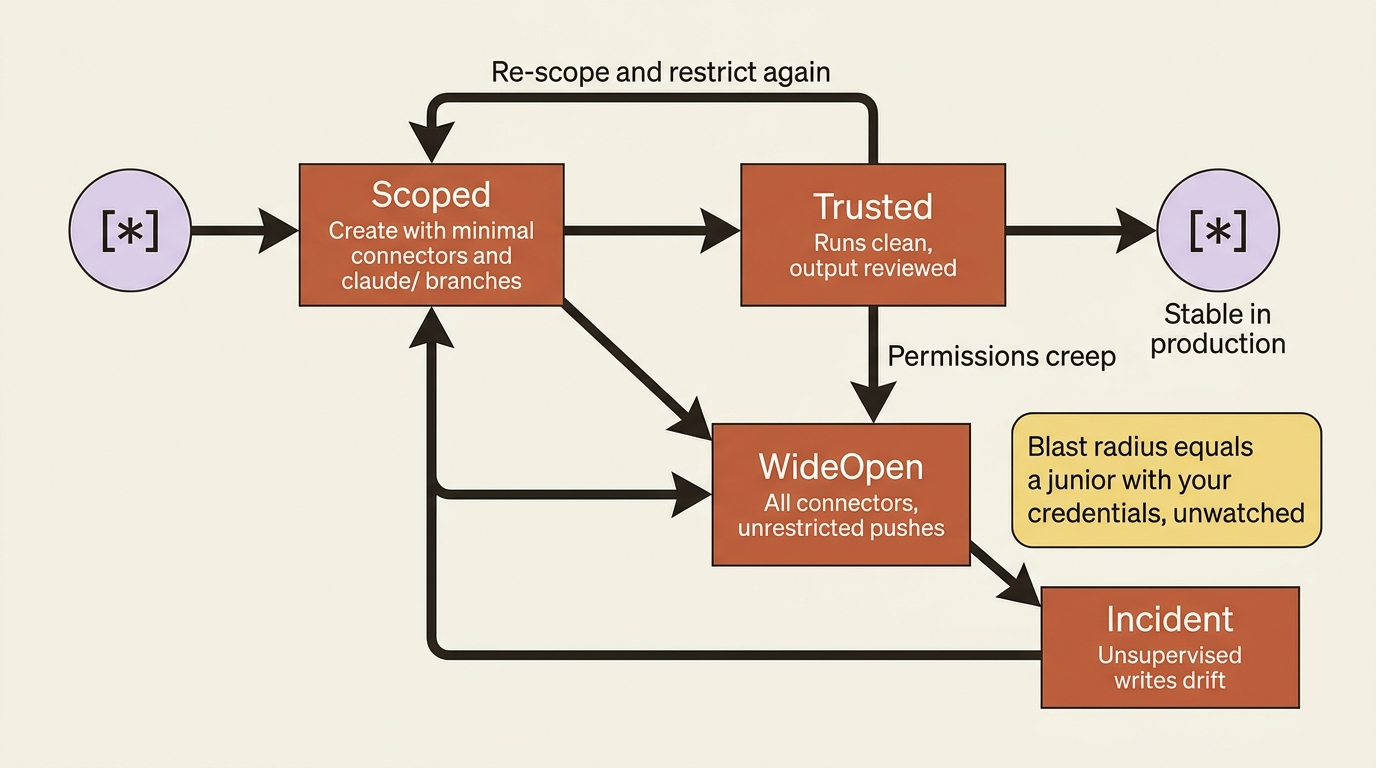
A routine that fires every hour, on a repo with unrestricted branch pushes, with all your connectors attached, has roughly the same blast radius as handing a junior engineer your credentials and walking away for the day. Treat it accordingly.
Usage and limits
Routines draw from your subscription usage the same way interactive sessions do. On top of that, routines have a daily cap on how many runs can start per account, separate from your regular usage limits. Current consumption and remaining daily runs are visible at claude.ai/code/routines and claude.ai/settings/usage. The exact cap depends on your plan.
When a routine hits the daily cap or your subscription limit, organizations with usage credits enabled can keep running on metered overage, while organizations without credits see additional runs rejected until the window resets. Turn on usage credits from Settings, Billing on claude.ai. Remember that one-off scheduled runs are exempt from the daily routine cap; they draw down regular usage like any other session.
Routines versus GitHub Actions
The common confusion: GitHub Actions also run code in the cloud on PR events. Why use Routines instead?
They overlap, but they are for different things. GitHub Actions are for deterministic CI/CD: run the test suite, build the artifact, deploy if tests pass. They run a script you wrote, and the steps are exactly what you coded. Actions excel when the work is mechanical and the inputs are predictable.
Routines are for tasks that require Claude's judgment in the loop: review a PR against a subjective checklist, triage an alert by reading the stack trace and deciding what is relevant, open a fix PR that needs someone to read the code and write the fix. Routines excel when the work needs language understanding, code reading, or decision-making that a static script cannot capture.
The two coexist in real setups. GitHub Actions handles "build, test, deploy." Routines handle "review the PR before it ships, triage the alerts that fired after deploy." Different tools for different layers of automation.
Routines versus local scheduled tasks
Three scheduling options exist, and they fit different jobs.
| Routines | Desktop scheduled tasks | /loop |
|
|---|---|---|---|
| Runs on | Anthropic cloud | Your machine | Your machine |
| Requires machine on | No | Yes | Yes |
| Requires open session | No | No | Yes |
| Access to local files | No (fresh clone) | Yes | Yes |
| MCP servers | Configured per routine | Local config + connectors | Inherits from session |
| Permission prompts | No (autonomous) | Configurable per task | Inherits from session |
| Triggers beyond time | Yes (API, GitHub) | No (time only) | No (time only) |
| Minimum interval | 1 hour | 1 minute | 1 minute |
| Run cap | Daily account cap | None (local) | None (local) |
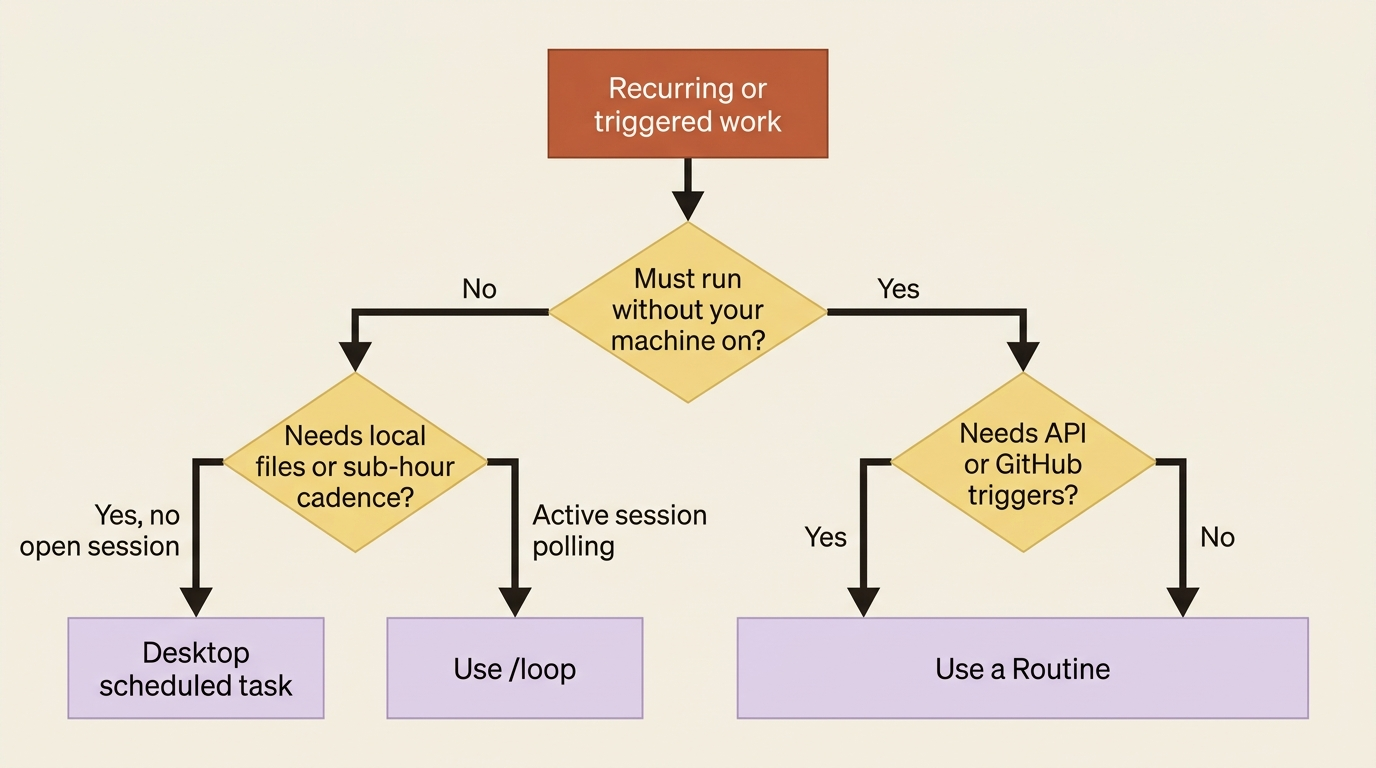
The rules are simple. Use Routines when the work should run reliably without your machine, especially when it benefits from API or GitHub triggers. Use Desktop scheduled tasks when the work needs local files, local tools, or sub-hour frequency but should not require an interactive session. Use /loop for short-lived polling during active session work. Trying to force one tool to cover all three only creates compromises.
Pitfalls to avoid
Five things first-time routine users hit.
Routines that drift because nobody reviews their output. A nightly routine produces twenty changes a week, and if nobody reads them it slowly drifts from what you intended. Build review into the workflow: a daily Slack summary, a weekly digest of opened PRs, a monthly read of actual sessions.
Routines that hit the daily cap and silently fail. A routine reacting to every commit on a busy PR can burn through hourly caps. If you enable a high-frequency trigger, watch the run count until you understand the volume.
Routines that need credentials they do not have. The cloud session sees only the connectors you configured and the environment's allowlisted domains. If your prompt says "deploy to production" but you did not include a deploy connector or allow the endpoint, the routine fails partway through. Test routines end-to-end before relying on them.
Routines that "succeed" but did not do the work. A green status means the session started and exited without an infrastructure error. It does not mean the task succeeded. Blocked network requests, missing connector tools, and task-level failures surface in the transcript, not the status indicator. Read the transcripts of new routines for the first week.
Routines created with wide-open permissions. The default for connectors is "all of mine, pre-selected." Lock down connectors on every new routine; attach only what it actually needs.
Do this today
- Pick one recurring manual task you actually do. A weekly dependency audit, a daily standup digest, nightly issue triage, a monthly metrics report. Something you have done by hand more than three times this month.
- Create a routine for it. Go to
claude.ai/code/routines, click New routine, set up the prompt, the repo, the connectors you genuinely need, and a scheduled trigger. Hit Create, then click Run now to test it immediately. - Read the transcript, not just the status. Verify Claude did what your prompt said, the way you expected, with the right connectors. Iterate on the prompt for a week until the output is consistent.
- Scope the connectors down before you trust it. Remove every connector the routine does not use, and leave branch pushes restricted to
claude/until you have watched it behave. - Then leave it alone. Once it runs clean, stop touching it and let it compound.
The leverage Routines exist to create
Every other surface that automates Claude Code needs your machine on. Routines do not, and that single difference changes what is possible. The dependency audit runs Sunday night whether or not your laptop is awake. The 3am alert turns into a draft PR before you open your eyes. The work that should happen without you finally has a home.
The compounding effect shows up over months. Every recurring task you push into a routine is one more thing that happens without you. Six months in, the gap between a team that uses Routines and one that does not is the gap between "we should automate this someday" and "we automated it three months ago and it has run ever since." Off-hours work stops requiring off-hours people.
That is the leverage Routines exist to create. Pick one task this week and move it to the clock that never sleeps.
This is Part 5 of "Claude Code Away from the Terminal," a 7-part guide to running Claude Code on every surface beyond your local terminal.