
'Idle' Does Not Mean Done: How to Actually Read a Managed Agents Event Stream
The Managed Agents event stream is not a streaming convenience; it is the entire control surface, and one field on one event decides whether your agent ships or hangs forever.
With Managed Agents, the tool loop runs on Anthropic's servers and narrates itself to you in events. Learn to read that stream and steering, interrupting, permissions, and outcomes all turn out to be the same mechanism.
In this article: You will learn why the Claude Managed Agents event stream is the entire interface, not a streaming add-on. We cover the five events you send, the three families of events you receive, and the single field,
stop_reason, that separates an agent that finishes its work from one that hangs forever. By the end you will know how to build an event loop that steers, interrupts, and never silently freezes.
If you have built with the Messages API, you know the rhythm: call the model, see a tool request, run the tool, feed the result back, call again. You write that loop. You own every iteration of it.
Managed Agents takes that loop away from you. The loop runs server-side, inside Anthropic's harness, and you never write it. That sounds like a simplification, and it is. But it raises a question that the rest of your agent's behavior hinges on: if you do not control the loop, how do you see it?
The answer is the Claude Managed Agents event stream. A loop you cannot control is a loop you cannot see, so the harness narrates it to you as a stream of events, and it accepts your input as events too. This is the reframe that makes everything else click. The event stream is not a streaming convenience bolted onto a request-response API. It is the entire interface. Once you can read it, you can steer an agent, interrupt it, approve its tool calls, and judge its outcomes, because all of those are just particular events flowing one way or the other.
This article is the longest in the early part of the series on purpose. The event model is the thing the whole system is built on.
Events flow in two directions
Start with the shape. Communication with a Managed Agents session is bidirectional. You send a small number of user event types to start and steer the work. You receive a larger number of agent, session, and span events back as the agent runs. Every event type is a string in {domain}.{action} form, which is why you see readable names like agent.tool_use and session.status_idle rather than opaque codes.
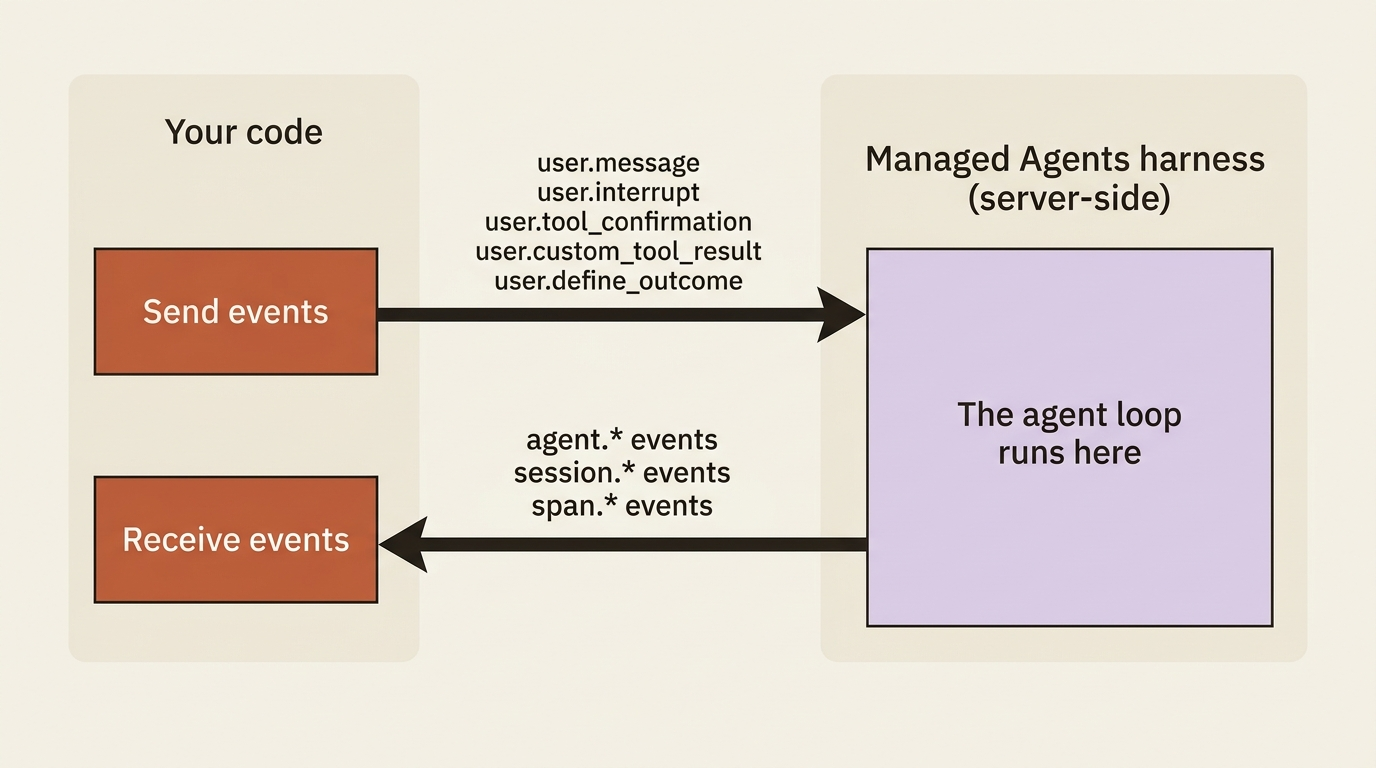
The events you send are few, because there are only so many things you can tell a running agent to do.
| Type | What it does |
|---|---|
user.message |
Send text to start or continue the work. |
user.interrupt |
Stop the agent mid-execution. |
user.tool_confirmation |
Approve or deny a tool call that a permission policy paused. |
user.custom_tool_result |
Return the result of one of your custom tools. |
user.define_outcome |
Hand the agent a goal to work toward and self-evaluate against. |
That is the entire input surface of the system: five event types, though self-hosted environments add a sixth, user.tool_result, which the SDK and CLI provide automatically for cloud environments. That is the whole vocabulary you will ever speak to a Managed Agents session. Most of your work uses just the first one. The other four unlock specific capabilities, but the list never grows beyond five for cloud environments.
The events you receive are richer, because the agent has more to tell you than you have to tell it. They split into three families.
Agent events are the agent's own activity:
| Type | What it means |
|---|---|
agent.message |
The agent is talking. Text content blocks. |
agent.thinking |
The agent's reasoning, emitted separately from its messages. |
agent.tool_use |
The agent invoked a pre-built tool such as bash or read. |
agent.tool_result |
The result of that pre-built tool call. |
agent.mcp_tool_use |
The agent invoked a tool from an MCP server. |
agent.mcp_tool_result |
The result of that MCP tool call. |
agent.custom_tool_use |
The agent invoked one of your custom tools, and now wants a result back. |
Session events are about the run's status rather than its content:
| Type | What it means |
|---|---|
session.status_running |
The agent is actively working. |
session.status_idle |
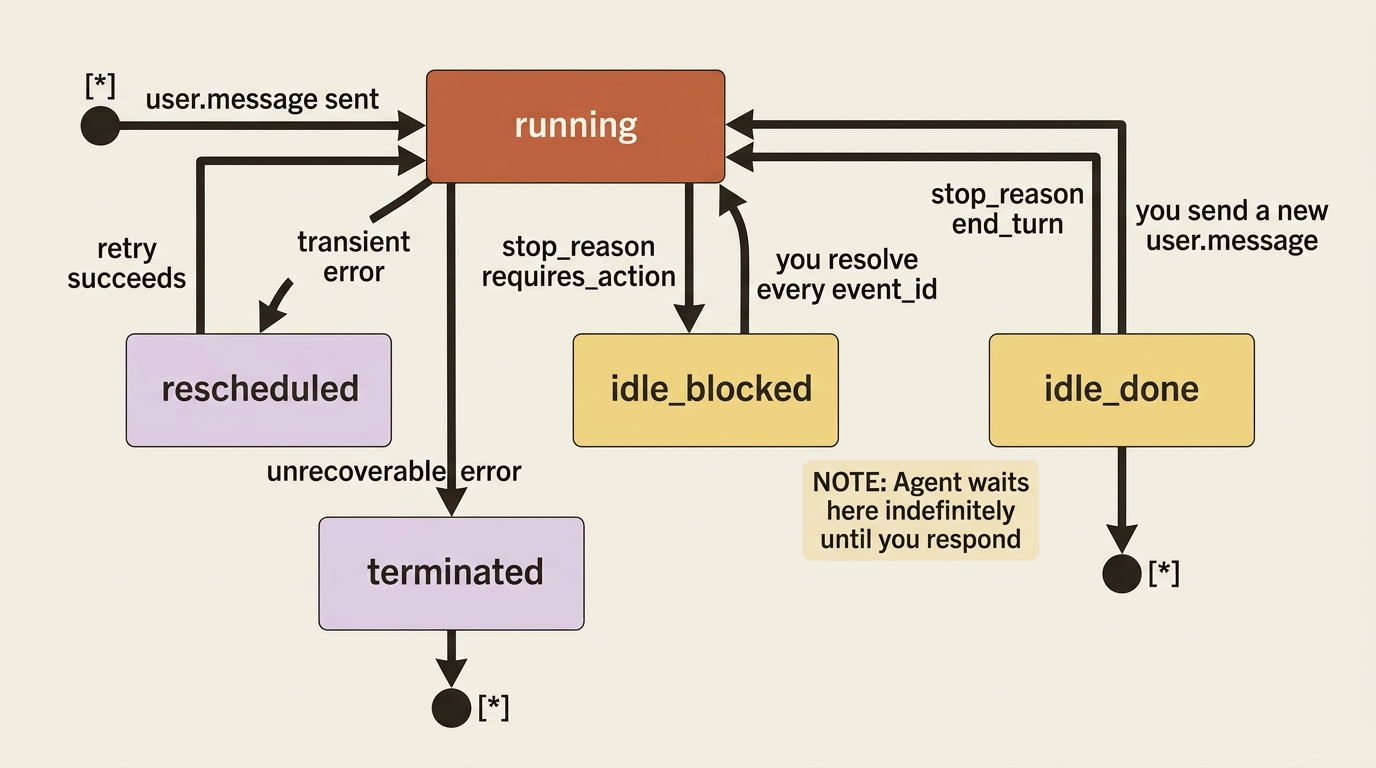
The agent stopped and is waiting. Carries a stop_reason saying why. |
session.status_rescheduled |
A transient error hit, and the session is retrying on its own. |
session.status_terminated |
The session ended on an unrecoverable error. |
session.error |
Something went wrong during processing. Carries a typed error with a retry_status. |
Span events are pure observability markers. They wrap activity so you can time it and count tokens, and span.model_request_start and span.model_request_end are the two you will see constantly.
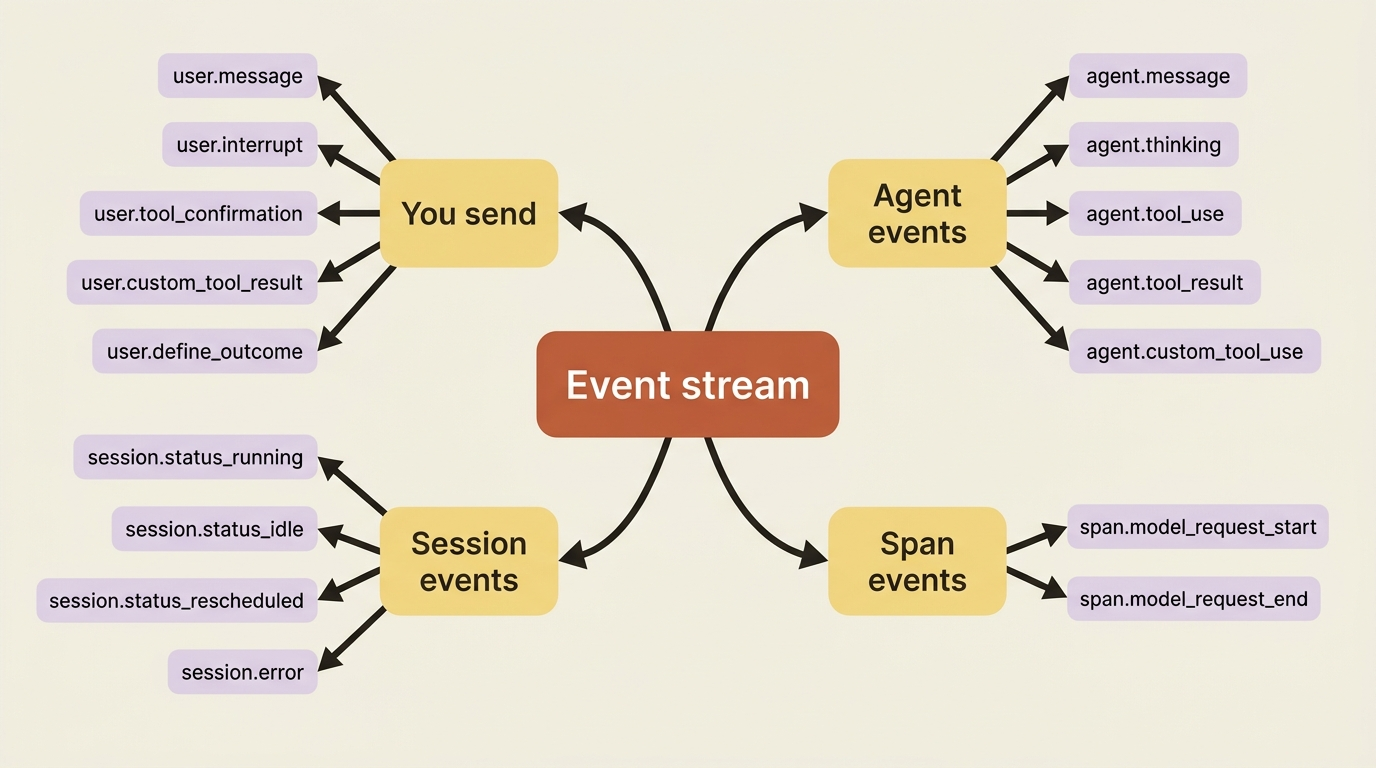
That is a lot of names. You do not memorize them. You learn the handful that drive control flow, and you let your event loop ignore the rest until a feature gives you a reason to care.
The stream is the interface, so open it first
There is one rule about the event stream that you violate exactly once before it burns itself into your memory: open the stream, then send the message.
The stream only delivers events emitted after you open it. If you send the message first, the agent can start working, and emit events, before your listener exists to catch them. You lose the beginning of the run, and on a fast agent you can lose the whole thing. The fix is not a workaround; it is the documented order of operations. Open the stream before sending events to avoid a race condition.
The SDK shape makes the correct order the natural one. You open the stream, send inside that scope, and loop. Here is a loop in Python that also catches errors:
with client.beta.sessions.events.stream(session.id) as stream:
    client.beta.sessions.events.send(
        session.id,
        events=[
            {
                "type": "user.message",
                "content": [{"type": "text", "text": "Reconcile the March invoices against the ledger."}],
            },
        ],
    )

    for event in stream:
        match event.type:
            case "agent.message":
                for block in event.content:
                    if block.type == "text":
                        print(block.text, end="")
            case "session.status_idle":
                break
            case "session.error":
                msg = event.error.message if event.error else "unknown"
                print(f"\n[Error: {msg}]")
                break
The same loop in TypeScript:
const stream = await client.beta.sessions.events.stream(session.id);
await client.beta.sessions.events.send(session.id, {
  events: [
    {
      type: "user.message",
      content: [{ type: "text", text: "Reconcile the March invoices against the ledger." }],
    },
  ],
});

for await (const event of stream) {
  if (event.type === "agent.message") {
    for (const block of event.content) {
      if (block.type === "text") process.stdout.write(block.text);
    }
  } else if (event.type === "session.status_idle") {
    break;
  } else if (event.type === "session.error") {
    console.log(`\n[Error: ${event.error?.message ?? "unknown"}]`);
    break;
  }
}
Adding the session.error case is the difference between a demo and something you would leave running. The error object carries a retry_status, so your handler can tell a transient hiccup that the harness will retry on its own from a hard failure that needs you. For now, printing and breaking is enough.
The hinge: idle does not mean done
Here is the single most important idea in this article, the one the title promises. When you see session.status_idle, the agent has stopped. It has not necessarily finished.
Idle means "I am not actively working right now," and there are two very different reasons that can be true. The event tells you which, in a field called stop_reason. Reading that field is the difference between an agent that works and one that hangs forever.
The first reason is the happy one. The agent did everything you asked and has nothing left to do. The stop_reason looks like this:
{ "type": "end_turn" }
That is your cue to stop listening. The work is complete, and the conversation is parked, waiting for whatever you send next.
The second reason is the one that surprises people. The agent stopped because it is blocked on you. It tried to do something that needs your input first, either a tool call that your permission policy gates or one of your custom tools whose result only your code can produce, and it cannot proceed until you respond. The stop_reason looks like this:
{ "type": "requires_action", "event_ids": ["sevt_01...", "sevt_01..."] }
Those event_ids are the specific events the agent is blocked on. Each one is a tool call waiting for your answer. The agent will sit at idle indefinitely until you resolve every one of them, at which point the session flips back to running and the loop continues on its own.
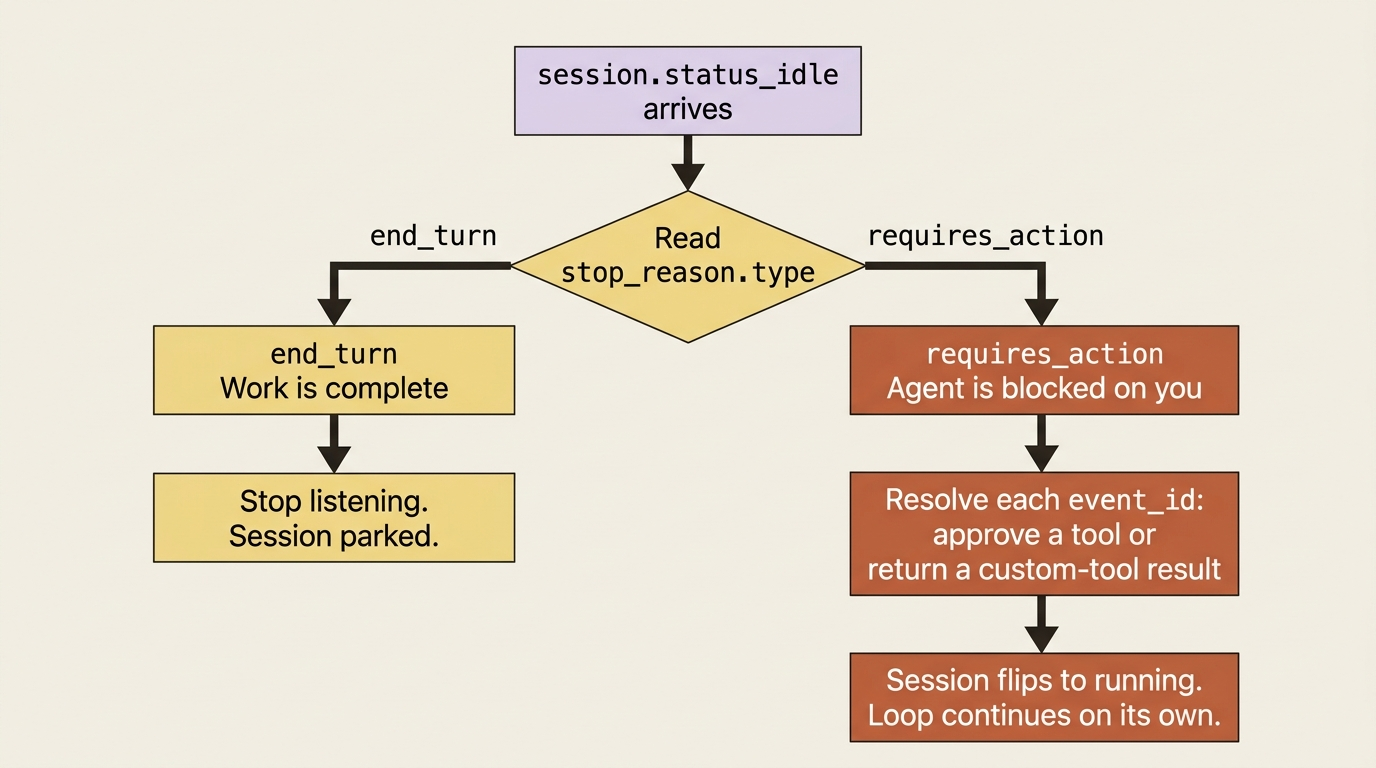
So the real shape of a robust event loop is not "break on idle." It is "on idle, read the stop_reason, and branch." In Python:
case "session.status_idle":
    stop = event.stop_reason
    if stop.type == "end_turn":
        break  # genuinely done
    elif stop.type == "requires_action":
        for event_id in stop.event_ids:
            # resolve each blocking event: approve a tool, or
            # return a custom-tool result, then the agent resumes
            ...
The instinct to build here is simple: an idle session is a question, and stop_reason is the question. An agent that "hangs" is almost always an agent sitting at requires_action while your code waits for it to do something it will never do on its own.
Gotcha: the most common cause of a Managed Agents session that "froze" is a loop that treats every
session.status_idleas the end. The agent is not frozen. It is atrequires_action, politely waiting for an answer your code never sends. Always readstop_reason.
Steering: you can talk to a running agent
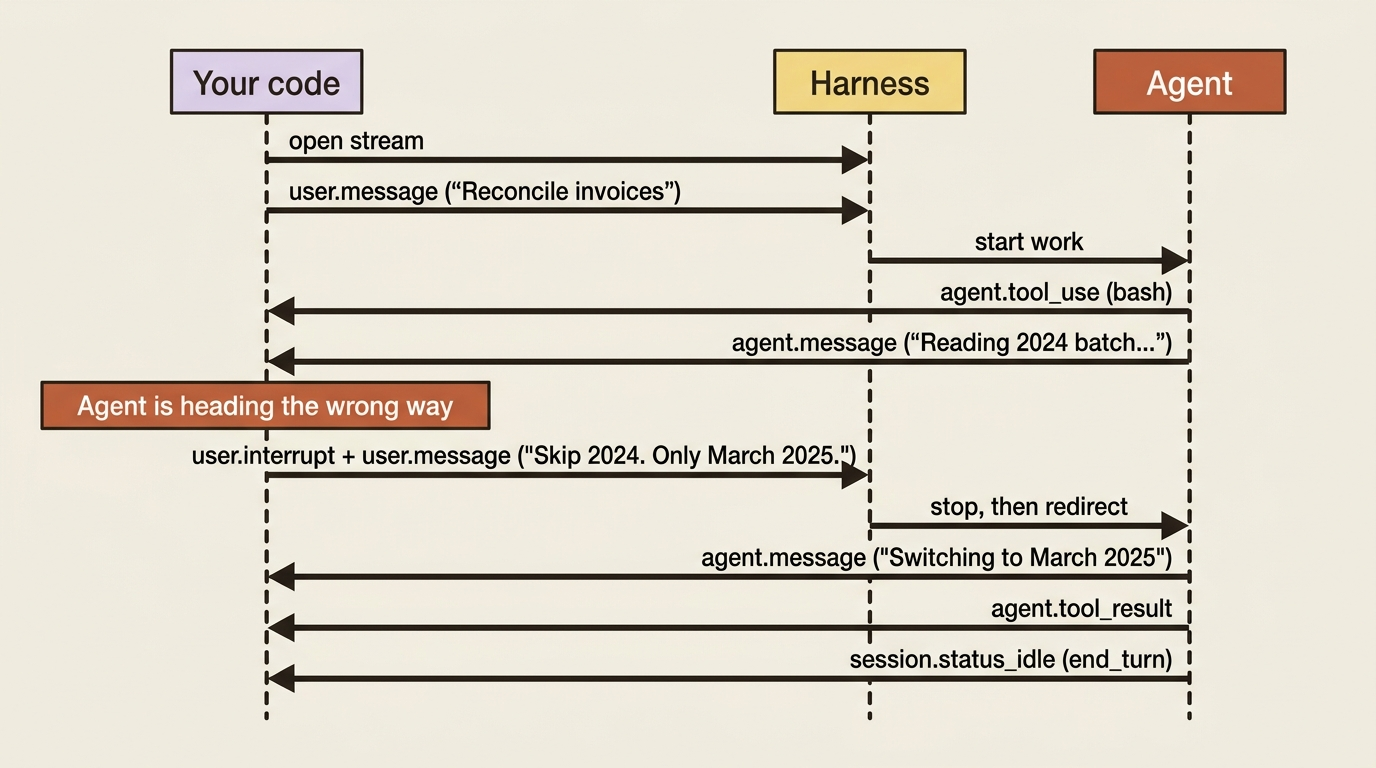
Because the input side is just events, you are not limited to one message and then silence. You can send another user.message at any time to add direction as the agent works, and it folds the new instruction into what it is doing. This is what turns a session from a one-shot call into a conversation that stays open across a long task.
The sharper tool is interruption. If the agent is heading the wrong way, you do not wait for it to finish being wrong. You send a user.interrupt to stop it mid-execution, and you can pair that with a user.message in the same send to immediately redirect. In Python:
client.beta.sessions.events.send(
    session.id,
    events=[
        {"type": "user.interrupt"},
        {
            "type": "user.message",
            "content": [{"type": "text", "text": "Skip the 2024 invoices. Only reconcile March 2025."}],
        },
    ],
)
And in TypeScript:
await client.beta.sessions.events.send(session.id, {
  events: [
    { type: "user.interrupt" },
    {
      type: "user.message",
      content: [{ type: "text", text: "Skip the 2024 invoices. Only reconcile March 2025." }],
    },
  ],
});
The agent acknowledges the interruption and switches to the new task. Notice that you sent two events in one call: stop, and here is what to do instead. That batching is deliberate. It means the agent never has a window where it is stopped with no new direction. For an interactive product, this is how a user's "no, wait, not that" reaches the agent without tearing the session down and starting over.
Building a small terminal UI
Put the pieces together and you have a terminal client that shows the agent thinking out loud: its messages, the tools it reaches for, and a clean finish. Here is the loop, in Python, with each interesting event type doing its own visible thing:
with client.beta.sessions.events.stream(session.id) as stream:
    client.beta.sessions.events.send(
        session.id,
        events=[{
            "type": "user.message",
            "content": [{"type": "text", "text": "Reconcile the March invoices and flag any mismatches."}],
        }],
    )

    for event in stream:
        match event.type:
            case "agent.message":
                for block in event.content:
                    if block.type == "text":
                        print(block.text, end="", flush=True)
            case "agent.tool_use":
                print(f"\n  -> {event.name}")
            case "agent.tool_result":
                print("  <- done")
            case "session.status_idle":
                if event.stop_reason.type == "end_turn":
                    print("\n\n[finished]")
                    break
                # requires_action handled by your tool resolution code
            case "session.error":
                print(f"\n[error: {event.error.message if event.error else 'unknown'}]")
                break
The same in TypeScript:
const stream = await client.beta.sessions.events.stream(session.id);
await client.beta.sessions.events.send(session.id, {
  events: [{
    type: "user.message",
    content: [{ type: "text", text: "Reconcile the March invoices and flag any mismatches." }],
  }],
});

for await (const event of stream) {
  switch (event.type) {
    case "agent.message":
      for (const block of event.content) {
        if (block.type === "text") process.stdout.write(block.text);
      }
      break;
    case "agent.tool_use":
      console.log(`\n  -> ${event.name}`);
      break;
    case "agent.tool_result":
      console.log("  <- done");
      break;
    case "session.status_idle":
      if (event.stop_reason.type === "end_turn") {
        console.log("\n\n[finished]");
      }
      break;
    case "session.error":
      console.log(`\n[error: ${event.error?.message ?? "unknown"}]`);
      break;
  }
  if (event.type === "session.status_idle" && event.stop_reason.type === "end_turn") break;
  if (event.type === "session.error") break;
}
Run it and the invoice agent narrates itself: a line of plan, an arrow into bash, an arrow into read, a result marker, more reasoning, and finally [finished]. You are watching the server-side loop you never wrote, one event at a time.
Add agent.thinking to the switch and you also see the reasoning the agent does between actions. That reasoning is emitted as its own event type rather than mixed into the messages, so you can show it or hide it independently. A debugging view shows it; a polished product UI hides it. Same stream, your choice.
Two details that save you later
Two smaller facts about the stream are worth tucking away now, because they explain behavior that would otherwise look like a bug.
Every event carries a processed_at timestamp marking when the harness recorded it server-side. If you ever see processed_at come back null, that is not an error. It means the event is queued behind earlier events that are still being processed, and it will be handled in order once they finish. Order is preserved; you are just seeing something mid-flight.
The stream is also live, not historical. It gives you what happens from the moment you attach. The full event history of a session is always retrievable separately through the events list endpoint, which matters when you reconnect to a session that has been running while you were away. You list the history to catch up, then tail the live stream for what is new, skipping anything you already saw. You will want this the first time a long reconciliation runs longer than your client stays connected.
Do this today
- Add a
session.errorcase to your event loop. Print the message and break. This is the one-line difference between a demo and something you can leave running unattended. - Stop breaking on every
session.status_idle. Branch onstop_reason.type:end_turnmeans done,requires_actionmeans the agent is blocked on you. - Log
stop_reasonwhenever a session goes idle. The next time an agent "hangs," your logs will tell you it is sitting atrequires_action, not frozen. - Try an interrupt. Send
user.interruptand a redirectinguser.messagein a single call, and watch the agent switch tasks without a teardown. - Render
agent.thinkingin a debug build. Seeing the reasoning between actions makes the server-side loop concrete instead of abstract.
Where this leaves you
You came in treating the event stream as a way to print the agent's output. You leave understanding it as the entire control surface: five event types you send, three families you receive, and one field, stop_reason, that decides whether an idle agent is finished or waiting on you.
That single distinction is the thing that separates people who ship Managed Agents from people who file confused bug reports about agents that hang. The agent is rarely broken. It is usually a question your loop never noticed it was asking.
Everything from here is a specific event flow. Custom tools, permission gates, outcomes, and multi-agent delegation are all just particular events crossing the stream in one direction or the other. The hinge you just learned to read, requires_action, is about to become the hinge you act on.
This is Part 3 of "Building with Claude Managed Agents," a 13-part guide to building production-ready AI agents.