
The Agent Cannot Call Your Database. Custom Tools Are How You Hand It Back.
Built-in agent tools run server-side and you never touch them; custom tools invert that completely, and understanding the request-result handshake is what connects a managed agent to your own systems.
Built-in tools run server-side, invisibly, and you never touch them. Custom tools invert that completely: the agent asks, your code answers. Here is the request-result handshake that connects a managed agent to your own systems.
In this article: You will learn how custom tools let a Claude managed agent reach data and services that live in your own infrastructure, not its sandbox. We cover the difference between server-side built-in tools and client-side custom tools, how to declare a tool as a name-plus-schema contract, the four-step
requires_actionhandshake that drives the request and result, the two failure modes that bite everyone first, and why the permission system deliberately does not touch any of this.
Your invoice agent can read files, run shell commands, and search the web, all without you writing a single line of execution code. The pre-built toolset runs inside the managed container, and the harness handles every detail. It feels almost magical until the moment your agent needs something real.
That moment arrives fast. The agent needs the vendor record behind your internal API. The customer tier in your production database. The rate from a pricing service that only answers requests from inside your network. None of that data is in the sandbox. It is in your application, behind your auth, on your network. And the managed container has no way to reach it.
Claude custom tools are the bridge across that gap. They invert the entire model you have been using with the built-in toolset. Instead of the agent running a tool and reporting back what it did, the agent describes what it wants, hands the request to you, and waits. Your code runs the operation against your own systems and feeds the answer back. The model never executes anything itself. It emits a structured request, your code does the work, and the result flows into the conversation so the agent can keep going.
If that pause-and-wait shape sounds familiar, it should. This is the requires_action branch in the agent event stream, the one most tutorials mention and never actually wire up. This article wires it up. Code is shown in Python and TypeScript.
Two kinds of tool, two opposite execution stories
It is worth being precise about the split, because it is the whole concept.
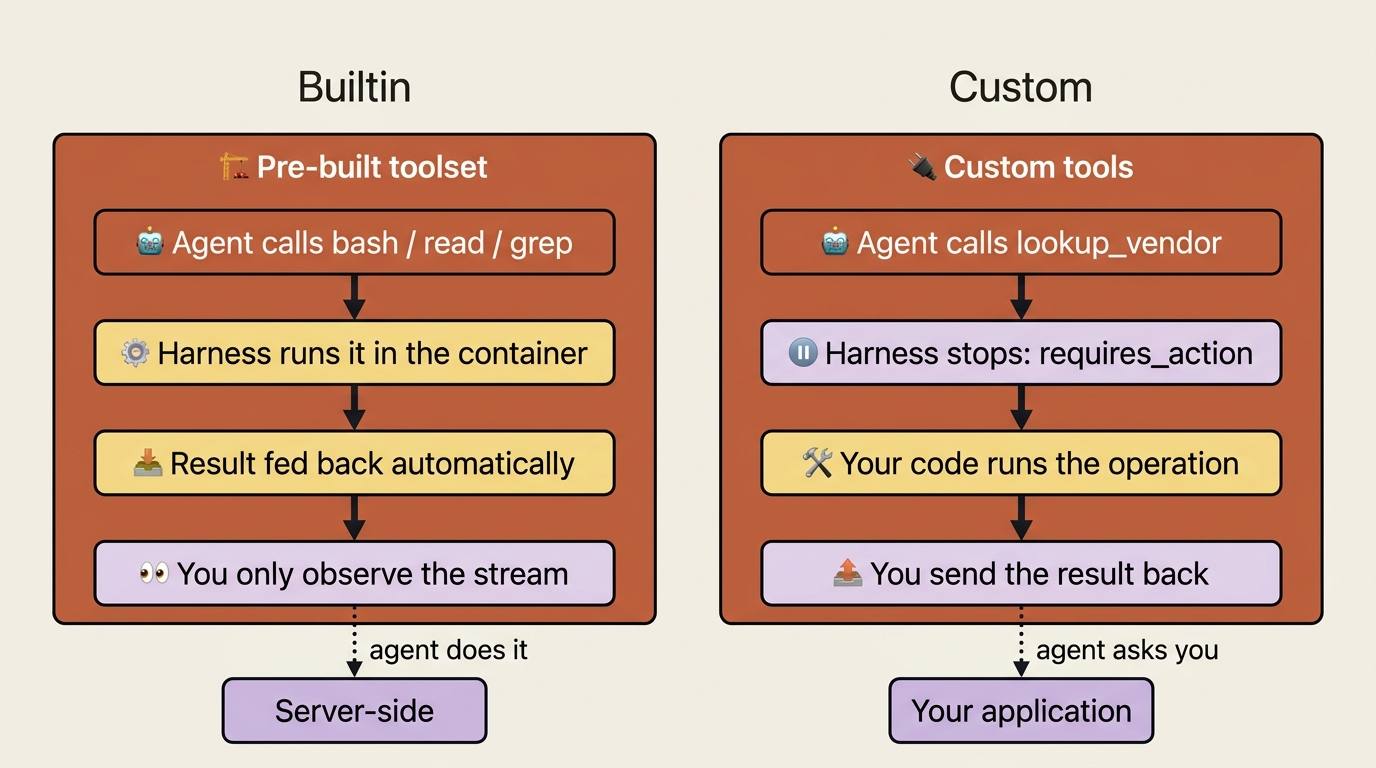
The pre-built toolset, bash, read, write, edit, glob, grep, web_fetch, and web_search, executes server-side. When the agent calls bash, the harness runs it in the container, captures the result, and feeds it back, all without involving your application at all. You see agent.tool_use and agent.tool_result flow past on the stream as a courtesy, but you are an observer, not a participant. The agent does the work; you watch.
Custom tools are the mirror image. The harness cannot run them, because the logic lives in your code and reaches systems only you can reach. So when the agent calls a custom tool, the harness stops and asks you to run it. You are now a participant, and the session cannot move until you respond.
Same agent, same event stream, opposite division of labor. The pre-built tools are something the agent does. Custom tools are something the agent asks you to do.
Declaring a custom tool: a name-plus-schema contract
A custom tool is a contract. You give it three things: a name, a description that tells the agent when to reach for it, and an input_schema, which is a JSON Schema describing the arguments. The agent reads the description to decide when the tool applies, and it uses the schema to shape its request.
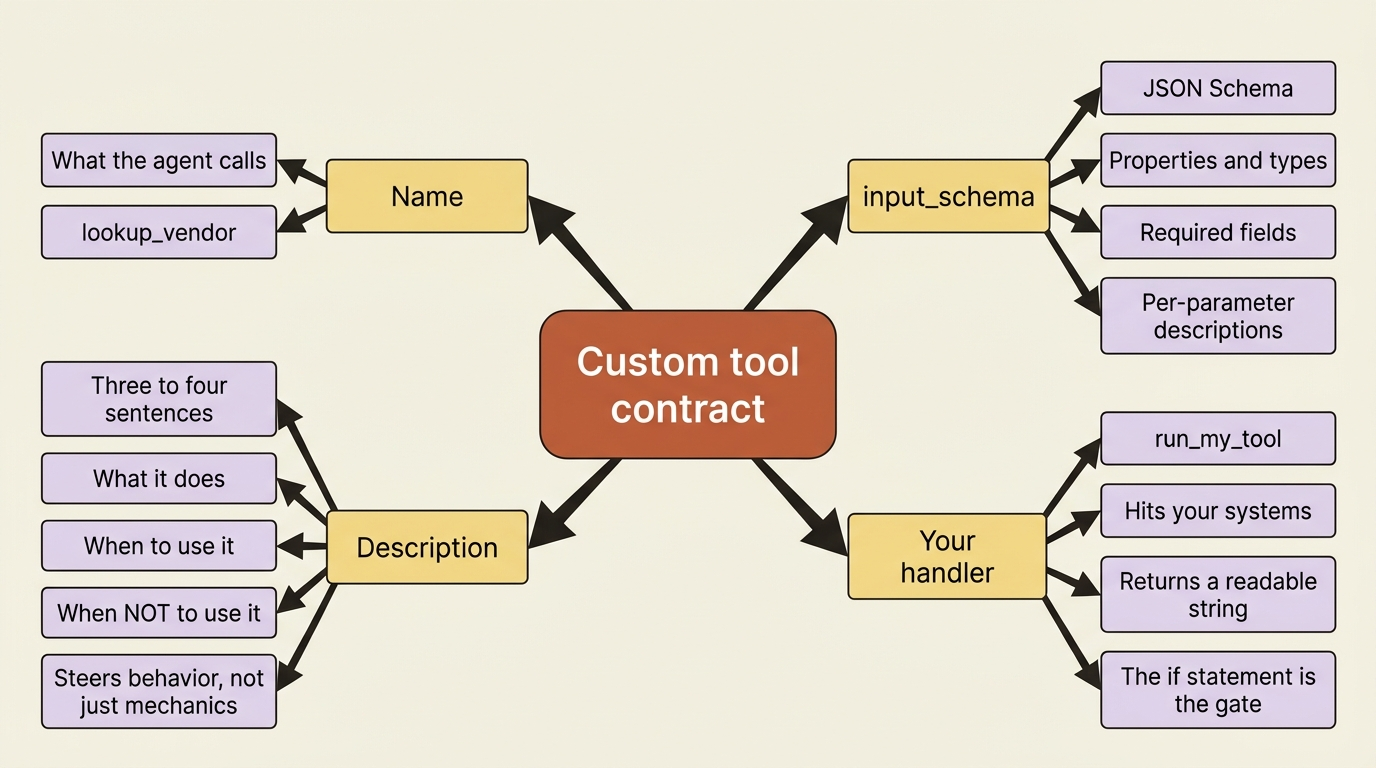
For the invoice agent, the obvious gap is vendor data. The agent can read an invoice file, but the canonical vendor record, the approved billing address, the payment terms, and the tax ID, lives behind your internal API. So you give it a lookup_vendor tool. You declare it alongside the pre-built toolset when you create the agent. In Python:
agent = client.beta.agents.create(
    name="Invoice Reconciler",
    model="claude-opus-4-7",
    system=(
        "You are an invoice-reconciliation agent. When an invoice references a "
        "vendor, use the lookup_vendor tool to fetch the canonical vendor record "
        "before trusting the values printed on the invoice."
    ),
    tools=[
        {"type": "agent_toolset_20260401"},
        {
            "type": "custom",
            "name": "lookup_vendor",
            "description": (
                "Fetch the canonical vendor record from the internal billing "
                "system by vendor ID. Returns the approved billing address, "
                "payment terms, and tax ID. Use this whenever you need to verify "
                "details printed on an invoice against the system of record. Do "
                "not guess vendor details; always look them up."
            ),
            "input_schema": {
                "type": "object",
                "properties": {
                    "vendor_id": {
                        "type": "string",
                        "description": "The vendor's internal ID, e.g. 'vnd_8841'.",
                    },
                },
                "required": ["vendor_id"],
            },
        },
    ],
)
And in TypeScript:
const agent = await client.beta.agents.create({
  name: "Invoice Reconciler",
  model: "claude-opus-4-7",
  system:
    "You are an invoice-reconciliation agent. When an invoice references a " +
    "vendor, use the lookup_vendor tool to fetch the canonical vendor record " +
    "before trusting the values printed on the invoice.",
  tools: [
    { type: "agent_toolset_20260401" },
    {
      type: "custom",
      name: "lookup_vendor",
      description:
        "Fetch the canonical vendor record from the internal billing system by " +
        "vendor ID. Returns the approved billing address, payment terms, and tax " +
        "ID. Use this whenever you need to verify details printed on an invoice " +
        "against the system of record. Do not guess vendor details; always look them up.",
      input_schema: {
        type: "object",
        properties: {
          vendor_id: { type: "string", description: "The vendor's internal ID, e.g. 'vnd_8841'." },
        },
        required: ["vendor_id"],
      },
    },
  ],
});
That description is doing more work than it looks. The single biggest factor in whether the agent uses a custom tool well is how thoroughly you describe it. Aim for three or four sentences minimum. Explain what the tool does, when to use it, when not to, what each parameter means, and any caveats. The agent has nothing to go on but the words you write, so a vague description produces a tool the agent ignores or misuses.
Notice the description above tells the agent both what the tool returns and the rule "always look them up, never guess." That sentence steers behavior, not just mechanics. A good tool description is part API spec and part instruction.
The handshake, step by step
Now comes the part that makes the event model concrete. When the agent decides to call lookup_vendor, four things happen in order.
First, the session emits an agent.custom_tool_use event carrying the tool's name and the input the agent constructed. This is the agent saying "I want to call lookup_vendor with vendor_id: vnd_8841."
Second, the session goes idle with stop_reason: requires_action, and the blocking event IDs sit in stop_reason.event_ids. The agent is not done. It is blocked on you, and it has told you exactly which calls it is waiting on.
Third, your code runs the actual operation, hitting your billing API, and sends back a user.custom_tool_result event. The critical field is custom_tool_use_id, which must match the ID of the event you are answering, paired with the content your tool produced.
Fourth, once every blocking event has a result, the session flips back to running, and the agent continues, now armed with the real vendor record.
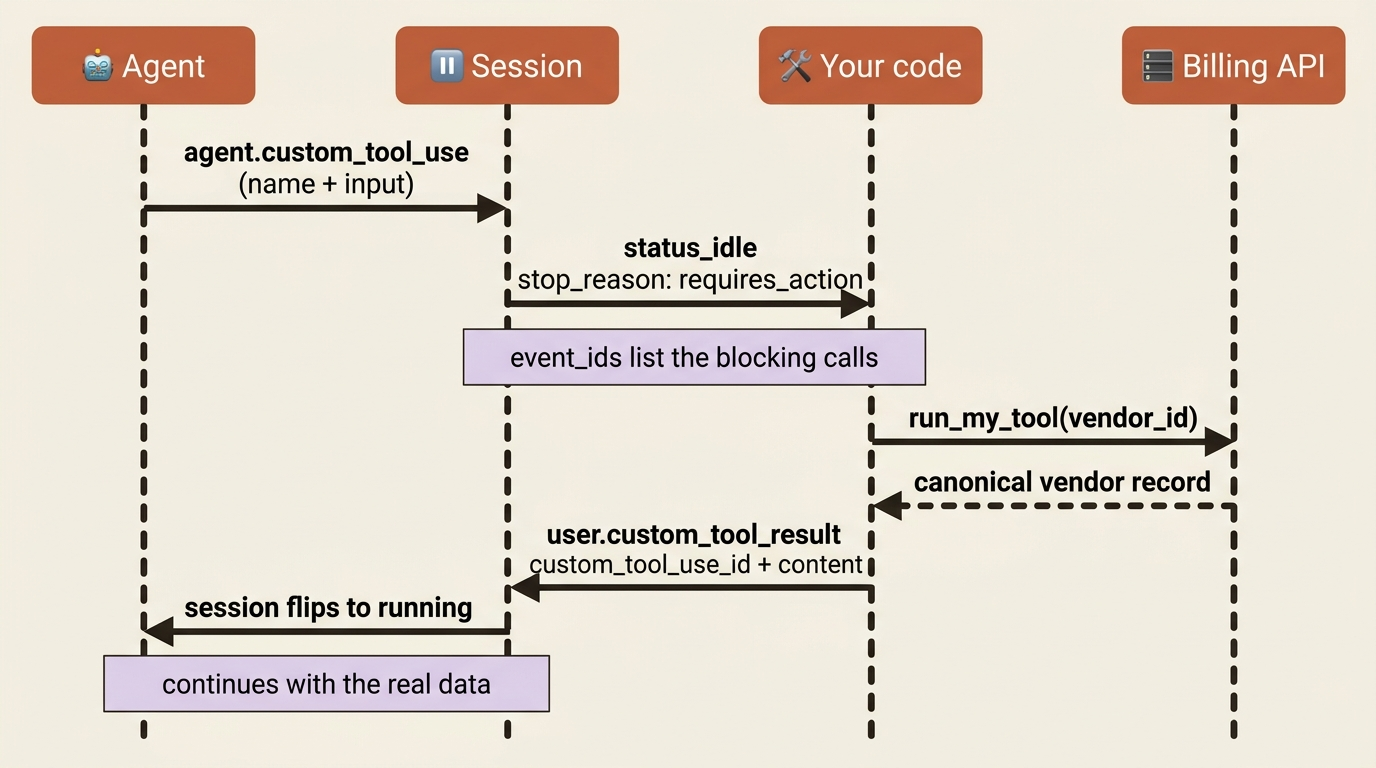
Here is the whole loop in Python. The key trick is keeping a map from event ID to the agent.custom_tool_use event, so that when you reach requires_action, you can look up what the agent actually asked for:
events_by_id = {}

with client.beta.sessions.events.stream(session.id) as stream:
    client.beta.sessions.events.send(
        session.id,
        events=[{
            "type": "user.message",
            "content": [{"type": "text", "text": "Reconcile the invoices in /mnt/invoices."}],
        }],
    )

    for event in stream:
        if event.type == "agent.custom_tool_use":
            # Remember the request so we can act on it when the session blocks.
            events_by_id[event.id] = event

        elif event.type == "session.status_idle" and (stop := event.stop_reason):
            match stop.type:
                case "requires_action":
                    for event_id in stop.event_ids:
                        tool_event = events_by_id[event_id]
                        result = run_my_tool(tool_event.name, tool_event.input)
                        client.beta.sessions.events.send(
                            session.id,
                            events=[{
                                "type": "user.custom_tool_result",
                                "custom_tool_use_id": event_id,
                                "content": [{"type": "text", "text": result}],
                            }],
                        )
                case "end_turn":
                    break
And in TypeScript:
const eventsById: Record<string, any> = {};

const stream = await client.beta.sessions.events.stream(session.id);
await client.beta.sessions.events.send(session.id, {
  events: [{
    type: "user.message",
    content: [{ type: "text", text: "Reconcile the invoices in /mnt/invoices." }],
  }],
});

for await (const event of stream) {
  if (event.type === "agent.custom_tool_use") {
    // Remember the request so we can act on it when the session blocks.
    eventsById[event.id] = event;
  } else if (event.type === "session.status_idle") {
    if (event.stop_reason?.type === "requires_action") {
      for (const eventId of event.stop_reason.event_ids) {
        const toolEvent = eventsById[eventId];
        const result = await runMyTool(toolEvent.name, toolEvent.input);
        await client.beta.sessions.events.send(session.id, {
          events: [{
            type: "user.custom_tool_result",
            custom_tool_use_id: eventId,
            content: [{ type: "text", text: result }],
          }],
        });
      }
    } else if (event.stop_reason?.type === "end_turn") {
      break;
    }
  }
}
run_my_tool is yours. For lookup_vendor, it is a call to your billing service that takes the vendor_id out of tool_event.input and returns a string the agent can read. The harness does not care what is inside it. It cares only that you eventually answer every blocking event.
The two mistakes everyone makes first
This flow has exactly two failure modes, and both are easy to trip.
The first: a mismatched custom_tool_use_id. The value you put in custom_tool_use_id must be the ID of the specific agent.custom_tool_use event you are answering. Send a result with a mismatched or invented ID, and the agent never gets the answer it was waiting for. It sits at idle looking, to you, exactly like it hung. It did not hang. You answered a question it never asked.
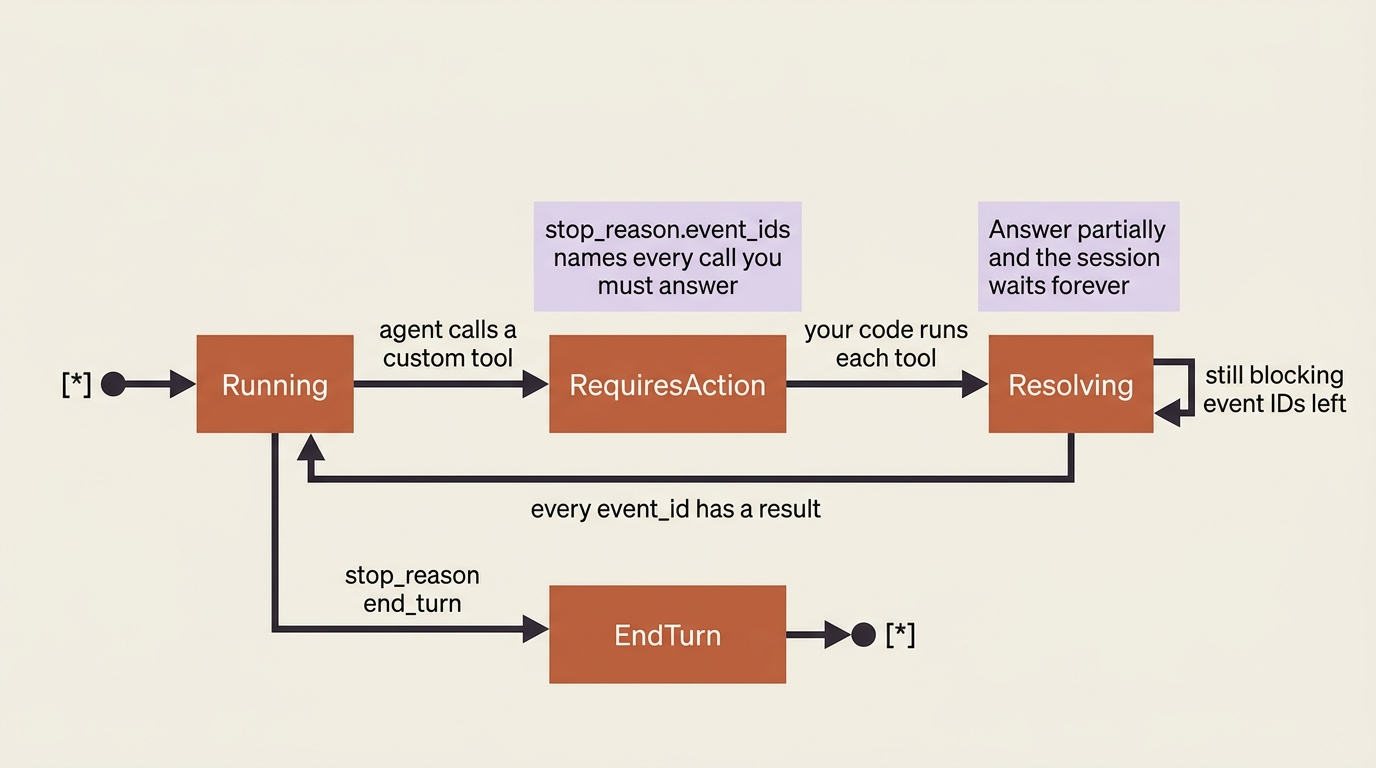
The second: partial resolution. When stop_reason.event_ids has more than one ID, the agent has fired several custom-tool calls in one turn, and the session stays blocked until you resolve every one. Answer two of three, and the session waits forever on the third. The loop above handles this correctly because it iterates over the full event_ids array. But if you ever special-case "the first tool call," this is exactly where it bites. The session leaves requires_action only when every blocking event has a result. No exceptions.
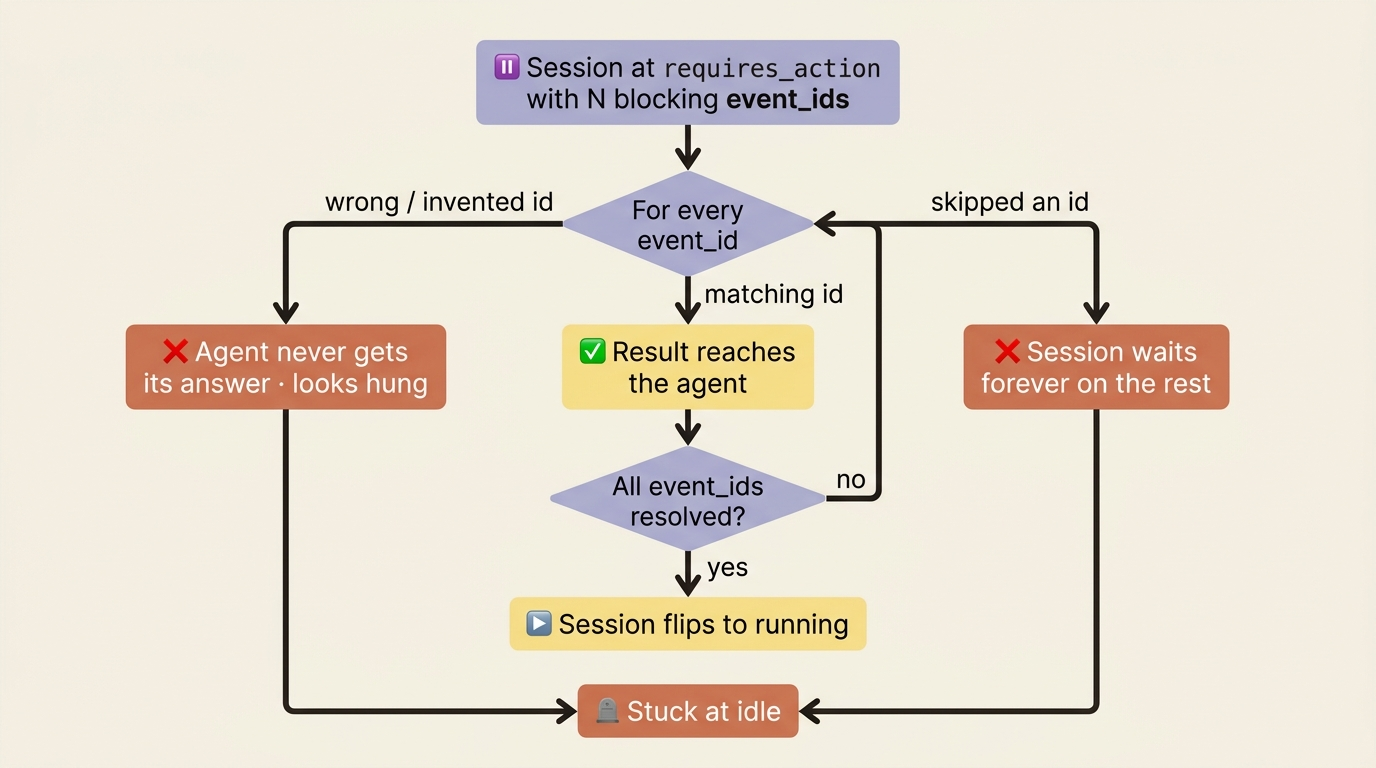
The state lifecycle makes the rule visible. The session moves through running, requires_action, and back to running only when the blocking set is empty.
Permissions do not apply here, and that is the point
You might expect custom tools to flow through the same approval machinery as the built-in tools. They do not. Permission policies govern only the tools the harness runs for you: the agent toolset and MCP tools. Custom tools are executed by your application, which means you already hold the decision. Nothing runs unless your code chooses to run it.
So the "approval" for a custom tool is not a policy setting. It is the if statement in your handler. If the agent asks to look up a vendor you do not recognize, or your code decides the request is out of bounds, you simply do not call the downstream system, and you return a result that says so. The agent reads that and adjusts. You get fine-grained control for free, because the execution was always yours.
This is a genuinely nice property. There is no separate gate to configure, no policy file to keep in sync. The point in the code where you do the work is the same point where you decide whether to do it at all.
When a tool returns a lot
One last practical note, because real tools sometimes return more than a sentence. If a custom-tool result, or any tool output, exceeds 100K tokens, the harness automatically writes it to a file in the sandbox and hands the agent a truncated preview plus the file path. The agent can then read the full content with its read tool if it needs more than the preview.
You do not have to manage this. It just means a tool that returns a giant payload will not blow up the context window. It also means the agent has a graceful path from "here is a summary" to "let me open the whole thing," which is usually what you want anyway.
Do this today
- Find the one piece of data your agent cannot reach. It is almost always a record in a database or a value behind an internal API. That is your first custom tool.
- Declare it with a description that earns its length. Three or four sentences: what it does, when to use it, when not to, what each parameter means. The agent has nothing else to go on.
- Wire the handshake with an event-ID map. Store every
agent.custom_tool_useevent by its ID, and when the session hitsrequires_action, look up each blocking ID and answer it. - Iterate over the full
event_idsarray, always. Never special-case the first tool call. The session unblocks only when every ID has a result. - Put your gate in the handler. The
ifstatement that decides whether to call the downstream system is your entire permission model for custom tools. Use it.
Where this leaves you
You have closed the loop between the agent and your own systems. The agent now reaches for lookup_vendor on its own, blocks at requires_action, hands you a structured request, and resumes the moment you answer, with the canonical vendor record in hand to check the invoice against. The requires_action hinge is no longer a branch you read about and skipped. It is a working handshake you drive.
You also saw the boundary clearly. Custom tools are yours to execute and yours to gate, which is exactly why the permission system does not touch them. The tools the harness runs for you are a different story. The bash that could delete a file, the MCP call that could write to production: those need a leash, and a capable agent should sometimes have to ask before pulling them. But for everything that lives in your own application, the answer is now in your hands. The agent asks. Your code answers. That is the whole contract.
This is Part 4 of "Building with Claude Managed Agents," a 13-part guide to building production-ready AI agents.