
Two Words Stand Between Your Agent and a Deleted Ledger
The Managed Agents permission system has only two policies and one override, and that minimalism is a feature once you see where the real control lives.
always_allow and always_ask are the entire permission vocabulary for server-run tools. No rule DSL, no glob patterns, just a policy and a per-tool override. Here is how to scope a capable agent so it has to ask before it does anything you would regret.
In this article: You will learn how Claude Managed Agents permissions actually work, which is far simpler than most permission systems and deliberately so. We cover what the two policies do, why the agent toolset and MCP tools have opposite defaults, how to trust the safe tools while gating the dangerous ones, and how the confirmation flow lets you inspect a real command before it runs. By the end you can hand an agent a shell and still sleep at night.
The invoice agent can run bash. That is wonderful right up until the moment it decides the cleanest way to reconcile the ledger is to rewrite it, or a malformed invoice convinces it to run a command you never intended. A pre-built toolset is powerful precisely because the harness executes it for you without a round trip back to your code. That same property is exactly what makes it worth putting on a leash. An agent that can act without asking is an agent that can act wrongly without asking.
This is the safety part of building with Managed Agents. The good news is that the control surface is small enough to hold in your head. There are two permission policies, one place to set a default, one place to override per tool, and one event you send to approve or deny a paused call. That is the whole system.
If you arrived expecting a rule language with glob patterns like Bash(npm *), set that expectation down now. Claude Managed Agents permissions do not have that. The system has a policy and an override, and for most agents that turns out to be more than enough. The minimalism is not a gap. It is a design choice, and once you see where the real control lives, you stop missing the rule language entirely.
Code below is shown in Python and TypeScript.
What permissions actually govern
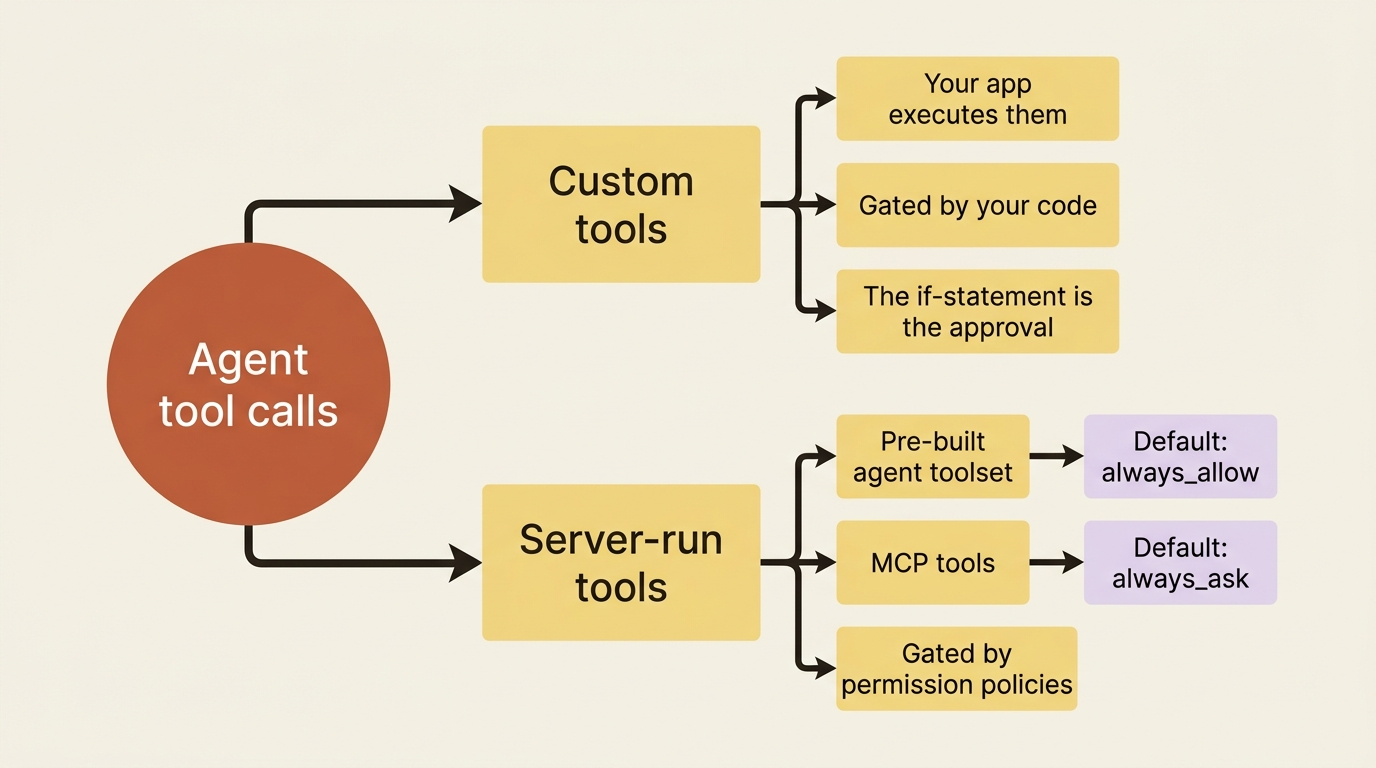
Be precise about the scope, because it is narrower than it sounds. Permission policies control only the tools the harness runs on your behalf: the pre-built agent toolset and any MCP tools. They decide one thing: whether such a tool executes automatically or pauses to wait for your approval.
They do not touch custom tools at all. The reason is structural. Your application executes custom tools, so you already hold the decision, and the "approval" is simply the if statement in your handler. Permissions exist for exactly the tools you do not run yourself, the ones where, without a policy, the agent would act and you would only find out afterward.
So the mental split is clean. Custom tools are gated by your code. Server-run tools are gated by permission policies. Nothing falls between the two.
The entire vocabulary: two policies
There are two policy types, and their names say what they do.
| Policy | Behavior |
|---|---|
always_allow |
The tool runs automatically, no confirmation. |
always_ask |
The session pauses and waits for your approval before the tool runs. |
That is it. There is no "ask once then remember," no per-argument matching, and no pattern syntax. A tool is either trusted to run on its own or it stops and asks every time. The simplicity is deliberate. The rich behavior comes not from a complex rule language but from where you attach these two policies, which is the next question.
The defaults matter, and they differ by toolset. If you say nothing, the agent toolset runs with always_allow, so bash, read, write, and the rest all execute freely. The MCP toolset is the opposite: it defaults to always_ask.
That asymmetry is intentional and worth understanding. The built-in tools are a known, fixed set. An MCP server is a moving target whose available tools can change under you as the server adds capabilities. The safe default, then, is to make every MCP call ask until you explicitly decide a server is trusted.
Setting a policy for the whole toolset
The blunt instrument is default_config.permission_policy, which applies one policy to every tool in a toolset. To make the agent ask before running anything in the pre-built toolset, you set the default to always_ask when you create the agent.
In Python:
agent = client.beta.agents.create(
    name="Invoice Reconciler",
    model="claude-opus-4-7",
    system="You are an invoice-reconciliation agent...",
    tools=[
        {
            "type": "agent_toolset_20260401",
            "default_config": {
                "permission_policy": {"type": "always_ask"},
            },
        },
    ],
)
And in TypeScript:
const agent = await client.beta.agents.create({
  name: "Invoice Reconciler",
  model: "claude-opus-4-7",
  system: "You are an invoice-reconciliation agent...",
  tools: [
    {
      type: "agent_toolset_20260401",
      default_config: { permission_policy: { type: "always_ask" } },
    },
  ],
});
That is maximally cautious, and for a first run against unfamiliar data it is not a bad place to start. However, asking before every read and every glob gets old fast, because reads are harmless and you will approve them every single time. What you actually want is to trust the safe tools and gate only the dangerous ones. That is what the override is for.
Overriding individual tools: trust most, gate the rest
The useful pattern is to set a permissive default and then carve out exceptions with the configs array. For the invoice agent, the dangerous capability is the one that changes state: writing. Reading invoices, globbing the folder, and grepping for a vendor name cannot hurt you. Writing to the ledger can.
So you allow the toolset by default and require confirmation specifically before bash, the tool the agent would use to modify files or run anything with side effects.
In Python:
tools = [
    {
        "type": "agent_toolset_20260401",
        "default_config": {
            "permission_policy": {"type": "always_allow"},
        },
        "configs": [
            {
                "name": "bash",
                "permission_policy": {"type": "always_ask"},
            },
        ],
    },
]
And in TypeScript:
const tools = [
  {
    type: "agent_toolset_20260401",
    default_config: { permission_policy: { type: "always_allow" } },
    configs: [
      { name: "bash", permission_policy: { type: "always_ask" } },
    ],
  },
];
Read that as a sentence: allow everything, but ask before bash. The default_config sets the baseline, and each entry in configs overrides one named tool. This is the shape you reach for most often.
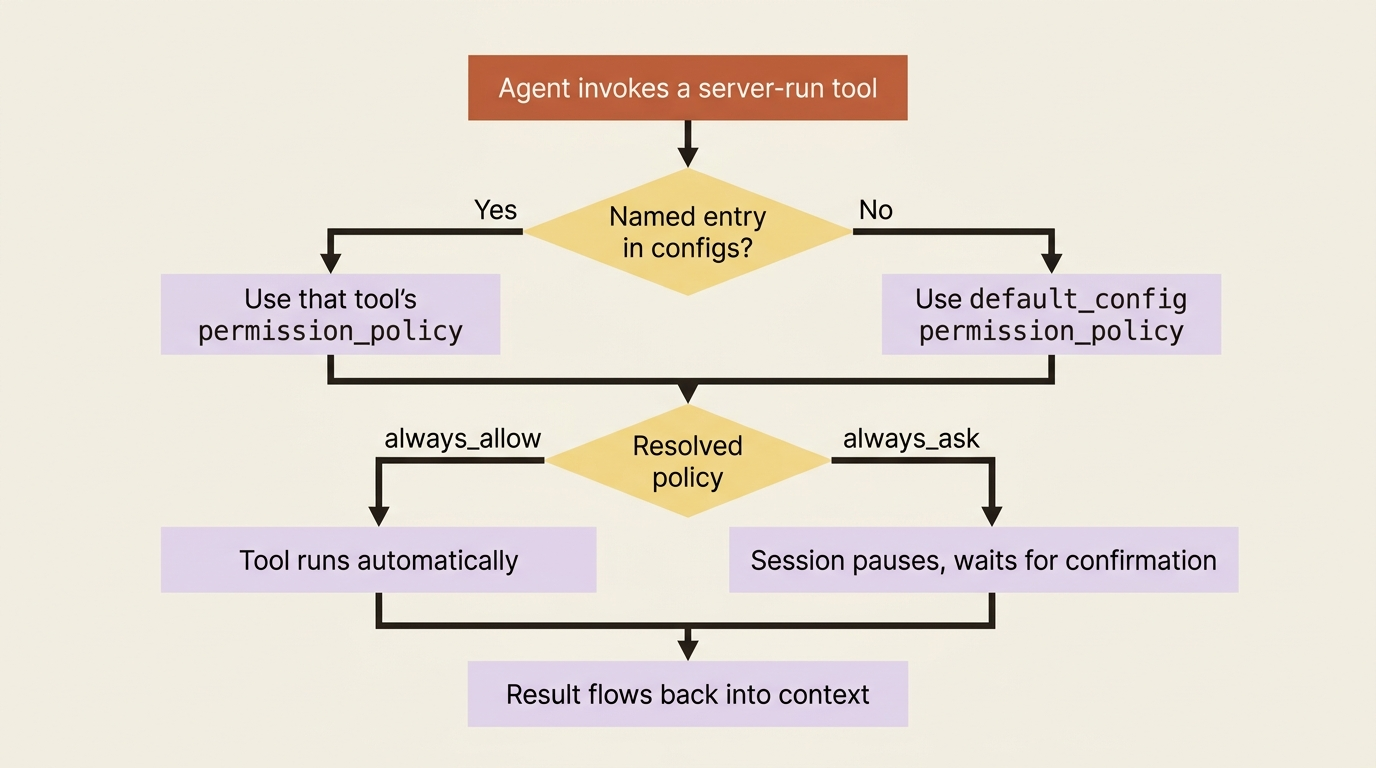
You could just as easily gate write and edit instead of bash, or in addition to it. The principle is to identify the tools that change the world and make only those stop and ask. Everything read-only stays friction-free.
This is also the honest answer to the missing rule DSL. In some agent frameworks you might write Bash(rm *) to gate destructive commands while allowing safe ones. Managed Agents has no such matching, so bash is all-or-nothing: either every shell command asks, or none does. The way you get finer control is not a static pattern. It is the confirmation flow itself, where you inspect the actual command the agent wants to run and decide in your own code. That decision point is where your real policy lives.
The confirmation flow: inspect, then decide
When the agent invokes a tool governed by always_ask, the session does not block silently. It hands you a structured, four-step handshake.
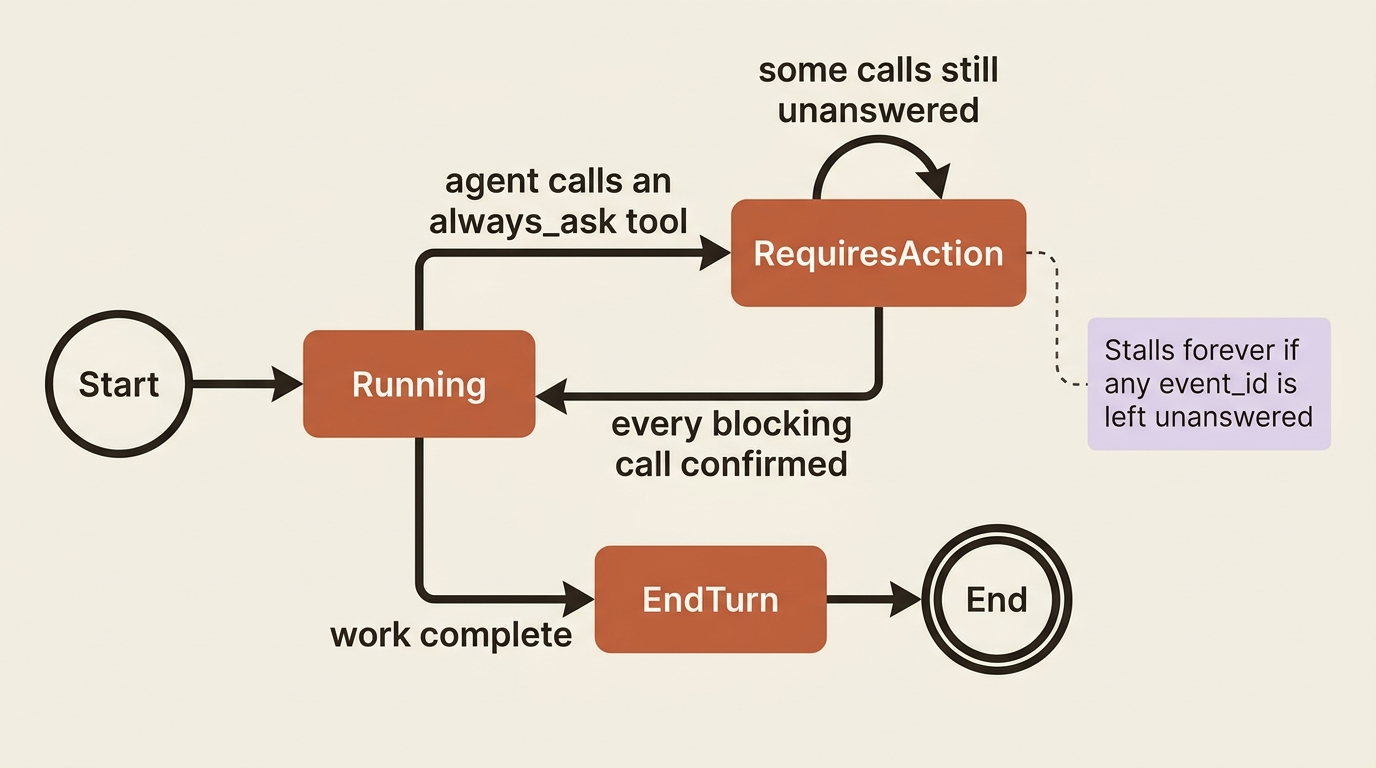
First, the session emits an agent.tool_use event, or agent.mcp_tool_use for an MCP tool, describing the call. Second, the session goes idle with stop_reason: requires_action, and the blocking event IDs sit in stop_reason.event_ids. Third, for each one you send a user.tool_confirmation event, passing the event ID in tool_use_id and setting result to "allow" or "deny". Fourth, once every blocking call is resolved, the session flips back to running.
Allowing is the simple case. In Python:
client.beta.sessions.events.send(
    session.id,
    events=[{
        "type": "user.tool_confirmation",
        "tool_use_id": tool_use_event.id,
        "result": "allow",
    }],
)
The same in TypeScript:
await client.beta.sessions.events.send(session.id, {
  events: [{
    type: "user.tool_confirmation",
    tool_use_id: toolUseEvent.id,
    result: "allow",
  }],
});
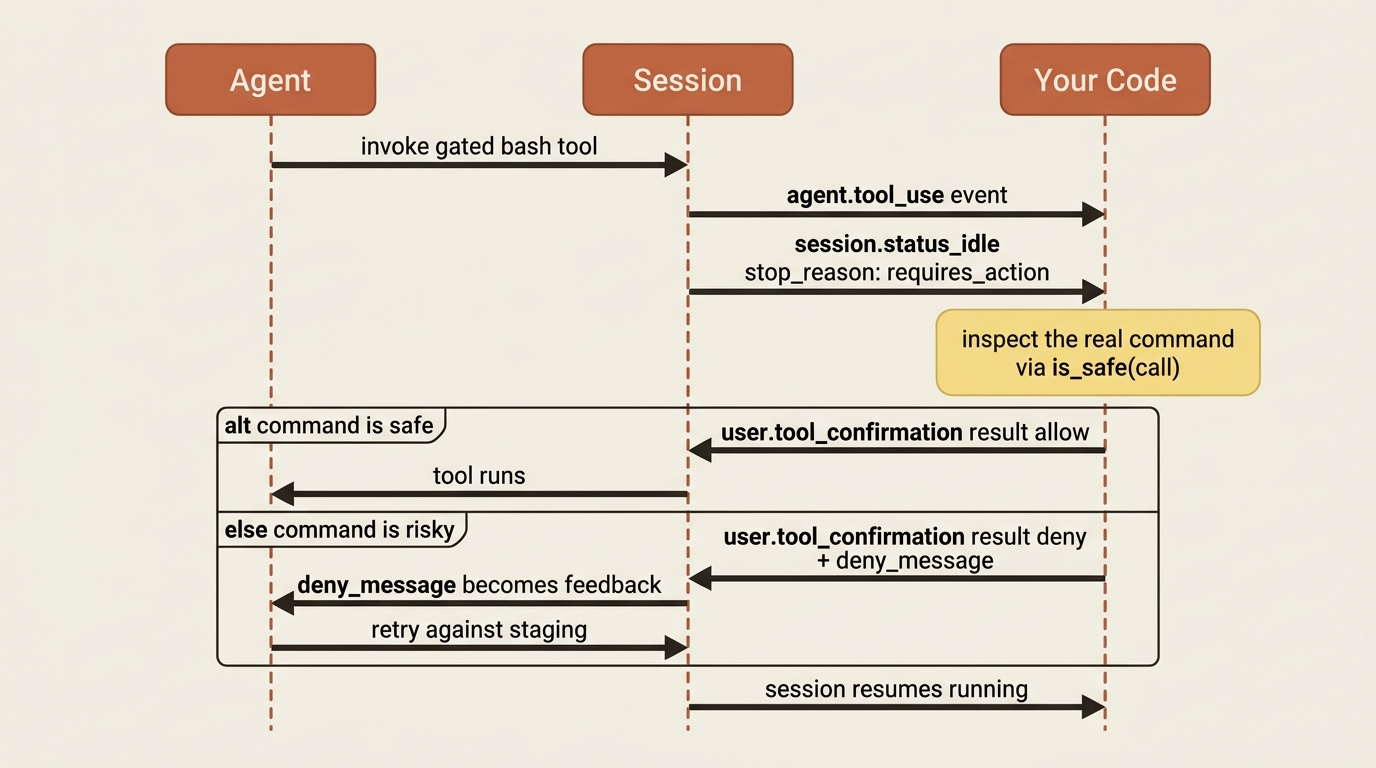
Putting it in the loop, you watch for the agent.tool_use events so you can see what the agent wants, then act when the session blocks. In Python:
events_by_id = {}

with client.beta.sessions.events.stream(session.id) as stream:
    client.beta.sessions.events.send(
        session.id,
        events=[{
            "type": "user.message",
            "content": [{"type": "text", "text": "Reconcile the invoices and update the ledger."}],
        }],
    )

    for event in stream:
        if event.type == "agent.tool_use":
            events_by_id[event.id] = event

        elif event.type == "session.status_idle" and (stop := event.stop_reason):
            match stop.type:
                case "requires_action":
                    for event_id in stop.event_ids:
                        call = events_by_id[event_id]
                        if is_safe(call):  # your judgment, on the real command
                            client.beta.sessions.events.send(
                                session.id,
                                events=[{
                                    "type": "user.tool_confirmation",
                                    "tool_use_id": event_id,
                                    "result": "allow",
                                }],
                            )
                        else:
                            client.beta.sessions.events.send(
                                session.id,
                                events=[{
                                    "type": "user.tool_confirmation",
                                    "tool_use_id": event_id,
                                    "result": "deny",
                                    "deny_message": "That writes to the production ledger. Write to the staging copy instead.",
                                }],
                            )
                case "end_turn":
                    break
This is where the finer control you missed from the rule DSL actually lives. is_safe(call) is yours, and it sees the real tool call, the actual bash command the agent wants to run. You can inspect the command string and decide. The pattern matching you would have written as a static rule, you instead write as live code with the concrete request in hand, which is strictly more expressive than a glob.
Denial is not rejection, it is redirection
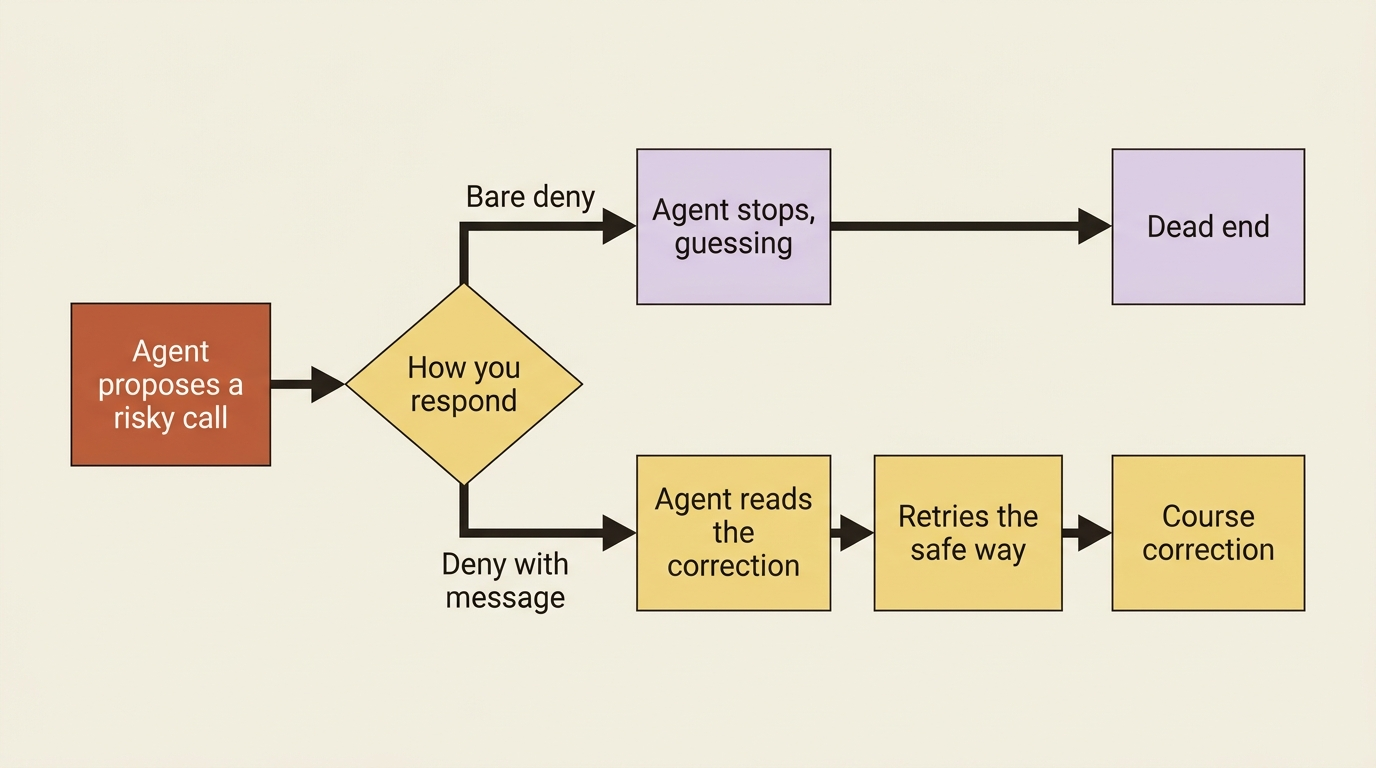
The deny_message field is the part people underuse, and it is the most useful thing in the whole system. When you deny a tool call, you are not just blocking it. You are talking to the agent. The message goes back into the conversation as feedback, and the agent reads it and adapts.
Look again at the denial in the loop above. You did not just say no. You said "that writes to the production ledger, write to the staging copy instead," and the agent will take that correction and try again against staging.
A bare deny stops the agent and leaves it guessing. A deny with a message steers it. Treat deny_message as a steering wheel, not a brake. Whenever you reject a call, tell the agent what would have been acceptable, and you turn a dead end into a course correction.
The two failure modes
The pitfalls follow directly from the confirmation handshake, and both come down to one rule: resolve every blocking call.
The first failure mode is a partial answer. The tool_use_id must match the event you are answering, and you must resolve every blocking call before the session resumes. If stop_reason.event_ids lists three calls and you confirm only two, the session waits forever on the third, looking for all the world like it hung. Iterate the full array, answer each one, and the agent moves.
The second is an unanswered gate. A tool set to always_ask that nobody ever answers is a permanent stall by design. If you deploy an agent with always_ask on bash and your code does not handle requires_action, the agent will block on its first shell command and never recover.
The lesson is blunt: either handle the confirmation flow, or do not gate the tool. There is no middle state where a gated tool quietly proceeds on its own.
Do this today
- Audit your agent's toolset defaults. Remember the asymmetry: the agent toolset is
always_allowby default, MCP tools arealways_ask. Know which tools in your agent currently run with no confirmation. - Identify the state-changing tools. For most agents that is
bash,write, andedit. Everything that only reads is safe to leave onalways_allow. - Set a permissive default, then gate the dangerous tools with a
configsentry per tool. This trusts the safe majority and stops only the calls that can hurt you. - Write a real
is_safe(call)check in your confirmation handler. Inspect the actual command string. This is your finer-grained policy, replacing the rule DSL that does not exist. - Make every
denycarry adeny_message. Tell the agent what would have been acceptable. A denial without guidance wastes a turn.
Two words, one safety surface
You can now hand the invoice agent the full power of the toolset and still sleep at night. The dangerous calls stop and ask. Your code inspects the real command before approving. A denial comes with a sentence that points the agent somewhere safe instead of just slamming a door.
Two policies, one default, one override, and one confirmation event. That is the entire safety surface for server-run tools, and its smallness is the point. A permission system you can hold in your head is a permission system you will actually configure correctly. The frameworks with rich rule languages give you more knobs and, with them, more ways to be quietly wrong. Managed Agents gives you always_allow, always_ask, and a place to put your judgment as live code. For an agent that can delete a ledger, that turns out to be exactly enough.
This is Part 5 of "Building with Claude Managed Agents," a 13-part guide to building production-ready AI agents.