
Your Agent Lives in a Box. MCP Is How It Reaches Your Billing System.
Custom tools make the agent ask your code for data; MCP lets it call your real services directly, and the interesting part is what happens when one of those services goes down.
Custom tools let an agent ask your code for data. The Model Context Protocol lets it call your real services directly, on its own. Here is how to wire a remote server in, scope which tools it can touch, and survive a server that dies mid-session.
In this article: You will learn how to connect a Claude Managed Agent to an external service over the Model Context Protocol. We cover the two-part declaration that the API enforces, how to scope which server tools the agent may use, why MCP tools ask for confirmation by default, and the failure modes that arrive the moment your agent depends on a service the harness does not control. By the end you can hand an agent a live connection to your internal systems without the integration becoming a single point of collapse.
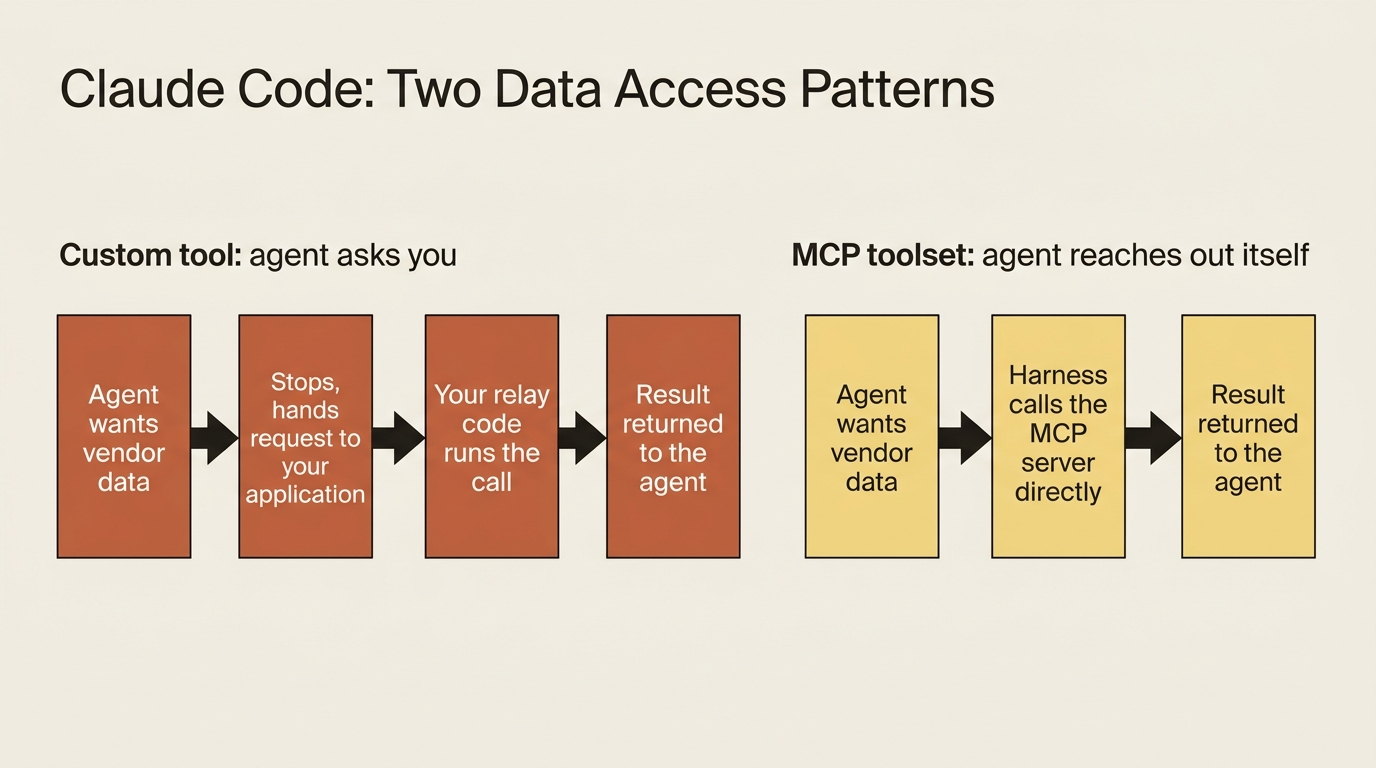
Give an agent a custom tool and watch what actually happens. The agent wants vendor data. It stops, hands your application a structured request, and waits. Your code receives the request, runs the lookup, and sends the answer back. For one tool, that is a clean contract. For an internal billing system with a dozen operations, reading vendors, fetching payment terms, posting reconciliation results, and querying tax records, you are now writing and maintaining a relay function for every single call. That is the exact plumbing an agent framework was supposed to delete.
The Model Context Protocol is the better answer. MCP is a standard way to expose a set of tools over an HTTP endpoint, and Managed Agents speaks it natively. You point the agent at your billing system's MCP server once, and from then on the agent calls any tool that server exposes directly. The harness executes the call. There is no per-call relay in your code at all.
The distinction is worth holding onto. A custom tool is the agent asking you for something. An MCP tool is the agent reaching out and getting it itself. This article wires a working agent into a real service over MCP, scopes what it is allowed to do there, and then deals honestly with the new failure modes that come with depending on something the harness cannot guarantee.
Code below is shown in Python and TypeScript.
Declaration is two halves that must agree
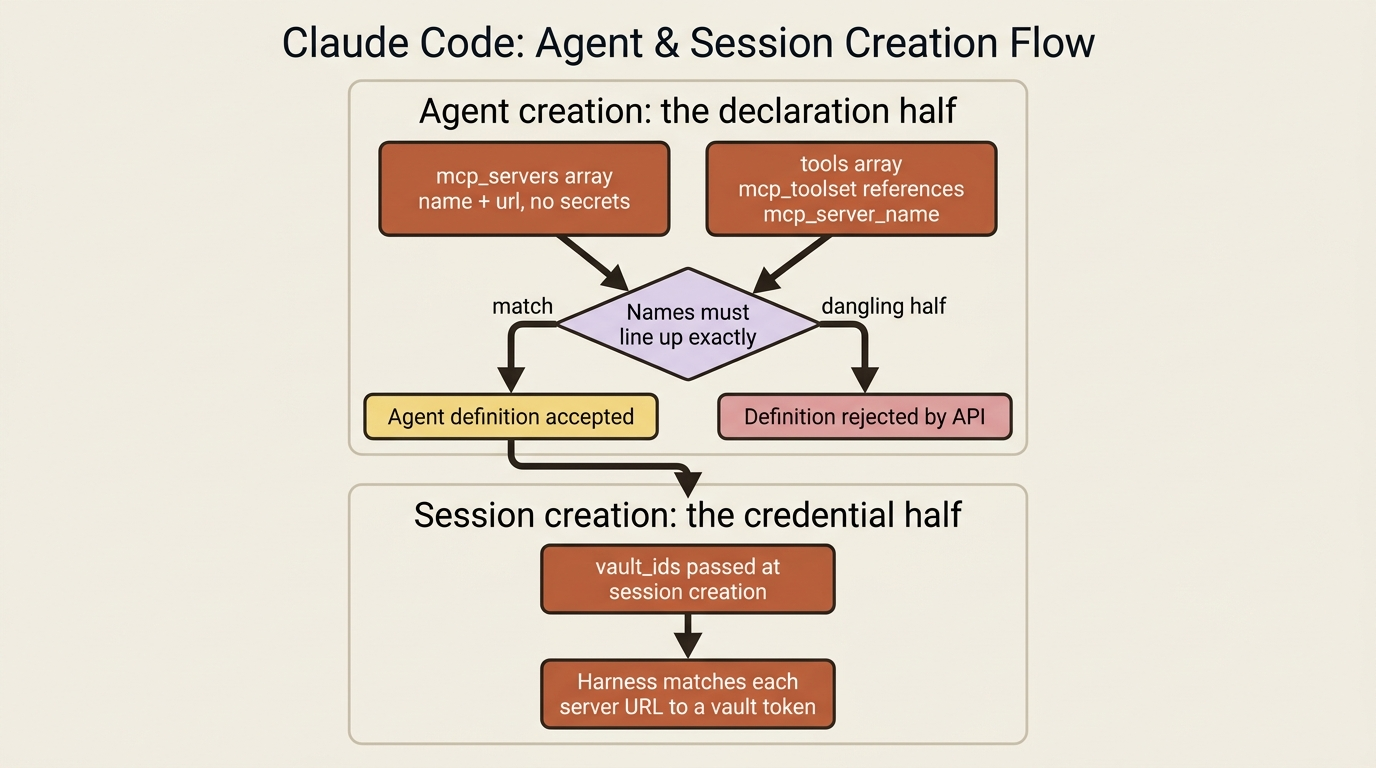
MCP setup deliberately splits across two moments in an agent's lifecycle. At agent creation you declare which servers exist, naming them and giving their URLs, with no secrets involved. At session creation you supply the credentials by referencing a vault. That separation is not bureaucracy. It keeps tokens out of your reusable agent definitions, so one agent definition can run for many different users, each with their own credentials.
This article is the declaration half. You declare servers in two places, and the two places have to line up. The mcp_servers array names each server and gives its URL. The tools array adds an mcp_toolset entry that references that server by name. The toolset entry is what actually exposes the server's tools to the agent. Here is an invoice-reconciliation agent pointed at an internal billing system, in Python:
agent = client.beta.agents.create(
    name="Invoice Reconciler",
    model="claude-opus-4-7",
    system=(
        "You are an invoice-reconciliation agent. Use the billing system's tools "
        "to fetch canonical vendor and ledger data rather than trusting values "
        "printed on invoices."
    ),
    mcp_servers=[
        {
            "type": "url",
            "name": "billing",
            "url": "https://mcp.internal.example.com/billing",
        },
    ],
    tools=[
        {"type": "agent_toolset_20260401"},
        {"type": "mcp_toolset", "mcp_server_name": "billing"},
    ],
)
And in TypeScript:
const agent = await client.beta.agents.create({
  name: "Invoice Reconciler",
  model: "claude-opus-4-7",
  system:
    "You are an invoice-reconciliation agent. Use the billing system's tools to " +
    "fetch canonical vendor and ledger data rather than trusting values printed on invoices.",
  mcp_servers: [
    { type: "url", name: "billing", url: "https://mcp.internal.example.com/billing" },
  ],
  tools: [
    { type: "agent_toolset_20260401" },
    { type: "mcp_toolset", mcp_server_name: "billing" },
  ],
});
The name field is the thread that ties the two halves together. You called the server billing in mcp_servers, and the mcp_toolset references it as mcp_server_name: "billing". That same name shows up on every MCP tool event in the stream, so when you see agent.mcp_tool_use go by, you know exactly which server it came from. The type is always "url", since these are remote servers reached over HTTP.
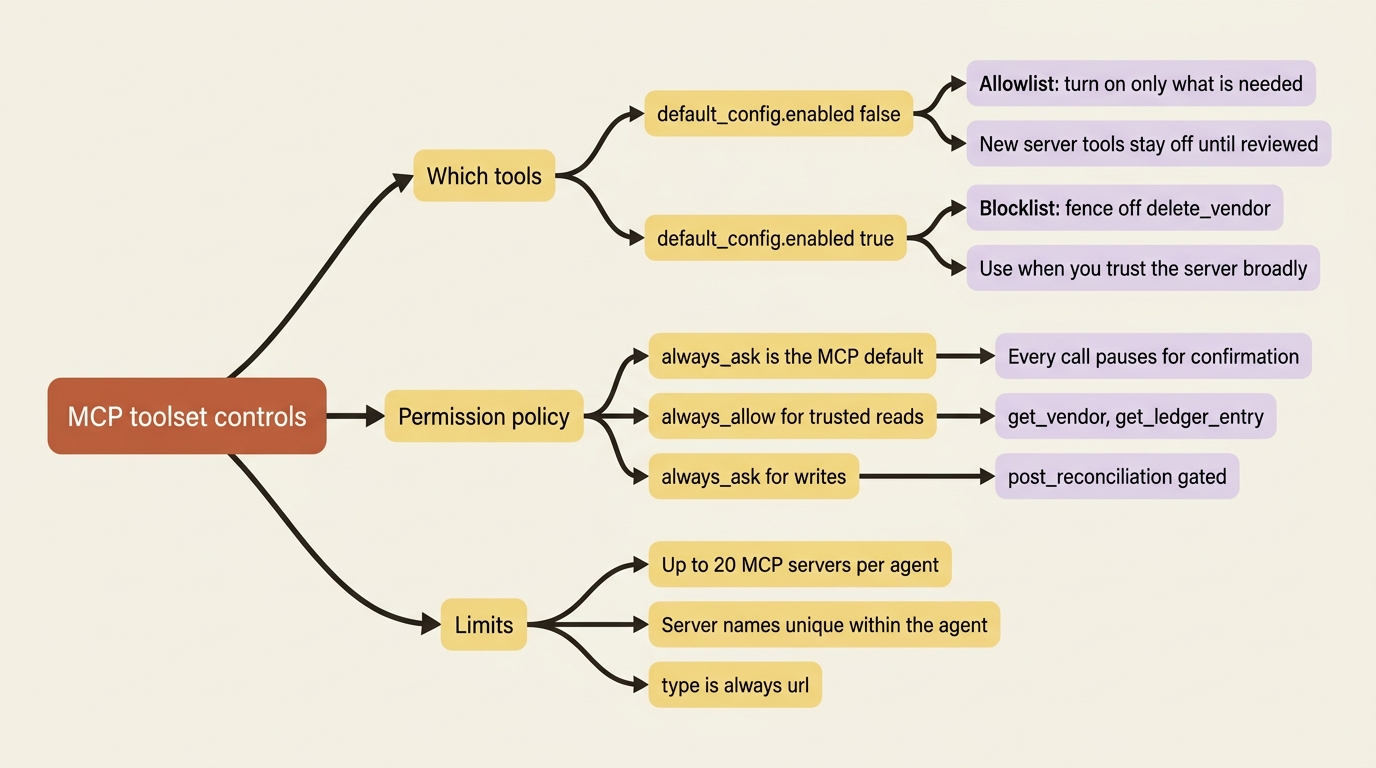
Here is the gotcha, and the API enforces it strictly. The two halves must agree exactly. Every server you declare in mcp_servers must be referenced by an mcp_toolset, and every mcp_toolset must point at a declared server. Declare a server and forget to add its toolset, or reference a server name you never declared, and the agent definition is rejected outright. There are no dangling halves. If agent creation fails with a complaint about MCP configuration, this mismatch is almost always the reason. One more limit: an agent can declare up to 20 MCP servers, and their names must be unique within that agent.
Scoping which tools the agent can touch
A real MCP server usually exposes more tools than your agent should ever use. Your billing system might offer the read operations you want alongside destructive ones you do not, like deleting a vendor or voiding a paid invoice. You scope this with the same default_config and configs shape that governs the built-in toolset. There is nothing new to learn here. The familiar pattern simply points at MCP tools now, named exactly as the server reports them.
The cautious posture is to start with everything off and turn on only what the agent genuinely needs. You set default_config.enabled to false, then list the tools to enable. The shape is identical across both SDKs, so here it is in JSON:
{
  "type": "mcp_toolset",
  "mcp_server_name": "billing",
  "default_config": { "enabled": false },
  "configs": [
    { "name": "get_vendor", "enabled": true },
    { "name": "get_ledger_entry", "enabled": true },
    { "name": "post_reconciliation", "enabled": true }
  ]
}
This allowlist posture is the right default for two reasons. It keeps the agent's tool surface small, which makes the agent choose tools more reliably. And it means any new tool the server operator ships later stays off until you review it, rather than silently becoming available to your agent the next time it runs.
The inverse pattern exists for when you trust the server broadly. You keep everything on by leaving default_config.enabled true, then disable a few dangerous tools by setting enabled: false on individual entries, fencing off, say, delete_vendor while leaving the rest open. Reach for whichever pattern matches how much you actually trust the server on the other end.
MCP tools ask by default, and that asymmetry is protecting you
There is one default that deserves a moment of thought before you change it. The MCP toolset defaults to a permission policy of always_ask, while the built-in toolset defaults to always_allow. That asymmetry is deliberate.
The built-in tools are a fixed, known set. An MCP server is a different kind of thing entirely. It is a service you do not control, whose tool list can change the moment its operator ships an update. So the safe default is to make every MCP call pause for your confirmation until you explicitly decide otherwise.
In practice that means, out of the box, your agent will stop and ask before each billing-system call. It surfaces an agent.mcp_tool_use event and goes idle with a requires_action status, the same confirmation flow you would use for any gated tool. You answer with a user.tool_confirmation event.
For a billing system you operate and trust, sitting through a confirmation on every single get_vendor is needless friction. So you flip the read tools to always_allow while keeping the state-changing ones, like post_reconciliation, on always_ask. You set this with default_config.permission_policy on the mcp_toolset. The judgment is the same one that governs any capable agent: trust the reads, gate the writes, and let a denial steer the agent with a deny_message when it reaches for something it should not.
The part that surprises people: failures are not loud
Now the failure modes, because depending on an external service introduces a class of problem the rest of the system simply does not have. The surprising part is what does not happen.
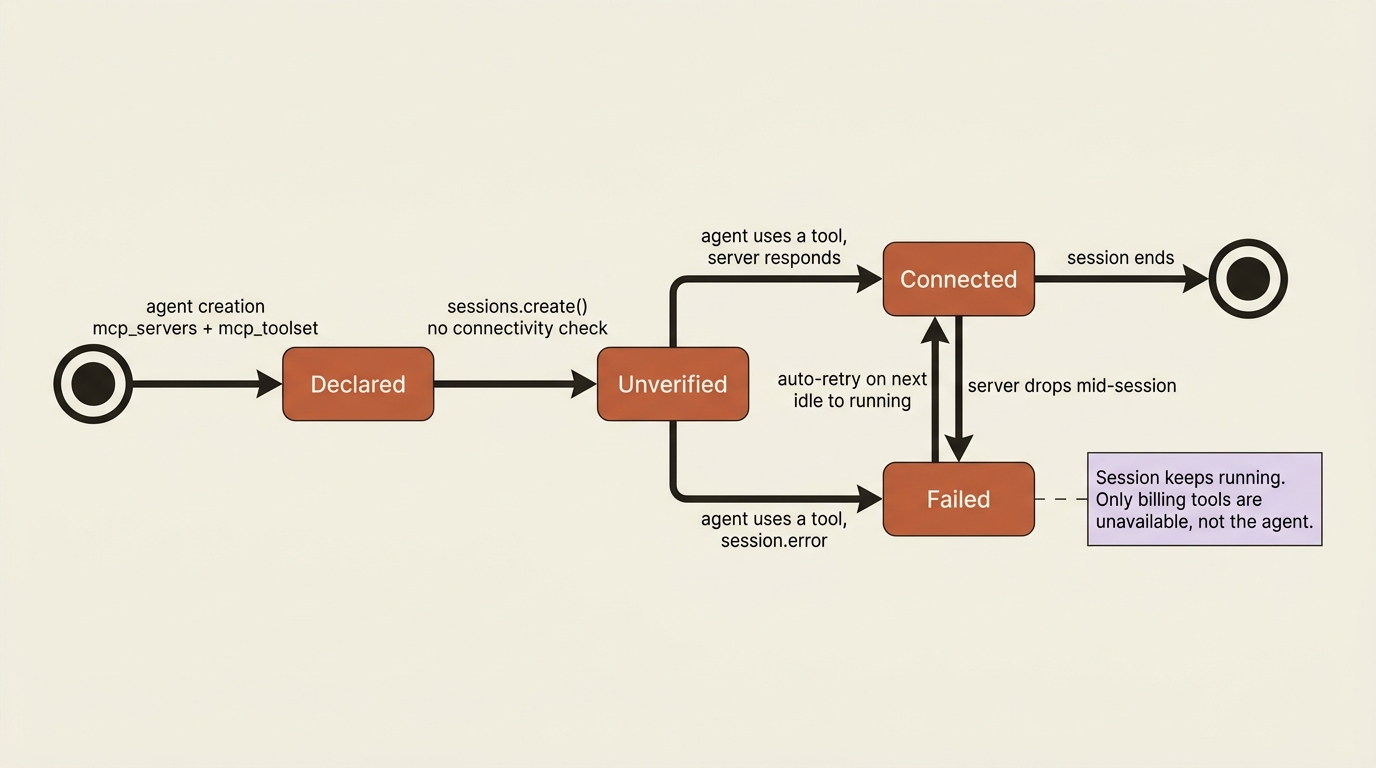
Session creation does not validate MCP connectivity or credentials. If your billing server is unreachable, or it rejects the credential the session supplied, the session still starts. You can still interact with the agent. Nothing throws at creation time.
What happens instead is that a session.error event arrives on the stream the moment the agent actually tries to use the server. The error carries the mcp_server_name of the affected server, so you know precisely which one failed, along with a retry_status. There are two error types:
| Error type | Meaning |
|---|---|
mcp_connection_failed_error |
The server could not be reached: a network error, a timeout, or a non-auth HTTP failure. |
mcp_authentication_failed_error |
The server was reached but rejected the supplied credential. |
This design is deliberate rather than lax. Deferring the failure to use-time keeps a single flaky integration from taking down the whole session. The agent toolset still works. The agent can still read invoice files and reason about them. Only the billing tools are unavailable.
That leaves you to decide what a missing integration means for your application. You might block further interaction and surface the error to a human. You might trigger a credential rotation if it is an auth failure. You might let the session continue and reconcile whatever it can without the billing data. The choice is yours, because the harness hands you the error rather than deciding on your behalf.
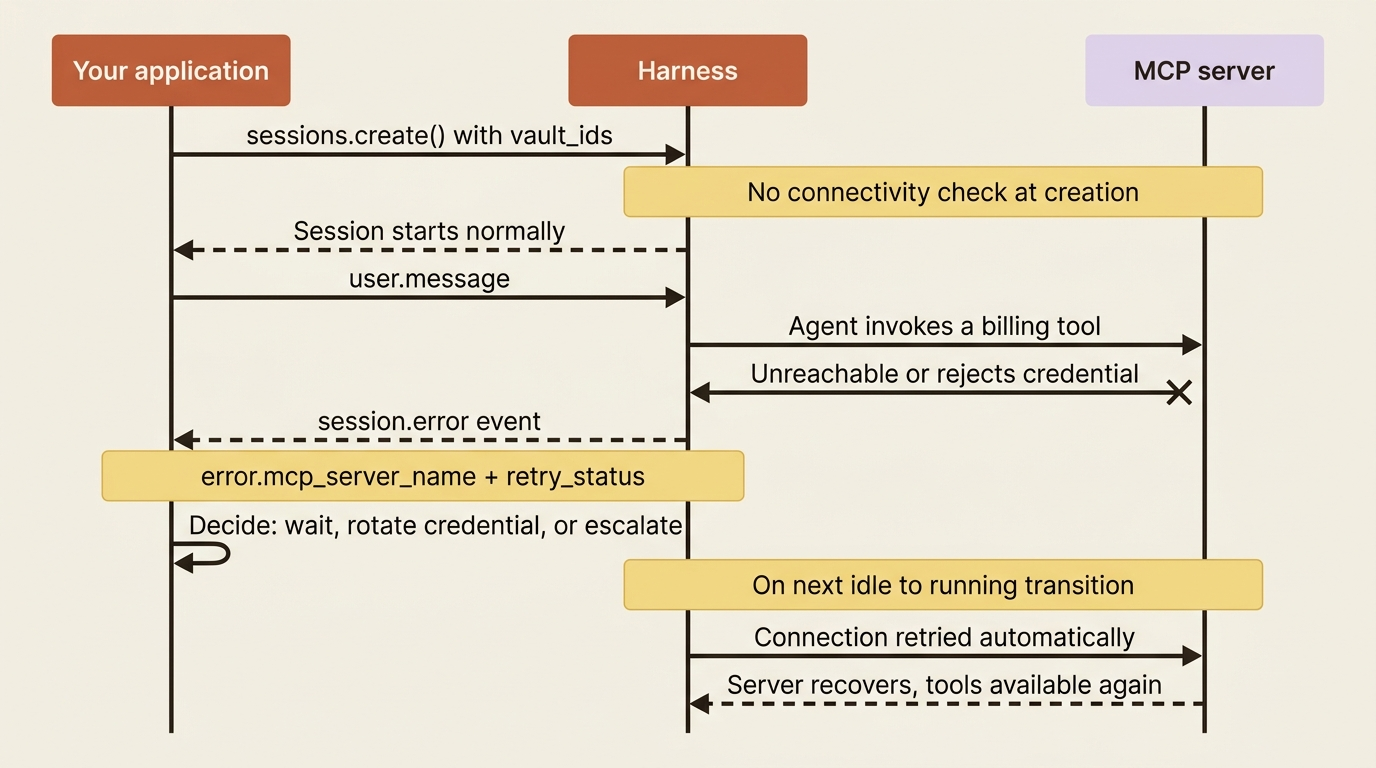
Better still, the failure is not permanent. The connection is retried automatically on the next transition from session.status_idle to session.status_running, which is to say the next time the agent goes back to work after going idle. A server that was down for a moment, or a credential you rotate between turns, can recover on its own without you rebuilding the session. In your session.error handler, reading the retry_status tells you whether a retry is already on the way, which shapes whether you wait or intervene.
Handling all of this is just another case in the event loop. In Python:
case "session.error":
    err = event.error
    if err and err.type in ("mcp_connection_failed_error", "mcp_authentication_failed_error"):
        print(f"\n[MCP server '{err.mcp_server_name}' failed: {err.type}]")
        # decide: wait for the automatic retry, rotate the credential, or surface to a human
    else:
        print(f"\n[session error: {err.message if err else 'unknown'}]")
Private servers and the credential half
Two forward references close this out, because a real billing system is unlikely to sit on the public internet.
If your MCP server is private, behind your own network boundary rather than reachable at a public URL, you connect it through an MCP tunnel instead of a plain URL endpoint. The agent setup looks the same from your side. The tunnel is simply what lets the harness reach a server it could not otherwise see.
And the credentials. Every example here declared a URL and no token, and the failure section talked about a "supplied credential" that was never actually supplied. That is the session half of MCP setup. At session creation you pass vault_ids, and the harness matches each declared server's URL against the credentials in those vaults, attaching the right token to the right server. If no credential matches a server's URL, the connection is attempted unauthenticated, which is one common way you land in mcp_authentication_failed_error. Vaults are how you do per-user authentication cleanly, and they are a subject worth their own deep treatment.
Do this today
- Stand up a minimal MCP server with two or three read-only tools, and point a test agent at it with a matching
mcp_serversentry andmcp_toolset. - Trigger the mismatch error on purpose. Remove the
mcp_toolsetwhile leaving the server declared, and confirm the API rejects the agent definition so you recognize the message later. - Scope with an allowlist. Set
default_config.enabledtofalseand enable only the tools the agent needs, so new server tools never appear without your review. - Test a failure path. Point the agent at an unreachable URL, confirm the session still starts, and watch the
session.errorevent arrive only when the agent first uses the server. - Add a
session.errorcase to your event loop that branches onmcp_connection_failed_errorversusmcp_authentication_failed_errorand readsretry_statusbefore deciding to wait or intervene.
Where this leaves you
The agent has reached outside its box. It can call your billing system's tools directly, executed by the harness with no relay code in your application, scoped to exactly the operations you chose to enable, and gated so the reads flow freely while the writes stop to ask. When the billing server has a bad moment, you get a precise session.error naming the server and the failure, an automatic retry on the next turn, and the freedom to decide what a missing integration means for your task rather than watching the session collapse around it.
You have now given an agent capability in every direction the system offers: the built-in tools it runs in the sandbox, the custom tools it asks your code to run, and the MCP tools it calls on external services. What you have not done is make it good at any particular job. A general agent with a billing connection is still a generalist. The next step is turning that generalist into a specialist, with portable skill units that encode your own conventions so the agent applies them without being told each time.
This is Part 6 of "Building with Claude Managed Agents," a 13-part guide to building production-ready AI agents.