
The Skill You Write in Claude Code Is the Same Skill Your Agent Ships With
A skill is the most portable artifact in the agent ecosystem: the same SKILL.md you prototype in Claude Code ships, unchanged, to a production Managed Agent.
Capability is what an agent can do. Expertise is knowing how your organization wants it done. Skills supply the second one, and unlike everything else you configure, a skill travels everywhere unchanged.
In this article: You will learn what Claude agent skills are, why they load on demand instead of bloating every prompt, and how to attach both pre-built and custom skills through one array. We cover writing your own
SKILL.mdto encode institutional knowledge, and the property that matters most: a skill is portable, so the one you prototype in Claude Code is the exact one your production agent ships with.
Your invoice agent can reach your billing system and run code in a sandbox. Ask it to produce the reconciled report, though, and you get whatever a general-purpose model improvises. Maybe a CSV. Maybe a Markdown table. Maybe an .xlsx with formatting that looks nothing like what your finance team expects.
The agent has the capability. It does not have the expertise. That distinction is the whole subject of this article. Capability is what the agent can do: call tools, run code, query a database. Expertise is knowing how your organization wants it done, the columns in the report, the rounding threshold, the order of operations. So far you have given it none of that.
Skills are how you supply it. And the reason skills deserve their own article, rather than a footnote in a configuration guide, is that a skill is the single most portable artifact in the entire agent ecosystem. Get one right once, and it runs everywhere.
What a skill actually is
A skill is a filesystem-based resource: a folder with a SKILL.md file at its root. That file packages a workflow, some context, and a set of best practices into something the agent can load when a task calls for it.
The word "when" is doing real work in that sentence. Skills load on demand. This is the property that separates a skill from a system prompt, and it is worth slowing down on.
A system prompt sits in the context window for the entire session, relevant or not. Every turn, every token, you pay for it. A skill behaves differently. Its one-line description is cheap and always visible, but the full body, the workflow and the rules and the examples, enters context only when the agent decides the task needs it. The moment the task is done, that weight is gone.
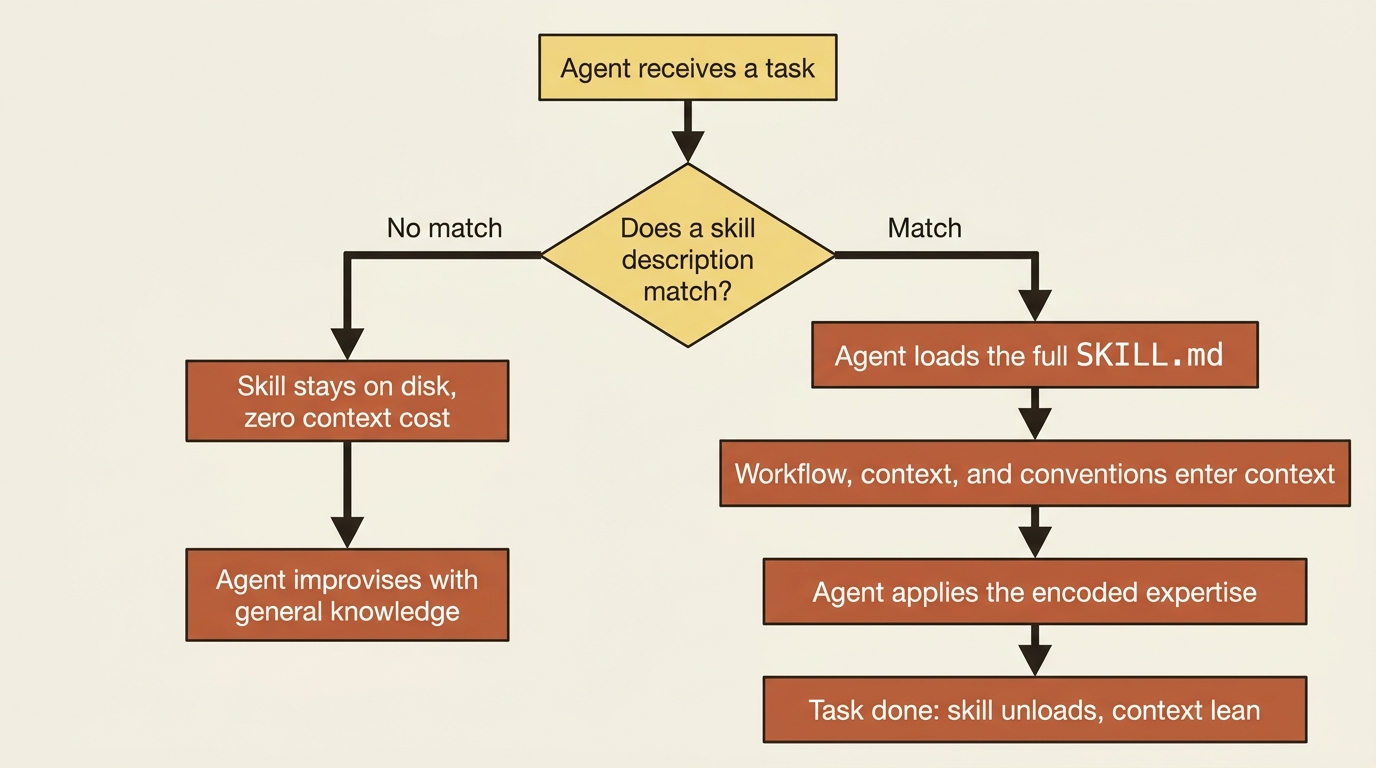
This is called progressive disclosure, and it is what makes skills practical. You can attach deep, specific, multi-page expertise to an agent without that expertise taxing every unrelated turn. The agent reaches for it the way a developer reaches for a runbook: only when the situation calls for one.
Two kinds of skill, one array
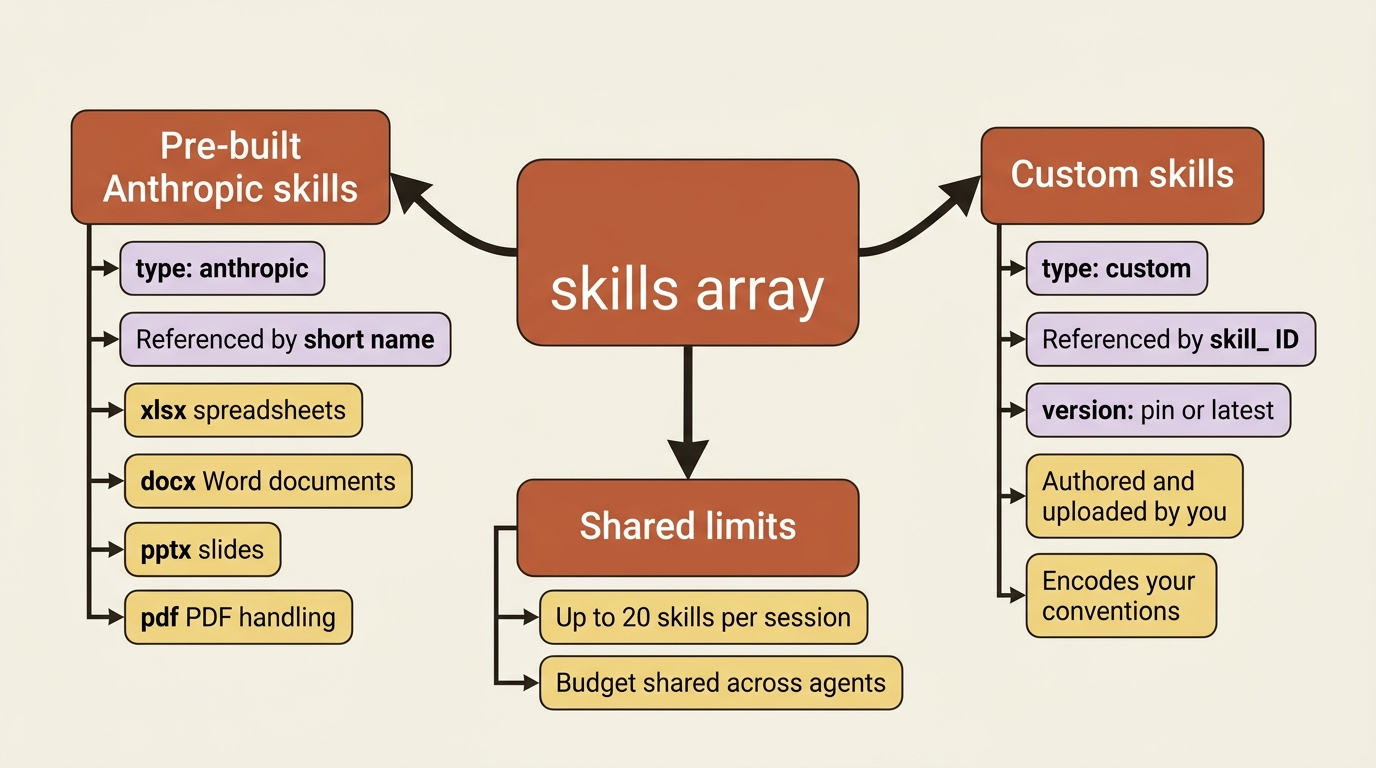
You attach skills when you create the agent, through a single skills array. There are two types, and they live side by side in that same array.
Pre-built Anthropic skills cover the common document-production tasks. There is xlsx for spreadsheets, docx for Word documents, pptx for slides, and pdf for PDF handling. You reference each one by its short name, and that is the entire configuration it needs.
Custom skills are ones you author yourself and upload to your workspace. You reference a custom skill by the skill_* ID you receive when you create it, plus a version.
The field set is deliberately small:
| Field | What it is |
|---|---|
type |
anthropic for a pre-built skill, or custom for one you uploaded. |
skill_id |
The short name for Anthropic skills, for example xlsx, or the skill_* ID for custom ones. |
version |
Custom skills only. Pin to a specific version, or use latest. |
Here is that table as a plain list. The skills array uses three fields. The type field is anthropic for a pre-built skill or custom for one you uploaded. The skill_id field is the short name for Anthropic skills, such as xlsx, or the skill_* ID for custom ones. The version field applies to custom skills only, and you either pin it to a specific version or set it to latest.
For the invoice agent, the immediate win is xlsx, so the reconciled report comes out as a real spreadsheet instead of improvised text. You attach it alongside a custom skill that will carry your own conventions. In Python:
agent = client.beta.agents.create(
    name="Invoice Reconciler",
    model="claude-opus-4-7",
    system="You are an invoice-reconciliation agent...",
    skills=[
        {"type": "anthropic", "skill_id": "xlsx"},
        {"type": "custom", "skill_id": "skill_recon_conventions", "version": "latest"},
    ],
)
And in TypeScript:
const agent = await client.beta.agents.create({
  name: "Invoice Reconciler",
  model: "claude-opus-4-7",
  system: "You are an invoice-reconciliation agent...",
  skills: [
    { type: "anthropic", skill_id: "xlsx" },
    { type: "custom", skill_id: "skill_recon_conventions", version: "latest" },
  ],
});
That is the whole attachment. When the agent reaches the point of writing the report, it pulls in the spreadsheet skill on its own, applies the formatting that skill encodes, and produces a proper workbook. You never told it to use the skill in your message. The agent recognized the task and loaded the relevant expertise. That recognition is the entire idea.
One limit to keep in your head: a session supports up to 20 skills total, and that count is shared across every agent in the session. For a single agent, 20 is plenty. For a coordinator delegating to several specialists that each carry their own skills, the budget is shared, so plan accordingly.
Writing a skill that encodes your conventions
The pre-built skills handle generic document mechanics. What they cannot know is how your shop reconciles invoices. They cannot know that a discrepancy under one dollar is rounding and gets ignored, that vendor IDs are checked against the billing system before amounts are trusted, or that the report needs a specific set of columns in a specific order. That knowledge is yours, and a custom skill is where it lives.
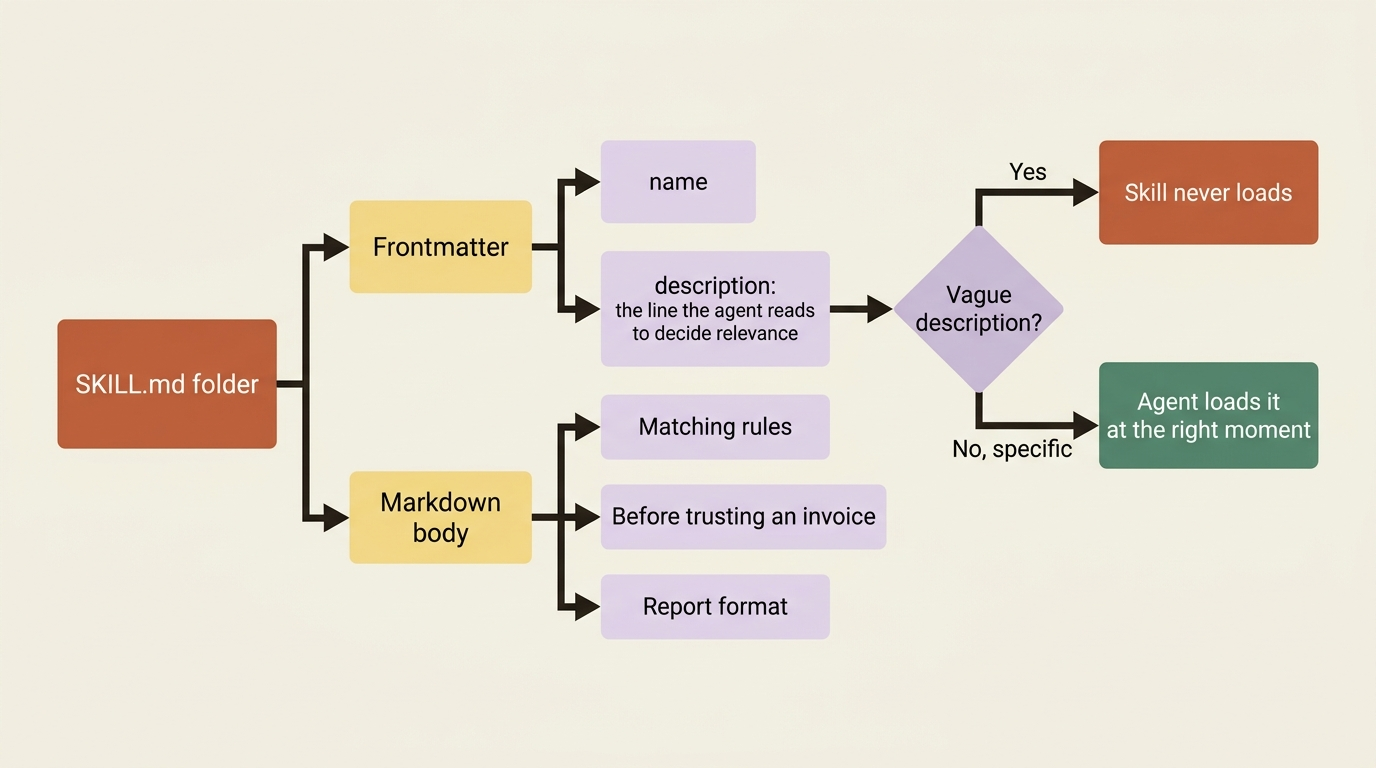
A skill is just a directory with a SKILL.md file, and the file is plain Markdown with a small bit of frontmatter. The frontmatter's description is the most important line you will write. It is the line the agent reads to decide whether the skill is relevant to the task at hand. A vague description produces a skill the agent never loads. Be specific about when the skill applies.
Here is a SKILL.md for the invoice agent's reconciliation conventions:
---
name: reconciliation-conventions
description: >
  Rules and output format for reconciling vendor invoices against the
  ledger. Use whenever reconciling invoices, comparing invoice amounts to
  ledger entries, flagging discrepancies, or producing a reconciliation report.
---

# Reconciliation conventions

## Matching rules
- Match each invoice to a ledger entry by vendor ID and invoice number.
- Treat an absolute difference under $1.00 as rounding. Do not flag it.
- Flag any difference of $1.00 or more as a discrepancy.
- If an invoice has no matching ledger entry, flag it as "unmatched".

## Before trusting an invoice
- Always look up the vendor with the billing tools before trusting the
  vendor name or address printed on the invoice.

## Report format
Produce an .xlsx with one row per invoice and these columns, in order:
Invoice #, Vendor ID, Vendor Name, Invoice Amount, Ledger Amount,
Difference, Status. Sort discrepancies to the top.
Notice what that file is doing. It is not code. It is the institutional knowledge a new hire would need on their first day, written down once so the agent applies it every time without you restating it in every message.
The matching rules remove ambiguity. The "before trusting an invoice" rule reinforces a safe MCP habit: verify the vendor before you trust what is printed on the document. The report format pairs with the xlsx skill to produce exactly the workbook your team expects.
You author this file, upload it to your workspace to receive a skill_* ID, and reference that ID in the skills array as shown above. The full authoring guidance lives in the Agent Skills documentation. The point worth taking from here is simpler: a skill is where your conventions go, stated plainly, once.
The payoff: the skill is the portable unit
Here is the part that makes skills more than a configuration field.
Everything else you configure for a Managed Agent, the tools, the permission policies, the MCP servers, is specific to Managed Agents. A skill is not. The SKILL.md format is identical across every Anthropic surface. The reconciliation skill you just wrote runs without modification in Claude Code, in Cowork, in the Claude Agent SDK, and in a LangChain DeepAgent. The skill is the portable unit. The harness it runs in is not.
That single fact reshapes how you build. You do not have to design your agent in the abstract and hope it works in production.

You can prototype in Claude Code, interactively, on your own machine, with the same xlsx skill and the same draft of your reconciliation skill. You iterate on the conventions until the agent produces reports you are happy with. Then, once the behavior is right, you promote it. The exact skill that worked in your terminal gets attached to a Managed Agent and runs in production, server-side, against real volume.
Nothing about the skill changes in the move. You validated the expertise in the fast, local loop, and you shipped it in the durable, managed one. The time you spend getting a skill right is never surface-specific waste. It is an asset that travels.
This is worth being deliberate about. Claude Code is the place to discover what your agent should know. A Managed Agent is the place to run it at scale. Skills are the bridge that carries the knowledge from one to the other intact.
A note on plugins
If you are coming from Claude Code with plugins, here is how they map. Managed Agents do not consume plugins as a unit. A plugin is a client-side packaging format for the Claude Code and Cowork apps, and the API has no plugin primitive.
The pieces inside a plugin, however, port directly. A plugin's bundled skills become entries in your skills array. Any MCP servers it ships become entries in mcp_servers. You unbundle the plugin into the primitives the agent already understands.
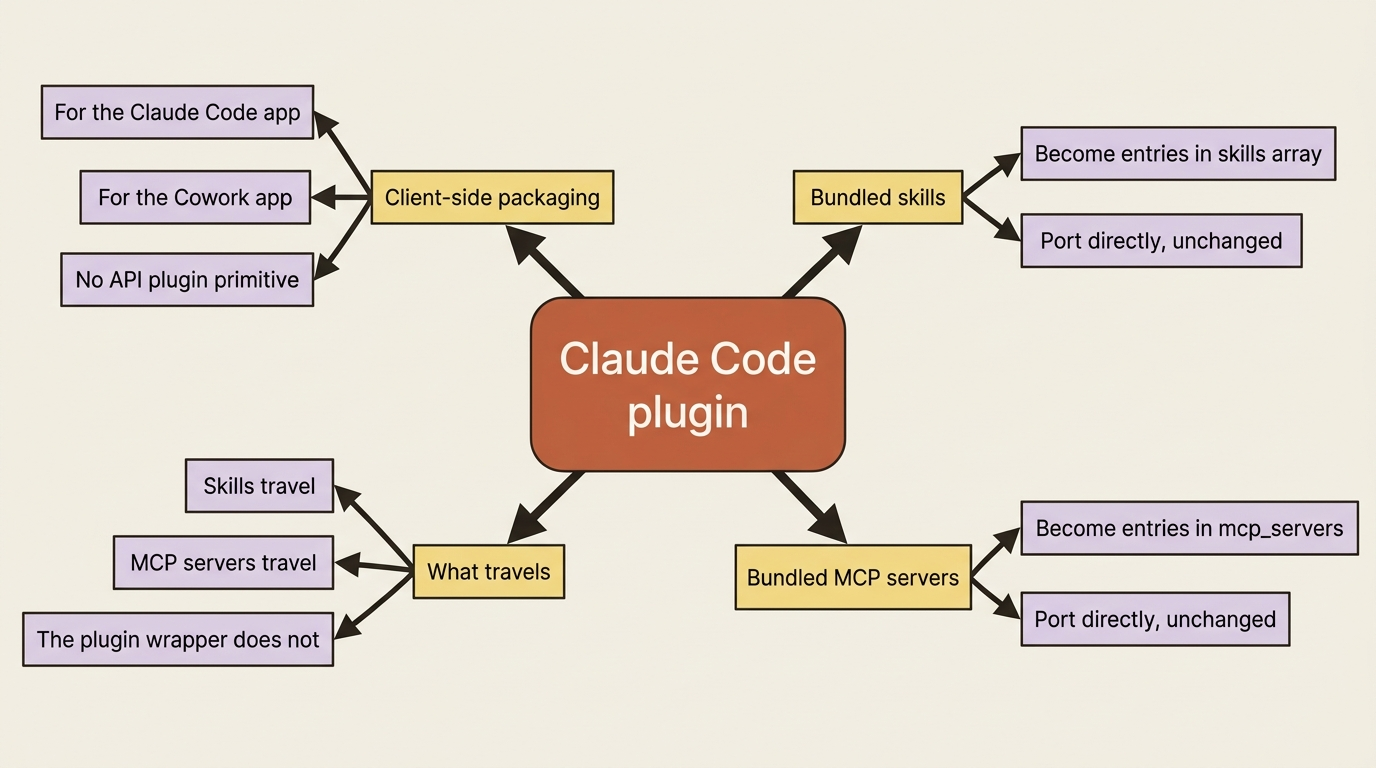
Skills and MCP servers, not plugins, are what travel.
Do this today
- Attach
xlsxto an agent that produces tabular output. It is one line in theskillsarray, and the difference between an improvised table and a real workbook is immediate. - Write a one-page
SKILL.mdfor a workflow you keep re-explaining. Put the conventions, the thresholds, and the output format in it. Spend most of your effort on thedescriptionline, because that line decides whether the skill ever loads. - Prototype the skill in Claude Code first. Iterate on the conventions locally until the output is right, where the feedback loop is fast.
- Promote the validated skill to a Managed Agent unchanged. Upload it, take the
skill_*ID, and add it to the production agent'sskillsarray. - If you have a Claude Code plugin you rely on, unbundle it. Move its skills into
skillsand its MCP servers intomcp_servers.
The asset that outlasts the surface
The invoice agent is a specialist now. It produces a real spreadsheet because the xlsx skill taught it how, and it applies your matching rules, your discrepancy threshold, and your report format because a custom skill wrote them down once. It loads that expertise only when the task calls for it, so the context stays lean the rest of the time.
The skill you wrote is not trapped in this agent. It runs anywhere Anthropic's tooling runs, which makes prototyping in Claude Code and shipping as a Managed Agent one continuous workflow rather than two separate builds.
There is one thing skills cannot do, and it is worth naming so you know what to reach for next. A skill gives the agent expertise you wrote down in advance. It does not let the agent remember what it learned along the way. Run the agent twice and it relearns the same vendor quirk from scratch, because every session starts fresh. Skills are knowledge you author. The next thing your agent needs is knowledge it accumulates. That is memory, and it is a different tool.
This is Part 7 of "Building with Claude Managed Agents," a 13-part guide to building production-ready AI agents.