
Your Agent Solves the Same Problem Every Month. Memory Stores End That.
Memory stores are a managed primitive that lets an agent carry what it learns across sessions, and the default access mode quietly decides whether that memory is also an attack surface.
Sessions start fresh by default, so everything an agent figures out evaporates when the work ends. Memory stores are a managed primitive that lets it carry the lessons forward. One default setting decides whether that memory is also a write path an attacker can exploit.
In this article: You will learn what a Claude Managed Agents memory store actually is, how to create and seed one, and how to attach it to a session. You will see the prompt-injection risk hiding in the default access mode and the one-word fix for it. By the end, you will know how to give an agent durable, versioned, auditable memory without turning it into a liability.
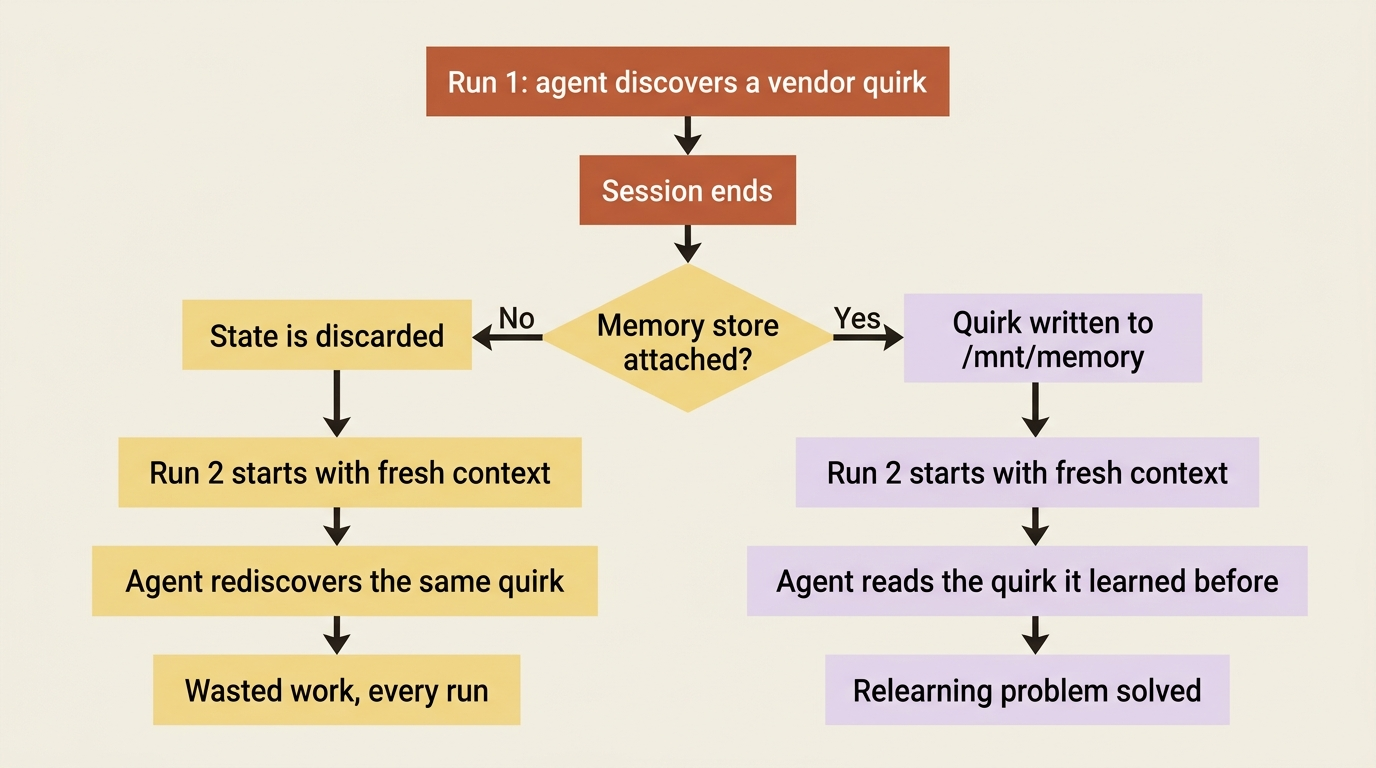
Run an invoice-reconciliation agent twice and you will notice something wasteful. In the first run, it discovers that one vendor always bills in euros and rounds line items in a way that throws your ledger off by a few cents. It learns to treat that difference as noise rather than a discrepancy. Smart. Then the session ends.
Next month you run it again, and it rediscovers the exact same quirk from scratch. The second session has no idea the first one ever happened. Every session starts with a fresh context, and when a session ends, any state the agent built up is gone. You are paying, in tokens and in time, for the same lesson over and over.
Skills give an agent expertise you write down in advance. They do not let it keep what it learns along the way. Claude Managed Agents memory stores are the other half of that story: a workspace-scoped collection of text documents that persists across sessions, so the corrections and quirks an agent picks up in one run are waiting for it in the next. This article shows how they work, and it spends real time on the sharp edge, because one default setting turns memory into a prompt-injection write path if you are not careful.
What a memory store actually is
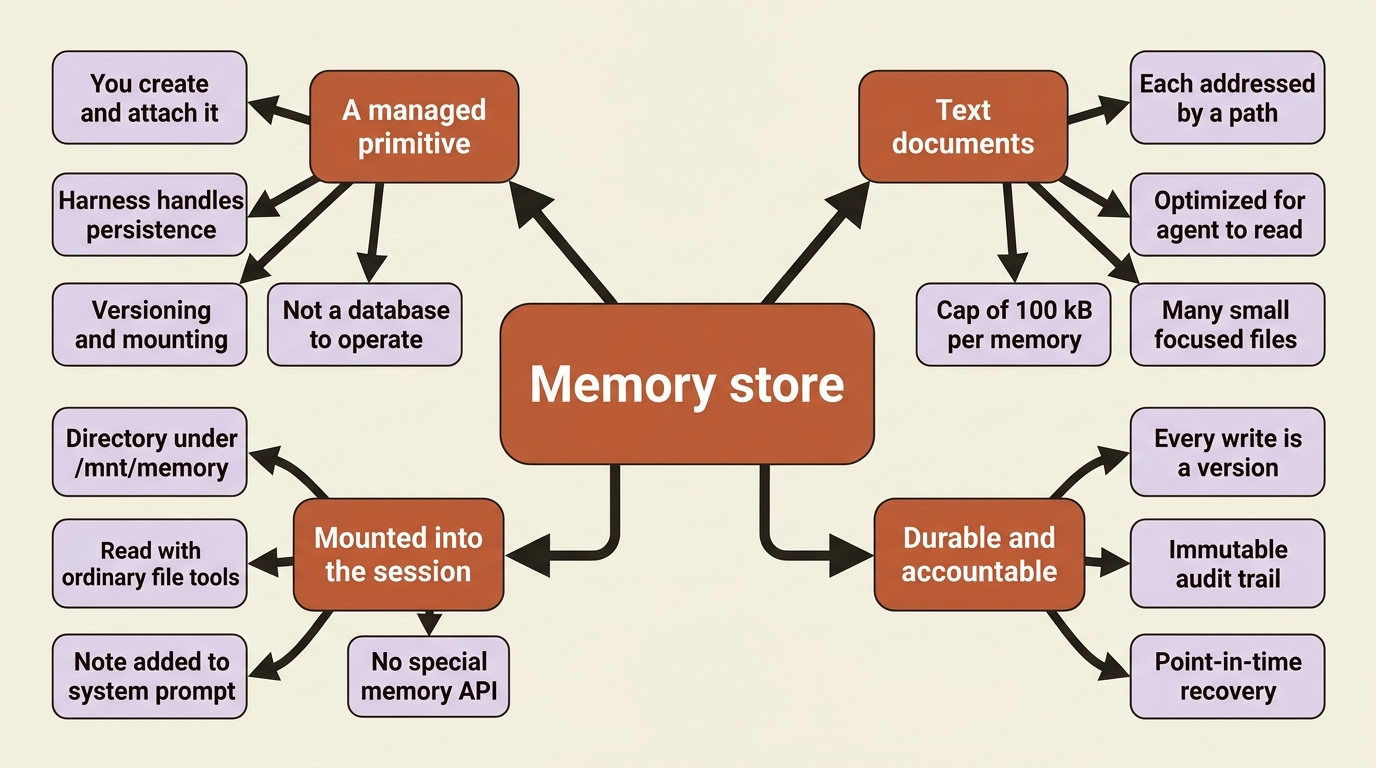
Before any code, understand what kind of thing you are dealing with. A memory store is not a database you integrate, not a vector store you query, and not a cache you manage. It is a managed primitive. You create it, attach it, and the agent reads and writes it with the same file tools it already uses, while the harness handles persistence, versioning, and mounting. You configure it; you do not operate it.
Three facts define the primitive, and they explain everything that follows.
A store is a collection of text documents, each addressed by a path. The documents are optimized for an agent to read. You can also read and edit them directly through the API or Console, which is how you seed, review, and correct them outside of any session. Memory is inspectable and editable by you, not a black box the agent alone touches.
A store mounts into the session as a directory. When you attach a store, the harness mounts it inside the session's container under /mnt/memory/. The agent reads and writes it with the ordinary file tools, the same read, write, and edit from the pre-built toolset. A note describing each mount is added automatically to the system prompt, so the agent knows the directory is there and what it contains. There is no special "memory API" the agent calls. To the agent, memory is just files in a folder it has been told about.
Every change creates an immutable memory version. Each write the agent makes produces a new version. That gives you an audit trail of everything the agent ever wrote, plus point-in-time recovery if a run corrupts something. Memory is durable and accountable, not just persistent.
Create a store, then seed it
You create a store with a name and a description. The description is not just bookkeeping; it is passed to the agent, telling it what the store contains. Write it for the agent's benefit.
store = client.beta.memory_stores.create(
    name="Vendor Quirks",
    description="Per-vendor reconciliation quirks learned from past runs: rounding behavior, currency, known mismatches.",
)
print(store.id)  # memstore_01Hx...
The same in TypeScript:
const store = await client.beta.memoryStores.create({
  name: "Vendor Quirks",
  description: "Per-vendor reconciliation quirks learned from past runs: rounding behavior, currency, known mismatches.",
});
console.log(store.id); // memstore_01Hx...
The memstore_... ID is what you attach to a session. You can let the agent populate the store from nothing, but often you want to pre-load reference material before any agent runs. You do that by writing memories directly. Each memory is a path and its content.
client.beta.memory_stores.memories.create(
    store.id,
    path="/vendors/vnd_8841.md",
    content="Acme GmbH bills in EUR. Rounds line items to the nearest cent; differences under EUR 0.05 are rounding, not discrepancies.",
)
Gotcha: structure memory as many small focused files, not a few big ones. Each individual memory is capped at 100 kB, roughly 25k tokens. Beyond the hard cap there is a softer reason to keep files small. The agent loads only what it needs, and a tidy /vendors/vnd_8841.md is far easier for it to find and apply than one sprawling notes.md. Treat the store like a well-organized folder: one file per vendor, per convention, or per topic, not a single growing scratchpad.
Attach it at session creation, and only then
You attach a store through the session's resources[] array when you create the session. This is the detail that bites people, so state it plainly first: memory stores can only be attached at session creation. Unlike some other resources, you cannot add or remove a store from a session that is already running. Decide what memory a session needs before you start it, because there is no mid-session attach.
Attaching takes the store ID, an access mode, and optional instructions for how the agent should use this store in this particular session.
session = client.beta.sessions.create(
    agent=agent.id,
    environment_id=environment.id,
    resources=[
        {
            "type": "memory_store",
            "memory_store_id": store.id,
            "access": "read_write",
            "instructions": "Vendor quirks from prior runs. Check the relevant vendor file before flagging a discrepancy, and record any new quirk you confirm.",
        }
    ],
)
And in TypeScript:
const session = await client.beta.sessions.create({
  agent: agent.id,
  environment_id: environment.id,
  resources: [
    {
      type: "memory_store",
      memory_store_id: store.id,
      access: "read_write",
      instructions: "Vendor quirks from prior runs. Check the relevant vendor file before flagging a discrepancy, and record any new quirk you confirm.",
    },
  ],
});
With that attached, the agent's first move on a reconciliation can be to read /mnt/memory/vendors/vnd_8841.md, see that sub-five-cent differences for Acme are rounding, and skip flagging them. That knowledge came entirely from a previous run. When the agent confirms a new quirk for a different vendor, it writes a new file, and that file is there next month. The relearning problem is gone.
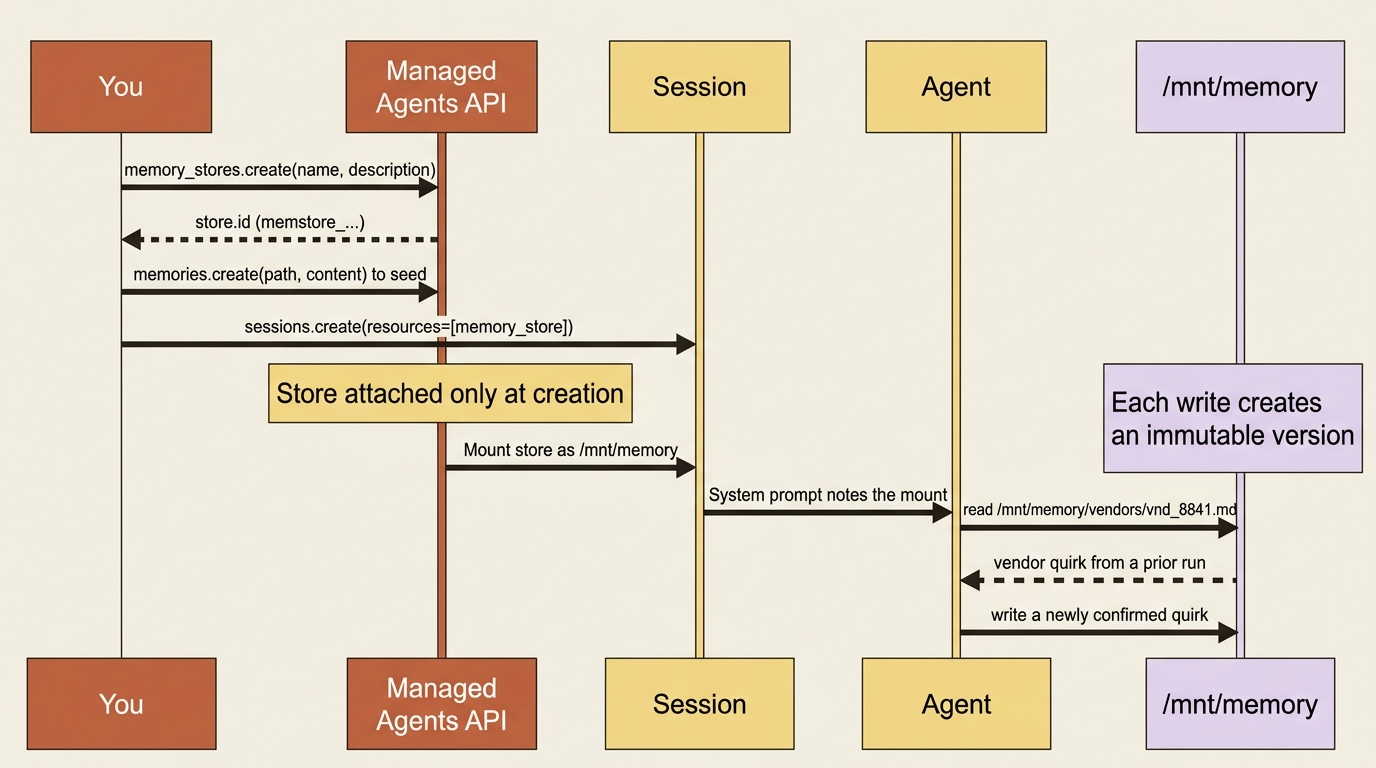
Two requirements make this work, and both are easy to miss. First, the agent toolset must be enabled on the agent, because memory access is just file-tool access; an agent without the toolset cannot touch the mount at all. Second, the agent's memory reads and writes show up on the event stream as ordinary agent.tool_use and agent.tool_result events, so you can watch the agent consult and update its memory in real time without any new event type to handle.
The security edge: read_write plus untrusted input
Now the sharp part, and it deserves your full attention, because it is the one place memory can hurt you. The access mode defaults to read_write. That is convenient, and for a store the agent owns and only it feeds, it is fine. But think about what read_write means in combination with the invoice agent's actual job.
The agent reads invoices. Invoices are untrusted input: a PDF or a line of text that came from outside your system, possibly from a vendor you do not fully control. Suppose a malicious invoice contains a prompt injection, text crafted to hijack the agent's behavior, and the agent has a read_write memory store attached. That injection can write content into the store. The next session that attaches the same store reads that content as trusted memory and acts on it. You have turned a one-time injection into a persistent foothold, planted in the very place the agent trusts most.
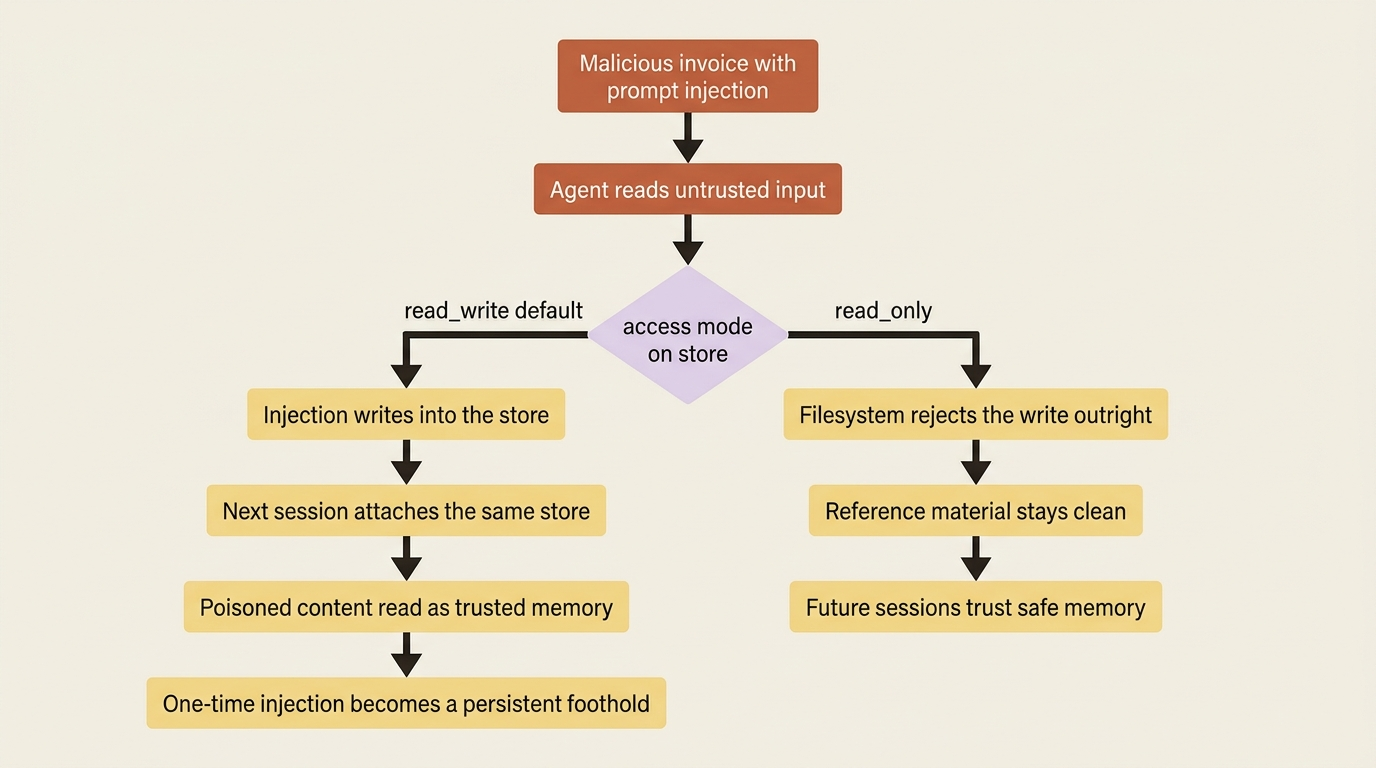
The defense is simple, and you should treat it as the default posture, not an optimization: make reference material read_only. Any store the agent only needs to consult, such as shared conventions, domain knowledge, or lookups it never modifies, should be attached read_only. The harness enforces that at the filesystem level, so writes are rejected outright. Reserve read_write for stores the agent genuinely must update, and even then, be deliberate about which sessions get write access.
The rule, stated directly: if the agent processes untrusted input, a read_write store is a write path an injection can exploit. Use read_only wherever the agent does not need to write. This is also a reason to split memory across stores. A read_only store of shared conventions and a read_write store of this agent's own learnings can coexist, each with the access it actually needs.
Multiple stores, and why you would use them
A session supports up to 8 memory stores. You reach for more than one when different parts of memory have different owners, lifecycles, or access rules. The pattern matters more than the number.
The most common split is shared-reference versus session-owned. You attach one read_only store holding standards and conventions, shared across many sessions and safe because nothing can write to it, alongside each session's own read_write store for what it learns.
Another split maps memory to your product's structure: one store per end user, per team, or per project, while every session runs the same agent configuration. The agent stays generic and the memory is specific.
A third split is about lifecycle: a store that outlives any single session, or one you archive on its own schedule independent of the others. The eight-store budget is generous enough that you rarely fight it. The skill is choosing boundaries that match how your data is actually owned.
The audit trail is a feature, not just bookkeeping
Because every write creates an immutable memory version, you get capabilities that a plain database would make you build yourself.
You can retrieve any past version of a memory to see exactly what the agent wrote and when. That is invaluable when a reconciliation goes wrong and you need to know what the agent believed at the time. You can recover a memory to an earlier state if a run corrupted it. And for compliance, you can redact content out of a historical version while preserving the record of who changed what and when. That is how you handle a leaked secret or a user-deletion request without destroying the audit trail itself. One rule worth knowing: you cannot redact the current head of a live memory, so you write a new version first, then redact the old one.
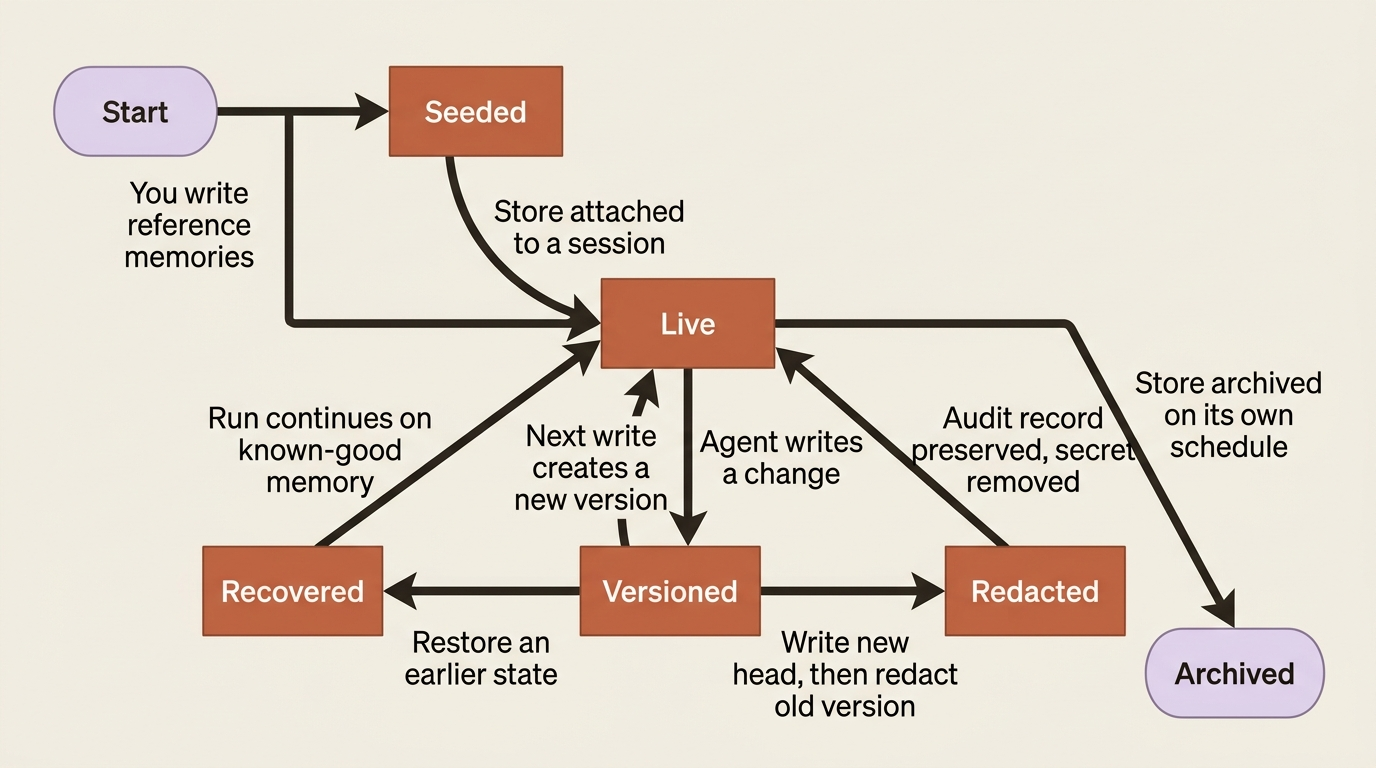
You will not need most of this on day one. But it is the difference between memory you can trust in production and a mutable blob you cross your fingers over, and it is there without you building any of it.
Do this today
- Create one memory store with a description written for the agent. Make the description say what the store contains and when to consult it, not just what you call it.
- Seed it with reference material as many small files. One file per vendor, convention, or topic. Keep each well under the 100 kB cap so the agent can find what it needs.
- Audit your
accessmodes. Any store the agent only reads should beread_only. The default isread_write; do not leave it there for reference material. - Split shared reference from agent learnings. Put conventions in a
read_onlystore and the agent's own discoveries in a separateread_writestore, so untrusted input cannot poison the trusted half. - Attach the store at session creation. Decide memory before you start the session. There is no mid-session attach.
Memory the agent can carry, and you can trust
The invoice agent no longer starts from zero every month. It carries vendor quirks, prior corrections, and your conventions from one run into the next, reading and writing them as ordinary files under /mnt/memory/, with every change versioned and recoverable.
The whole feature comes down to two disciplines. Keep memories small and well-organized, so the agent can actually use what is there. And default reference material to read_only, so an agent reading untrusted invoices cannot be tricked into poisoning the memory that future sessions trust. The first makes memory useful. The second keeps it from becoming the most dangerous thing your agent owns.
Persistence is the easy part; the harness gives it to you. The judgment is yours: decide what the agent should remember, and decide what it is allowed to change. Get those two right and you have an agent that gets smarter every run instead of paying for the same lesson again.
This is Part 8 of "Building with Claude Managed Agents," a 13-part guide to building production-ready AI agents.