
Stop Conversing With Your Agent. Hand It a Spec and Walk Away.
Why an AI agent stops needing you on every turn once you replace the conversation with a spec and let a separate grader score the work until it passes.
Most AI agent work is a back-and-forth where you are the quality bar on every turn. Outcomes change that: you write an acceptance test once, a separate grader scores the work, and the agent revises until it passes.
In this article: You will learn how to turn an AI agent session from an open-ended conversation into a job with a measurable definition of done. We cover why a separate grader is more trustworthy than an agent judging itself, how to write a rubric a grader can actually score, the five evaluation results and what each one means, and how to collect the deliverable when the work passes.
Every time you use an AI agent, you are probably having a conversation. You send a message, the agent works, you watch the stream, you steer it if it drifts, it reports back, and you decide whether the result is good enough. If it is not, you send another message. That loop works fine for exploratory work. But look closely at where the judgment lives: in you, on every single turn.
You are the quality bar, applied by hand, one message at a time. For a task you run once, that is tolerable. For a task you run every month across hundreds of items, being the human in the loop on every iteration is exactly the toil you adopted an agent to escape. You did not automate the work. You automated the typing and kept the judging.
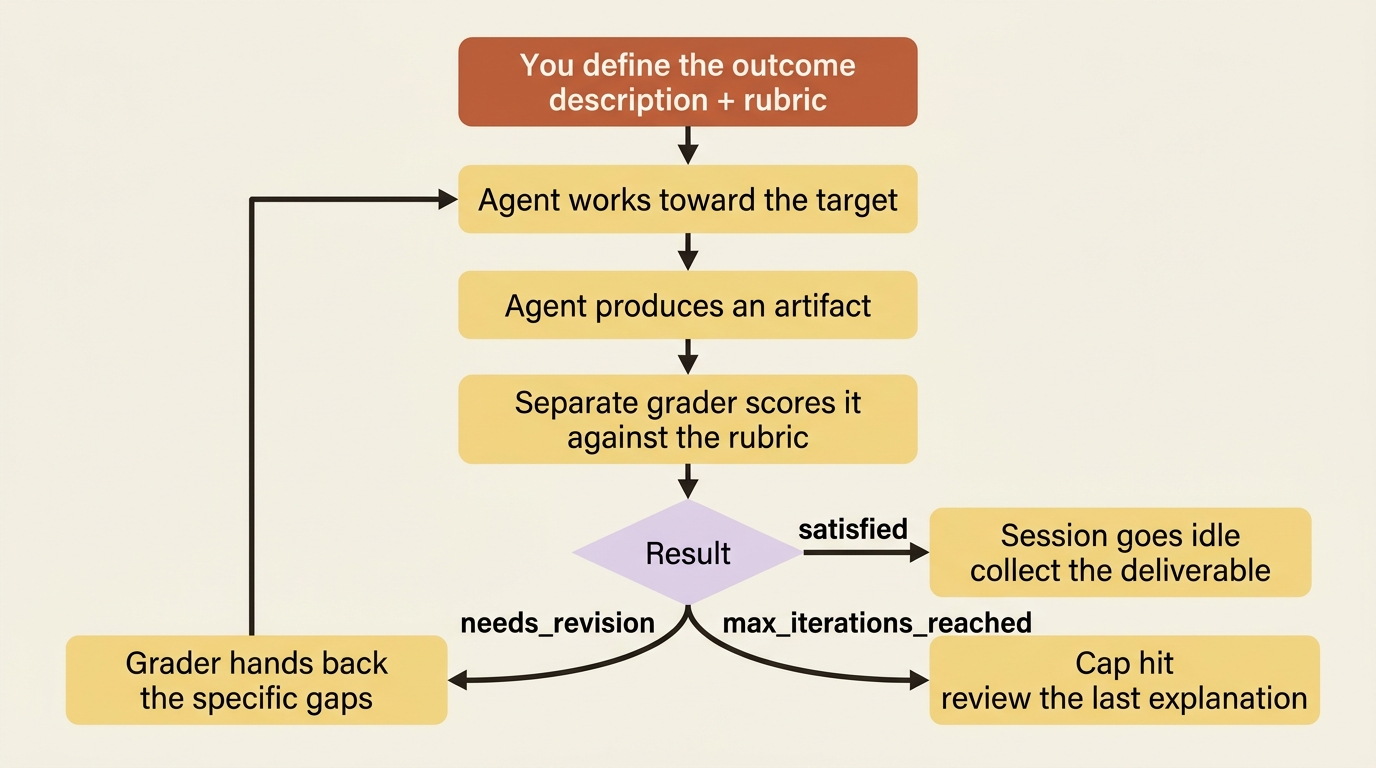
AI agent outcomes flip that relationship. Instead of conversing toward a result, you define the result up front: a description of what you want and a rubric that says how to judge it. The agent then works toward that target on its own. And here is the part that makes an outcome more than a fancy prompt: a separate grader evaluates the artifact against your rubric, hands the specific gaps back to the agent, and the agent revises. It repeats until the work passes or runs out of iterations. You wrote the acceptance test once. The agent runs against it until it passes.
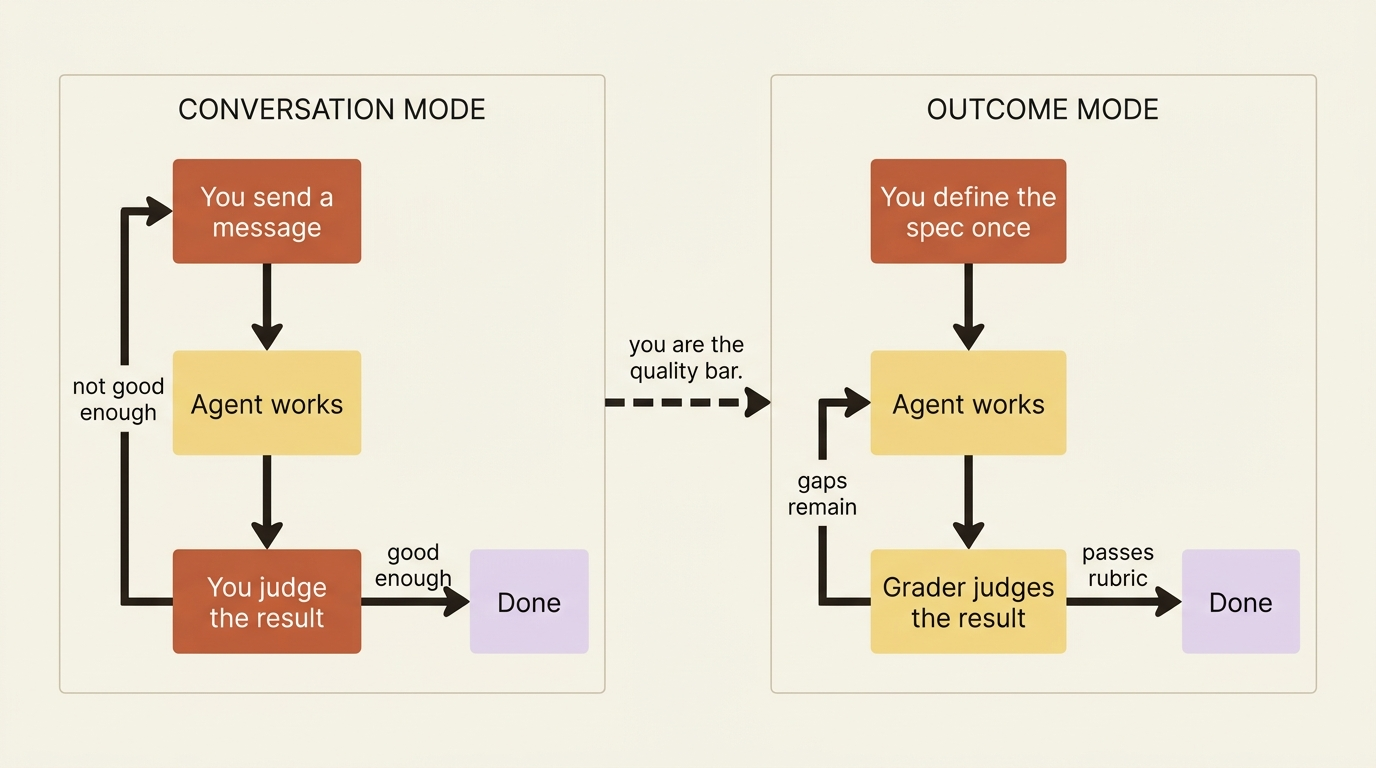
That shift, from "chat until I am satisfied" to "here is the spec, tell me when it meets it," is the thing Claude Managed Agents is genuinely built for. One housekeeping note before the mechanics: outcomes are part of the Managed Agents public beta, reached through the standard managed-agents-2026-04-01 beta header, with no separate access request. If you can already run Managed Agents, you can run everything in this part.
Code is shown in Python and TypeScript.
The grader is a second pair of eyes, on purpose
The mechanism worth understanding first is the grader, because it is what separates an outcome from the agent simply deciding it is done.
When you define an outcome, the harness automatically provisions a grader to evaluate the artifact against your rubric. The grader runs in a separate context window, so it is not influenced by the main agent's implementation choices. That separation is the whole point. An agent grading its own work is a notoriously unreliable judge. It knows what it meant, so it tends to believe it succeeded. A grader that never saw the agent's reasoning, only the rubric and the artifact, evaluates what is actually there.
The grader does not return a thumbs up or down. It returns a per-criterion breakdown. For each line in your rubric, it reports either that the artifact satisfies it, or the specific gap between the current work and the requirement. That structured feedback is what gets handed back to the agent for the next iteration, which is why a good rubric matters so much. The agent does not revise against a vague wish. It revises against a checklist of exactly what is still missing.
Writing a rubric the grader can actually score
The rubric is a Markdown document of per-criterion scoring, and it is required. The single most important property is that each criterion be explicitly gradeable.
"The data looks good" is unscoreable. The grader cannot tell whether that is met. "The report contains a Difference column with numeric values" is scoreable. It either does or it does not. The grader scores each criterion independently, so vague criteria produce noisy, unreliable evaluations, while concrete ones produce a clean pass-or-gap signal.
Here is a rubric for a reconciliation report that an invoice agent produces. Every line encodes a fact about what a correct report looks like:
# Reconciliation Report Rubric

## Coverage
- Every invoice in the input folder appears as exactly one row.
- Invoices with no matching ledger entry are present and marked "unmatched".

## Discrepancy logic
- Differences with absolute value under $1.00 are not flagged as discrepancies.
- Differences of $1.00 or more are flagged with status "discrepancy".
- Each flagged row shows both the invoice amount and the ledger amount.

## Vendor verification
- Vendor name and ID in each row match the billing system record, not the invoice text.

## Output quality
- Output is a single .xlsx file.
- Columns appear in order: Invoice #, Vendor ID, Vendor Name, Invoice Amount, Ledger Amount, Difference, Status.
- Discrepancy rows are sorted to the top.
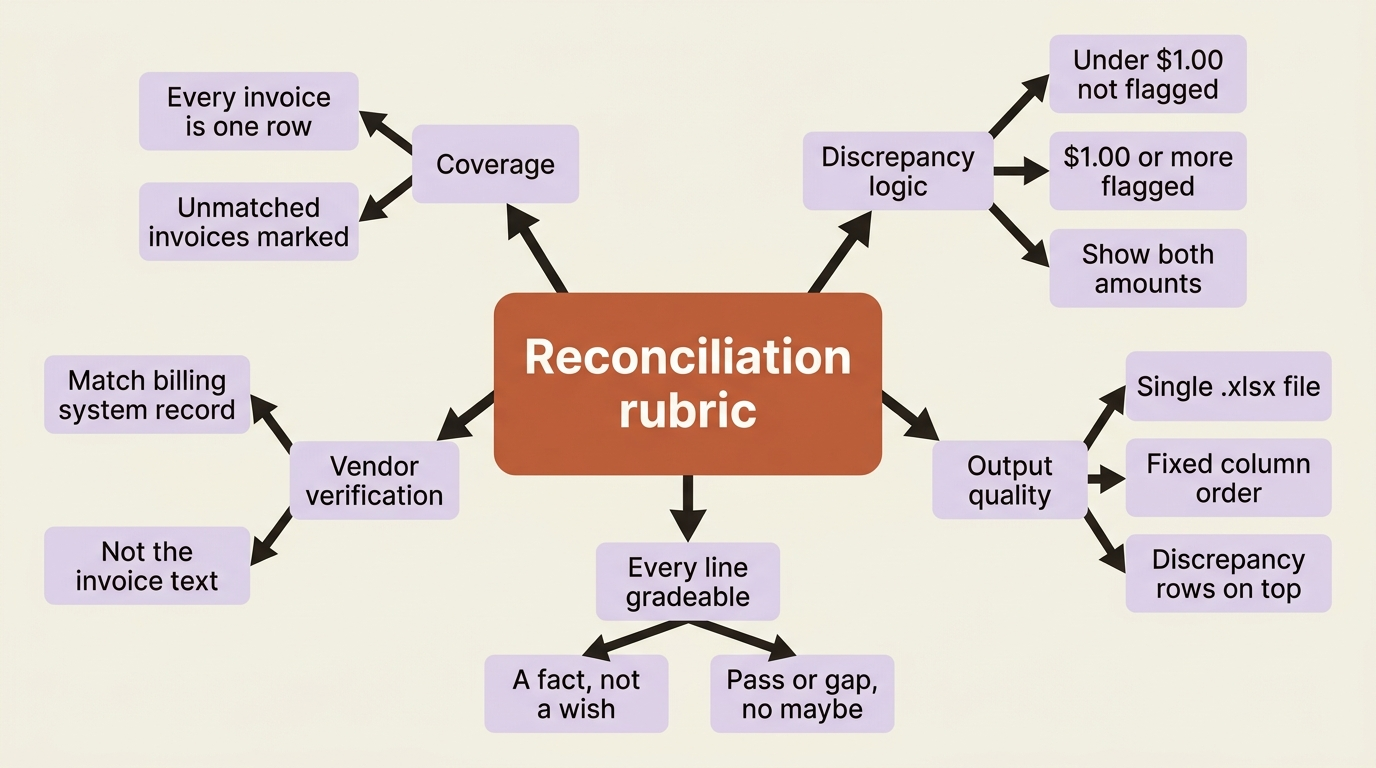
Notice that every line is a fact the grader can check against the spreadsheet. If you do not have a rubric on hand and writing one from scratch feels hard, there is a reliable shortcut: give Claude an example of a known-good report and ask it to analyze what makes that artifact good, then turn that analysis into a rubric. Reverse-engineering criteria from a real example you trust usually beats inventing them in the abstract, because it surfaces the implicit standards you would otherwise forget to write down.
You can pass the rubric inline as text, or upload it once via the Files API and reference it by ID across many sessions. The second option is the better choice once a rubric stabilizes and you want one source of truth.
Defining the outcome
You create the session as usual, then send a user.define_outcome event. The notable thing is what you do not send: there is no user.message kicking off the work. The agent begins working the moment it receives the outcome, because the outcome is the instruction.
In Python:
session = client.beta.sessions.create(
    agent=agent.id,
    environment_id=environment.id,
    title="Reconcile March invoices",
)

client.beta.sessions.events.send(
    session_id=session.id,
    events=[
        {
            "type": "user.define_outcome",
            "description": "Reconcile the invoices in /mnt/invoices against the ledger and produce a report.",
            "rubric": {"type": "text", "content": RECONCILIATION_RUBRIC},
            # or: "rubric": {"type": "file", "file_id": rubric.id},
            "max_iterations": 5,  # optional; default 3, max 20
        }
    ],
)
And in TypeScript:
const session = await client.beta.sessions.create({
  agent: agent.id,
  environment_id: environment.id,
  title: "Reconcile March invoices",
});

await client.beta.sessions.events.send(session.id, {
  events: [
    {
      type: "user.define_outcome",
      description: "Reconcile the invoices in /mnt/invoices against the ledger and produce a report.",
      rubric: { type: "text", content: RECONCILIATION_RUBRIC },
      // or: rubric: { type: "file", file_id: rubric.id },
      max_iterations: 5, // optional; default 3, max 20
    },
  ],
});
The description is the goal in a sentence. The rubric is how it is judged. max_iterations caps how many revision cycles the agent gets, defaulting to 3 and maxing at 20. Set it with intent. Too low, and a nearly-good report gets cut off before it is fixed. Too high, and a fundamentally stuck agent burns budget chasing a target it cannot hit. Five is a reasonable middle for a task like this.
Watching it iterate
An outcome session streams the same agent.* events you already know, showing the agent reading invoices, calling its tools, and writing the spreadsheet. Layered on top are three new span events, emitted only for outcome sessions, that narrate the grading loop.
span.outcome_evaluation_start fires when the grader begins evaluating one iteration. Its iteration field is a 0-indexed counter: 0 is the first evaluation, 1 is the re-evaluation after the first revision, and so on. span.outcome_evaluation_ongoing is a heartbeat while the grader runs. The grader's internal reasoning is opaque, so this tells you it is working, not what it is thinking. span.outcome_evaluation_end is the one that matters. It is emitted when the grader finishes an iteration, carrying a result, an explanation of which criteria passed or failed, and the iteration it just judged.
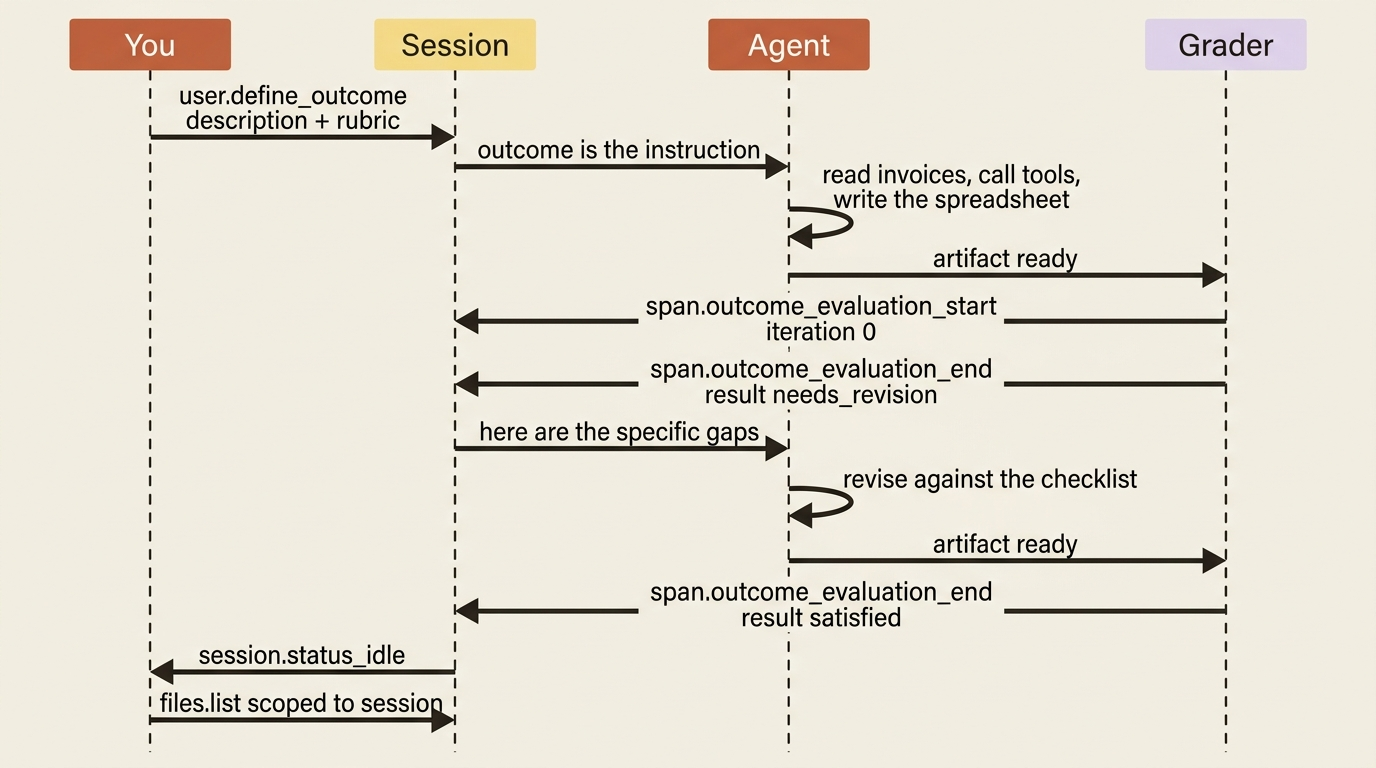
That result is the branch point, and there are five values:
| Result | What it means and what happens next |
|---|---|
satisfied |
The artifact met the rubric. The session goes idle. You are done. |
needs_revision |
Gaps remain. The agent starts another iteration cycle against the grader's feedback. |
max_iterations_reached |
The cap was hit. No more evaluation cycles, though the agent may run one final revision before going idle. |
failed |
The rubric fundamentally does not match the task, for example the description and rubric contradict each other. The session goes idle. |
interrupted |
You sent a user.interrupt after evaluation had started. The current outcome stops so you can redirect. |
The two you will see in normal operation are needs_revision, repeatedly, as the agent closes gaps, and finally satisfied. The interesting one to design around is max_iterations_reached, because it means the agent got close but ran out of road. When you see it, the right move is usually to read the last explanation, decide whether the remaining gaps matter, and either accept the artifact or raise the cap and rerun. And failed is a signal about your rubric, not the agent. It means you asked for something the rubric cannot consistently judge, often because the description and the criteria are pulling in different directions.
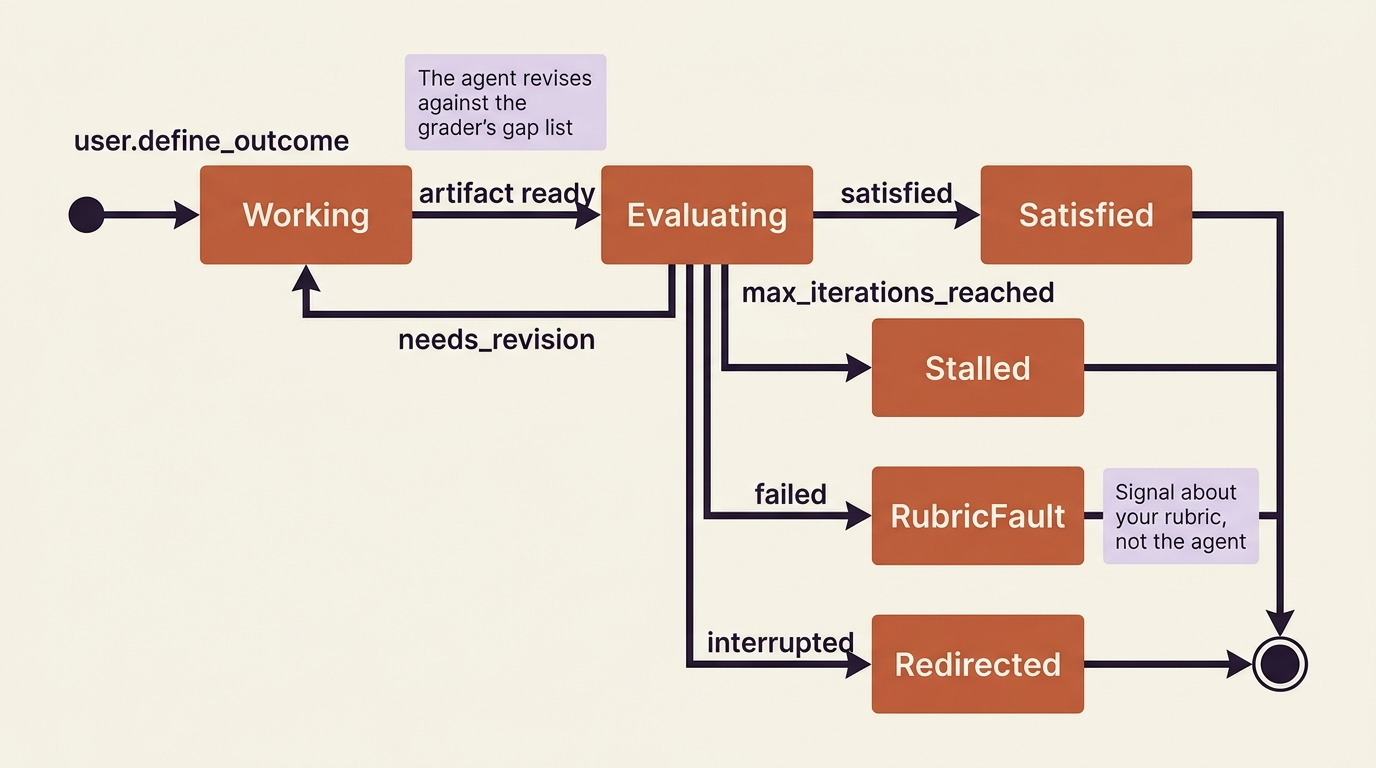
Handling it in the loop is just two more cases in the stream you have been building. In Python:
for event in stream:
    if event.type == "span.outcome_evaluation_end":
        print(f"\n[iteration {event.iteration}: {event.result}]")
        if event.result == "satisfied":
            print(event.explanation)
        elif event.result == "max_iterations_reached":
            print("Stopped short. Review the gaps:", event.explanation)
    elif event.type == "session.status_idle":
        break
If you would rather not tail the stream, you can poll the session instead and read outcome_evaluations[].result off it. That is handy for a long-running job you check on periodically rather than watch live.
Collecting the deliverable
When the agent produces the report, it writes it to /mnt/session/outputs/ inside the container, which is the conventional home for an outcome's deliverables. Once the session is idle, you fetch what landed there through the Files API, scoped to the session so you get only this run's outputs.
In Python:
files = client.beta.files.list(scope_id=session.id)
for f in files:
    print(f.id, f.filename)

if files.data:
    content = client.beta.files.download(files.data[0].id)
    content.write_to_file("./march-reconciliation.xlsx")
And in TypeScript:
const files = await client.beta.files.list({ scope_id: session.id });
for (const f of files.data) {
  console.log(f.id, f.filename);
}

if (files.data.length > 0) {
  const content = await client.beta.files.download(files.data[0].id);
  await writeFile("./march-reconciliation.xlsx", new Uint8Array(await content.arrayBuffer()));
}
That .xlsx is the payoff: a file produced by an agent that knew your conventions, checked the work against your rubric without your supervision, and revised until it passed.
After the outcome
Two behaviors are worth knowing for real use. Only one outcome runs at a time, but you can chain them. After a terminal evaluation, send a new user.define_outcome to kick off the next goal, and the session keeps the history of the prior one. And after the final evaluation, the session does not have to end. You can continue it as an ordinary conversational session, asking follow-up questions about the report it just produced, with all the outcome's context still in scope. The outcome is a mode the session enters and exits, not a one-way door.
Do this today
- Pick one repetitive agent task you run more than once. A report, a migration, a batch transform: anything where you currently judge the result by hand every time.
- Write the acceptance test before the prompt. List the concrete, checkable facts that make the output correct. If a criterion cannot be answered with a clear yes or no, rewrite it until it can.
- Reverse-engineer the rubric from a known-good example. Hand Claude an artifact you trust, ask what makes it good, and turn that analysis into rubric lines.
- Set
max_iterationswith intent. Start around five for a non-trivial task, then tune it after you see how many cycles the agent actually needs. - Watch for
max_iterations_reachedandfailed. The first means raise the cap or accept the gaps. The second means fix the rubric, not the agent.
Where this leaves you
You have changed what it means to use an AI agent. Instead of supervising it turn by turn, you hand it a goal and an acceptance test and let it grade-and-revise its way to a result you can trust. The judge is a separate set of eyes scoring concrete criteria, not the agent congratulating itself. The work now takes a one-line outcome and a rubric and returns an artifact that provably meets your standard, with the iteration count and the grader's explanation as your record of how it got there.
There is one ceiling left, and it is about scale rather than capability. A single agent, however well it self-evaluates, works through a large job sequentially, in one context window that fills up as the work grows. When the work is big enough, you want to split it: cheap agents working in parallel, a specialist reviewing the hard cases, a coordinator pulling the results together. That is where a single worker becomes a team.
The lesson of outcomes is simple. Stop being the loop. Write down what done looks like, let a grader hold the line, and walk away.
This is Part 9 of "Building with Claude Managed Agents," a 13-part guide to building production-ready AI agents.