
One Agent, Many Users, Zero Secret Store
How to make one AI agent serve hundreds of customers without building a secret store or threading tokens through every call, by registering per-user credentials in vaults.
How to make a single AI agent act on behalf of hundreds of customers without building a token vault or passing credentials on every call
In this article: You will learn how vaults solve multi-tenant authentication for AI agents. We cover the two-object model of vaults and credentials, the difference between
static_bearerandmcp_oauthcredential types, why credentials validate at runtime instead of creation, the three constraints that shape your design, and how rotation and revocation reach live sessions. By the end, you will know how to make one agent definition serve every customer cleanly.
You built an agent. It connects to a billing system, reads files, runs code, and produces a report. It works beautifully for one customer. Then the second customer signs up, and the third, and the hundredth, and you hit a wall that has nothing to do with your agent's logic.
Each customer's data is reached with that customer's own credential. Your agent is one product, one configuration. The credential is different every single time it runs. So how do you connect them?
The obvious answer is the wrong one. You stand up a secret store, look up the right token per request, and inject it into every call yourself. Congratulations: you are now running credential-management infrastructure on the side, which is exactly the kind of plumbing that a managed agent platform was supposed to spare you. There is a cleaner answer, and it is the subject of this article. It is called a vault.
The problem credentials actually pose
Start with the shape of the problem, because it is more specific than "the agent needs auth."
Credentials belong to a different layer than the agent. The agent is your product. You define it once. Its configuration, its tools, its declared MCP servers, all of that is stable and shared across every customer. The credential, by contrast, is a runtime detail. It depends entirely on who the agent is acting for in a given run.
Mixing those two layers is the trap. If the agent definition holds a secret, you cannot reuse it across customers. If you pass a token on every call, you are transmitting secrets constantly and you still need somewhere to store them. Either way, you have entangled "the agent you built" with "the user it acts for," and untangling them later is painful.
A vault keeps them separate. A vault is a per-end-user collection of credentials that you reference by ID when you create a session. You do not run your own secret store. You do not transmit tokens on every call. And you never lose track of which user the agent acted for.
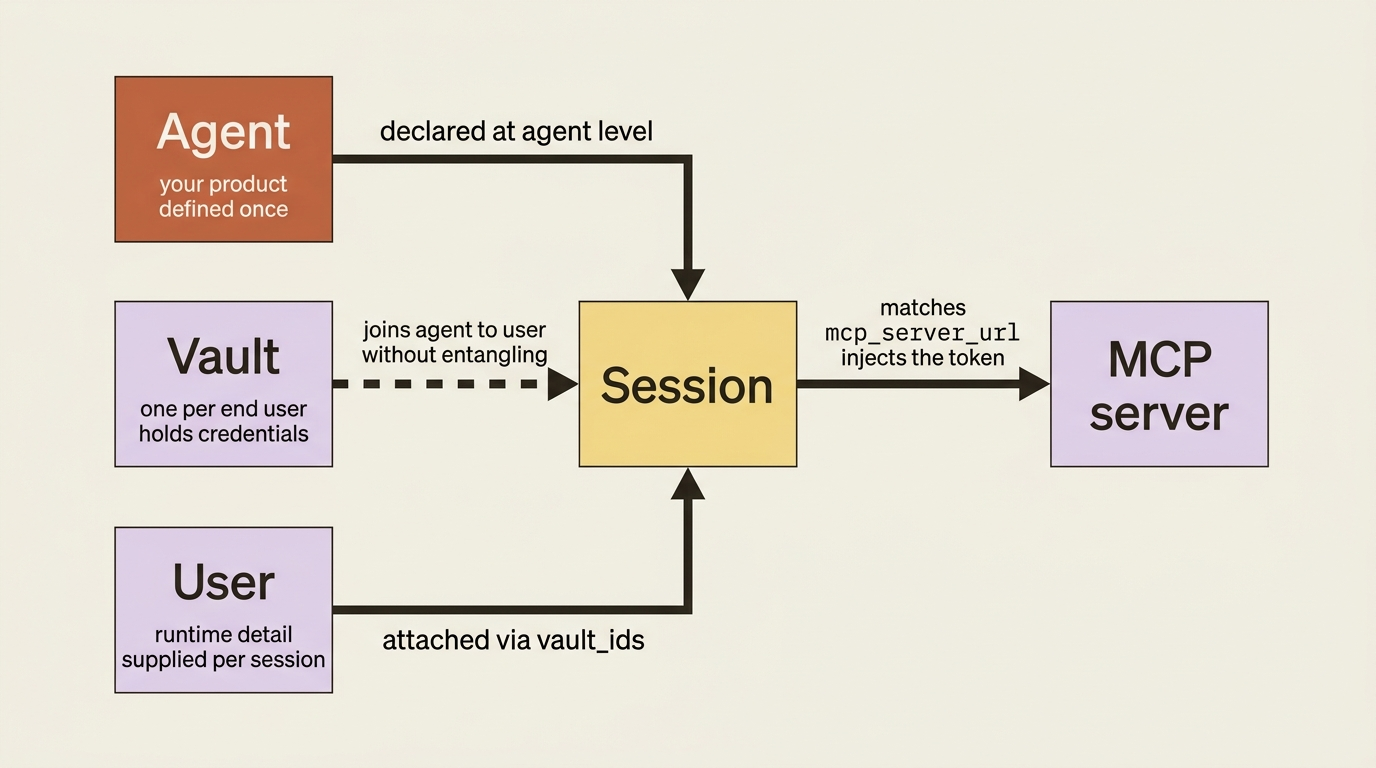
The mental model is a clean separation of concerns. The agent is defined at the agent level. The user is supplied at the session level. The vault is what joins them. Hold that picture and the rest of the API falls into place.
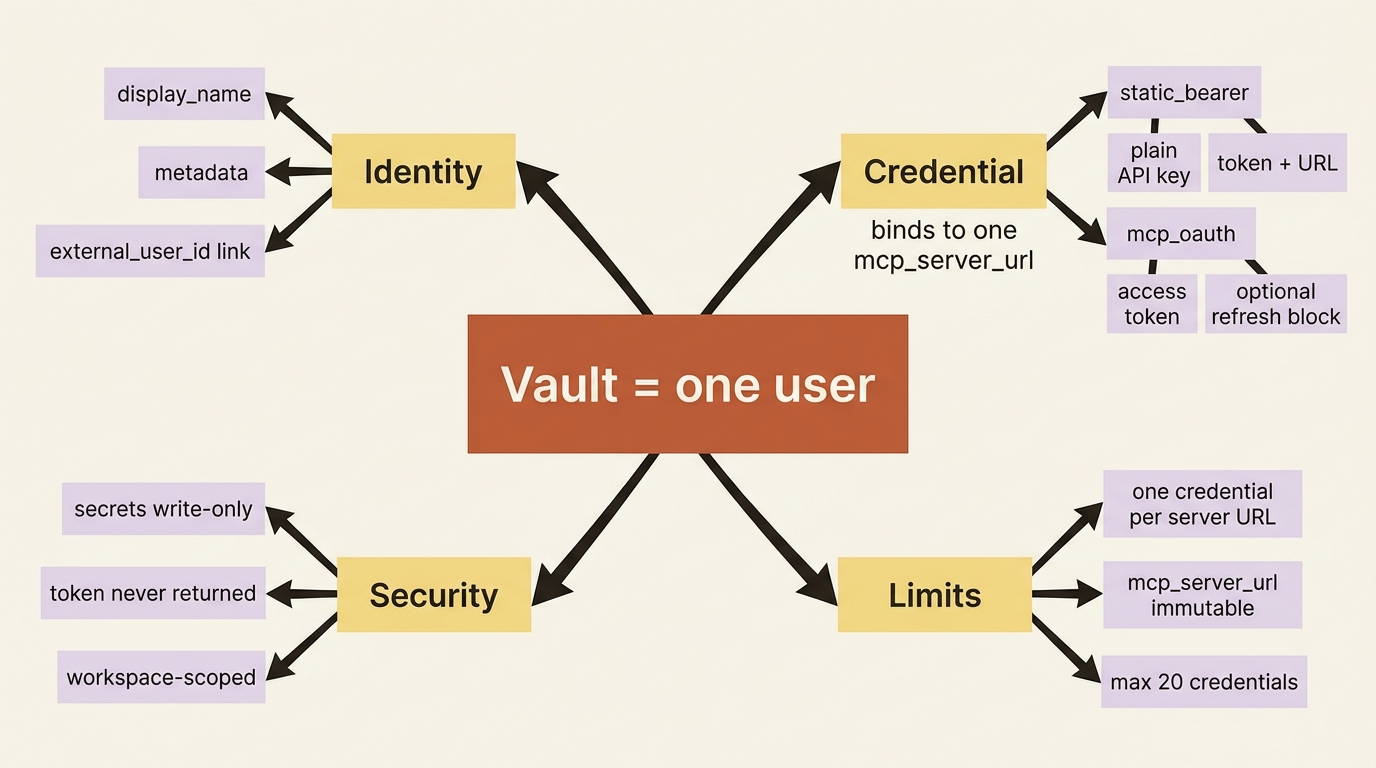
A vault is a user; a credential is a key that user holds
The model is two nested objects, and the nesting deliberately mirrors your own data.
A vault represents one end user. You create it with a display_name and, importantly, optional metadata that maps it back to your own user records. That metadata is the hook that keeps your system and the agent platform in sync. You stamp the vault with your internal user ID, so later you always know whose vault this is.
vault = client.beta.vaults.create(
    display_name="Acme Corp (customer)",
    metadata={"external_user_id": "cust_8841"},
)
print(vault.id)  # "vlt_01ABC..."
In TypeScript:
const vault = await client.beta.vaults.create({
  display_name: "Acme Corp (customer)",
  metadata: { external_user_id: "cust_8841" },
});
console.log(vault.id); // "vlt_01ABC..."
A credential lives inside a vault and is the actual key for one service. Its defining property is that each credential binds to a single mcp_server_url. At session runtime, when the agent connects to an MCP server, the API matches that server's URL against the active credentials on the referenced vault and injects the right token.
So a credential is not "a token." It is "the token for this specific server, held by this specific user." The URL is part of its identity, not an afterthought.
Choosing a credential type
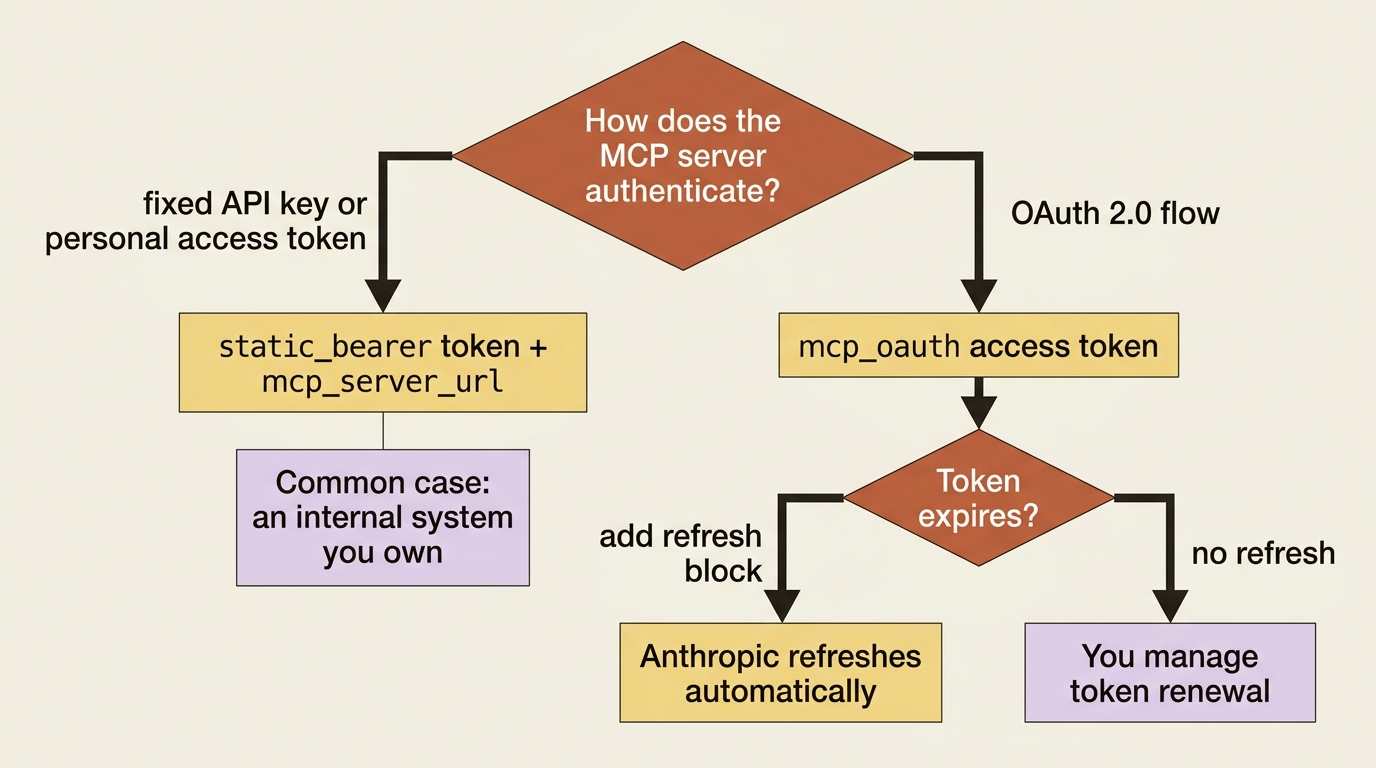
There are two credential types, and which one you use depends on how the server authenticates.
static_bearer is for servers that take a fixed API key or personal access token. It is the simplest shape: a token, a URL, and no refresh dance. For an internal system you own, such as a billing API, this is almost always the right choice.
credential = client.beta.vaults.credentials.create(
    vault_id=vault.id,
    display_name="Acme billing API key",
    auth={
        "type": "static_bearer",
        "mcp_server_url": "https://mcp.internal.example.com/billing",
        "token": "blng_acme_live_key",
    },
)
In TypeScript:
const credential = await client.beta.vaults.credentials.create(vault.id, {
  display_name: "Acme billing API key",
  auth: {
    type: "static_bearer",
    mcp_server_url: "https://mcp.internal.example.com/billing",
    token: "blng_acme_live_key",
  },
});
mcp_oauth is for servers that authenticate with OAuth 2.0. It carries an access token and, optionally, a refresh block holding the refresh token and token endpoint. When that block is present, Anthropic refreshes the access token on your behalf when it expires.
You reach for mcp_oauth when the user authorized your app through an OAuth flow, the way you would integrate a third-party SaaS such as Slack. You reach for static_bearer when the server takes a plain API key. Either way, the credential binds to one URL and one user's vault.
Secrets are write-only
One security property is worth stating plainly. The secret fields, token, access_token, refresh_token, and client_secret, are write-only. You send them in, and the API never returns them in any response.
You cannot read a credential's secret back out. That is the correct behavior for a credential store, and it means a leaked API response cannot leak a token. The platform takes the secret off your hands and never hands it back.
Pointing a session at a user
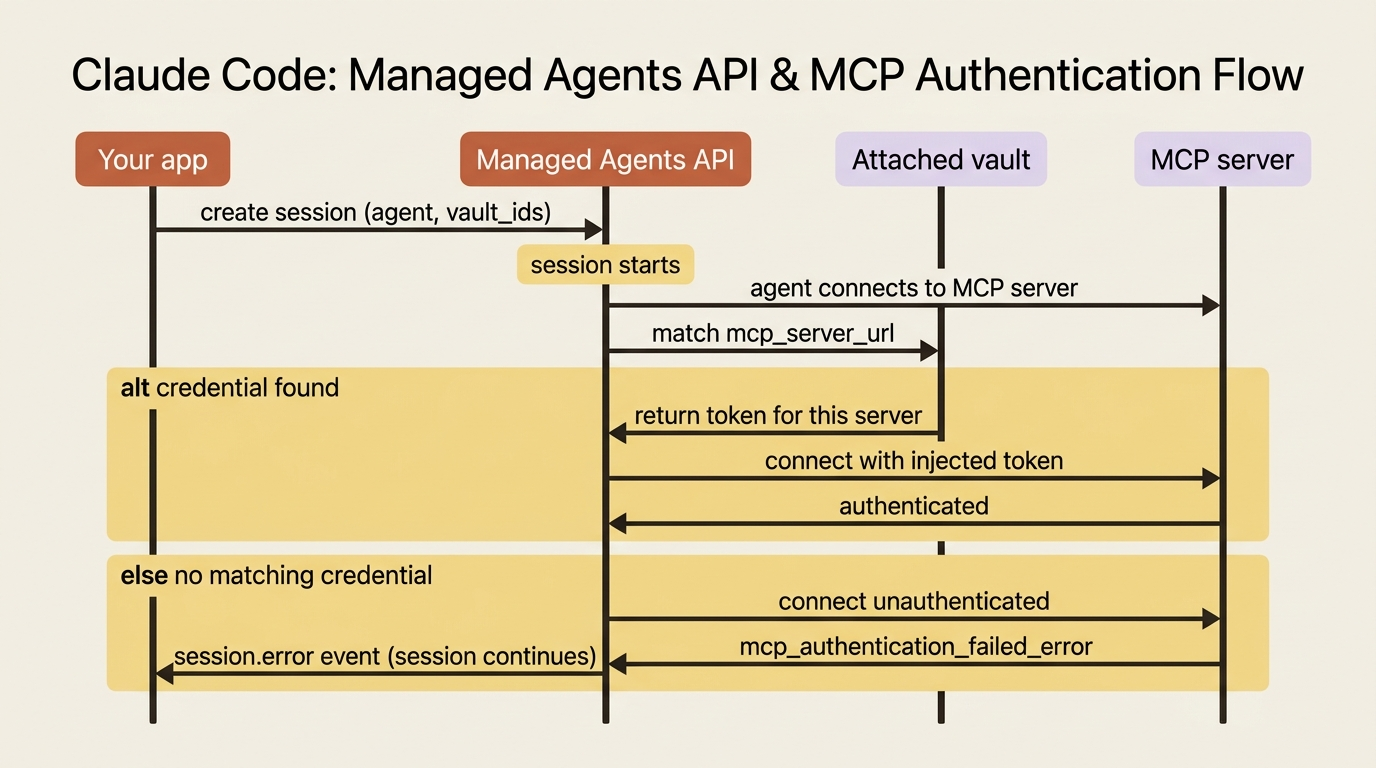
With the vault populated, authenticating a session as that user is one parameter. You pass vault_ids when you create the session, and the platform handles the rest.
session = client.beta.sessions.create(
    agent=agent.id,
    environment_id=environment.id,
    vault_ids=[vault.id],
    title="Reconcile Acme's March invoices",
)
In TypeScript:
const session = await client.beta.sessions.create({
  agent: agent.id,
  environment_id: environment.id,
  vault_ids: [vault.id],
  title: "Reconcile Acme's March invoices",
});
That is the whole multi-tenant story. The same agent, unchanged, now runs as Acme by attaching Acme's vault. The next session runs as a different customer by attaching theirs. The agent definition never holds a secret, and you never inject a token into a call.
When the agent reaches for the billing MCP server you declared in the agent configuration, the API finds the credential in the attached vault whose mcp_server_url matches that server, and injects it. The URL is the join key between the agent's server declaration and the vault's credential.
Two resolution rules govern the edge cases:
- No matching credential. When a vault has no credential matching the server's URL, the connection is attempted unauthenticated. If the server requires auth, that surfaces as an
mcp_authentication_failed_error. - Multiple vaults, same server. When you attach multiple vaults that each cover the same server, the first vault with a match wins. Order your
vault_idsdeliberately if there is any overlap.
The validation timing that surprises people
Here is the detail that catches people off guard, and it is the most important thing to internalize.
Credentials are stored as provided and are not validated until session runtime. Creating a credential with a typo'd token succeeds. Attaching it to a session succeeds. Nothing complains until the agent actually tries to use the server. At that point, a bad token surfaces as an MCP auth error on the event stream, and that error is emitted but does not block the session from continuing.
Gotcha: do not treat successful vault and credential creation as proof that the credential works. It only proves that the shape was valid. The real test is the first session that uses it, and the signal is a session.error carrying mcp_authentication_failed_error and the affected mcp_server_name.
Build your credential setup expecting that verification happens at runtime, not at creation. Lean on your event-stream error handling to catch a bad or expired token. A clean creation call does not mean a working integration.
The three constraints to design around
A handful of rules shape how you structure vaults, and each one prevents a specific confusion.
One active credential per mcp_server_url per vault. Try to create a second credential for the same server URL in the same vault and you get a 409. This makes sense: a user has one identity at a given service, so there is one credential for it. If you need to replace it, you rotate or archive. You do not stack a second.
The mcp_server_url is immutable once the credential is created. To point a credential at a different server, you archive it and create a new one. The URL is the binding, so changing it would mean it is a different credential entirely.
A maximum of 20 credentials per vault. This deliberately matches the maximum of 20 MCP servers per agent. The symmetry is the point. An agent can declare up to 20 servers, so a vault can hold up to 20 credentials, one per server the agent might reach. A user's vault can fully cover a maximally-connected agent, and no more, because no more would have anywhere to bind.
Keeping credentials current, and cutting them off
Credentials are not static once attached. The system re-resolves them periodically, both during a running session and across the vault's lifecycle, so that rotation, archival, or deletion propagates to live sessions without a restart.
If you rotate a customer's billing key mid-reconciliation, the running session picks up the new key on the next resolution rather than failing or needing to be torn down. For mcp_oauth credentials with a refresh block, this is also when an expired access token gets refreshed automatically.
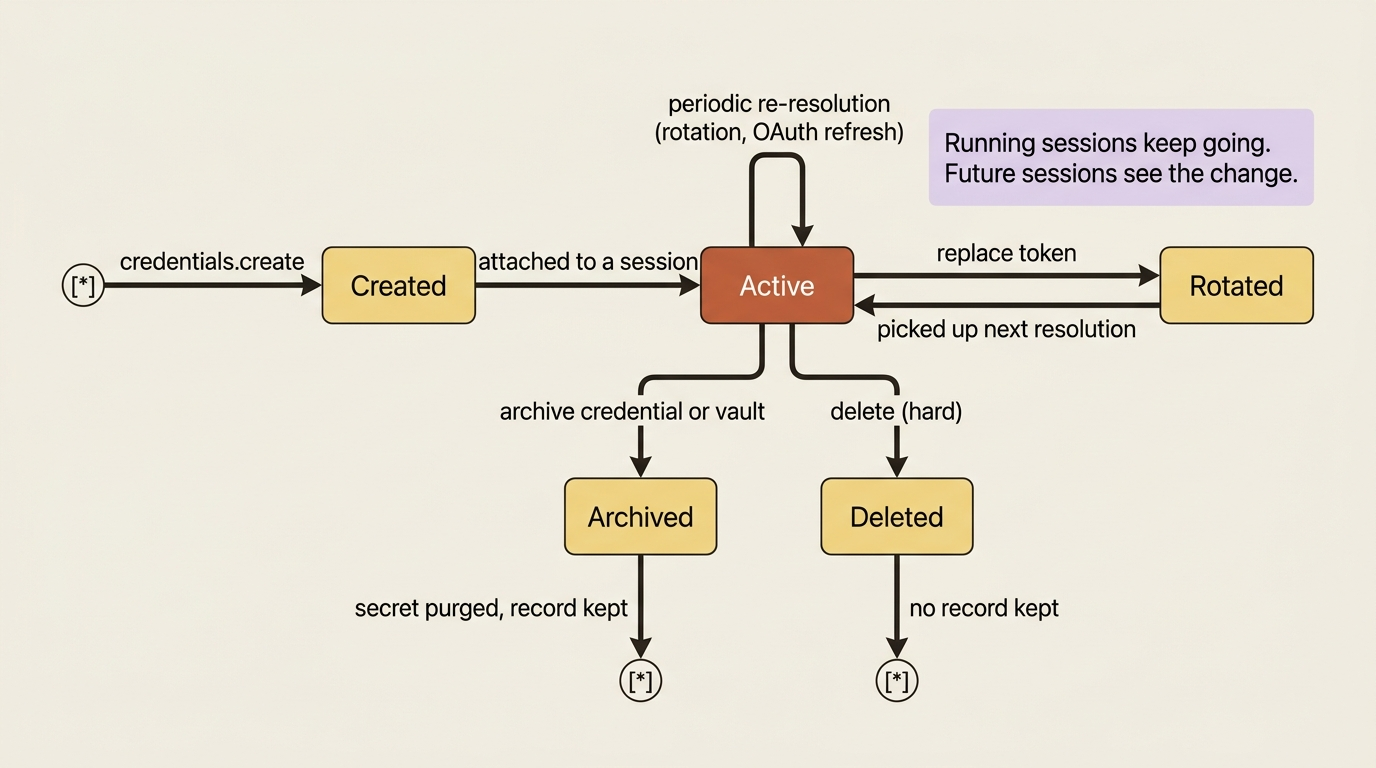
Revocation is the same lever in reverse, and it is how you cut off access. Because vaults and credentials are workspace-scoped, anyone with API key access can use them to authorize an agent, so when access should end, you remove the credential.
- Archiving a vault cascades to all of its credentials, purges the secrets, and retains the records for auditing. Future sessions referencing that vault fail, and any running session continues.
- Archiving a single credential purges just that secret and frees its
mcp_server_urlfor a replacement. - Deleting is the hard version with no record kept.
Archive is what you want whenever you need an audit trail. The practical rule: to revoke a user's access, delete or archive the vault or the specific credential, and the change reaches running sessions on the next re-resolution.
For production you will want to know the moment a credential goes bad rather than discovering it through a failed session. Vault and credential lifecycle changes, including archival, deletion, and a failed OAuth refresh, are all available as webhooks. Subscribe to them and you get notified of a refresh_failed credential instead of finding out when a customer's reconciliation errors out.
Do this today
- Create a vault for one real customer with
metadatacarrying your internal user ID. That metadata is what keeps your records and the platform in sync. - Add a
static_bearercredential bound to an MCP server URL your agent already declares. Confirm the secret is write-only by reading the credential back and noting the token is absent. - Run a session with
vault_idsset and watch the event stream. A clean creation call is not proof; the first real session is. - Add error handling for
mcp_authentication_failed_errorkeyed onmcp_server_name, so a bad token surfaces clearly instead of silently degrading a run. - Subscribe to credential lifecycle webhooks so a
refresh_failedevent reaches you before a customer's job does.
Where this leaves you
Your agent is now genuinely multi-tenant. One agent definition serves every customer, and each session authenticates as the right one by attaching that customer's vault. There is no secret store of your own, no token threaded through every call, and a clean record, via the vault's metadata, of whose data the agent touched.
You also know the sharp edges: credentials prove out at runtime rather than at creation, the URL is the immutable join key, there is one credential per server per vault, and revocation is a delete or archive that reaches live sessions on the next refresh.
The lesson underneath all of it is the separation of concerns. The agent is your product. The user is a runtime detail. The vault is what joins them without entangling the two. Once you stop trying to bake identity into the agent and start attaching it per session, multi-tenancy stops being an infrastructure project and becomes a single parameter.
This is Part 11 of "Building with Claude Managed Agents," a 13-part guide to building production-ready AI agents.