
Your Agent Has No Deploy Button. It Is Already Deployed.
There is no deploy button for a managed agent because the agent and its environment are already the deployed resources. Shipping one to production is really four disciplines: provisioning, containment, lifecycle, and a real threat model.
Shipping a Claude Managed Agent to production is not pushing an artifact. It is four separate disciplines: how you provision it, how you contain it, how you run it over time, and how you defend it from input it did not author.
In this article: You will learn why deploying a Claude Managed Agent is really a provisioning problem, not a publishing one. We cover the split between durable resources and ephemeral sessions, least-privilege networking, the 30-day session checkpoint clock and how to track cost, self-hosting when data cannot leave your boundary, and the prompt-injection threat model that should shape every choice. By the end you can take a working prototype and harden it into something genuinely shippable.
There is a moment in every agent project where the demo works. The agent ingests the files, calls the API, produces the report, and you think you are done. You are not. What you have is a script on your machine, running in a default cloud container, with open networking and credentials passed by hand. That is a prototype's posture. It is fine for proving the idea and dangerous for running real work.
Here is the reframe that changes how you think about all of it. In Managed Agents there is no separate deploy or publish step, because agents and environments are the deployed resources. The first time you called agents.create and environments.create, you were already deploying. Those calls returned server-side resources you reference by ID from then on. There is no build to ship and no artifact to push. A "deploy script" here is really a provisioning script.
That sounds like a small semantic point. It is not. It is the key to a clean production setup, because once you see your agent and environment as live resources rather than code waiting to be uploaded, the right way to structure everything else falls out naturally. Shipping an agent that takes real actions on untrusted input is not one concern but four: how you deploy it, how you contain it, how you run it over time, and how you defend it. This article walks all four.
Code is shown in Python and TypeScript where it matters.
Split provisioning from execution
The durable resources and the disposable ones have different lifecycles, so they belong in different scripts.
Agents and environments are long-lived. You create them on a config change, not on every task. Sessions are ephemeral: one per task, created fresh each run. The clean pattern mirrors that split exactly. A deploy script stands up the environment and the agent roster and writes a manifest of their IDs. A separate run script loads that manifest and starts sessions.
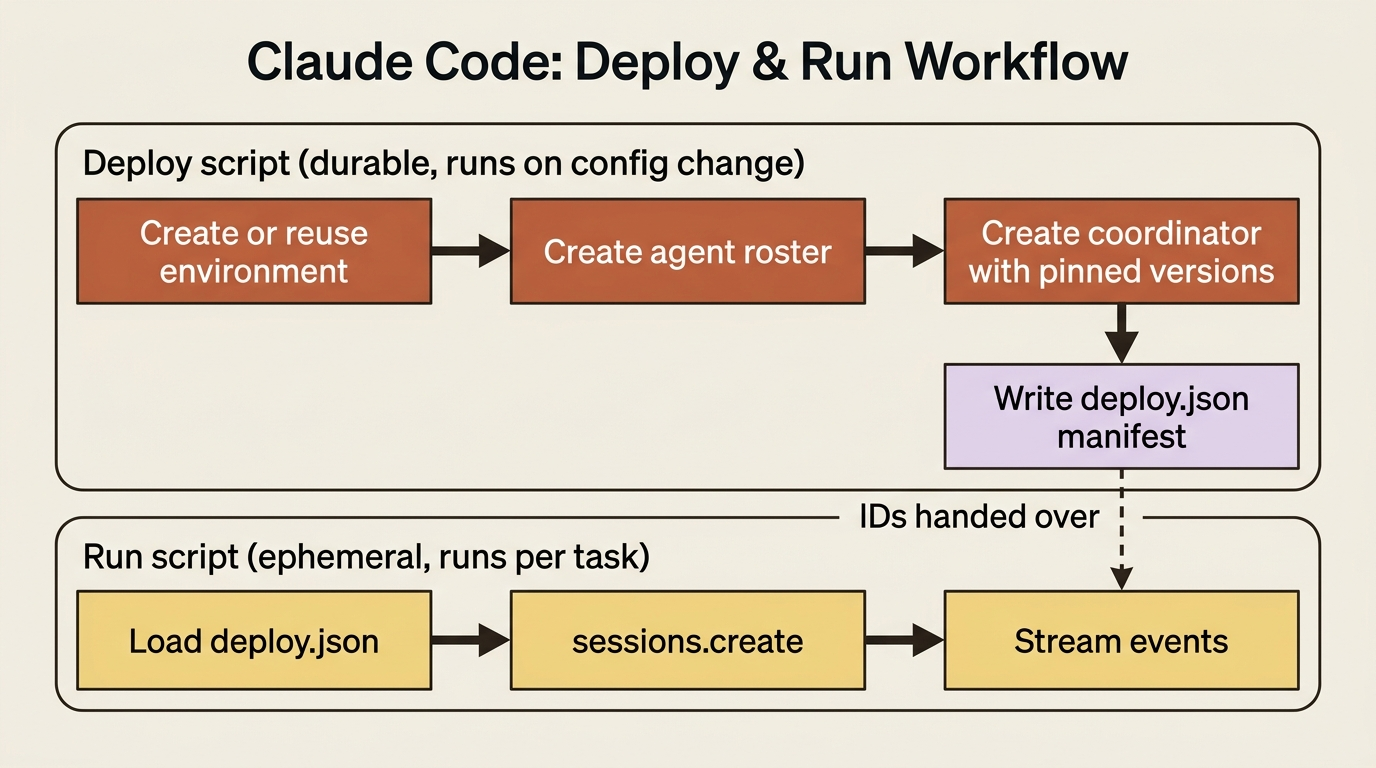
The deploy script provisions everything durable and records the IDs. Here is the shape, provisioning an invoice agent's environment and a multi-agent roster, then writing a manifest:
import json
from pathlib import Path
from anthropic import Anthropic

client = Anthropic()

def get_or_create_environment(name: str) -> str:
    # Environments are NOT versioned, so reuse by name instead of recreating.
    for env in client.beta.environments.list():
        if env.name == name and env.archived_at is None:
            return env.id
    env = client.beta.environments.create(
        name=name,
        config={
            "type": "cloud",
            "packages": {"pip": ["pandas", "openpyxl"]},
            "networking": {"type": "limited", "allowed_hosts": ["mcp.internal.example.com"],
                           "allow_mcp_servers": True, "allow_package_managers": True},
        },
    )
    return env.id

def deploy() -> dict:
    environment_id = get_or_create_environment("invoice-env")
    checker = client.beta.agents.create(name="Line-Item Checker", model="claude-opus-4-7", ...)
    reviewer = client.beta.agents.create(name="Reviewer", model="claude-opus-4-7", ...)
    coordinator = client.beta.agents.create(
        name="Reconciliation Lead",
        model="claude-opus-4-7",
        multiagent={"type": "coordinator", "agents": [
            {"type": "agent", "id": checker.id, "version": checker.version},
            {"type": "agent", "id": reviewer.id, "version": reviewer.version},
        ]},
    )
    return {
        "environment_id": environment_id,
        "coordinator_id": coordinator.id,
        "coordinator_version": coordinator.version,
    }

if __name__ == "__main__":
    Path("deploy.json").write_text(json.dumps(deploy(), indent=2))
The run script stays separate and just loads the manifest to start a per-task session:
import json
from pathlib import Path
from anthropic import Anthropic

client = Anthropic()
manifest = json.loads(Path("deploy.json").read_text())

session = client.beta.sessions.create(
    agent=manifest["coordinator_id"],
    environment_id=manifest["environment_id"],
)
# ... stream events as usual
Two properties of the resources drive this design.
Agents are versioned. Re-running the deploy script after a config change produces a new agent version rather than a duplicate, which is exactly what you want for a controlled rollout. If you re-run unchanged, compare against agents.list first to skip the work.
Environments are not versioned. A config change cannot be rolled back, which is precisely why you reuse an environment by name instead of recreating it, and why logging environment updates on your own side is worth doing.
One more production habit is visible in the code above: pin subagent versions in the coordinator's roster. The deployed coordinator is then fully reproducible rather than silently shifting the day someone updates a worker.
Lock down the network
The environment is where the agent's code runs, and its networking config is your first containment lever.
There are two modes. unrestricted, the default, gives the container full outbound access except for a general safety blocklist. That is convenient for development and wrong for production. limited restricts the container to an explicit allowed_hosts list, with two toggles that widen it: allow_mcp_servers permits reaching the MCP servers configured on the agent, and allow_package_managers permits public registries like PyPI and npm. Both default to false, so limited with neither toggle is the tightest posture available.
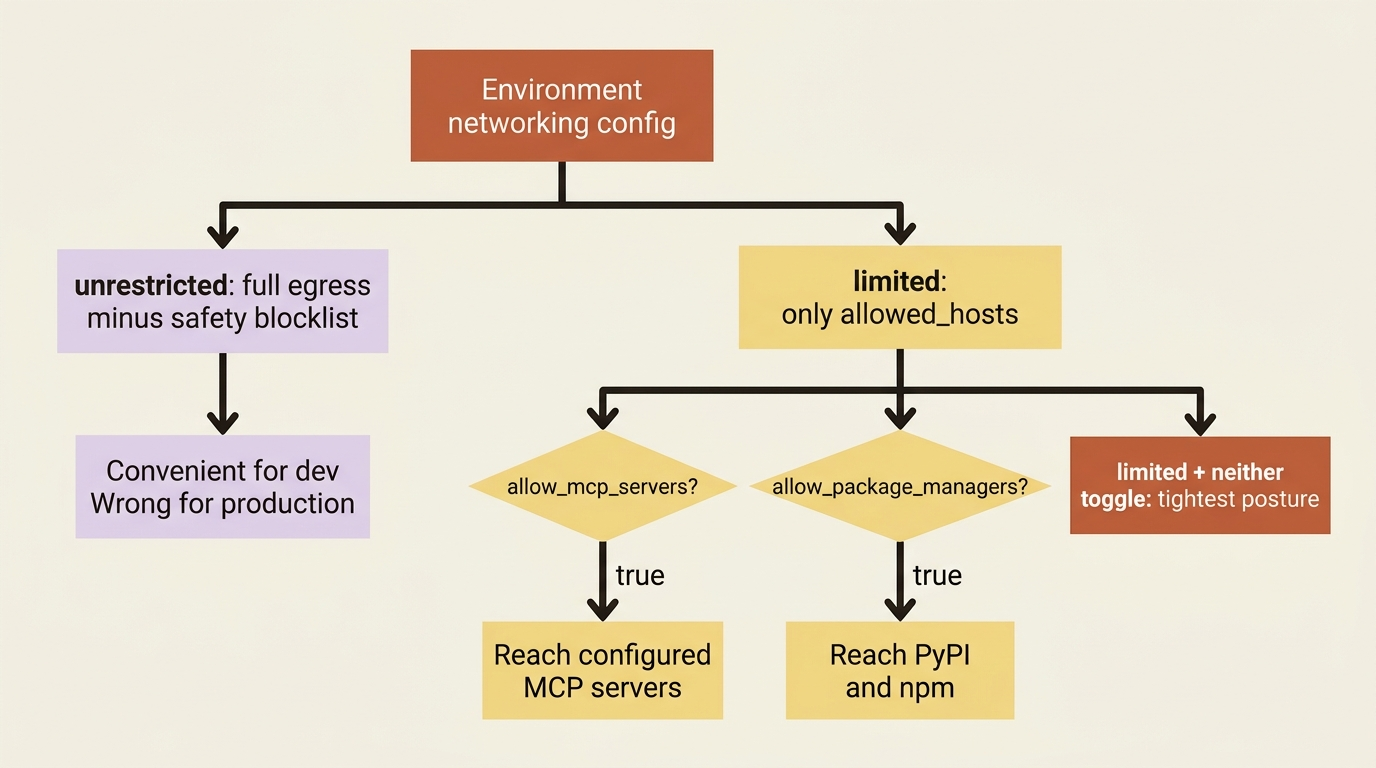
The production guidance is unambiguous: use limited with an explicit allowed_hosts list, grant only the minimum the agent needs, and audit those domains regularly. For an invoice agent that means allowing the billing MCP server and the package registries it genuinely depends on, and nothing else. The deploy script above already does this, listing only mcp.internal.example.com and toggling on MCP and package access.
Note one boundary that surprises people: the networking config governs the container's own egress, not the web_search and web_fetch tools, which have their own separate domain controls. Tightening networking does not silently disable web search.
The reasoning is worth saying plainly. An agent that reads untrusted invoices and has unrestricted egress is an agent that, if compromised, can talk to anywhere. Least privilege on the network is the cheapest meaningful defense you have. Start every environment at limited and widen only when a real dependency forces it.
Manage the session lifecycle and its cost
Sessions persist between interactions, which is what lets a long reconciliation span days of back-and-forth. But persistence has a clock on it.
When a session goes idle, its container is checkpointed. That checkpoint preserves the full container state: the filesystem, installed packages, and every file the agent created. It lets you resume cleanly by sending a user.message to the session ID, and the agent picks up with all its prior context and files intact.
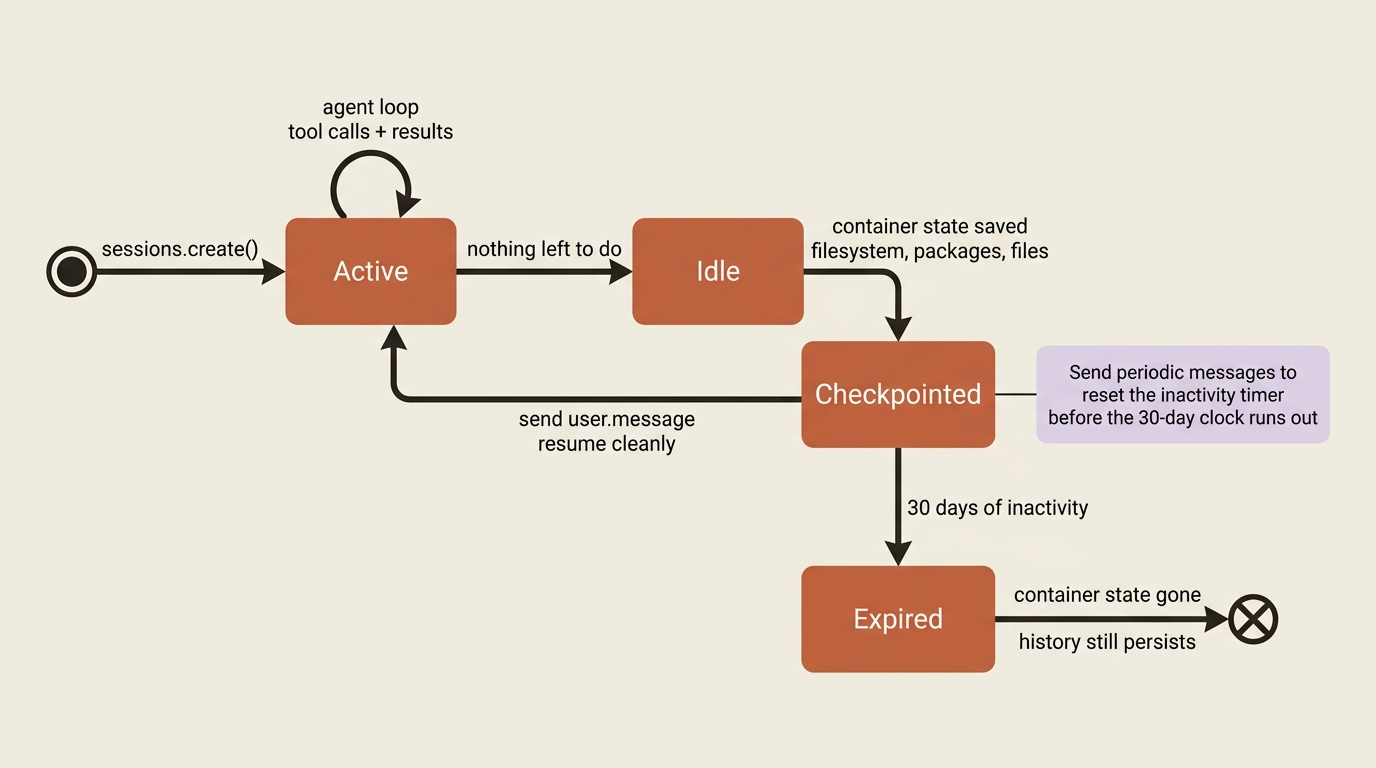
Here is the gotcha that bites people. The checkpoint is preserved for only 30 days after the session's last activity. Session history persists until you delete it, but the container state, meaning the files and installed tools, expires at 30 days of inactivity. Anyone who assumes a session is permanent is in for a surprise. If a workflow needs the full container state to outlive a month of dormancy, send periodic user.message events to reset the inactivity timer before the checkpoint expires. A monthly reconciliation that depends on files the agent left behind is exactly the case to watch, because it sits right at that boundary.
Cost tracking rides on the same session object. After a session goes idle, fetch it and read the cumulative usage field, which carries four numbers: input_tokens for uncached input, output_tokens for total output, and cache_creation_input_tokens and cache_read_input_tokens for prompt-caching activity.
session = client.beta.sessions.retrieve(session.id)
u = session.usage
print(f"in={u.input_tokens} out={u.output_tokens} "
      f"cache_write={u.cache_creation_input_tokens} cache_read={u.cache_read_input_tokens}")
These totals are how you track spend, enforce budgets, and monitor consumption per session, which matters once you are running many. Cache reads in particular are cheaper per token than fresh input, so a healthy cache_read_input_tokens relative to input_tokens is a sign that your agent is benefiting from caching rather than reprocessing the same context every turn.
Self-host when the data cannot leave
Everything so far assumes Anthropic-managed cloud containers, which is the right default. But some data cannot leave your network boundary, some internal services are not publicly routable, and some workloads must run under your own compliance controls.
For those cases, self-hosted sandboxes keep Anthropic's orchestration on its side while moving tool execution onto infrastructure you control. The agent's code, filesystem, and network egress never leave your environment.
The mechanism is a work queue. You create an environment with config: {"type": "self_hosted"}, and that environment becomes a queue connecting Anthropic's orchestration to a worker you run. When a session is assigned to that environment, Anthropic enqueues it as a work item. Your environment worker, a process on your own infrastructure, claims items from the queue, spawns an execution context per session, downloads the agent's skills, runs the tool calls locally, and posts results back.
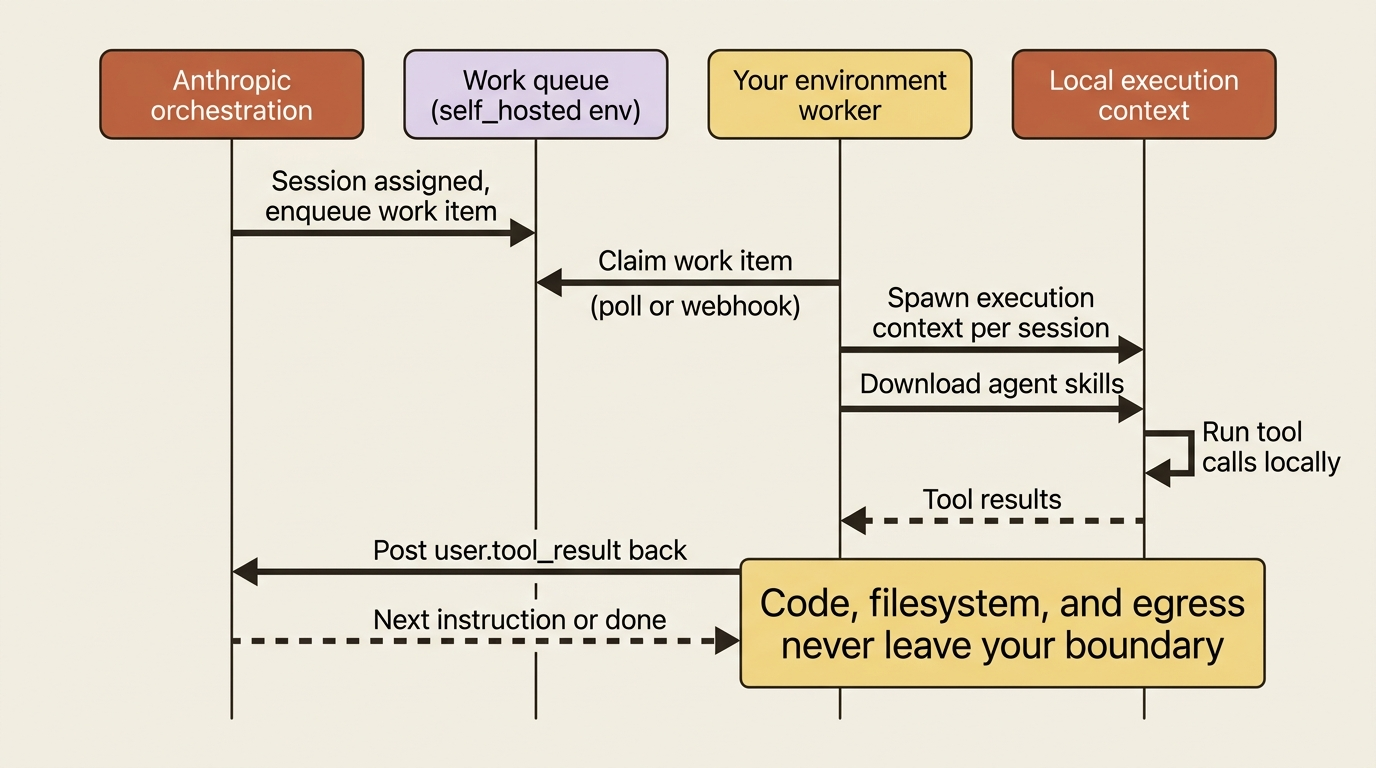
You claim work in one of two ways: an always-on worker that polls continuously, or a webhook-triggered handler that wakes on session.status_run_started and starts polling. The ant CLI ships an always-on worker. The SDK supports both patterns, with pre-built helpers so you do not implement the claim-and-keep-alive loop yourself.
One detail matters for correctness. In a cloud environment the harness runs the agent toolset for you. In a self-hosted one, your worker is responsible for executing those tools and posting back user.tool_result for the agent toolset's calls. The SDK and CLI workers handle this automatically through their tool helpers, so if you use them you never write it by hand. But if you build a worker directly against the work endpoints, returning the tool result is now your job. The pre-built workers also download skills to /workspace/skills/ and write deliverables to /mnt/session/outputs/.
Self-hosting composes cleanly with MCP tunnels, and the two are easy to conflate, so it is worth being precise. Self-hosting controls where the agent's code executes. MCP tunnels control how Anthropic reaches MCP servers inside your network. They are independent. A cloud-container session can still reach a private MCP server through a tunnel, and a self-hosted session can use tunneled or public servers. Reach for both when you want execution and tool access to stay inside your boundary. If you are on a specific platform, there are dedicated worker guides for Cloudflare, Daytona, Modal, and Vercel that handle the sandboxing particulars for you.
The threat model you are actually defending against
End with the security posture, because it is the thing that should shape every choice above.
The defining property of an agent is that it takes dynamic actions on dynamic input. An invoice agent runs shell commands and writes files in response to invoices it did not author and instructions that may be partly attacker-controlled. That is not a hypothetical risk. It is the operating condition.
Prompt injection is real. Content the agent reads, whether an invoice, a fetched page, or a tool result, can carry instructions crafted to redirect its behavior. You cannot assume the input is benign.
There is no single switch that makes this safe. The answer is defense in depth: layering independent controls so that no single failure is catastrophic. If you have followed this series, you have already met most of the layers.
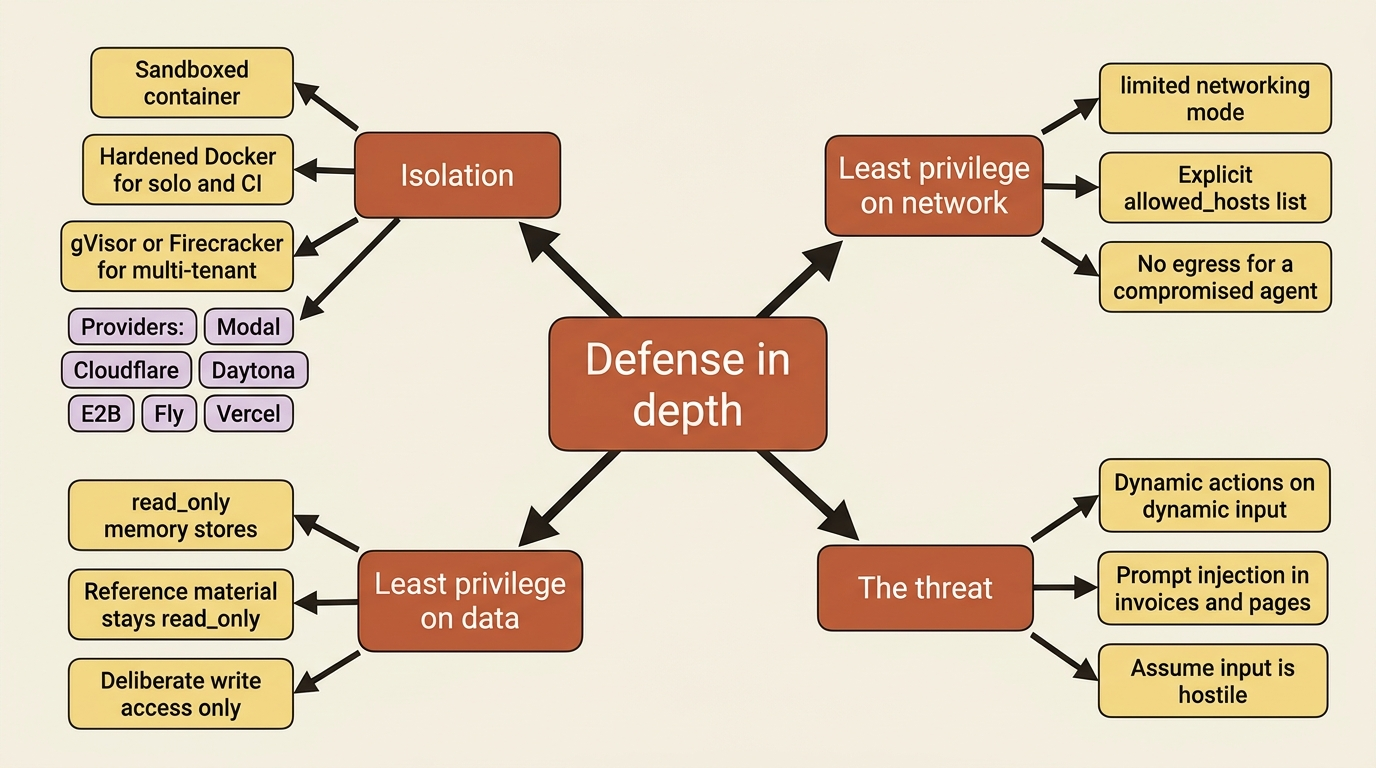
Isolation. Tool execution runs in a sandboxed container. For stronger separation in multi-tenant deployments, the standard toolkit runs from a hardened container outward: the canonical locked-down Docker configuration for solo and CI use, and stronger isolation like gVisor or Firecracker when you are running many tenants' work side by side. Several sandbox providers, including Modal, Cloudflare, Daytona, E2B, Fly, and Vercel, exist precisely to give you that isolation without building it yourself.
Least privilege on the network. The limited networking mode from earlier means a compromised agent has nowhere to exfiltrate to.
Least privilege on data. Reference material in a memory store should be read_only, because that is the same prompt-injection threat wearing a different hat. An agent reading a malicious invoice with a read_write memory store can be tricked into poisoning the memory that future sessions trust. Write access should be deliberate, not the default.
The throughline is this: each control you turned on for convenience earlier, gated tools, scoped MCP, read-only memory, and limited networking, is also a security boundary. Production hardening is largely the discipline of choosing the restrictive option at each of those points rather than the permissive default, and assuming the input is hostile until your boundaries prove it cannot hurt you. For self-hosted deployments specifically, the shared-responsibility security model spells out which boundaries are yours to enforce.
Do this today
- Split your one script into two. A deploy script that provisions durable environments and agents and writes a manifest of IDs, and a separate run script that loads the manifest and starts sessions.
- Set every environment to
limitednetworking. Give it an explicitallowed_hostslist with only the domains the agent genuinely needs, and audit that list on a schedule. - Pin subagent versions in any coordinator roster so a deployed multi-agent system is fully reproducible.
- Add a cost check. After a session goes idle, retrieve it and log the four
usagenumbers so spend and cache health are visible. - Audit your memory stores. Anything that is reference material should be
read_only. Treatread_writeas a deliberate decision, not a default.
The agent is built. Now you run it.
A genuinely shippable agent is provisioned as durable, versioned resources through a deploy script, started as ephemeral sessions through a separate run script, contained behind least-privilege networking, tracked for cost through the usage field, kept alive deliberately against the 30-day checkpoint clock, optionally run entirely inside your own boundary through a self-hosted worker, and defended in depth against the prompt-injection threat that any agent on untrusted input must take seriously.
Notice that none of this is new capability. It is the same agent you already built, with the restrictive option chosen at each fork instead of the permissive default. Production hardening is not a feature you add at the end. It is a posture you adopt, one boundary at a time, and then assume the input is hostile until those boundaries prove otherwise.
There is no deploy button because there was never anything waiting to be shipped. The agent was always live. The work of going to production is the work of containing what is already running.
This is Part 12 of "Building with Claude Managed Agents," a 13-part guide to building production-ready AI agents.