
Your ADK Agent Is Only as Good as Its Worst Tool Description
Your ADK agent is only as capable as its worst tool description, because the docstring you write is the entire picture the model gets.
In Google's Agent Development Kit, the model learns everything it knows about a tool from a docstring you write. Get it wrong and your agent ignores a perfectly good capability. Get it right and it just works.
In this article: You will learn how ADK turns a plain Python function into a tool the model can use, why the docstring is the real API contract between you and the language model, and the handful of rules that actually change whether your agent reaches for a tool or quietly skips it. You will build a tool that shells out to pytest, meet
ToolContextfor tools that touch session state, and see the pause-and-resume shape ofLongRunningFunctionTool.
Here is the uncomfortable truth about agent tools. The model never sees your implementation. It does not know that your function is clever, fast, or wired to exactly the right database. It knows the tool's name, its parameters, and its docstring, and nothing else. Every decision the model makes, whether to reach for a tool and how to fill in its arguments, comes from those few lines of metadata.
A brilliant tool with a vague docstring is a tool your agent will not use, or will use wrong. When an agent "will not use" a perfectly good capability you handed it, the bug is almost never in the code. It is in the description. This article is about writing tools the model can actually understand, and along the way we make a real one: a test runner that shells out to pytest, reads the failures, and hands them back to the agent.
The simplest tool is just a function
ADK does not make you subclass anything or fill out a registration form to add a capability. You write a plain Python function, put it in the agent's tools list, and the framework wraps it as a FunctionTool automatically.
What ADK does behind that simplicity is the important part. It inspects your function's signature: its name, its parameters, their type hints, their default values, and its docstring. From all of that it generates a schema, and that schema is the entire picture the model gets of your tool. So the function is not just your implementation. By way of its signature and docstring, it is also the tool's documentation, written for an audience of one language model.
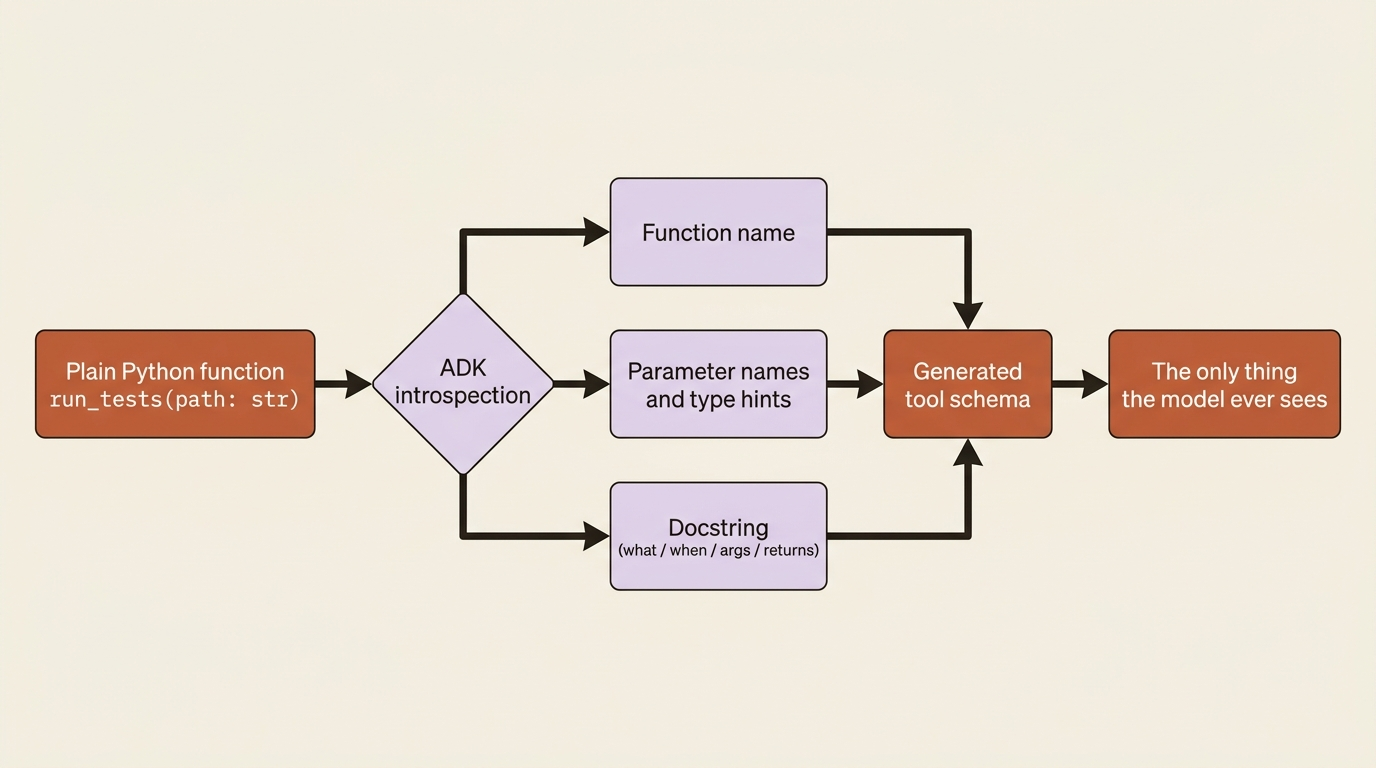
This is why the rest of this article harps on names and docstrings. They are not style. They are the API contract between you and the model.
Making a real test-running tool
Let us build a tool that runs the actual pytest suite for a Python project. The logic is ordinary Python: shell out to pytest, capture the output, and return a structured result. The care goes into the signature and the docstring.
import subprocess
from google.adk.agents import Agent


def run_tests(path: str) -> dict:
    """Runs the pytest suite for a Python project and reports the results.

    Use this whenever you need to know whether a project's tests pass or
    which tests are failing, for example before or after proposing a fix.

    Args:
        path: The filesystem path to the project directory to test.

    Returns:
        A dict with a 'status' of 'passed' or 'failed', and an 'output'
        field containing pytest's summary so you can see which tests failed.
    """
    result = subprocess.run(
        ["python", "-m", "pytest", path, "-q"],
        capture_output=True,
        text=True,
        timeout=120,
    )
    status = "passed" if result.returncode == 0 else "failed"
    return {"status": status, "output": result.stdout[-2000:]}


root_agent = Agent(
    model="gemini-flash-latest",
    name="buggy_shop_agent",
    description="Inspects a Python repo, runs its tests, and reports failures.",
    instruction=(
        "You are a code-maintenance assistant. When the user asks about the "
        "state of a project, call 'run_tests' on its path, then explain in "
        "plain language which tests are failing and what the errors suggest."
    ),
    tools=[run_tests],
)
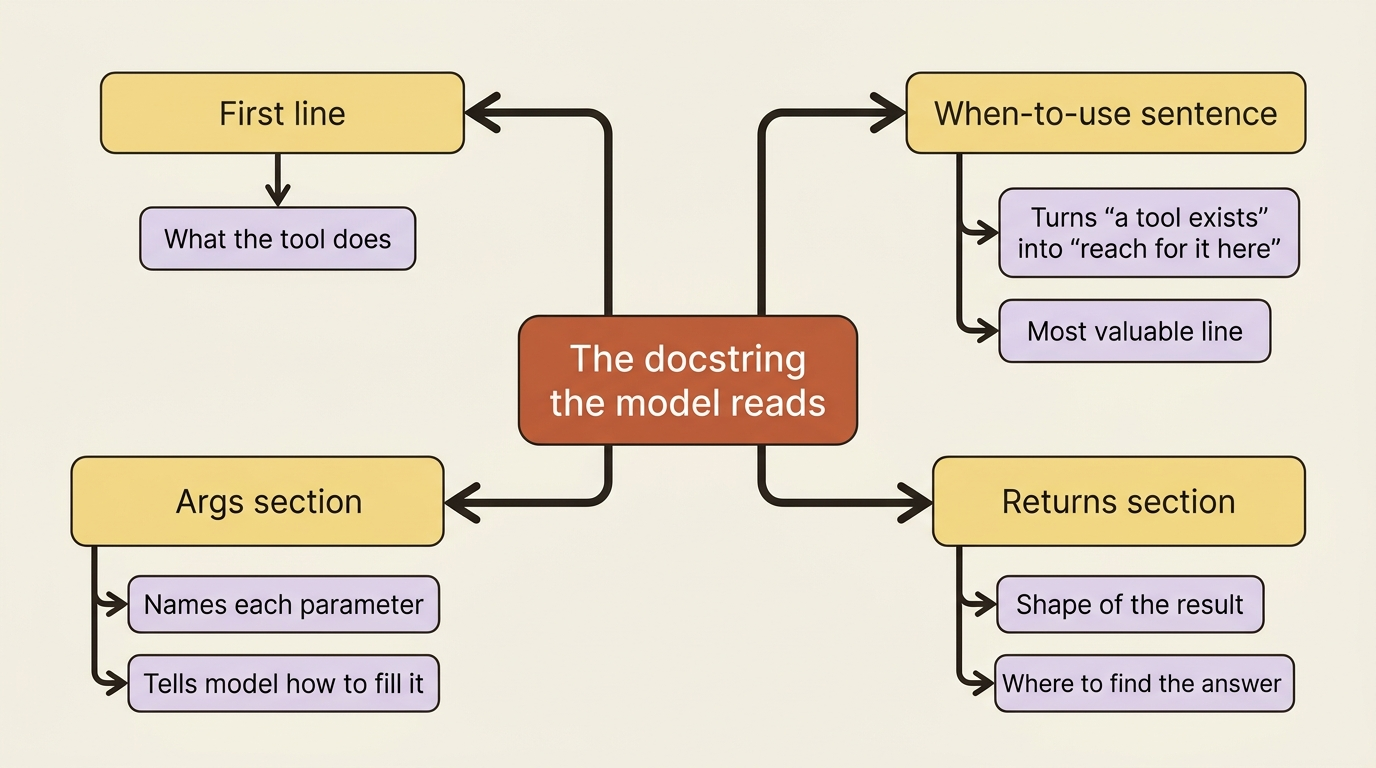
Read that docstring the way the model will. The first line says what the tool does. The second paragraph says when to use it, which is the single most valuable sentence in the whole function, because it is what turns "a tool exists" into "the model knows to reach for it here." The Args section names and describes each parameter, so the model knows to fill path with a directory. The Returns section tells the model the shape of what comes back, so it knows to look in output for the failures. None of that is decoration. Every line steers a real decision the model makes.
Run this against a real repo and the agent genuinely runs your tests, reads the real failure, and explains it. No canned output, no fake. The agent is now carrying actual tool results.
The rules that change behavior, not just style
There is real flexibility in how you write a tool, but a handful of guidelines move the needle on whether the model uses it well. These come straight from how the language model consumes the schema.
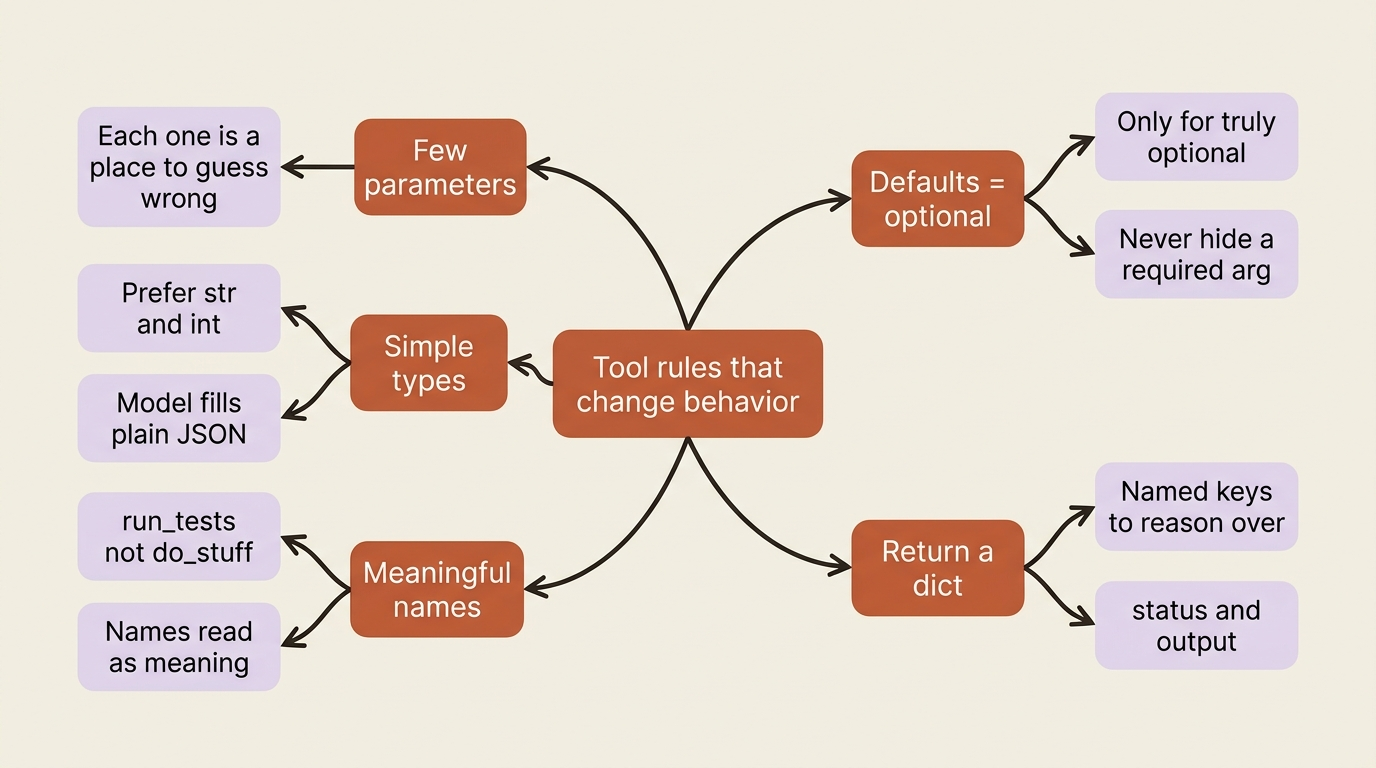
Keep parameters few. Every parameter is one more thing the model has to get right, and one more place it can guess wrong. A tool with one clear parameter is used far more reliably than a tool with six.
Favor simple types. Prefer str and int over custom classes. The model fills arguments as plain JSON values, and a flat signature is one it fills correctly. Reserve rich types for when you truly need them.
Name things for what they do. The model reads the function name and the parameter names as meaning, not as labels. run_tests(path) tells the model something; do_stuff(x) tells it nothing, and the agent will treat it accordingly. Avoid generic names the way you would avoid a function called process() in code review.
Use defaults only for genuinely optional values. A parameter with a default becomes optional in the schema, so the model may omit it. That is correct for a flexible_days=0 knob and wrong for anything the model should derive from the user's request. Do not paper over a required argument with a default to avoid an error. You will just get a tool called with the wrong value.
Return a dict. ADK wraps a bare return value into a dictionary anyway, so returning one yourself, with named keys like status and output, gives the model labeled fields to reason over instead of an unlabeled blob.
Gotcha. The model knows about your tool exactly what the name, signature, and docstring say, and nothing more. A vague docstring or a generic name like
do_stuffproduces a tool the model uses wrong or skips entirely. When an agent will not use a tool you gave it, look at the description first, not the code.
When a tool needs to see the session: ToolContext
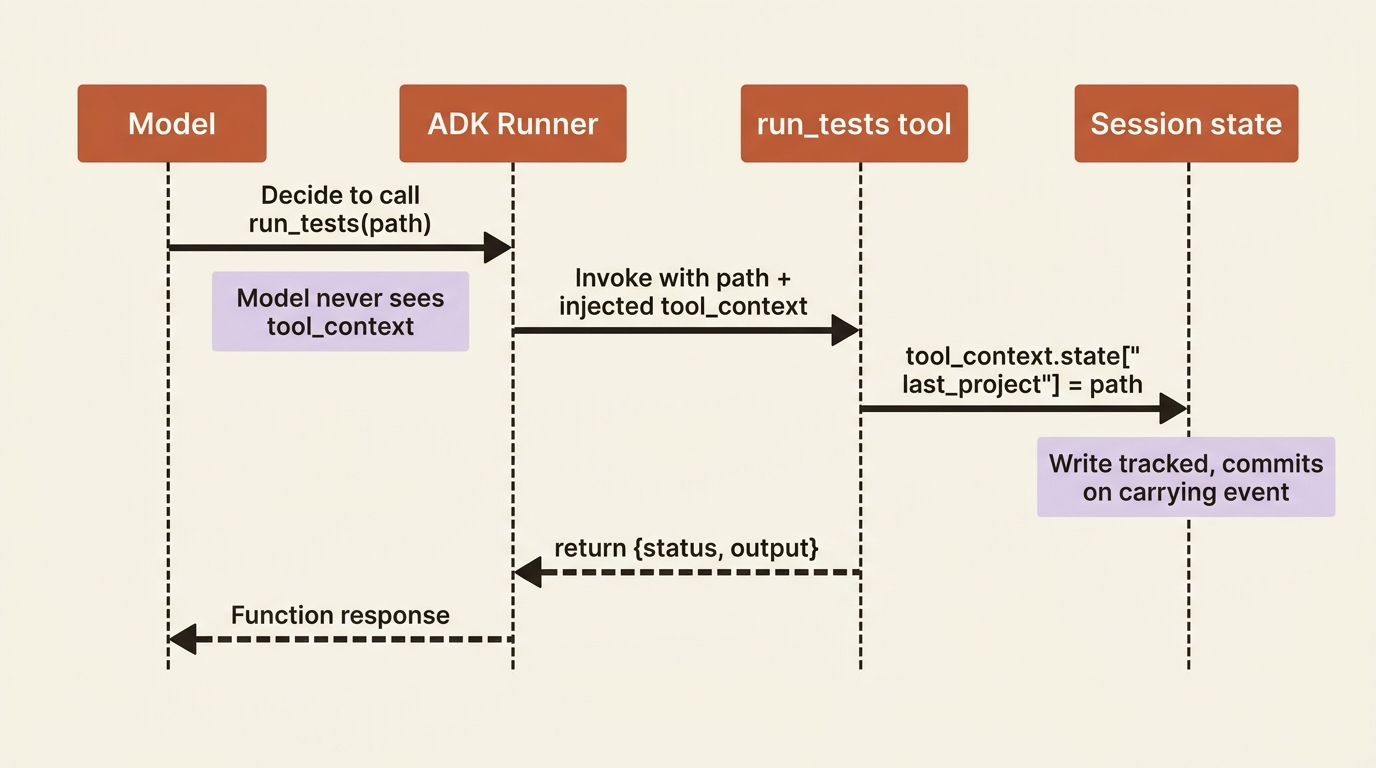
Sometimes a tool needs more than its arguments. It needs to read or write the conversation's state, influence what the agent does next, or know which tool call it is answering. ADK gives you that through a special parameter: add tool_context: ToolContext to your function signature and the framework injects it automatically when the tool runs.
Through tool_context you get a few useful levers. The state attribute is read-write access to the session state, and writes through it are tracked and persisted the proper way, which means they commit when the carrying event is processed rather than the instant you assign them. The actions attribute lets you influence the agent's next move, such as skipping the model's summarization of your result. And function_call_id is the unique id of this particular tool invocation, handy for correlating things like authentication responses when several tools fire in one turn.
For the test runner, we can record which project it last looked at, so later work can build on that memory:
from google.adk.tools import ToolContext


def run_tests(path: str, tool_context: ToolContext) -> dict:
    """Runs the pytest suite for a Python project and reports the results.

    Use this whenever you need to know whether a project's tests pass.

    Args:
        path: The filesystem path to the project directory to test.
    """
    tool_context.state["last_project"] = path  # commits on the carrying event
    result = subprocess.run(
        ["python", "-m", "pytest", path, "-q"],
        capture_output=True, text=True, timeout=120,
    )
    status = "passed" if result.returncode == 0 else "failed"
    return {"status": status, "output": result.stdout[-2000:]}
Gotcha. Do not document
tool_contextin the docstring'sArgssection, and do not describe it to the model at all. ADK injects it after the model has already decided to call the tool, so it plays no part in that decision. Listing it just confuses the model into thinking it needs to supply a value it never should. Document the real parameters; leavetool_contextout of the prose entirely.
A tool, in other words, is not limited to its arguments. The door to session state is right there when you need it.
Tools that take a while, and the human in the loop
Some work should not block the loop. A task that takes minutes, or one that needs a human to approve something before the agent continues, does not fit the run-and-return-immediately shape of an ordinary tool. ADK has a LongRunningFunctionTool for exactly this.
The mental model is pause-and-resume. When the model calls a long-running tool, your function kicks off the work and optionally returns an initial result, such as a ticket id or a "pending approval" status. ADK packages that into a function response so the model can tell the user what is happening, and then the agent run pauses. Later, your application sends back an intermediate update or a final answer, and the agent resumes from there. That pause-ask-resume cycle is the foundation of human-in-the-loop approval.
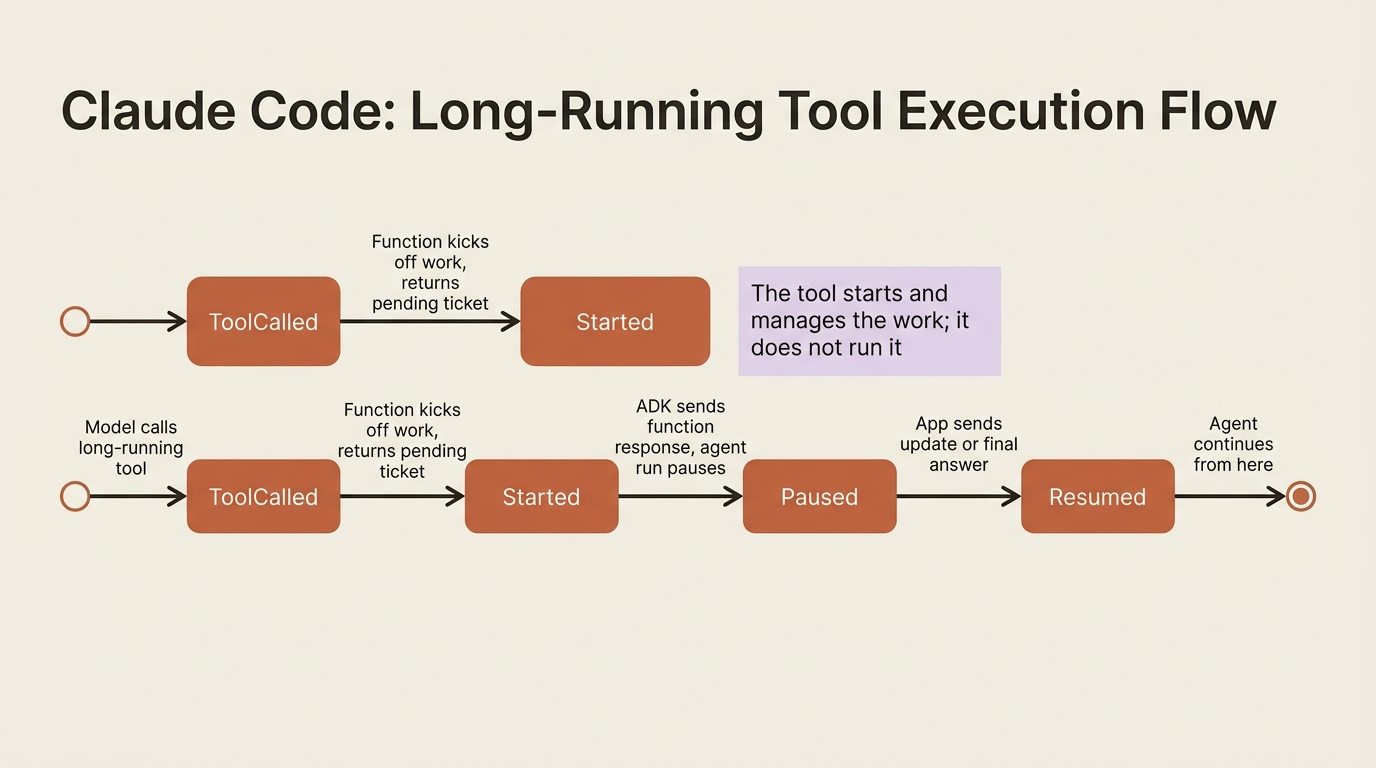
You wrap a function as a long-running tool the same easy way:
from google.adk.tools import LongRunningFunctionTool


def ask_for_approval(purpose: str, amount: float) -> dict:
    """Requests human approval for an action and returns a pending ticket.

    Use this when an action needs sign-off before proceeding, such as
    applying a risky fix. Returns a ticket the approver will act on.

    Args:
        purpose: A short description of what needs approval.
        amount: A numeric measure of the request's size or risk.
    """
    # Create a ticket and notify the approver out of band.
    return {"status": "pending", "ticket_id": "approval-1", "purpose": purpose}


approval_tool = LongRunningFunctionTool(func=ask_for_approval)
One sharp caveat trips people up. A long-running tool is for starting and managing a slow task, not for performing it. Do not put a five-minute computation inside the function and expect ADK to babysit it. The function should hand the work off to a separate worker or service and return a handle. ADK manages the conversational pause and resume around the task; it does not run the task for you. For work that is merely slow rather than human-gated, designing the tool for asynchronous, parallel execution is often the better answer than reaching for a long-running tool at all.
Do this today
You can turn a stubbed tool into a real one in an afternoon. Here is the shortest path.
- Write the function first, the docstring second, and reread the docstring as the model. Confirm it says what the tool does, when to use it, what each parameter is, and the shape of the return value.
- Audit your signatures against the rules. Few parameters, simple types like
strandint, meaningful names, and defaults only for genuinely optional values. Rename anydo_stuff-style function or generic parameter. - Return a dict with named keys such as
statusandoutput, so the model has labeled fields to reason over instead of an unlabeled blob. - Add
tool_context: ToolContextonly where a tool truly needs session state, and never document it in theArgssection, since the model must not try to fill it. - Reach for
LongRunningFunctionToolonly for human-gated or hand-off work, and make the function start and manage the task rather than perform it inline.
The work goes into the description
You turned a fake tool into a real one, and in the process learned the rule that governs every tool you will ever write for an agent: the model's entire understanding of a capability comes from the name, the signature, and the docstring, so that is where the work goes. You saw the guidelines that actually change behavior, met ToolContext for the cases where a tool needs to touch the session, and saw the long-running tool's pause-and-resume shape, with the warning that it manages slow work rather than doing it.
An agent that can run its own tests and read its own failures is a genuinely capable single agent. But a single agent trying to do everything, finding the bug, proposing a fix, reviewing the fix, and running the tests again, eventually collapses under its own instruction prompt, getting mediocre at every job because it is juggling all of them. The fix is not a bigger prompt. It is a team. And tools were the thing you needed first to make that team concrete.
So the next time your agent confidently ignores a tool you were sure it should use, do not touch the implementation. Reread the docstring as if you were the model, and you will usually find the bug in the very first line.
This is Part 3 of "Building with Google's Agent Development Kit (ADK)," an eleven-part guide that takes a working Python developer from zero to a hardened, observable, production-deployed agent on Google Cloud.