
Your ADK Agent Forgot the User's Name. Here Is the Prefix That Would Have Saved It.
Three kinds of memory, and the one-character prefix that decides which one a value gets, is why ADK agents forget the things they should keep and keep the things they should forget.
Session, State, and Memory are three different things, and ADK developers conflate them constantly. The difference is a prefix on a key and a choice of service, and getting it wrong is exactly why your agent forgets.
In this article: You will learn the three things a Google ADK agent can remember, namely the
Session, itsState, and its long-termMemory, and why they are not the same thing. You will see how a one-character prefix on a state key decides how long a value lives and who can read it, the only correct ways to write state so it actually persists, and how theSessionServiceyou pick turns a demo that forgets on restart into an agent that resumes cleanly.
You built an agent. It worked. Then you closed the terminal, restarted, and it remembered nothing. Not the project, not the user, not the fix it proposed five minutes ago. The reflex is to assume something broke. Nothing broke. You used in-memory storage and never told ADK that anything should outlive the process.
This article is about what your agent remembers, for how long, and who can see it. ADK gives you three distinct concepts here, and the single most common mistake in the whole framework is treating them as one thing. A Session is one conversation. State is the working memory inside it, and a prefix on the key decides how long a value lives and who shares it. Memory is a searchable archive that spans many conversations. Mix these up and you get an agent that forgets a name between two messages, or one that leaks one user's data into another's chat. Keep them straight and your agent remembers exactly what it should.
Three concepts, drawn apart
Start with the clean mental model, because the rest is detail.
A Session is a single conversation thread. It holds the chronological list of events and a state scratchpad, and it is identified by an id. One user opening your agent twice is two sessions. A SessionService is what creates, loads, saves, and deletes these threads. Your agent never manages sessions by hand.
State is the working memory inside a session: a dictionary of serializable key-value pairs the agent reads and writes during the conversation. It holds things like the user's current step in a task, a flag, or a value to inject into the next prompt.
Memory is different in kind. It is a searchable, long-term store that can span many past sessions, managed by a separate MemoryService. Where state is your short-term memory during one chat, memory is the library you consult to recall something from a conversation that ended last week.
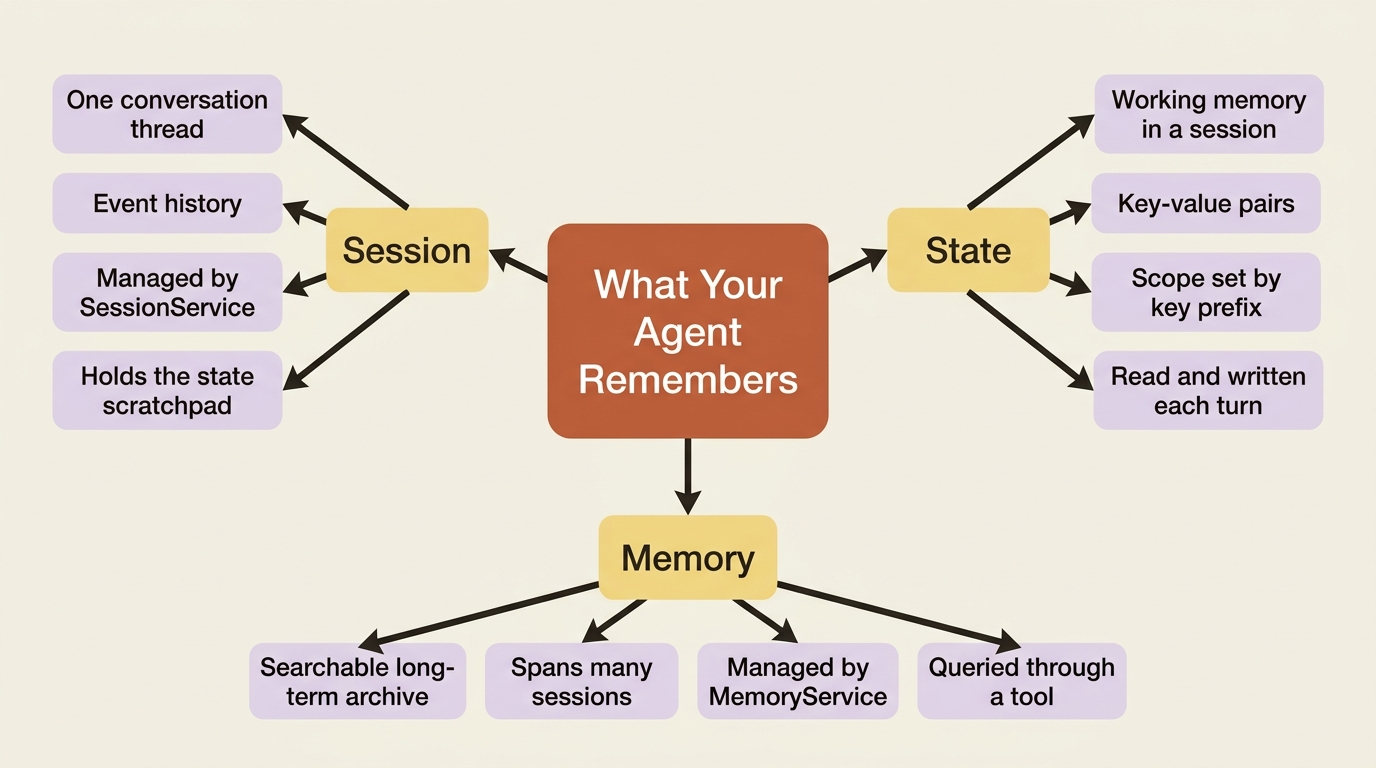
Hold that distinction. Session and state are the current conversation. Memory is everything outside it. Almost every confusion in this area is someone reaching for one when they needed the other.
State, and the prefix that changes everything
Here is the part worth committing to memory. In ADK, a prefix on a state key decides its scope and how long it lives. The same session.state dictionary holds keys at four different scopes, and the framework routes each to the right storage based on its prefix.
No prefix means session state. The value belongs to this one conversation. Use it for the current step of a task or a temporary flag: session.state['current_step'] = 'review'.
The user: prefix means user state, tied to the user_id and shared across all of that user's sessions in the same app. This is where preferences and profile details go: session.state['user:preferred_language'] = 'fr'. The user's other conversations will see it.
The app: prefix means app state, shared across every user and every session in the application. Global settings, shared templates: session.state['app:discount_code'] = 'SAVE10'.
The temp: prefix means temporary invocation state. It lives only for the current invocation, that single user-input-to-final-output cycle, and is discarded the moment the invocation ends. Use it for scratch values passed between tool calls within one turn, never for anything that must survive to the next message.
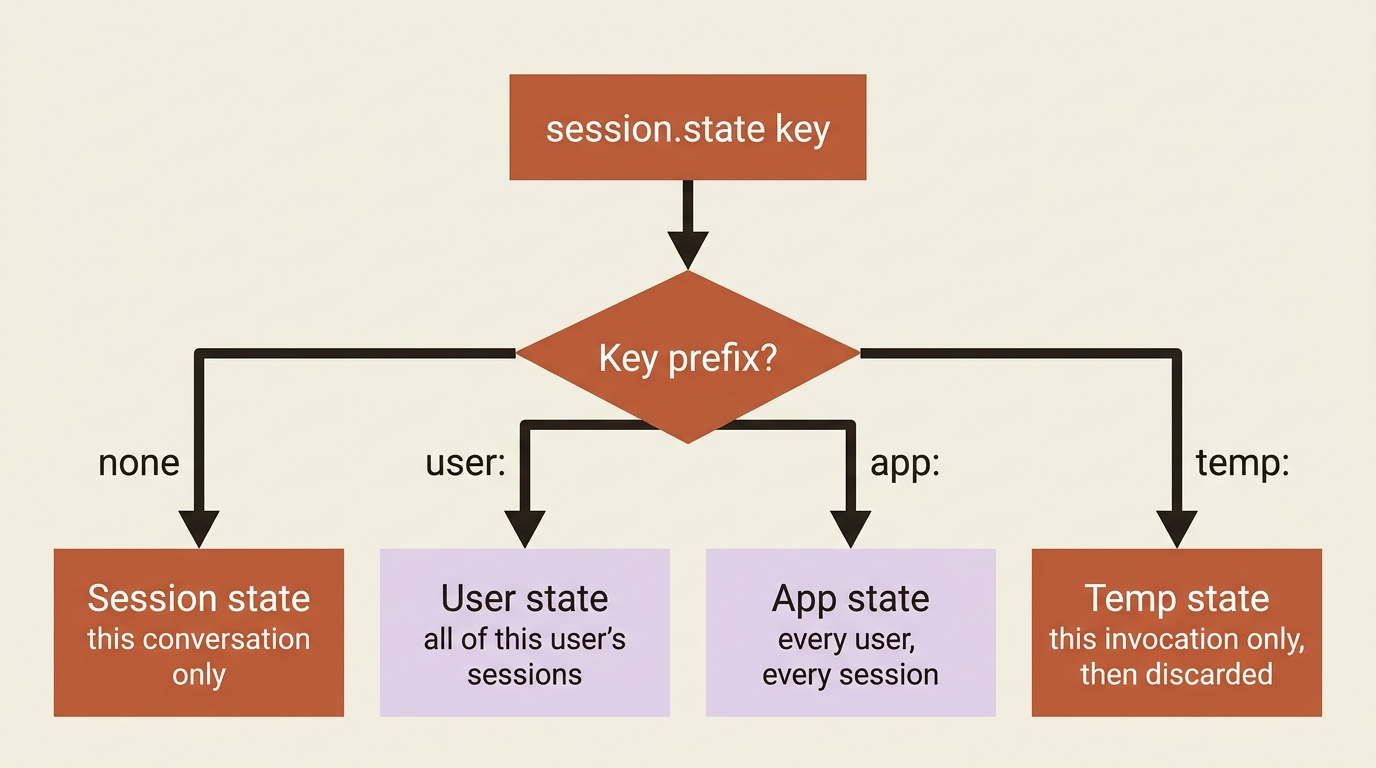
That last one is the classic trap.
Gotcha. Put a value the agent needs to remember into a
temp:key and it is gone by the next message, becausetemp:is discarded when the invocation ends. The agent that "forgets the user's name between two messages" almost always stashed it intemp:, or in plain session state under in-memory storage. If it must survive the turn, it does not belong intemp:. If it must survive across the user's conversations, it needsuser:.
One subtlety worth knowing: because a SequentialAgent passes the same invocation context to its sub-agents, the entire chain shares one temp: namespace within a turn. That is occasionally useful for passing scratch data between agents in a pipeline, but it is still gone when the turn ends.
Writing state the right way
In ADK, state commits on a yielded event, not on assignment. That rule has a practical corollary: there is a correct way to write state, and a tempting wrong way that silently fails to persist.
The right ways are three. The simplest is output_key on an LlmAgent: the framework takes the agent's output, wraps it into the event's state_delta, and the Runner commits it. Inside a tool or callback, you write through the context object, tool_context.state['k'] = v or callback_context.state['k'] = v, and the framework automatically folds that change into the event's delta. For complex updates touching multiple keys or specific prefixes outside an agent's text output, you construct an EventActions(state_delta=...) and append the event yourself.
The wrong way is grabbing a session from the service and mutating its dictionary directly:
# DON'T do this:
retrieved = await session_service.get_session(...)
retrieved.state["key"] = "value"   # bypasses the event system; will not persist
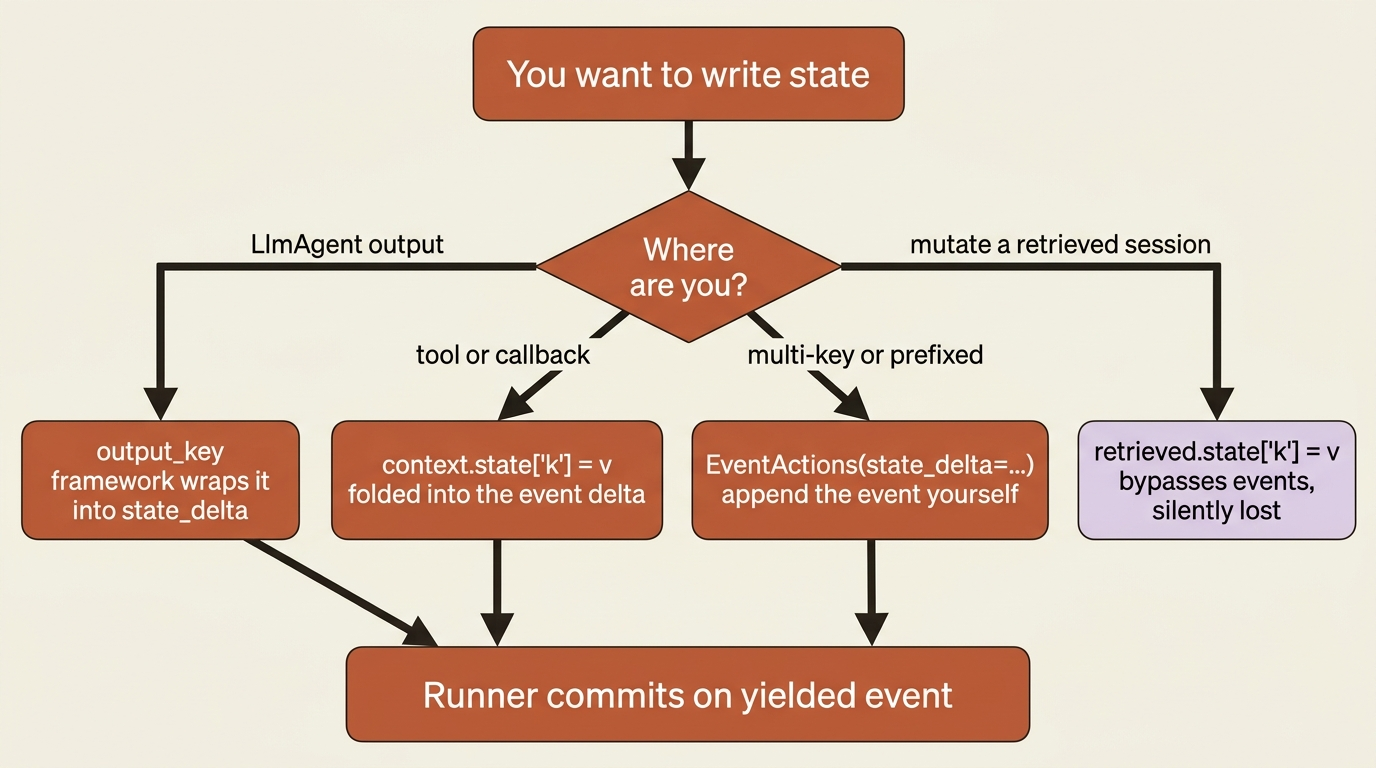
Gotcha. Directly modifying
session.stateon a session you pulled from the service, outside a tool or callback context, does not reliably persist. It bypasses the event history, will likely not be saved by a database or Vertex service, and is not thread-safe. Read state freely from a retrieved session, but write it only throughoutput_key, a context object'sstate, or an explicitEventActions(state_delta=...). Anything else is a write that quietly disappears.
Choosing where sessions live
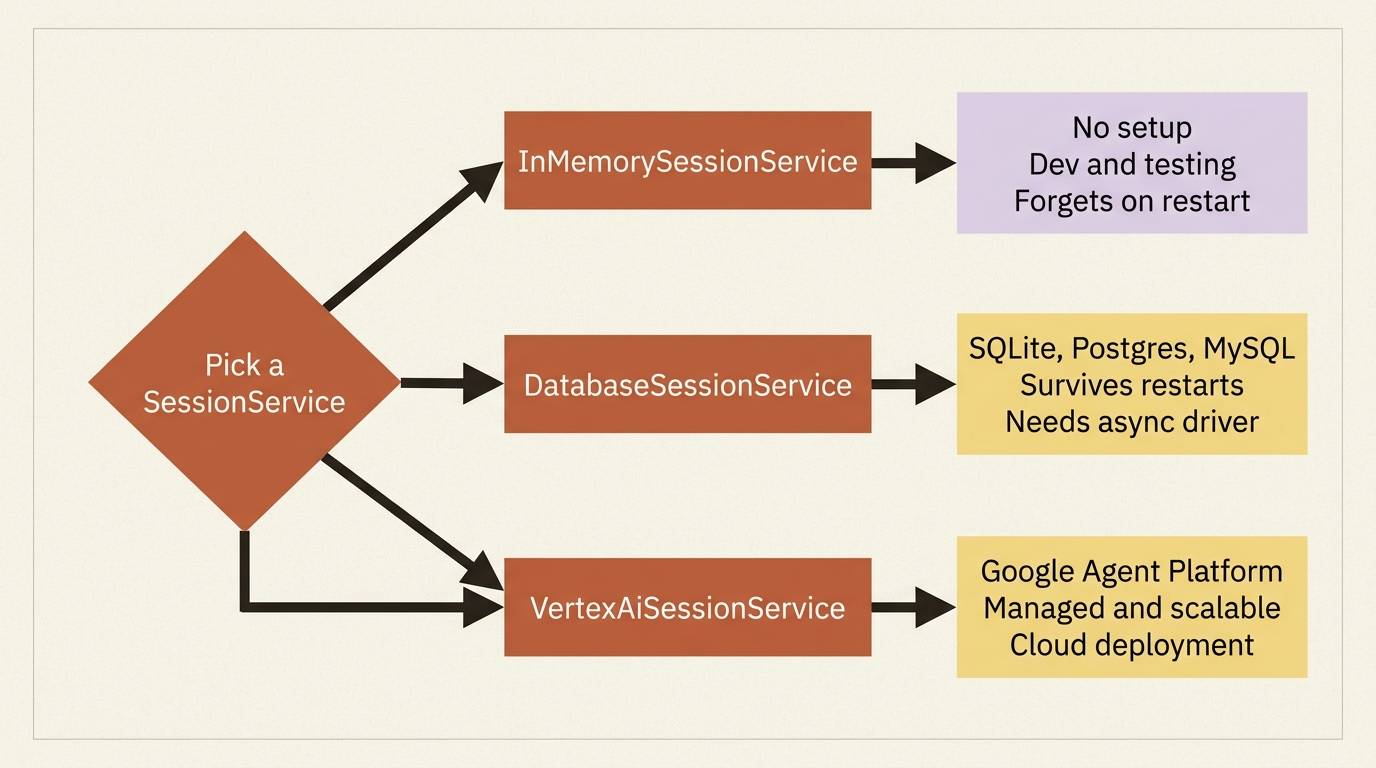
State persistence is not a property of state. It is a property of the SessionService you chose. The same user:-prefixed key is durable under one service and evaporates under another. You have three options.
InMemorySessionService keeps everything in process memory. It needs no setup and is perfect for development and testing, and it loses every session, including user: and app: state, the instant the application restarts. This is the one most people start with, and it is why the agent forgot everything after a restart.
DatabaseSessionService connects to a relational database such as SQLite, PostgreSQL, or MySQL, and stores sessions in tables that survive restarts. It is the right choice when you want reliable persistence you manage yourself. One catch worth knowing now: it needs an async driver, so a SQLite URL looks like sqlite+aiosqlite:///./my_agent_data.db, not plain sqlite.
VertexAiSessionService uses Google Cloud's Agent Platform infrastructure, managed and scalable, and is the natural choice when you deploy on Google Cloud.
from google.adk.sessions import InMemorySessionService, DatabaseSessionService

# Development: forgets on restart.
session_service = InMemorySessionService()

# Persistent: survives restarts. Note the async driver in the URL.
session_service = DatabaseSessionService(db_url="sqlite+aiosqlite:///./buggy_shop.db")
In production. The
SessionServiceyou pick is the entire difference between a demo that forgets on restart and an agent that resumes cleanly. In-memory for development, a database or Vertex service for anything deployed.
Giving an agent memory across runs
Suppose you want a code-maintenance agent to remember which project it last worked on, even in a brand-new conversation tomorrow. That is exactly what user: state plus a persistent service is for. If a run_tests tool already records tool_context.state["last_project"], promote that to a user: key and back it with a database, and the memory persists across sessions:
def run_tests(path: str, tool_context: ToolContext) -> dict:
    """Runs the pytest suite for a Python project and reports the results.

    Args:
        path: The filesystem path to the project directory to test.
    """
    tool_context.state["user:last_project"] = path   # survives across this user's sessions
    # ... run pytest as before ...
Paired with DatabaseSessionService, the next time this user starts a conversation, state['user:last_project'] is already populated, and an agent instruction can reference {user:last_project} to pick up where things left off. Same code, durable result, because the prefix and the service agree.
Memory: recalling past conversations
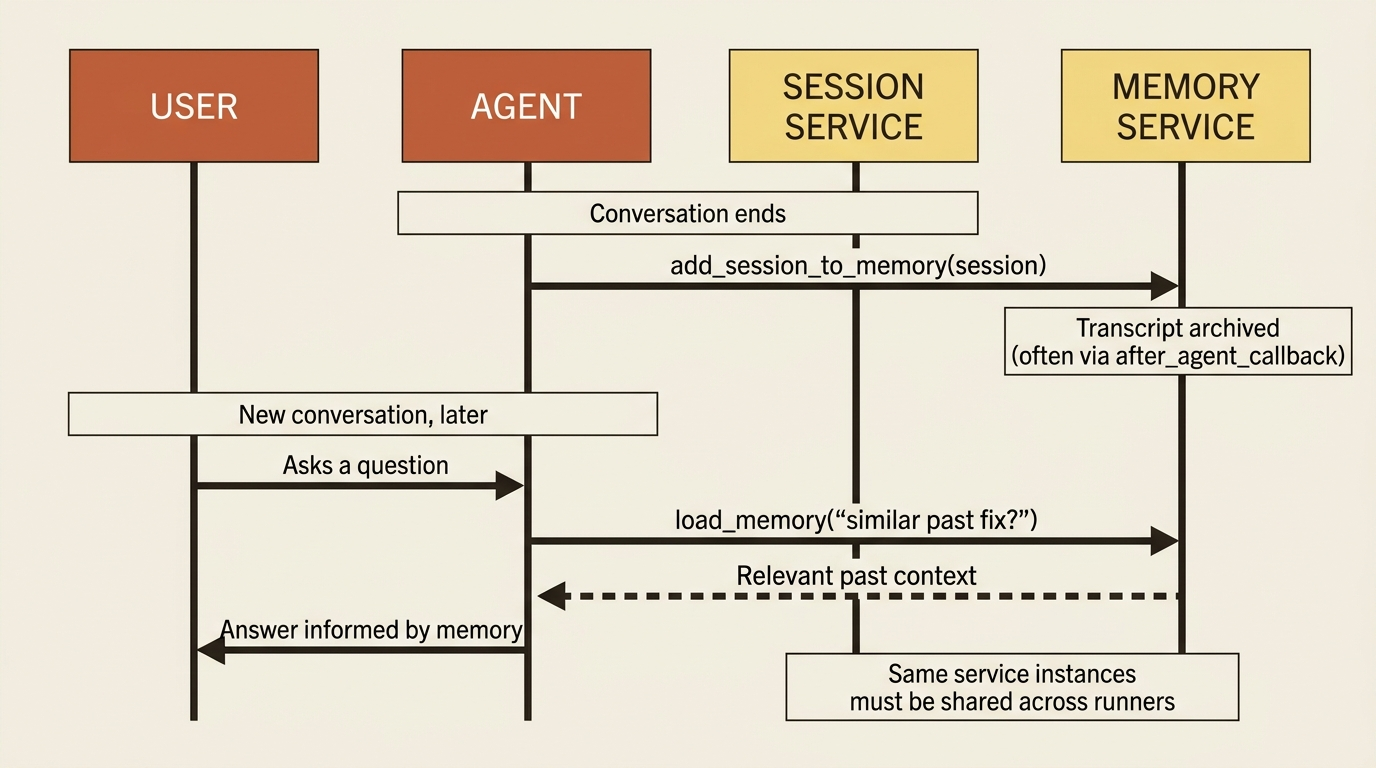
State, even user: state, is about values you deliberately tracked. Memory is about searching the substance of past conversations. The MemoryService is a searchable archive, and ADK ships three implementations. InMemoryMemoryService does basic keyword matching, needs no setup, and loses everything on restart, so it is for prototyping. VertexAiMemoryBankService extracts and consolidates meaningful information from conversations using an LLM and offers semantic search. VertexAiRagMemoryService indexes full transcripts for vector-similarity retrieval, the right pick when you already run RAG infrastructure.
The workflow has two halves: getting conversations into memory, and letting an agent search them. You write a completed session into the store with add_session_to_memory, often automated with an after_agent_callback so every finished conversation is archived. You let an agent retrieve from the store with one of two built-in tools: LoadMemoryTool, which the agent calls when it decides past context would help, or PreloadMemoryTool, which fetches relevant memory at the start of every turn automatically.
from google.adk.agents import LlmAgent
from google.adk.tools import load_memory   # the agent-triggered memory search tool

recall_agent = LlmAgent(
    model="gemini-flash-latest",
    name="recall_agent",
    instruction=(
        "Answer the user's question. Use the 'load_memory' tool if the answer "
        "might be in a past conversation, for example a fix you proposed before."
    ),
    tools=[load_memory],
)
For a code-fixing agent, this is how it consults a memory of past fixes: archive each completed fixing session, and give the fixer the load_memory tool so that when it sees a familiar failure, it can search whether it has solved something like this before instead of starting cold.
One wiring detail trips people up, and it is worth stating plainly.
Gotcha. Memory only works if the same
SessionServiceandMemoryServiceinstances are shared across the runners that write and read them. Spin up a fresh service in each runner and the second one searches an empty archive, so the agent "remembers nothing" even though your code looks right. Create the services once and pass the same objects everywhere.
Do this today
- Audit your prefixes. Grep your agent for
state[writes and check the prefix on each. Anything that must survive the turn does not belong intemp:; anything that must follow the user across conversations needsuser:. - Stop mutating retrieved sessions. Find any
get_session(...)followed by a directstate[...] = ...assignment and replace it withoutput_key, atool_context.statewrite, or an explicitEventActions(state_delta=...). - Swap in a real
SessionService. ReplaceInMemorySessionService()withDatabaseSessionService(db_url="sqlite+aiosqlite:///./agent.db")and confirm youruser:state survives a restart. - Wire up memory once. If you want cross-session recall, create one
MemoryService, archive finished sessions withadd_session_to_memory, and give the agent theload_memorytool. Share the same service instances across every runner.
Three questions, finally answerable
You can now answer the three questions that define what an agent remembers. What conversation am I in: the Session. What do I know right now, and how long does it last: State, scoped by its prefix, user: or app: or temp: or none. What can I recall from other conversations: Memory, searched through a tool and fed by add_session_to_memory. And you know that durability is a choice you make when you pick a SessionService, not a default you get for free.
The agent that forgot everything was not broken. It was honest about being in-memory. Give it a user: prefix and a persistent service and it remembers the project it last touched across sessions, and a load_memory tool and it can consult past fixes. The prefix and the service finally agree, and that is the whole difference between a demo and a real, persistent agent.
This is Part 5 of "Building with Google's Agent Development Kit (ADK)," an eleven-part guide that takes a working Python developer from zero to a hardened, observable, production-deployed agent on Google Cloud.