
Your ADK Agent Goes Silent for Forty Seconds. Your User Thinks It Crashed.
A working agent that says nothing while it runs looks broken from the outside; ADK streaming surfaces the work it is already doing, from typewriter text to live voice.
A working agent that says nothing while it runs is indistinguishable, from the outside, from a broken one. ADK streaming lets the agent show its work, from typewriter text to live voice. Here is how to switch it on.
In this article: You will learn the one knob that governs how ADK delivers a response,
streaming_mode, and its three settings. You will build a live terminal UI that surfaces tool calls and types the answer out word by word, see how to choose which events reach the user, and meet the bidirectional voice path throughrun_live()and aLiveRequestQueue. By the end, a dead-feeling pause becomes visible progress.
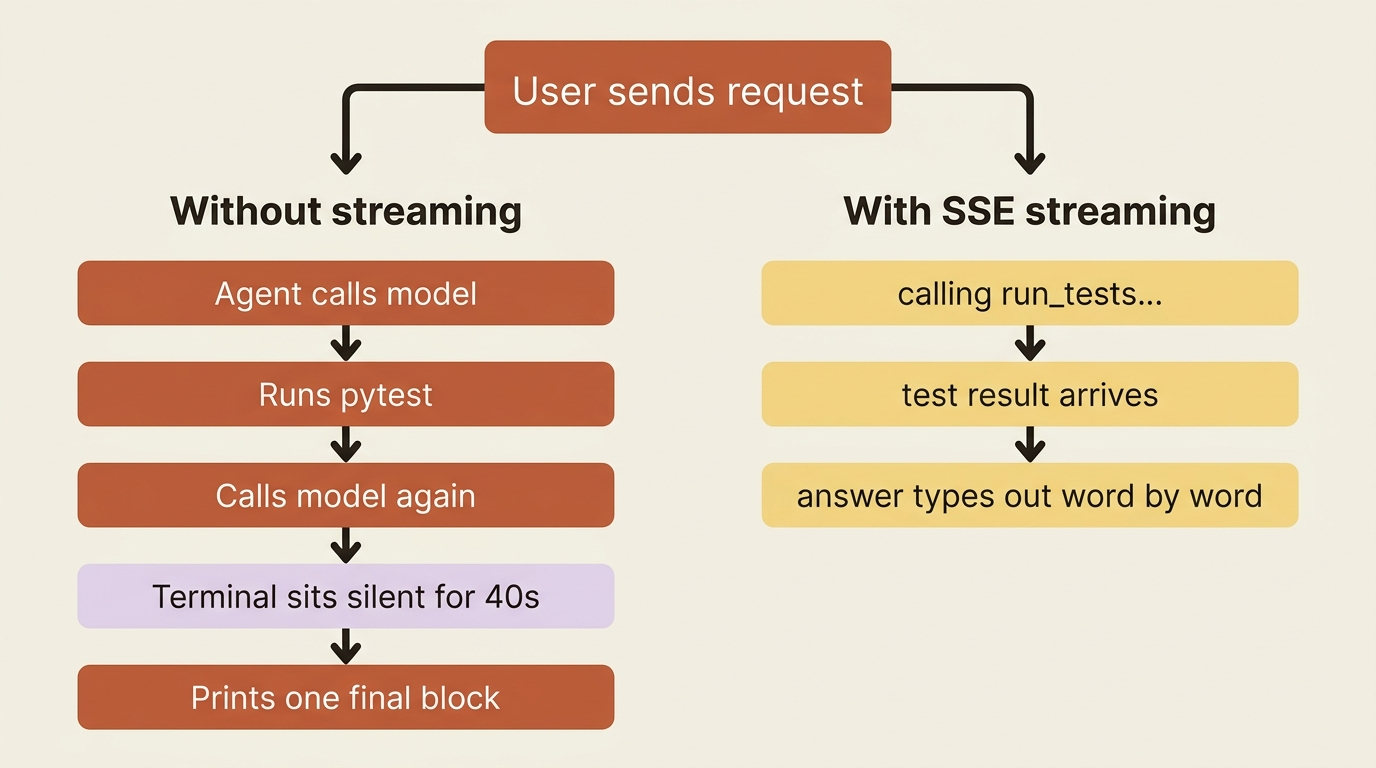
Run a real agent against a real repo and something uncomfortable happens. The terminal sits there. The agent is calling the model, running pytest, reading the output, and calling the model again, all of which takes real seconds, and during those seconds the user sees nothing. No text, no spinner, no sign of life. A patient user waits. A normal user assumes it hung and kills it.
This is a UX problem, not a logic problem, and it has a clean fix. The agent already produces a stream of events as it works. ADK streaming is just the practice of surfacing that stream to the user as it happens, instead of swallowing everything and printing one block at the end. ADK supports this at two very different levels: simple token-by-token text streaming for a chat UI, and full bidirectional voice and video for a live conversational agent. This article covers both, starting with the one you will reach for far more often.
Three modes, and which one you actually want
ADK has a single knob that governs delivery, streaming_mode, set on a RunConfig, and it has three settings. Knowing which is which saves a lot of confusion.
StreamingMode.NONE is the default. The runner produces one complete response per turn. This is right for batch jobs, scripts, and any case where nobody is watching a screen in real time.
StreamingMode.SSE is server-sent-events streaming over the normal run_async path. The runner yields partial events as the model generates them, which is what powers a typewriter-style UI: text appearing word by word, tool calls showing up the moment they happen. This is the everyday "show the user progress" mode, and it is where this article spends most of its time.
StreamingMode.BIDI is bidirectional streaming for the Live API, reached through a different method, run_live(), not run_async. It is for real-time voice and video, where the user can talk while the agent is still responding. It is powerful, it is more involved, and it is currently experimental. We cover it in the back half.
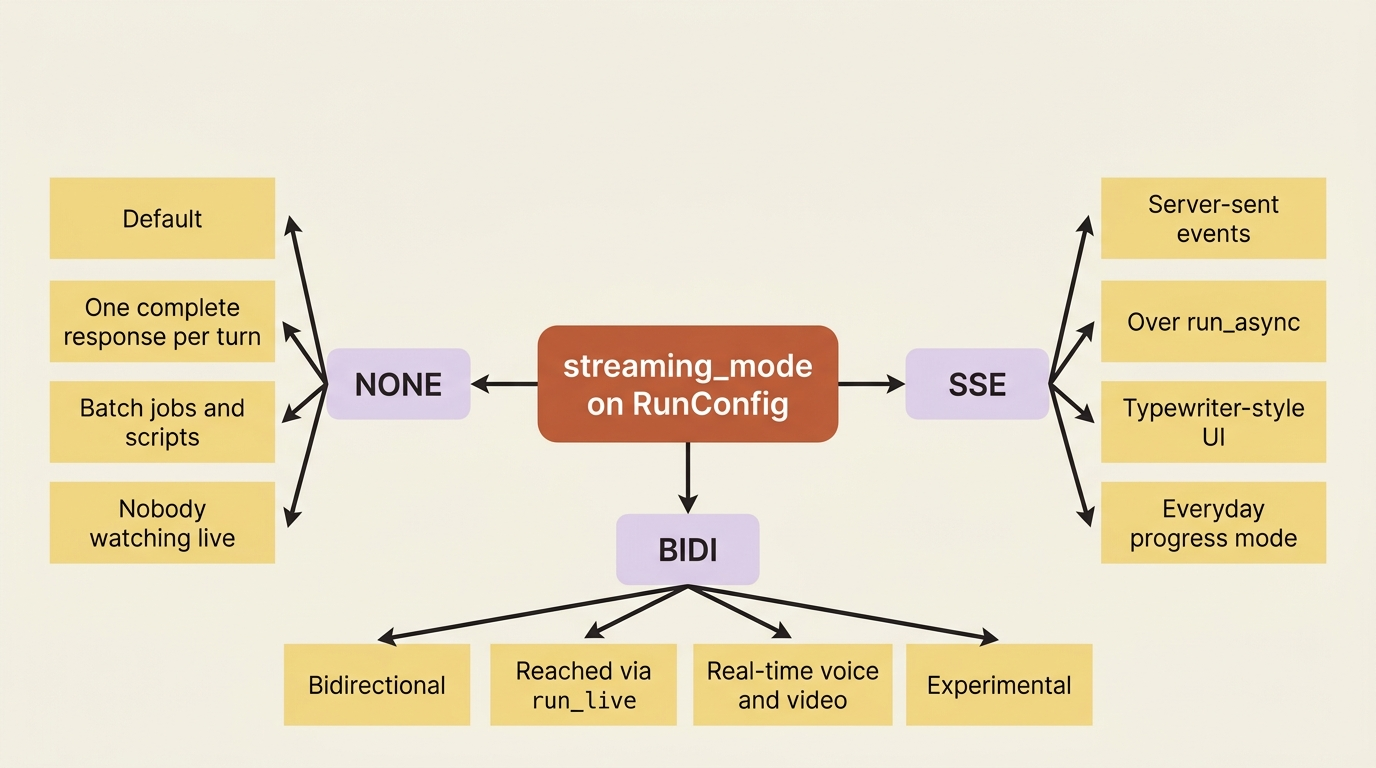
One clarification, because it trips people up: these modes describe how ADK talks to the Gemini model, not how your app talks to its own users. You can build a WebSocket frontend on top of SSE mode, or a plain REST endpoint, however you like. The mode is about the ADK-to-model protocol underneath.
Text streaming: making the agent talk while it works
Start with the common case. You want the agent's output to appear as it is produced, and you want to show tool calls and intermediate steps live so the user knows work is happening. You already have everything you need, because the event loop was streaming events all along. You just print them as they arrive instead of waiting for the end.
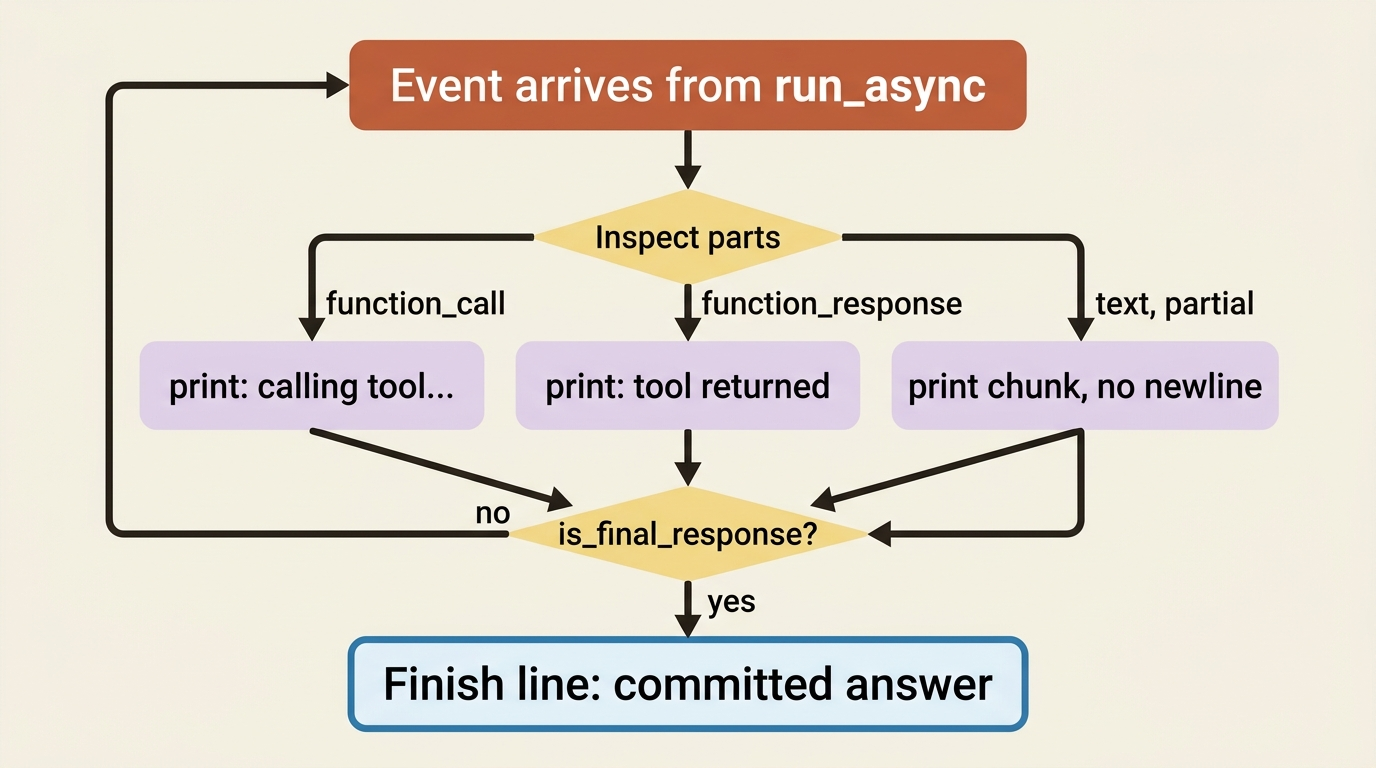
Here is the behavior that makes this work. When the model generates a response token by token, the runtime yields many events for that one reply, most marked partial=True. The runner forwards those partial events immediately so your UI can render them, and it commits state only on the final, non-partial event. That is exactly what a typewriter UI wants: stream the partials to the screen, and treat the final one as the committed answer.
So a live terminal UI is mostly a matter of inspecting each event as it comes and printing the right thing:
async for event in runner.run_async(
    user_id=USER_ID, session_id=SESSION_ID, new_message=content
):
    if event.content and event.content.parts:
        for part in event.content.parts:
            if part.function_call:
                print(f"\n[calling {part.function_call.name}...]", flush=True)
            elif part.function_response:
                print(f"[{part.function_call.name if part.function_call else 'tool'} returned]", flush=True)
            elif part.text:
                # Partial text arrives in chunks; print without a newline to build it up.
                print(part.text, end="", flush=True)

    if event.is_final_response():
        print()  # finish the line on the committed answer
The behavior this produces is the whole point. The moment the agent decides to run the tests, the user sees [calling run_tests...]. When the result comes back, they see it. When the agent starts composing its explanation, the text types itself out. The forty-second silence becomes forty seconds of visible progress, and the user never wonders whether it died. Notice we still lean on is_final_response() to know when the turn is genuinely done, rather than guessing.
To turn this on at the runtime level rather than just reading events as they come, set the mode explicitly on a RunConfig:
from google.adk.agents.run_config import RunConfig, StreamingMode

run_config = RunConfig(streaming_mode=StreamingMode.SSE)
# pass run_config into the runner's run call
This is the version of streaming most agents need. It costs you almost nothing, it reuses the loop you already understand, and it is the difference between an app that feels responsive and one that feels broken.
What to stream, and what to hide
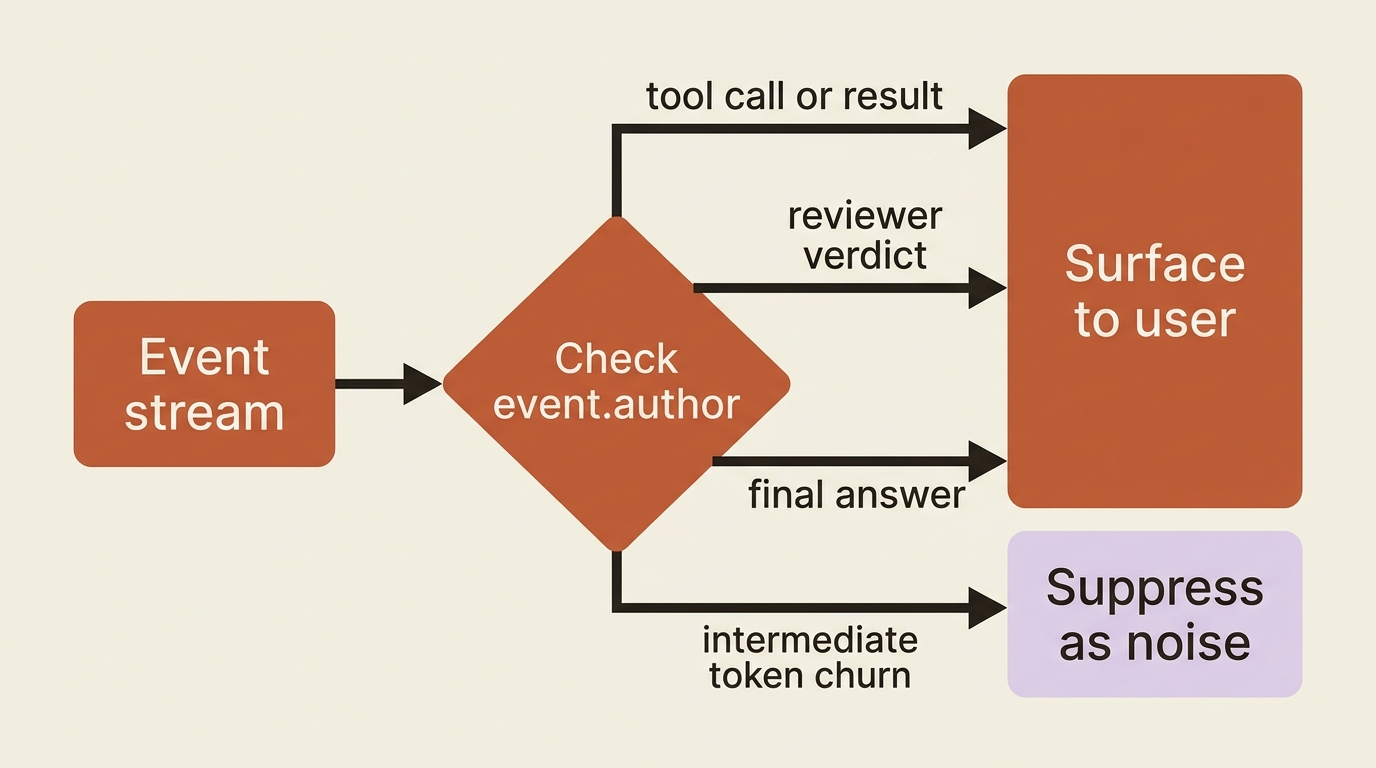
Streaming everything is not always the goal. Your agent produces a lot of intermediate chatter: reasoning, deliberation, and raw tool output. Some of that is useful to show, and some is noise that makes the experience worse. The event stream gives you the raw material; deciding what reaches the user is a product call.
A reasonable default: show the high-signal milestones, such as a tool being called, a test result arriving, and the final answer typing out, and suppress the low-level token churn of intermediate agents the user did not ask to watch. Because every event carries its author, you can filter by which agent produced it, surfacing a reviewer's verdict while quietly dropping its internal mutterings. Streaming is a dial, not a switch. You choose the signal.
Bidirectional streaming: when the agent needs to listen and speak
Now the harder, flashier case. Sometimes text is not the interface. You want a user to talk to the agent, have it respond in voice, and crucially be able to interrupt it mid-sentence the way people interrupt each other in real conversation. That is a fundamentally different interaction than request-then-response, and ADK handles it through the Gemini Live API Toolkit.
Be honest about the bar here. This is experimental, it is Python-focused, and it requires a Gemini model that supports the Live API. It is not the five-minute change that text streaming is. But it is also genuinely hard to build by hand, which is the reason to let ADK do it. Managing a WebSocket connection, orchestrating tool calls mid-stream, handling audio in and audio out, and coordinating all of that concurrently is exactly the kind of plumbing the framework exists to absorb.
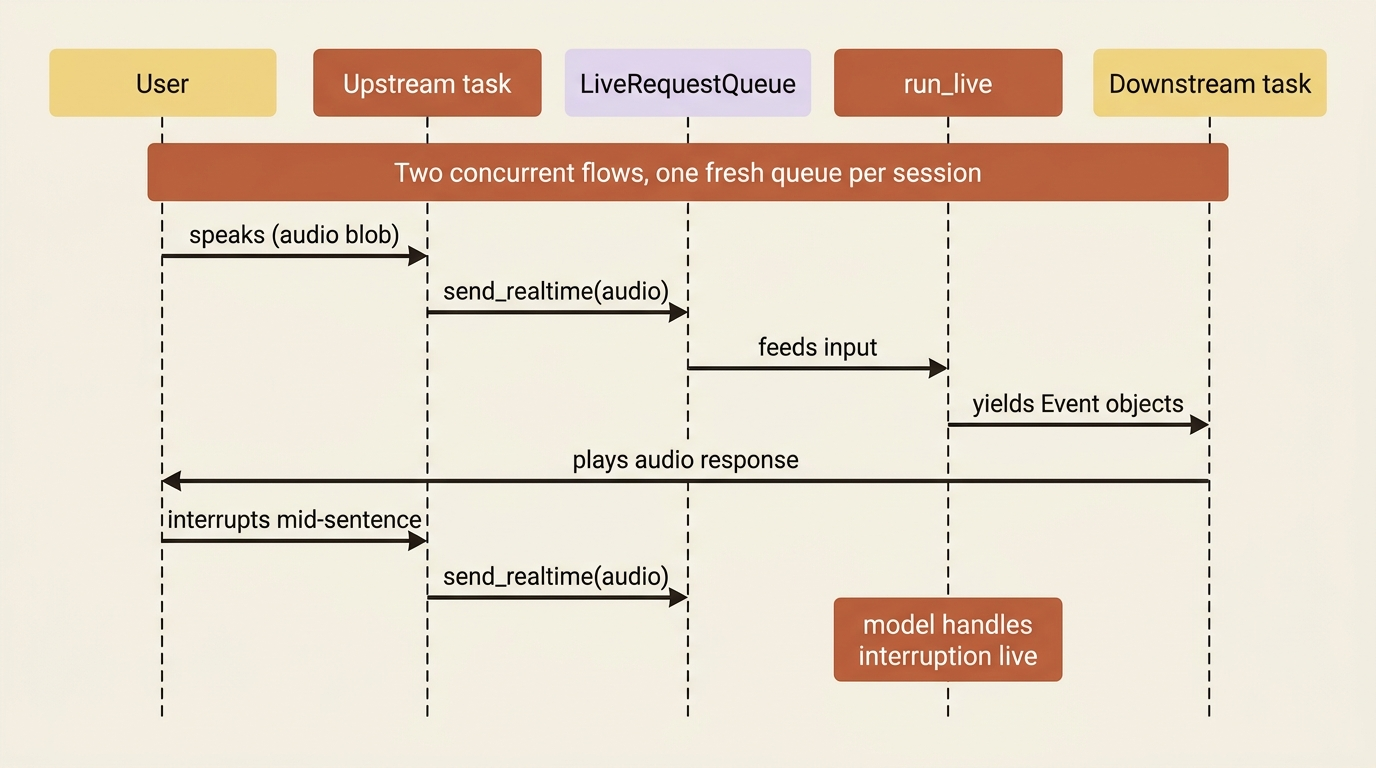
The mental model shifts from "iterate a stream of events" to "two concurrent flows." You open a session with run_live() instead of run_async, and you communicate through a LiveRequestQueue. An upstream task takes input from the user, such as text, audio blobs, or video frames, and pushes it onto the queue. A downstream task reads the Event objects that run_live() yields and sends them back to the user. Both run at once, which is what lets the user speak while the agent is still talking.
from google.adk.agents.run_config import RunConfig, StreamingMode
from google.adk.agents.live_request_queue import LiveRequestQueue
from google.genai import types

run_config = RunConfig(
    streaming_mode=StreamingMode.BIDI,
    response_modalities=["AUDIO"],   # one modality per session: TEXT or AUDIO
    input_audio_transcription=types.AudioTranscriptionConfig(),
    output_audio_transcription=types.AudioTranscriptionConfig(),
)

live_request_queue = LiveRequestQueue()
# Upstream: live_request_queue.send_content(...) / send_realtime(audio_blob)
# Downstream: async for event in runner.run_live(..., live_request_queue=live_request_queue, run_config=run_config): ...
A couple of sharp edges are worth naming so they do not surprise you. A session is locked to one response modality: you pick TEXT or AUDIO at the start and cannot switch mid-session. The LiveRequestQueue is also single-use.
Gotcha. Never reuse a
LiveRequestQueueacross streaming sessions. Eachrun_live()session needs a fresh queue, because the close signal and any leftover messages persist in the old one and will corrupt the next session's ordering and state. Create a new queue per session, and close it when the session ends.
Gotcha. Voice and video require a Gemini model that supports the Live API. A regular model ID will not silently downgrade; it simply will not work for
BIDIaudio. Check your model against the current Live-API-capable list (see https://ai.google.dev/gemini-api/docs/models) before wiring sound, and remember the toolkit is experimental, so pin versions and expect some churn.
Building a full voice app, including the FastAPI server, the WebSocket frontend, and the audio encoding, is a project in its own right, and ADK ships a complete reference implementation worth studying (see the ADK streaming samples at https://github.com/google/adk-python) rather than reconstructing from a tutorial. The takeaway is the shape: run_live() plus a LiveRequestQueue, two concurrent flows, one modality per session. When you need a talking agent, that is the door.
Do this today
- Switch on SSE. Create a
RunConfig(streaming_mode=StreamingMode.SSE)and pass it into your runner's run call. That single line turns the everyday "show progress" mode on. - Print events as they arrive. Wrap
runner.run_async(...)in anasync forloop, inspect each event's parts, and print function calls, function responses, and partial text without waiting for the end. - Lean on
is_final_response(). Use it to know when the turn is genuinely done, rather than guessing from the content. - Filter by
author. Surface high-signal milestones (tool calls, results, the final answer) and suppress the intermediate token churn the user did not ask to watch. - Before wiring voice, verify your model is on the current Live-API-capable list, and create one fresh
LiveRequestQueueperrun_live()session.
A dead pause becomes visible progress
Your agent no longer has to work in silence. For the common case, SSE streaming over the loop you already understand turns a dead-feeling pause into visible, typewriter-style progress, with the partial-versus-final event distinction doing the heavy lifting. For the ambitious case, the Live API Toolkit gives you real-time voice and video through run_live() and a LiveRequestQueue, with the honest caveats that it is experimental and demands a Live-capable model.
In both cases, you are not streaming blindly. You choose which events reach the user, which signal to surface, and which noise to drop. The difference between an app that feels responsive and one that feels broken is rarely a smarter agent. It is letting the agent you already built show its work.
This is Part 6 of "Building with Google's Agent Development Kit (ADK)," an eleven-part guide that takes a working Python developer from zero to a hardened, observable, production-deployed agent on Google Cloud.