
You Gave Your Agent Hands. Now Give It a Leash.
An AI agent that can write files and run shell commands needs two different kinds of restraint, and confusing them is how production data gets deleted.
An AI agent that can write files and run shell commands is exactly as useful as it is dangerous. Here are the two controls that keep a Deep Agent productive without letting it wreck your repository.
In this article: You will learn the two safety controls every production Deep Agent needs and why they are not interchangeable. We cover declarative filesystem permissions, the first-match-wins rule that trips up almost everyone, the boundary where permissions stop working, and human-in-the-loop approval with its pause-collect-resume cycle. By the end you will know which control to reach for and how to wire both into a real agent.
In an earlier step of building a Deep Agent, you give it a real filesystem. With it comes the ability to write files, overwrite files, and, once it has a sandbox, run shell commands. That is exactly the capability you wanted. It is also exactly the capability that ends careers when an agent edits the wrong file, clobbers a config it should never have touched, or runs a command nobody approved.
An agent that can act is an agent that can act wrongly. The gap between "it worked in my testing" and "it deleted production data" is a leash you forgot to attach. And the worst version of this failure is silent. There is no exception, no stack trace, just a file that is now different from what you expected.
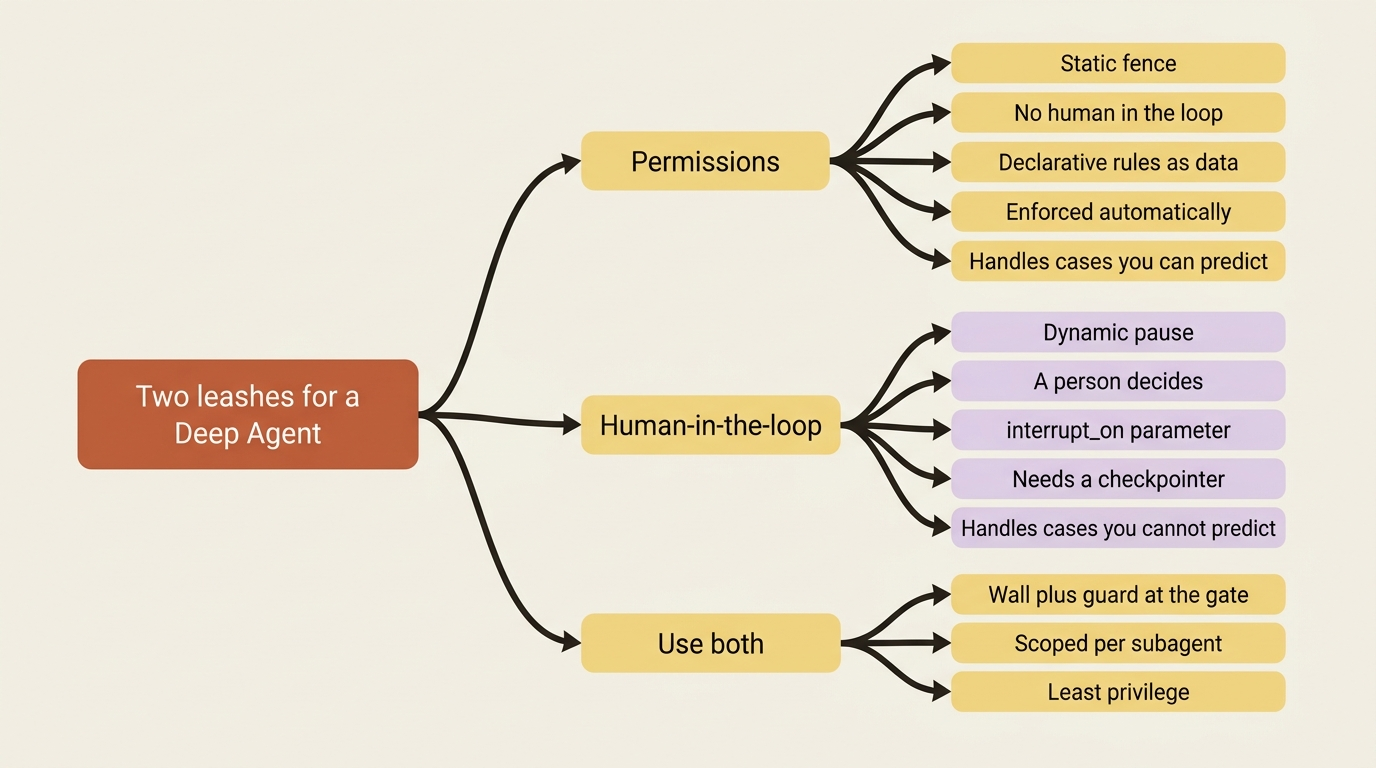
Deep Agents gives you two leashes, and the first thing to understand is that they are not redundant. They guard different things. The first is permissions, a static fence around which files the agent may read or write, enforced automatically with no human in the loop. The second is human-in-the-loop, a dynamic pause that hands a specific action to a person for a yes or no before it runs. Permissions are the wall. Approval is the guard at the gate. Real agents use both, because the wall handles the cases you can predict and the guard handles the ones you cannot.
Permissions: a fence you declare once
The core idea: you hand create_deep_agent a list of rules, each one allowing or denying read or write on a set of paths, and the built-in filesystem tools respect them automatically.
Permissions in Deep Agents are declarative. You do not write logic that inspects each file operation. You describe the policy as data, and the harness enforces it. Each rule is a FilesystemPermission with three fields, and the whole model fits in a sentence: an operation, a set of paths, and whether to allow or deny.
The operations field is "read", "write", or both. Read covers ls, read_file, glob, and grep. Write covers write_file and edit_file. The paths field is a list of glob patterns, with ** for recursive matching, so /workspace/** means everything under the workspace. The mode field is "allow" or "deny".
Here is the simplest useful policy, a read-only agent that may look but never touch:
from deepagents import FilesystemPermission, create_deep_agent

agent = create_deep_agent(
    model="anthropic:claude-sonnet-4-6",
    backend=backend,
    permissions=[                       # ①
        FilesystemPermission(
            operations=["write"],       # ②
            paths=["/**"],              # ③
            mode="deny",                # ④
        ),
    ],
)
① The permissions parameter takes a list of rules; here the list holds a single rule, which is all this policy needs.
② The operations field scopes the rule to writes only, so reads (ls, read_file, glob, grep) are left untouched.
③ The paths field uses the recursive /** glob to match every file on the filesystem.
④ The mode field set to "deny" turns the rule into a blanket write ban across all of those paths.
Note: The full extracted listing at code/langchain_deepagents/part-5-permissions-and-hitl/listings/01-read-only-agent.py shows the backend setup elided here.
What that does: it denies every write everywhere, so the agent can read and search the whole filesystem but cannot modify a single file. One rule, and an entire class of mistakes is now impossible rather than merely discouraged. That is the appeal of a declarative fence. It does not depend on the model behaving well.
First match wins, so order is the whole game
The rule that trips everyone up: permissions are evaluated top to bottom, and the first one that matches decides the outcome. Specific rules must come before broad ones or they never fire.
The single most important thing to internalize about permissions is the evaluation order. Rules are checked in declaration order, and the first rule whose operation and path match the current call wins. If no rule matches at all, the operation is allowed, a permissive default. That ordering is not a detail. It is the entire behavior, and getting it backwards is the most common permissions bug.
The canonical pattern is "carve out, then allow the zone, then deny the rest." Say you want the agent to work freely in /workspace but never read or write the secrets file inside it:
permissions = [
    FilesystemPermission(operations=["read", "write"], paths=["/workspace/.env"], mode="deny"),    # ①
    FilesystemPermission(operations=["read", "write"], paths=["/workspace/**"], mode="allow"),      # ②
    FilesystemPermission(operations=["read", "write"], paths=["/**"], mode="deny"),                 # ③
]
① The narrowest rule comes first: it denies all access to the single .env secrets file, so it gets the first say before any broader rule can match.
② The workspace rule comes second: it allows read and write everywhere under /workspace, opening up the working area now that the secret is already carved out.
③ The broadest rule comes last: it denies everything else on the filesystem, shutting the door on any path the two rules above did not match.
Note: The full extracted listing at code/langchain_deepagents/part-5-permissions-and-hitl/listings/02-first-match-wins.py shows the backend and agent wiring elided here.
What that ordering buys you: the .env deny is checked first, so it catches the secrets file before the broad workspace allow can match it. Then the workspace allow opens up everything else under /workspace. Then the final deny shuts the door on the rest of the filesystem.
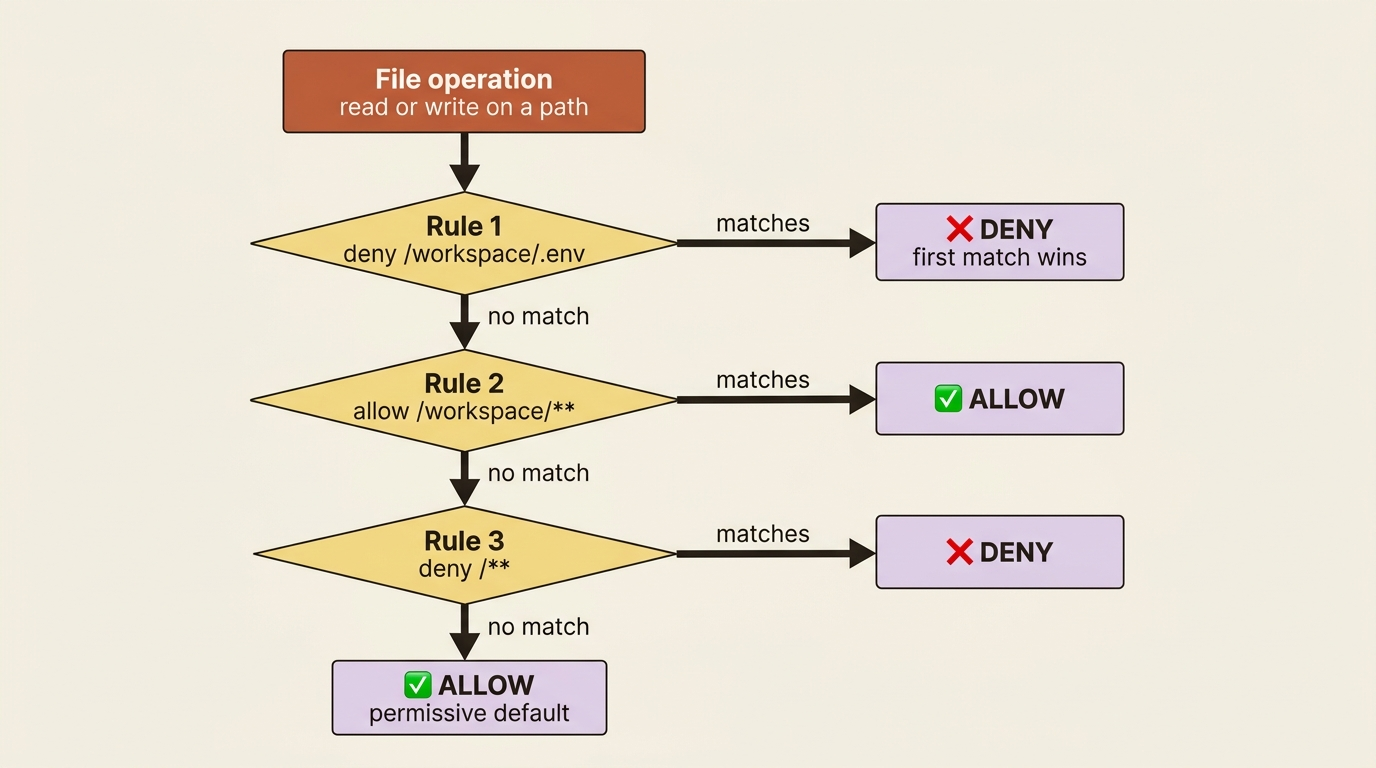
Now flip the first two rules. The bug is silent: /workspace/** matches .env first, says allow, and the deny below it never runs. Same rules, opposite result, no error to tell you. This is the failure mode that hurts, because nothing in the system signals that your fence has a hole in it. The lesson is short enough to memorize: specific before broad, always.
What permissions do not cover
This is the boundary that gets people hurt, so be clear-eyed about it. The permissions system governs exactly the six built-in filesystem tools and nothing more.
A custom tool you write that happens to open files is not covered. An MCP tool from an external server is not covered. And critically, the execute tool that a sandbox backend adds is not covered, because shell commands can touch the filesystem in ways a path rule cannot anticipate. A deny on /workspace/secrets/** does nothing to stop cat /workspace/secrets/key.pem running through execute.
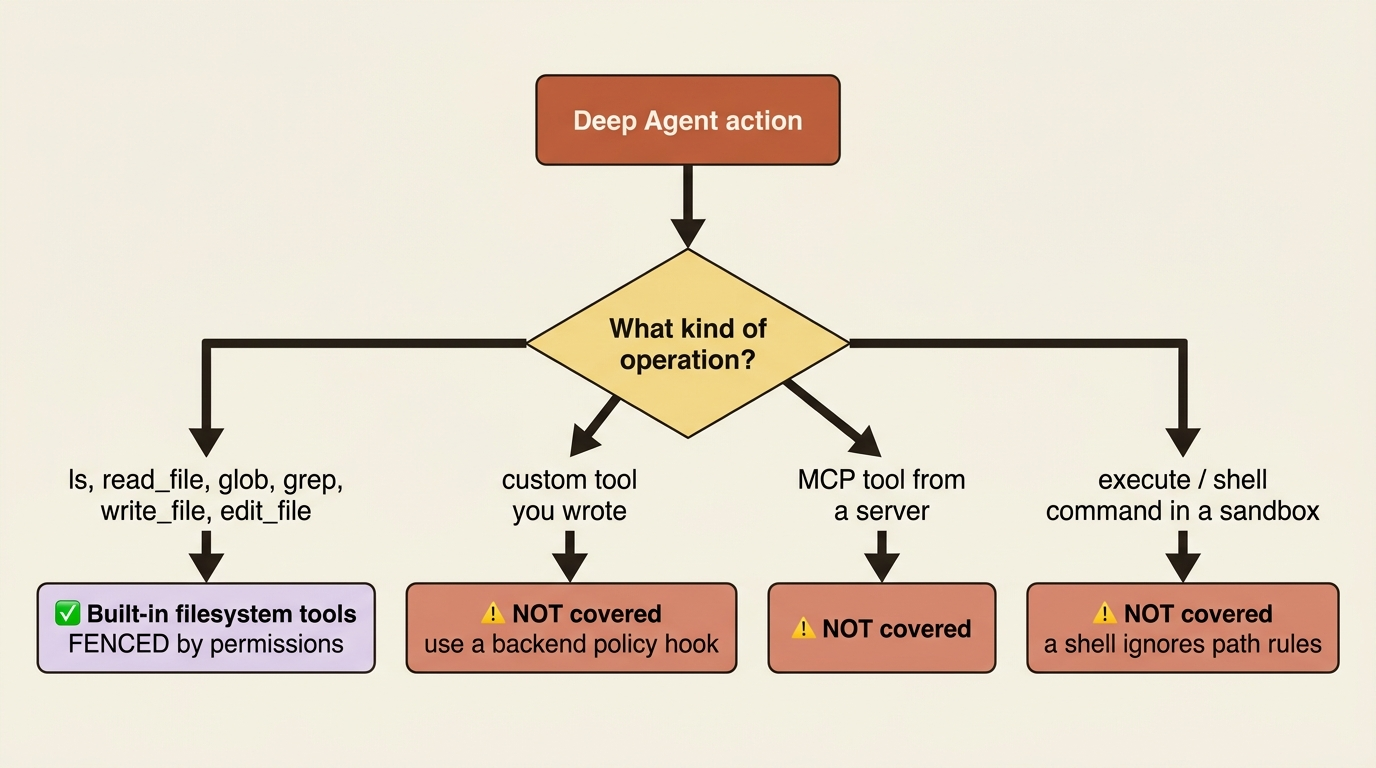
There is a sharp corner here worth stating outright. If you put a sandbox as the default backend in a CompositeBackend, every permission path has to be scoped under a non-sandbox route, or create_deep_agent raises rather than letting you believe a fence exists where it cannot. The reasoning is exactly the above. The harness will not pretend a path rule constrains a shell.
For validation that needs to cover custom tools or apply real logic, such as rate limiting, audit logging, or content inspection, the right tool is a backend policy hook. Permissions are a clean fence for the common case, not a universal sandbox. Treat them as one layer, not the whole defense.
Human-in-the-loop: stop and ask
A fence handles the rules you can write down in advance. It cannot handle "this particular deletion looks right but I want a human to glance at it first," because that is a judgment, not a policy.
For that you want the agent to genuinely stop, surface what it is about to do, and wait. That is human-in-the-loop, and you turn it on with the interrupt_on parameter, a map from tool names to how you want each one gated.
Each tool you list can be set three ways. True enables the default gate, which offers the full set of decisions. False leaves the tool ungated. A config dict like {"allowed_decisions": ["approve", "reject"]} narrows which decisions a reviewer may make for that tool.
The four decision types are worth knowing precisely:
- approve runs the tool as the agent proposed it.
- edit lets the human change the arguments before it runs.
- reject skips the call entirely.
- respond returns a human-written message to the agent in place of running the tool.

You tune the gate to the risk: full control on a deletion, approve-or-reject on an email, nothing on a read.
from deepagents import create_deep_agent
from langgraph.checkpoint.memory import MemorySaver

agent = create_deep_agent(
    model="anthropic:claude-sonnet-4-6",
    tools=[delete_file, read_file, send_email],
    interrupt_on={                                                       # ①
        "delete_file": {"allowed_decisions": ["approve", "edit", "reject"]},  # ②
        "send_email": {"allowed_decisions": ["approve", "reject"]},      # ③
        "read_file": False,                                             # ④
    },
    checkpointer=MemorySaver(),  # required, see the gotcha             # ⑤
)
① The interrupt_on map keys each tool name to its gate, which is what turns human-in-the-loop on for this agent.
② delete_file gets the fullest gate: a reviewer may approve, edit the arguments, or reject, matching the risk of a destructive action.
③ send_email gets a narrower gate: approve or reject only, with no editing of the message before it sends.
④ read_file is set to False, leaving it ungated so harmless reads run without interruption.
⑤ The checkpointer is mandatory for human-in-the-loop: it is the persistence layer that holds the paused state between the interrupt and the resume.
Note: The full extracted listing at code/langchain_deepagents/part-5-permissions-and-hitl/listings/03-interrupt-on.py shows the tool definitions elided here.
What that configures: the agent will pause and ask before deleting a file, with full approve, edit, or reject control, and before sending an email, with approve or reject only, while reads run freely. The gate is matched to how much damage each action can do.
The pause and the resume
The mechanics here are the part people fumble, so walk through the cycle carefully.
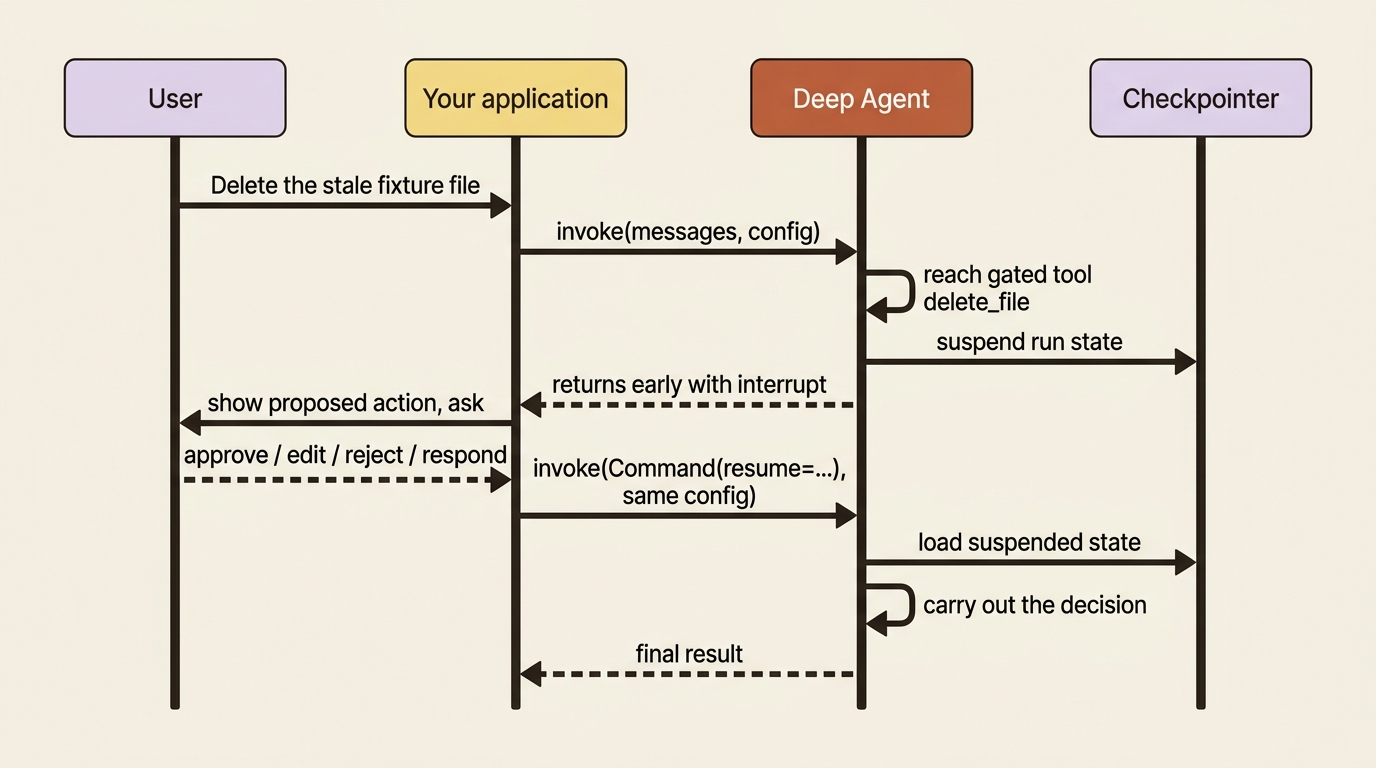
When the agent reaches a gated tool, invoke returns early with an interrupt attached to the result rather than running the tool. Your application reads the pending action out of that interrupt, presents it to whoever is deciding, collects their answer, and then calls the agent again. This time it passes a Command(resume=...) carrying the decision, using the same config as the original call. The run picks up exactly where it paused and continues.
from langgraph.types import Command

config = {"configurable": {"thread_id": "fix-session-1"}}    # ①

result = agent.invoke(
    {"messages": [{"role": "user", "content": "Delete the stale fixture file"}]},
    config=config,
    version="v2",
)                                                            # ②

if result.interrupts:                                        # ③
    # show result.interrupts[0] to a human, collect their choice, then:
    result = agent.invoke(
        Command(resume={"decisions": [{"type": "approve"}]}),  # ④
        config=config,      # same config, same thread        # ⑤
        version="v2",
    )
① The thread_id in the config names the run; both invoke calls must share it so the resume can find the state the pause left behind.
② The first invoke runs the agent until it reaches the gated delete_file tool, then returns early instead of deleting anything.
③ The result.interrupts check is how you detect that the run paused at a gate rather than finishing on its own.
④ The resume passes a Command(resume=...) carrying the human decision, here an approve, which lets the paused tool call proceed.
⑤ The second call reuses the exact same config (and therefore the same thread_id), which is what lets the run resume where it stopped.
Note: The full extracted listing at code/langchain_deepagents/part-5-permissions-and-hitl/listings/04-pause-and-resume.py shows the agent and tool setup elided here.
What just happened: the first call ran until it wanted to delete a file, then handed control back to you with the proposed action. You approved. The second call resumed the same run and carried out the deletion. The agent never blocked a thread waiting, which is what makes this work behind a web request where the human might take thirty seconds or thirty minutes to answer.
The gotcha that catches everyone: human-in-the-loop silently does nothing without a checkpointer. The pause has to live somewhere between the interrupt and the resume, and that somewhere is the checkpointer. With no checkpointer there is no state to suspend, so the gate never engages.
One thing bites right after. The resume call must use the same thread_id as the original, or the run cannot find the state it paused. The version="v2" argument in the examples above is not part of that. It sets the astream_events event-schema format, so you can watch the interrupt land in the stream. If you set interrupt_on and nothing pauses, check for a missing checkpointer before you check anything else.
Tightening the leash per subagent
Both controls can be scoped tighter for a subagent than for its parent. This is how you let a delegated worker do less than the agent that called it.
A subagent inherits its parent's permissions by default, but you can set its own permissions to replace them entirely. That is how you make a code-reviewer subagent strictly read-only even though the parent can write. Likewise a subagent can carry its own interrupt_on that differs from the parent's, gating actions in the delegated context that the main agent runs freely.
The principle is least privilege applied recursively. A worker you spin up for one job should be able to do that job and nothing more.
Wiring it into a real agent
Picture a code-maintenance agent that fixes bugs in a repository. The two leashes compose naturally onto its filesystem backend.
We fence it to the repo: allow reads and writes under the repo path, deny a durable memory route to writes so the agent cannot quietly rewrite its own long-term notes mid-task, and deny everything else. Then we gate the dangerous action with interrupt_on={"edit_file": True}.
Now the agent may read and grep and plan all it likes, but the moment it wants to actually change a source file, it stops and shows you the edit first. That is the right shape for a bug-fix agent: total freedom to investigate, a human checkpoint before it mutates code. The fence prevents the mistakes you can name. The gate catches the one you could not.
Do this today
- Add a deny-all-writes rule to a read-only experiment. Build a small agent with one
FilesystemPermissionthat denies writes on/**and confirm it can search but not modify. This is the cheapest way to feel the declarative fence work. - Write a three-rule policy and then deliberately break it. Order the rules carve-out, allow-zone, deny-rest. Then swap the first two and watch the carve-out silently stop working. The silent failure is the lesson.
- Add
interrupt_onto one dangerous tool, with aMemorySavercheckpointer. Then remove the checkpointer and watch the gate go quiet. Seeing the failure once means you will never debug it slowly later. - List every tool your agent can call and classify each one. Mark which are built-in filesystem tools, which are custom or MCP tools, and which run shell commands. Anything not in the first group is outside the permission fence and needs another control.
The wall and the gate
You can now reason about both leashes independently and use them together. Permissions are a declarative, automatic fence on the built-in filesystem tools, evaluated first-match-wins, specific rules before broad ones, and explicitly not a cover for custom tools or shell commands. Human-in-the-loop is a dynamic pause on named tools, with four decision types and a pause-collect-resume cycle that absolutely requires a checkpointer.
Neither control alone is enough. A wall with no guard lets through every action you did not think to forbid in advance. A guard with no wall makes a person approve things a rule should have handled automatically, which burns attention until the approvals become reflexive and meaningless. The two work because they divide the problem: the wall takes the predictable cases, the guard takes the judgment calls.
The checkpointer that makes the approval pause and resume is not a detail of human-in-the-loop. It is the same persistence layer that lets a whole conversation pause and resume, that lets you branch a run to try two fixes, and that lets you rewind a bad edit as if it never happened. Give your agent hands, then give it a leash. Then learn what the leash is actually made of.
This is Part 5 of "Building with LangChain Deep Agents," a 13-part guide to building production-ready AI agents.