
Stop Stuffing Your System Prompt. Teach the Agent on Demand Instead.
An AI agent's standing knowledge has three natural homes, and the bloated system prompt everyone ends up with is the symptom of jamming all three into one.
Your AI agent has three natural homes for its standing knowledge. Cram all three into the system prompt and you get a wall of instructions the agent rereads every turn. Here is how progressive disclosure fixes it.
In this article: You will learn the three distinct places a Deep Agent stores standing knowledge, the system prompt, memory files, and skills, and the simple decision rule for choosing among them. We cover how
AGENTS.mdmemory works, how progressive disclosure lets a project carry fifty skills without paying for fifty runbooks, the SDK-versus-CLI loading model that confuses everyone, and how skills flow to subagents. By the end you will know exactly where each piece of knowledge belongs.
Every system prompt starts clean. Then reality arrives. You add the coding conventions. Then the note about the flaky test module. Then the step-by-step for the release process, the formatting rules, the "always run pytest before claiming a fix" rule, and the API quirk that bit you last month.
Six weeks later the system prompt is two thousand words nobody can read. The agent burns tokens reciting it on every single turn. And you are still copy-pasting context into the chat, because the prompt somehow does not cover today's task.
This is the wrong shape. Not all standing knowledge wants the same treatment. Some of it really is always relevant and belongs in the prompt. Some of it is task-specific and should load only when that task comes up. Deep Agents gives you three distinct mechanisms for getting knowledge into the agent, and the skill, pun intended, is knowing which one to reach for.
The headline idea is progressive disclosure: the agent learns what skills exist without paying to read them, then reads the full thing only when a task actually calls for it. That single mechanism is what lets you stop stuffing the prompt.
Three places knowledge lives
Before any code, get the map straight, because the three blur together if you let them.
The system prompt is your direct instructions to the agent, plus the harness's own built-in guidance about how to use its tools. It is always in context. It is the right home for the agent's core role and behavior, the things true of every single turn.
Memory is project context loaded from AGENTS.md files. Like the system prompt, it is always injected, every conversation, with no progressive disclosure. The difference from the system prompt is where it lives and what it is for. It lives on disk or in the backend, not hardcoded in your create_deep_agent call. It carries durable conventions and preferences that should survive across conversations without you re-stating them: project coding style, testing strategy, and architectural notes.
Skills are on-demand capabilities. The agent reads only the short description of each skill at startup, and pulls in the full instructions exclusively when a task matches. This is the home for knowledge that is large, specific, and only sometimes relevant: the detailed release runbook, the multi-step data-migration procedure, and the "how to debug this one gnarly subsystem" guide.
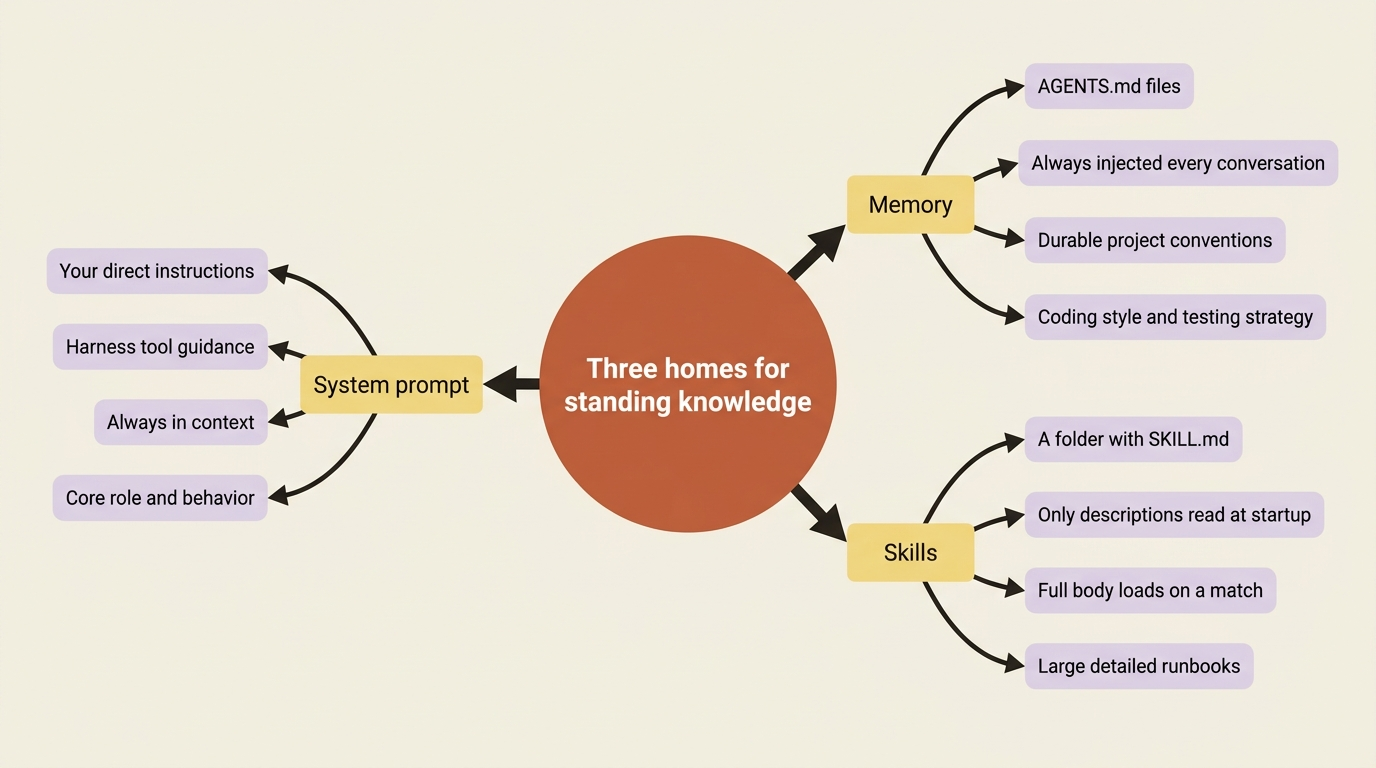
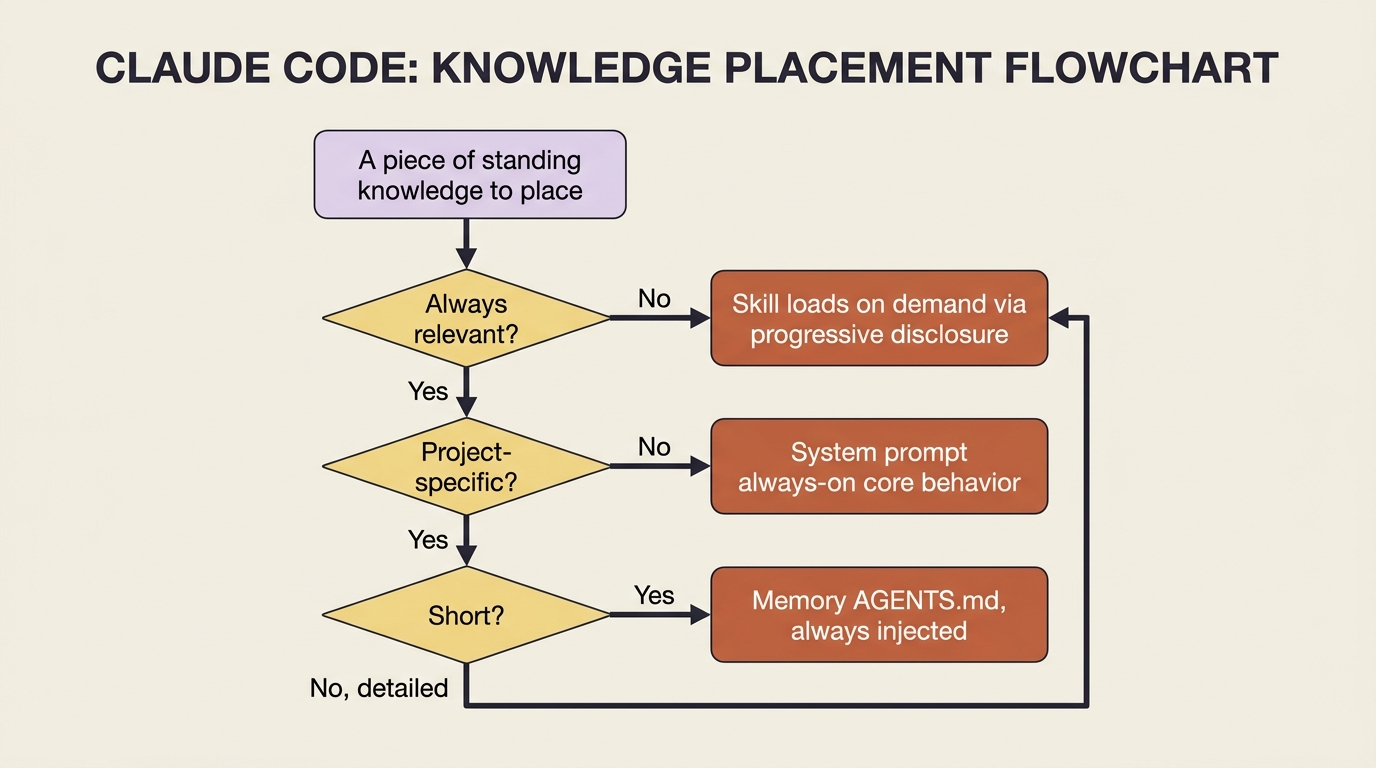
The decision rule is almost mechanical once you see the axis. Always relevant and short? System prompt. Always relevant and project-specific? Memory. Sometimes relevant, especially if detailed? Skill. The bloated prompt is what happens when "sometimes relevant and detailed" gets jammed into the always-on slot.
Memory: the context you stop repeating
Memory in Deep Agents uses AGENTS.md, the same open convention other agent tools have adopted, which means the file is just Markdown describing how to work in this project. You point the agent at one or more of them through the memory parameter:
from deepagents import create_deep_agent

agent = create_deep_agent(
    model="anthropic:claude-sonnet-4-6",
    memory=["/project/AGENTS.md"],
)
The contents of /project/AGENTS.md get injected into the agent's context at startup, every conversation, so the conventions written there are always in force without you pasting them into the chat. Write "this repo uses pytest, type hints are required, and the pagination module has historically been the source of off-by-one bugs" once, and the agent carries it into every session.
Two cautions ride along.
First, keep memory minimal. Because it is always loaded, every line you put in AGENTS.md is a line the agent reads on every turn forever. It has the same bloat failure mode as the system prompt if you overstuff it. Detailed procedures belong in skills, not memory.
Second, and this matters for safety, prefer that memory be written by your application code rather than freely by the agent, especially any memory shared across users. Shared writable memory is a channel an attacker can use to plant instructions one user's agent will later read. The defense is a permission rule denying writes to the memory path: load AGENTS.md as context the agent reads, and keep the pen in your hands.
Skills: expertise that loads itself
Skills are the part worth slowing down on, because progressive disclosure is the idea that makes the whole "stop stuffing the prompt" thesis work.
A skill is a folder. At minimum it contains a SKILL.md file, and it can carry extra scripts, reference docs, or templates alongside it. The SKILL.md opens with YAML frontmatter, just a name and a description, followed by the actual instructions in Markdown:
---
name: run-and-fix-tests
description: Use when asked to fix a failing test in the buggy-shop repo. Covers running pytest, reading failures, and verifying a fix.
---

To fix a failing test in this repo:

1. Run the suite with `pytest -x` to stop at the first failure.
2. Read the traceback and locate the failing assertion.
3. ... (full procedure here)
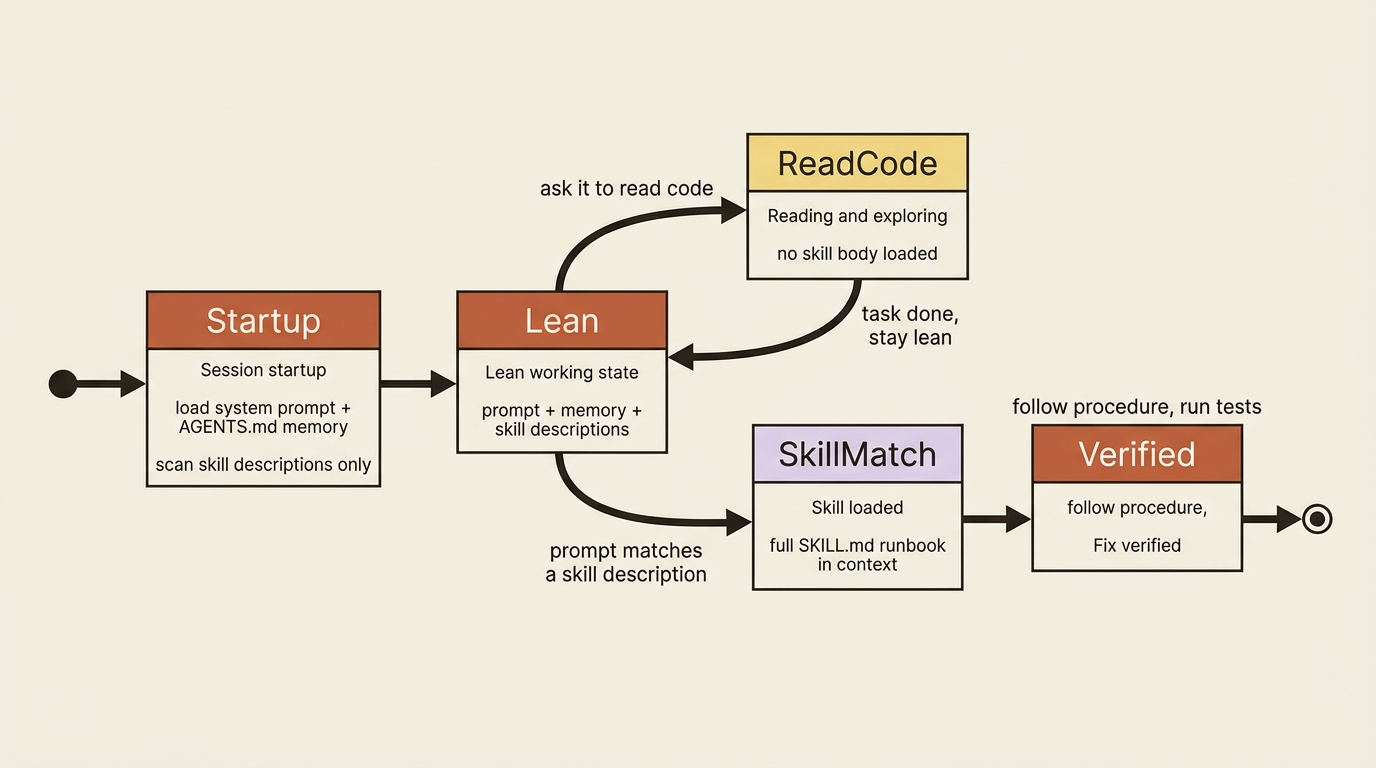
Here is the mechanism that matters. At startup the agent reads only the frontmatter, the name and description, of every skill. That is cheap: a sentence per skill, not the whole runbook. Then, when a prompt arrives, the agent checks those descriptions against the task. Only if one matches does it open the full SKILL.md and follow it.
So a project can have fifty skills, and the agent pays, per turn, for fifty one-line descriptions plus the full text of the one or two it actually uses. That is progressive disclosure, and it is why skills scale where a fat system prompt does not.
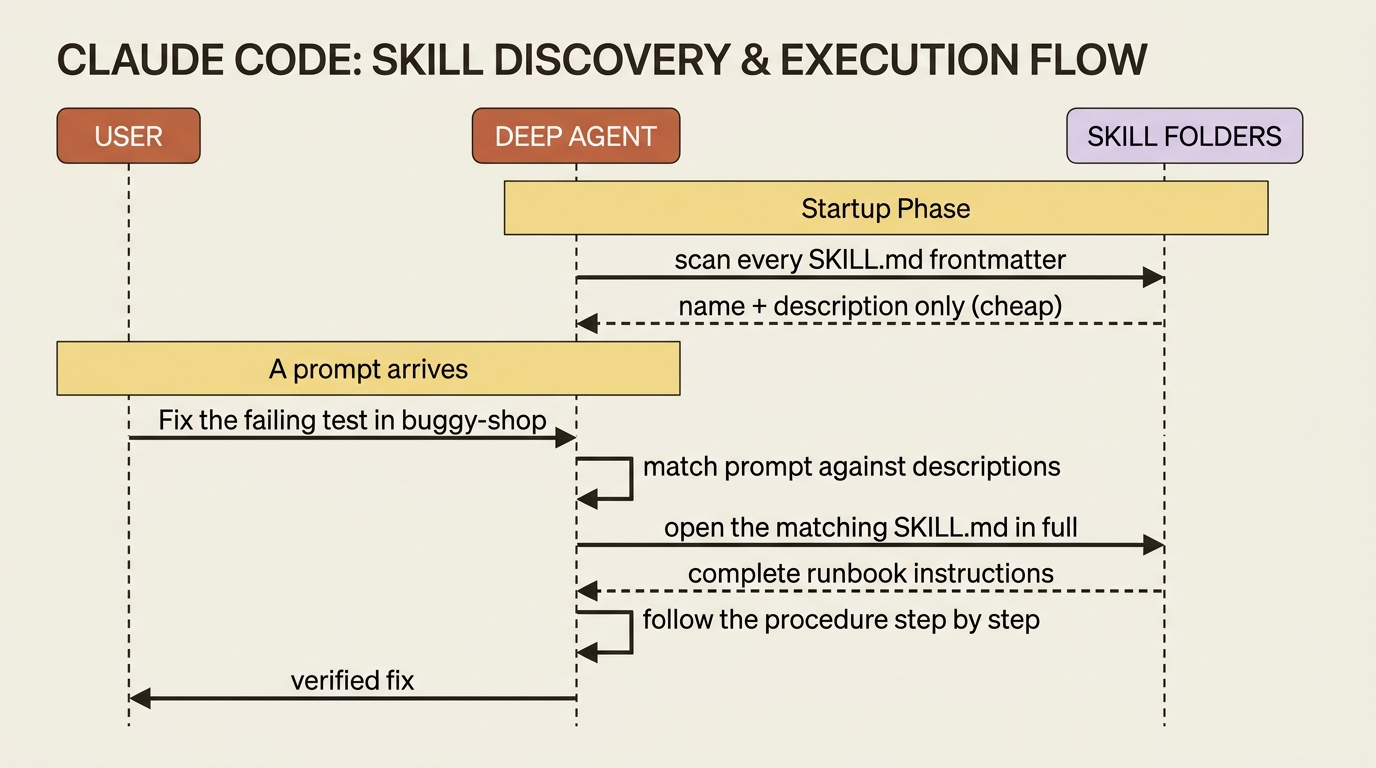
This puts real weight on the description field. It is the only thing the agent sees when deciding whether a skill is relevant, so a vague description means the skill never fires when it should, or fires when it should not. Write the description as a precise trigger: when to use this, and on what kind of task. "Use when asked to fix a failing test in the buggy-shop repo" tells the agent exactly when to reach for it.
Loading skills in the SDK, and the CLI distinction that confuses everyone
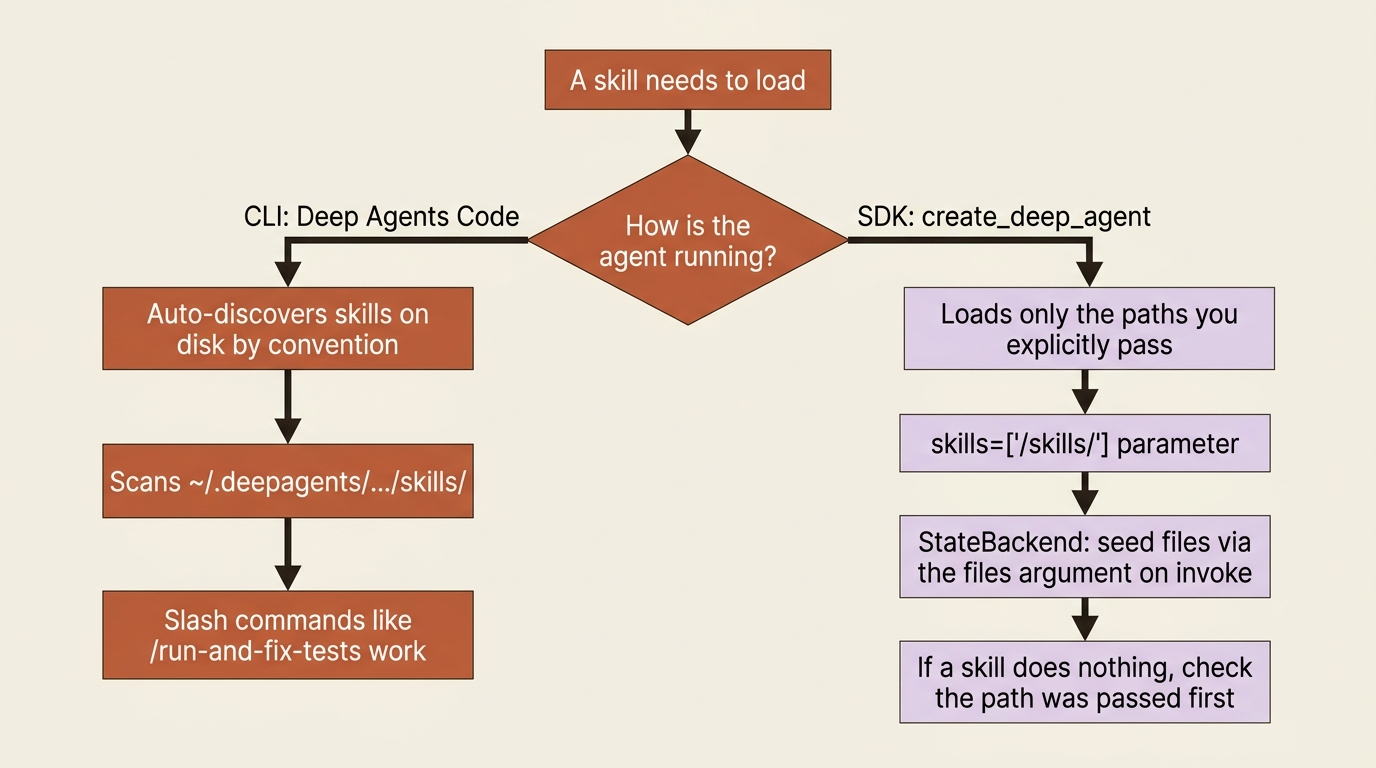
You attach skills with the skills parameter, a list of source paths relative to the backend's root:
agent = create_deep_agent(
    model="anthropic:claude-sonnet-4-6",
    skills=["/skills/"],
)
There is one wrinkle specific to the default StateBackend, and it trips up everyone the first time. Because StateBackend is a virtual in-state filesystem, the skill files do not exist on disk anywhere the agent can see. You have to put them into that virtual filesystem when you invoke. You do that with the files argument, using a helper to format the contents:
from deepagents.backends.utils import create_file_data  # ①

skill_md = """---
name: run-and-fix-tests
description: Use when asked to fix a failing test in the buggy-shop repo.
---
... full instructions ...
"""  # ②

result = agent.invoke(
    {
        "messages": [{"role": "user", "content": "Fix the failing test in buggy-shop."}],  # ③
        "files": {"/skills/run-and-fix-tests/SKILL.md": create_file_data(skill_md)},  # ④
    },
    config={"configurable": {"thread_id": "fix-1"}},  # ⑤
)
① The helper formats raw text into the file-data shape the virtual StateBackend filesystem expects.
② The skill is just a string here, the same SKILL.md frontmatter plus body you saw above.
③ The user message is the task; its wording is what the agent matches against each skill's description.
④ The files argument seeds the skill into the virtual filesystem at the path skills=["/skills/"] points at, so the agent can find and read it on this run.
⑤ The thread_id scopes the conversation, the seeded files and all, to one resumable thread.
Note: The full extracted listing at code/langchain_deepagents/part-7-context-skills-memory/listings/01-seed-skill-into-state-backend.py shows the runnable form.
You seeded the skill file into the agent's virtual filesystem at the path skills=["/skills/"] points at, and on this invocation the agent saw a matching task, read the skill, and followed it. With a FilesystemBackend instead, the skills would simply load from disk relative to the backend root, and you would skip the seeding step.
The gotcha: the SDK loads only the skill sources you explicitly pass. It does not scan the directories the command-line tool uses, like ~/.deepagents/.../skills/. This is the single most confusing point about skills, because Deep Agents Code, the CLI, does scan those directories automatically, and slash-command invocation like /run-and-fix-tests is also a CLI feature.
So a skill that "just works" when a colleague uses the CLI will appear to do nothing in your SDK code until you pass its path in skills. They are two different loading models: the CLI discovers skills on disk by convention, and the SDK loads exactly what you hand it. If your SDK agent ignores a skill, check that you actually passed its source path before you debug anything else.
Skills and subagents do not share by default
A short but important rule. Skills do not automatically flow to every subagent.
The built-in general-purpose subagent does inherit whatever you passed to the main agent's skills. But a custom subagent you define yourself starts with no skills unless you give it its own skills list in its definition. Its skill state is fully isolated: the parent cannot see the subagent's skills, and vice versa.
This is usually what you want, because a specialized subagent should have a focused, separate toolkit, but it is a surprise if you assumed inheritance. A reviewer subagent will need its own skills handed to it deliberately.
Wiring it into a real agent
This composes cleanly. Picture a code-maintenance agent working in a buggy-shop repository.
It gets an AGENTS.md in memory carrying the always-true facts: the repo uses pytest, type hints are required, and fixes are not done until the suite is green. That is short, always relevant, and now permanent.
Then it gets the run-and-fix-tests skill from above, which holds the detailed multi-step procedure for actually diagnosing and verifying a fix. Most conversations with the agent will never load that skill, because you might just be asking it to read code. Its full text stays out of context until you ask for a fix, at which point the description matches and the runbook loads. Lean prompt, deep expertise on tap.
The agent also has a durable /memories/ route, so as it works it can record what it learns there for next time, the long-term complement to the static AGENTS.md you wrote by hand.
Do this today
- Run
/contextthinking on your worst system prompt. Find the lines that are detailed and only sometimes relevant. Those are skills waiting to be extracted. - Move durable conventions into an
AGENTS.md. Repo coding style, testing strategy, and known-fragile modules. Pass it through thememoryparameter and stop re-stating it. - Extract one runbook into a skill. Pick your most detailed procedure, write a
SKILL.mdwith a precise trigger description, and pass its path in theskillsparameter. - If a skill is not firing, check the path first. The SDK loads only what you hand it. A skill that works in the CLI does nothing in SDK code until you pass its source path.
- Deny writes to your memory path. Keep the agent from quietly rewriting its own standing instructions, especially when memory is shared across users.
Where this leaves you
You now have a real answer to the bloated-prompt problem. Three slots, one decision axis: always-on short instructions go in the system prompt, always-on project context goes in memory via AGENTS.md, and sometimes-relevant detailed expertise goes in skills that load themselves through progressive disclosure.
The system prompt was never meant to hold everything. It became a wall of text because it was the only slot you knew about. Once you see all three homes, the bloat is not a discipline problem. It is a routing problem, and routing has a simple rule.
Stop making the agent reread your release runbook on every turn. Teach it on demand instead.
This is Part 7 of "Building with LangChain Deep Agents," a 13-part guide to building production-ready AI agents.