
Three Ways to Give Your Deep Agent New Powers, in the Order You Will Want Them
There are exactly three ways to extend a Deep Agent, and they belong in a specific order: custom tools, then MCP, then subagents. Two of them add capability; the third one protects you from too much of it.
Custom tools for the things the built-ins cannot do, MCP for plugging in services you did not write, and subagents for handing off work before it drowns your context. A field guide to extending a Deep Agent without bloating it.
In this article: You will learn the three distinct ways to extend a LangChain Deep Agent and, more importantly, when to reach for each one. We cover custom tools and how they read secrets safely through an injected runtime, MCP for consuming services someone else built, and subagents for delegating messy subtasks so they never crowd your main context. By the end you will see why the order matters and which of the three traps quietly breaks production agents.
The built-in toolbox takes you surprisingly far. A Deep Agent can read, write, edit, search, plan, and delegate without you defining a single tool. Then a real project arrives, and the gaps appear. The agent needs to call your internal API. It needs to run your test suite. It needs to hit a service someone else built. Or it needs to hand off a gnarly subtask so the main conversation does not fill up with a hundred intermediate results.
That is when developers start bolting things on, and that is when agents start misbehaving. A tenth tool gets added, then a third MCP server, and suddenly the model picks the wrong tool and the context window is full of noise. The problem is rarely the extension itself. The problem is reaching for the wrong kind of extension.
There are exactly three ways to extend a Deep Agent, and they belong in a specific order, because that order matches the order you will actually reach for them. First, custom tools, for capabilities you write yourself. Second, MCP, for capabilities someone else already wrote and exposed as a service. Third, subagents, for when the problem is not "I need a new capability" but "I have too much capability happening in one context." Two of these add power. The third one protects you from too much of it.
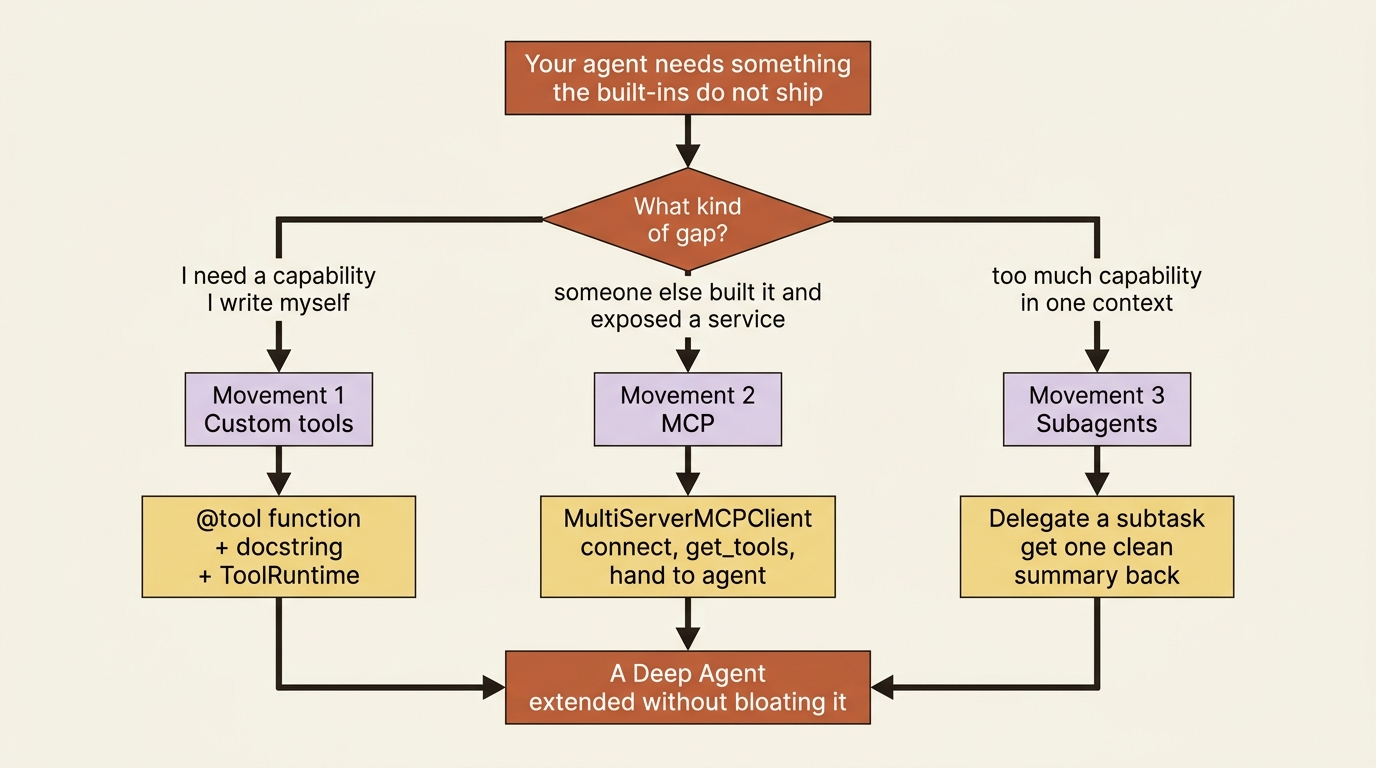
Throughout, the running example is a small code-maintenance agent called buggy-shop. By the end, it will be able to run its own tests and delegate the review of its own fix to a specialist worker.
Movement one: custom tools
The key idea: a custom tool is a plain Python function with the @tool decorator and a good docstring, and it can read per-request values like a user ID or API key through an injected runtime object.
A tool in Deep Agents is not a special class or a config object. It is a function. You write the function, decorate it with @tool, and write a docstring. That docstring tells the model what the tool does and when to use it, and it matters more than developers expect, because the docstring is the only thing the model sees when it decides whether to call the tool. Then you hand the function to the agent through the tools parameter.
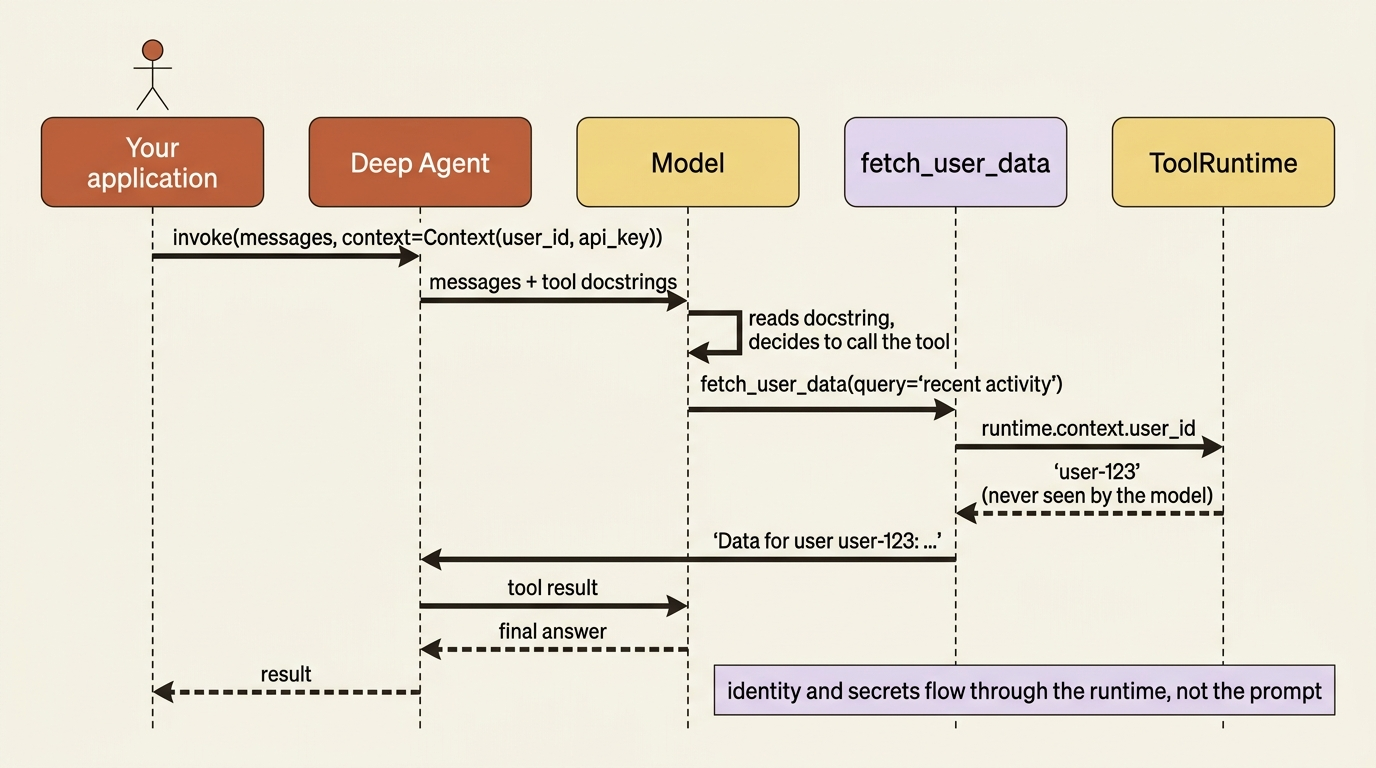
What makes tools genuinely useful in production is that they can read runtime context: values that belong to one specific invocation, such as who the user is or what API key to use. You do not want to hardcode those values, and you cannot put them in the prompt. So you declare the shape of that context with context_schema, pass the values in at invoke time, and read them inside the tool through an injected ToolRuntime argument.
from dataclasses import dataclass
from deepagents import create_deep_agent
from langchain.tools import tool, ToolRuntime

@dataclass
class Context:  # ①
    user_id: str
    api_key: str

@tool  # ②
def fetch_user_data(query: str, runtime: ToolRuntime[Context]) -> str:  # ③
    """Fetch data for the current user. Use when the user asks about their own account."""  # ④
    user_id = runtime.context.user_id  # ⑤
    return f"Data for user {user_id}: {query}"

agent = create_deep_agent(
    model="anthropic:claude-sonnet-4-6",
    tools=[fetch_user_data],
    context_schema=Context,  # ⑥
)

result = agent.invoke(
    {"messages": [{"role": "user", "content": "Get my recent activity"}]},
    context=Context(user_id="user-123", api_key="sk-..."),  # ⑦
)
① The context schema is a plain dataclass declaring the per-invocation values the tool may read, here a user id and an API key.
② The @tool decorator turns an ordinary function into a tool the model can call.
③ The injected runtime: ToolRuntime[Context] argument is how the function receives the typed runtime; the model never sees or fills it.
④ The docstring is the only thing the model reads when deciding whether to call the tool, so it states what the tool does and when to use it.
⑤ The tool reads the user id off runtime.context, not from the prompt, so identity and secrets stay out of the model's view.
⑥ Wiring context_schema=Context tells the agent the shape of the runtime context it must accept at invoke time.
⑦ The concrete context values are supplied through context= at invoke time and flow to the tool without ever entering the conversation.
Note: The full extracted listing at code/langchain_deepagents/part-8-custom-tools-mcp-subagents/listings/01-custom-tool-runtime-context.py shows the runnable form.
Look closely at what just happened. The model decided to call fetch_user_data based purely on its docstring. The tool then read user_id straight off the runtime, not from anything the model could see or tamper with. The user's identity flowed in through context= at invoke time and never touched the prompt.
This is the clean separation that production agents need. The model orchestrates. The runtime supplies the sensitive bits. A model cannot leak a secret it was never shown, and it cannot be tricked into using the wrong API key when the key never appeared in its context.
For buggy-shop, the obvious custom tool is one that runs the test suite. The agent already has filesystem tools to read and edit code, but proving a fix means actually running pytest. So you write a run_tests tool that shells out, runs the suite, and returns the pass or fail summary as a string the model can reason about. With that one tool, the agent can close the loop: edit the code, run the tests, read the result, and decide whether it is done.
Movement two: MCP
The key idea: MCP lets your agent use tools hosted by an external server, so you connect to a service through a client, pull its tools, and hand them to the agent like any other tools.
The second movement is for capabilities you should not write yourself, because someone already did. The Model Context Protocol (MCP) is an open standard for exposing tools over a connection. A growing ecosystem of services, including internal APIs, databases, and third-party products, ships MCP servers. Deep Agents consumes them through the langchain-mcp-adapters library. You describe the servers you want to connect to, the client fetches their tools, and those tools become ordinary LangChain tools you pass to the agent.
You point a MultiServerMCPClient at one or more servers, each with a transport, then call get_tools() to retrieve them. A transport is either a local subprocess over stdio or a remote server over http.
from langchain_mcp_adapters.client import MultiServerMCPClient

client = MultiServerMCPClient(  # ①
    {
        "internal-api": {  # ②
            "transport": "http",  # ③
            "url": "http://localhost:8000/mcp",
        },
    }
)

tools = await client.get_tools()  # ④

agent = create_deep_agent(
    model="anthropic:claude-sonnet-4-6",
    tools=tools,  # MCP tools sit alongside any custom tools you wrote  ⑤
)
① The client is configured with a dictionary of named servers, one per service you want to reach.
② Each entry's key is a label for the server; here a single internal API.
③ The transport says how to reach it, http for a remote server or stdio for a local subprocess, alongside the connection url.
④ Calling get_tools() fetches every tool the servers expose and returns them as ordinary LangChain tools.
⑤ Those fetched tools are passed to create_deep_agent exactly like custom tools, so the agent cannot tell they live in another process.
That connects to your internal API's MCP server, converts every tool the server exposes into a tool your agent can call, and adds them to the agent's toolset right next to run_tests and the built-ins. The agent does not know or care that these tools live in another process. They look like any other tool. For buggy-shop, this is how you would connect an internal issue tracker so the agent can read the bug report it is supposed to fix.
There is a second reason MCP matters, and it shows up the moment you connect many servers. A model's tool-selection quality degrades when you put fifty tools in front of it. The descriptions of all those tools also eat context, every turn. The ecosystem's answer is tool search. Rather than loading every tool's full description upfront, the agent searches for the tools relevant to the current task and pulls in only those.
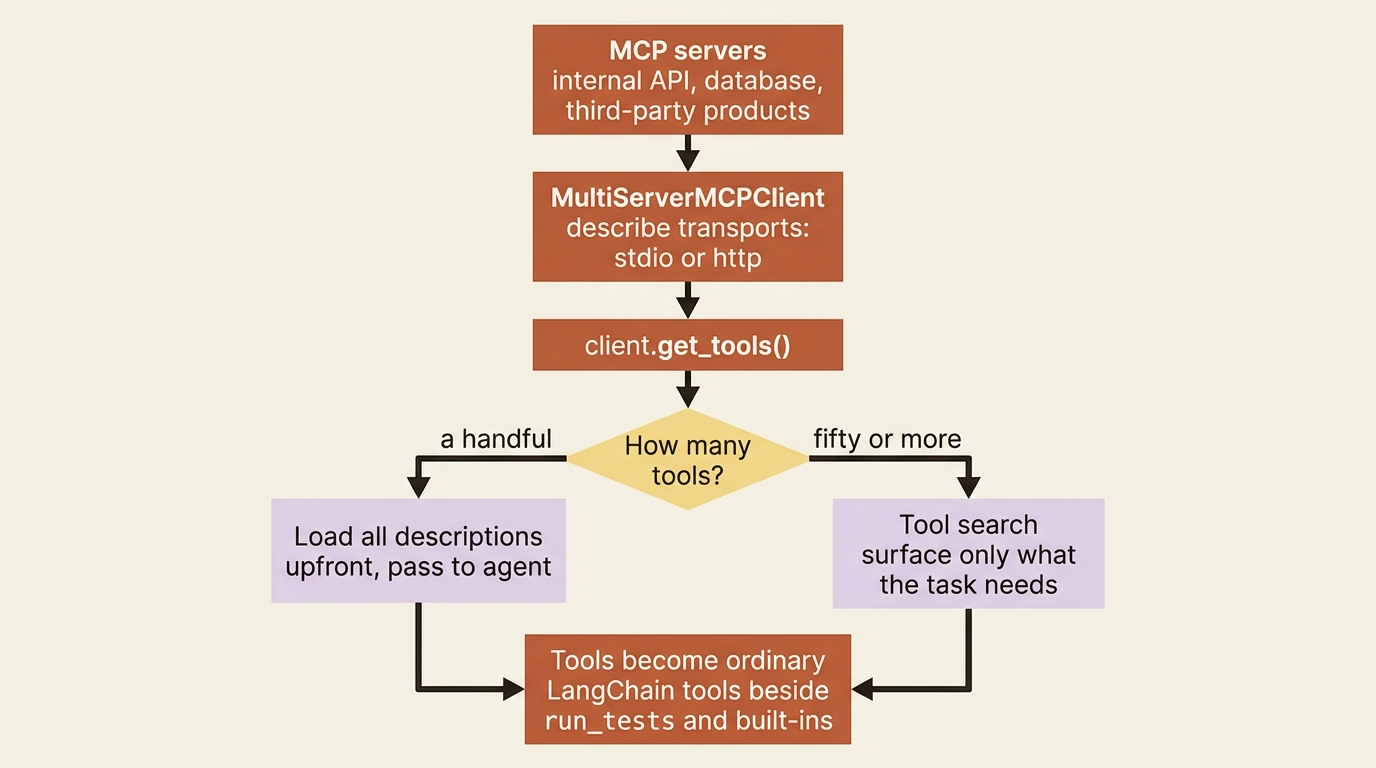
The mechanics of tool search are still evolving, so check the current docs before you build around it. The principle, though, is stable and worth internalizing: do not put everything in context at once. Surface what the task needs when it needs it.
Movement three: subagents
The key idea: a subagent is a fresh agent the main agent can delegate a whole subtask to, getting back only the final result, which keeps the main context clean and lets you specialize the worker.
The third movement is different in kind. Custom tools and MCP add capabilities. Subagents solve a problem that appears once your agent has a lot of capability: context bloat.
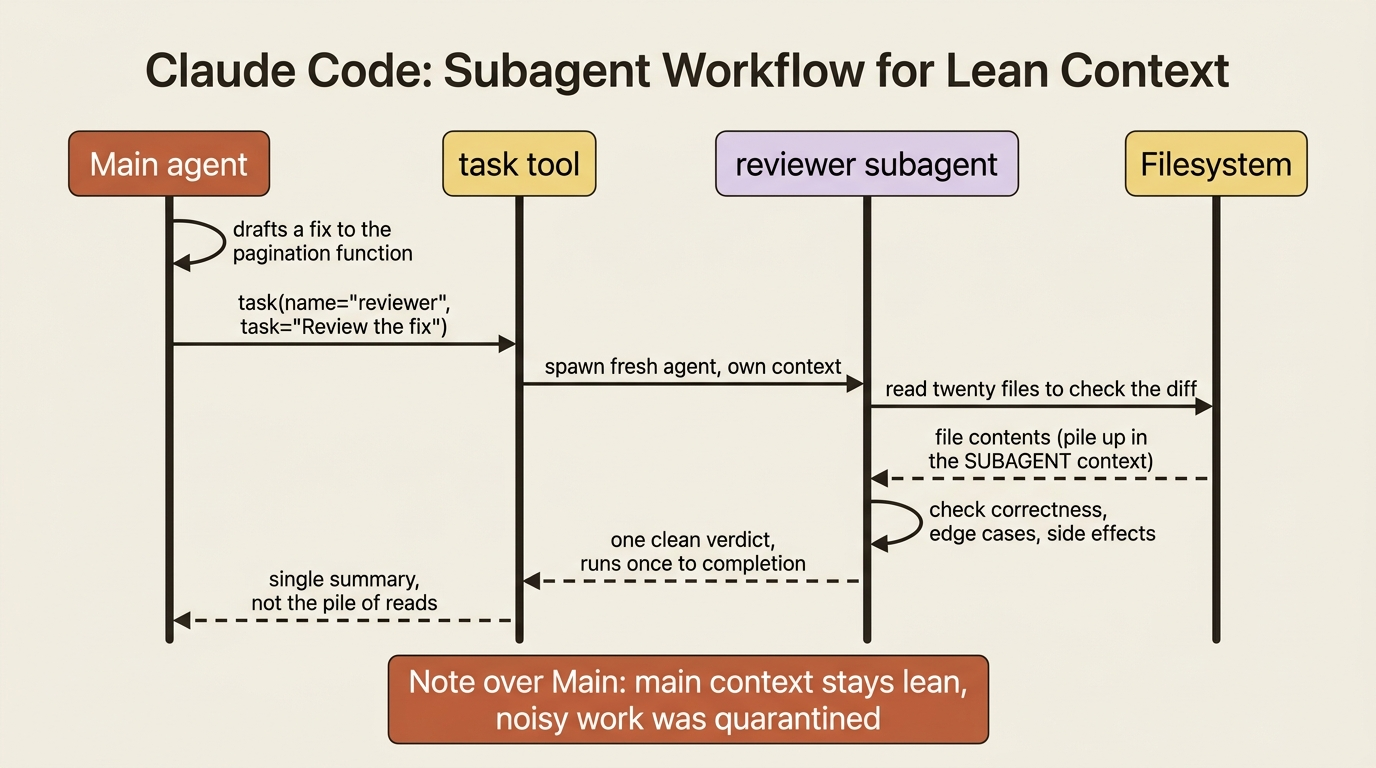
When an agent does a big, messy subtask inline, the mess stays. Imagine the agent reads twenty files to review a change. All twenty reads pile up in its context and crowd out everything else, including the original task and the instructions that matter. A subagent quarantines that mess. The main agent delegates the subtask. The subagent does all the noisy work in its own separate context. The main agent gets back one clean summary instead of the pile of intermediate steps.
You have actually had this capability all along. Every deep agent ships with a task tool and a default general-purpose subagent: a fresh instance with the same tools and model as the main agent. It is perfect for "go do this multi-step thing and just tell me the result." When the main agent calls task(name="general-purpose", task="..."), that worker runs to completion on its own and returns a single report. That alone gives you context isolation with no setup.
Custom subagents are where it gets powerful. You define a specialized worker as a dictionary, the SubAgent spec, with a name, a description, a system prompt, its own tool list, and optionally a different model. The main agent reads the description to decide when to delegate to it. The model can be cheaper or stronger than the parent's, tuned to the job.
reviewer = {  # ①
    "name": "reviewer",  # ②
    "description": "Reviews a proposed code fix for correctness and side effects. Use after a fix is drafted, before finalizing.",  # ③
    "system_prompt": "You are a meticulous code reviewer. Check the diff for correctness, missed edge cases, and unintended side effects. Return a short verdict and any concerns.",  # ④
    "tools": [],  # read-only review; inherits filesystem reads  ⑤
    "model": "anthropic:claude-sonnet-4-6",  # ⑥
}

agent = create_deep_agent(
    model="anthropic:claude-sonnet-4-6",
    tools=[run_tests],
    subagents=[reviewer],  # ⑦
)
① The subagent is just a dictionary, the SubAgent spec, not a special class.
② The name is the handle the main agent uses when it calls task(name="reviewer", ...).
③ The description is what the main agent reads to decide when to delegate to this worker.
④ The system prompt specializes the worker, giving it a focused role distinct from the main agent.
⑤ An empty tools list keeps the reviewer read-only; it still inherits the filesystem read tools.
⑥ The model is set per subagent, so a specialist can run on a cheaper or stronger model than the parent.
⑦ The spec is wired in through the subagents parameter, making reviewer available to delegate to.
Note: The full extracted listing at code/langchain_deepagents/part-8-custom-tools-mcp-subagents/listings/02-custom-subagent.py shows the runnable form.
Here is what that wiring buys buggy-shop. After the main agent drafts a fix, it can call task(name="reviewer", task="Review the fix to the pagination function"). A specialized reviewer, with its own focused prompt, examines the change in its own context and returns a verdict. The main agent stays lean and coordinating, while the detailed review happens off to the side.
For more complex cases, you can pass a fully built graph instead of a dict, as a CompiledSubAgent, but the dict form covers most needs. And when a delegated job is long-running, or you want several running in parallel with mid-flight steering, that is the territory of async subagents, a more advanced capability beyond the scope of this article.
The three traps that bite
Subagents change what propagates and what does not, and the surprises cluster in three places. Get these wrong and nothing errors. The agent simply behaves in ways you did not expect.
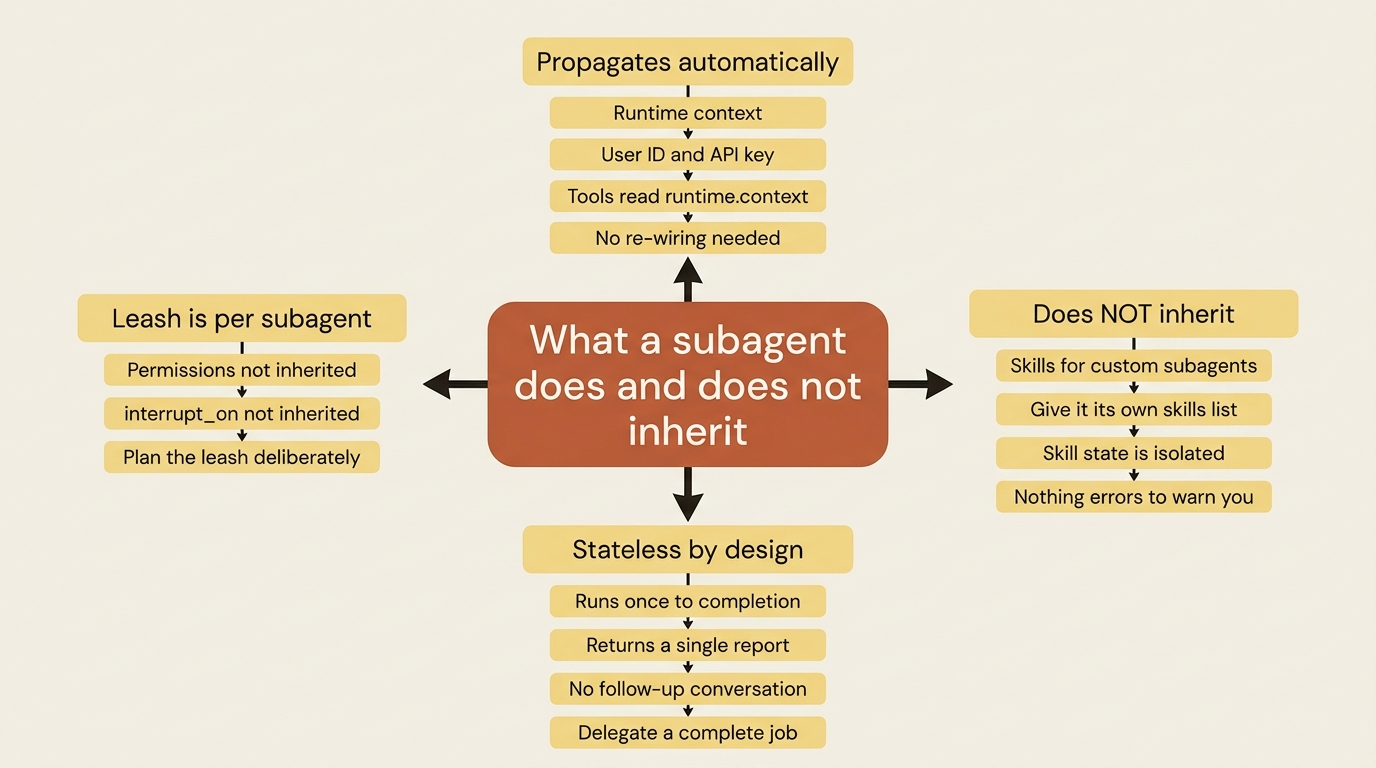
Trap one is good news: runtime context propagates automatically. The Context you passed at invoke time, with the user ID and API key, flows down to every subagent and its tools without you re-wiring anything. A subagent's tools can read runtime.context exactly like the parent's. This one rarely causes trouble. It is worth knowing precisely so you do not waste time re-passing context you already have.
Trap two is the one that quietly breaks things: custom subagents do not inherit skills. The general-purpose subagent inherits the skills you gave the main agent. A custom subagent like our reviewer starts with none, unless you give it its own skills list in its definition. Its skill state is also fully isolated from the parent. If you assumed your reviewer could use the project's skills, it cannot, and nothing errors to tell you. You hand them over explicitly, or the subagent simply works without them.
Trap three is architectural, not a bug: subagents are stateless. A subagent is not a conversation you can go back and forth with. It runs once, to completion, and returns a single final report. You cannot send it a follow-up. If you need another round, the main agent delegates a fresh task. Design your delegation around "here is a complete job, give me the result," not "let us discuss this together."
There is one more thing to plan for. Subagents do not inherit the parent's permissions or its human-in-the-loop gating. You set those per subagent. If you delegate work that touches dangerous tools, plan the subagent's leash deliberately, because the parent's leash does not extend to it.
Do this today
- Write one custom tool with a runtime context. Define a
@dataclasscontext with a fake user ID, write a@toolfunction that readsruntime.context, and pass real values throughcontext=at invoke time. Confirm the value never appears in the prompt. - Write a
run_teststool for a real project. Have it shell out to your test runner and return the pass or fail summary as a string. Now your agent can close its own edit-test-fix loop. - Connect one MCP server. Point a
MultiServerMCPClientat any MCP server, callget_tools(), and pass the result straight intotools=. Watch external tools appear beside your own. - Define one custom subagent. Write a
reviewerdict with a name, description, and system prompt, attach it throughsubagents=, and ask the main agent to delegate a review. Observe how little of the subagent's work lands back in the main context. - Audit your subagent leashes. For every custom subagent, list its skills, permissions, and
interrupt_onsettings explicitly. Assume nothing is inherited.
Where this leaves you
You now have three distinct ways to extend a Deep Agent, and a clear sense of which to reach for. Custom tools for capabilities you write, with ToolRuntime to read identity and secrets safely. MCP for capabilities someone else exposed as a service, with tool search as the escape valve when there are too many. Subagents for delegating whole subtasks to keep the main context clean, with the default general-purpose worker available for free and custom specialists when you need them.
The order is the lesson. When your agent needs something new, ask which kind of gap you are filling. Is it a capability you must write, a service that already exists, or simply too much happening in one place? The right extension point is usually obvious once you ask the question precisely. Reaching for the wrong one is how agents end up bloated, confused, and slow.
Adding tools, services, and workers is one half of building a serious agent. The other half is not about new capabilities at all. It is about intercepting the agent's own behavior: auditing what it did, blocking a dangerous command before it runs, injecting fresh context on every turn. That is a different layer, and a different kind of control.
This is Part 8 of "Building with LangChain Deep Agents," a 13-part guide to building production-ready AI agents.