
Stop Configuring Your AI Agent. Start Governing It.
Prompt instructions are requests an agent can ignore; middleware is deterministic code on the agent loop that turns 'please never do this' into 'this cannot happen.'
There is one command you never want your agent to run. A prompt asking it not to is a request. Middleware that intercepts the call is a guarantee. Here is the layer where you take control.
In this article: You will learn what agent middleware is, where it hooks into the agent loop, and why it is the difference between configuring an agent and governing one. We cover the four hook points, three practical demos (auditing every tool call, blocking a forbidden command, and injecting live context), the context compression you are already getting for free, and the two traps that will crash your application if you miss them.
There is exactly one shell command you never want your code-maintenance agent to run, and you already know which one. The trouble is that none of your existing controls reliably stop it.
Permissions do not catch it, because permissions fence the filesystem tools, not the sandbox shell. A carefully worded prompt does not reliably prevent it either, because the entire point of an agent is that it decides for itself what to do. A prompt instruction is a request, and a request can be ignored, misread, or quietly overridden by the next clever turn of reasoning.
What you actually want is a piece of code that sits between the moment the agent decides to run a command and the moment the command runs. Code that looks at the call and refuses. Ten lines that guarantee the dangerous thing can never happen, no matter what the model decides.
That code is middleware, and it is where you graduate from configuring an agent to controlling one.
Configuration versus control
Everything up to this point has been configuration. You have told the agent what it can do: which tools it has, which model runs it, which files it may touch, and which actions need approval. Configuration draws the boundaries.
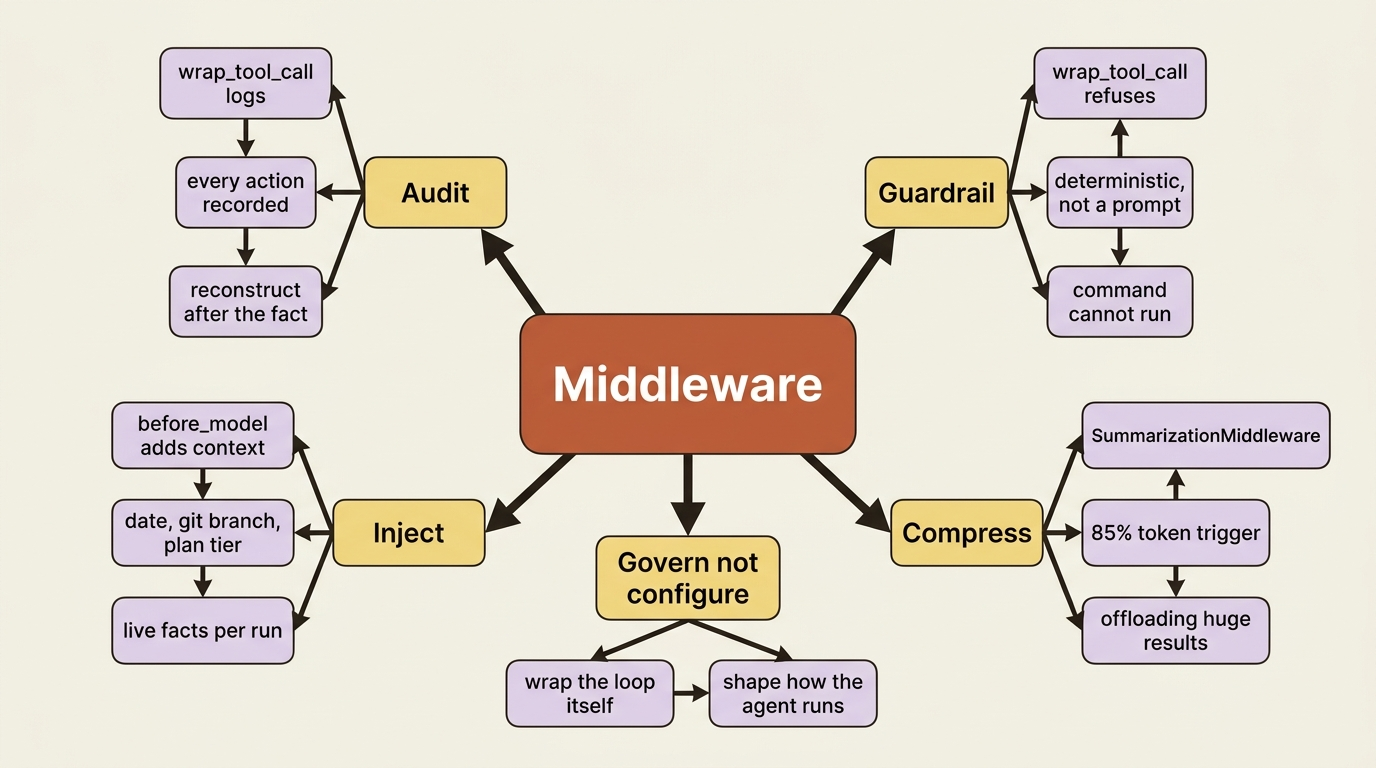
Middleware is different. It lets you wrap the agent's own loop and shape how it runs from the inside. You can inspect and rewrite tool calls, inject context before a turn, log every action the agent takes, and enforce a guardrail the model cannot talk its way around. Configuration adds capabilities. Middleware governs them.
This distinction matters because an agent is, by design, a system that makes its own decisions. You cannot govern a decision-maker with a list of suggestions. You govern it with deterministic code that runs whether the model cooperates or not.
What middleware wraps: the four hook points
Recall that the agent loop is a graph: the model takes a turn, tools execute, and the cycle repeats. Middleware inserts your code at the seams of that loop. There are four hook points worth knowing, and they map onto the loop exactly where you would expect.
before_modelruns just before the agent calls the model. This is where you inject context into the conversation.wrap_model_callwraps the model call itself, so you can see or modify both the request and the response.wrap_tool_callwraps every tool execution. This is the workhorse: you see the tool name and arguments before it runs, and the result after.after_modelruns once the model has responded.
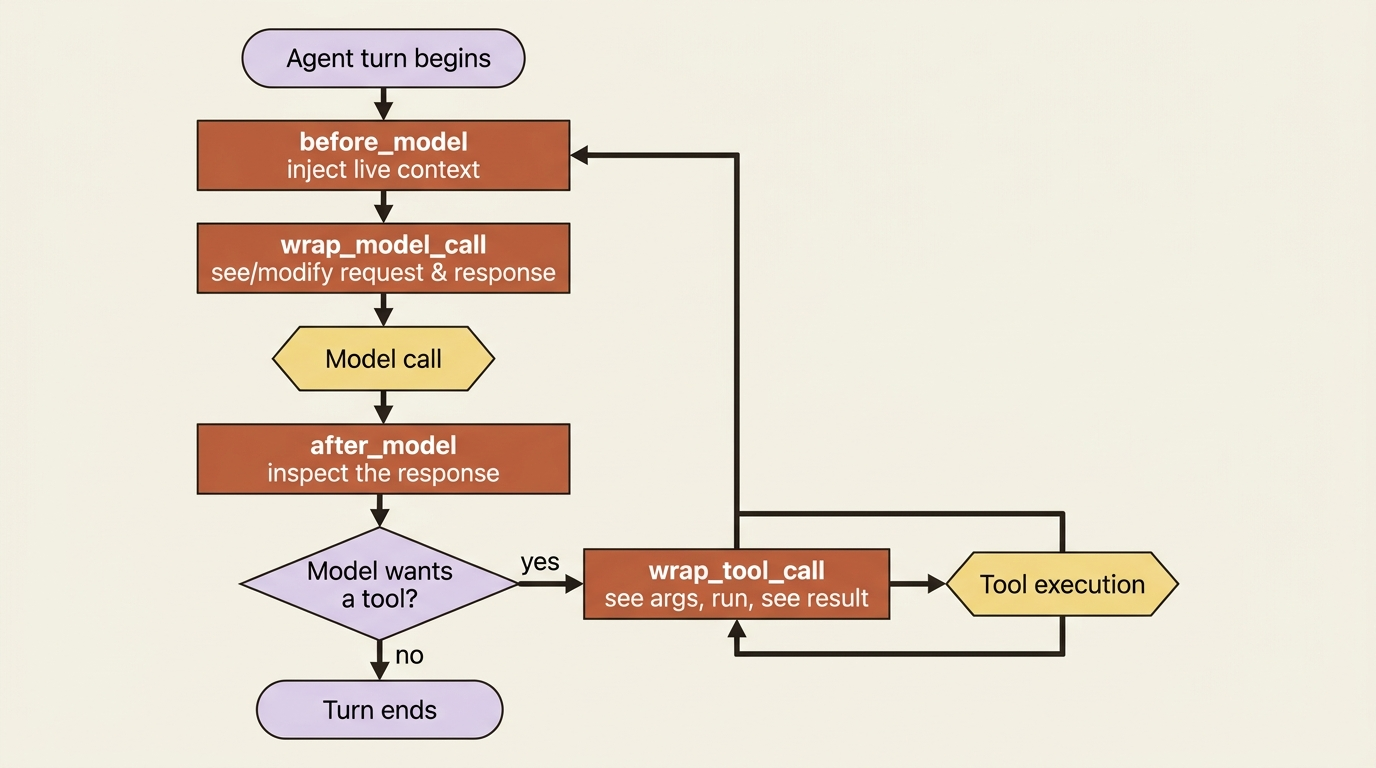
These hooks run deterministically, every single time, around the relevant step. That determinism is the whole point. It is what makes a hook trustworthy as a guardrail in a way a prompt instruction never can be. A prompt is advice the model weighs against everything else in context. A hook is code that always executes.
You write middleware in one of two ways. For a single cross-cutting concern, a decorator on a function is enough. For something stateful or spanning multiple hooks, you subclass AgentMiddleware. Either way, you pass the result to the middleware parameter of create_deep_agent.
Demo one: audit every tool call
The simplest useful middleware logs every tool call. You decorate a function with @wrap_tool_call. It receives the tool request and a handler you call to actually run the tool. Whatever you put around that handler call is your interception point.
from langchain.agents.middleware import wrap_tool_call
from deepagents import create_deep_agent

@wrap_tool_call  # ①
def audit_tool_calls(request, handler):
    """Log every tool call to an audit trail."""
    tool_name = request.tool_call["name"]  # ②
    log_to_audit_trail(tool_name, request.tool_call.get("args", {}) or {})  # your logging  ③
    result = handler(request)  # run the actual tool  ④
    return result  # ⑤

agent = create_deep_agent(
    model="anthropic:claude-sonnet-4-6",
    tools=[run_tests],
    middleware=[audit_tool_calls],  # ⑥
)
① The decorator turns a plain function into tool-call middleware; the harness will invoke it around every tool execution.
② The request exposes the tool call, so you can read the tool's name before it runs.
③ Your side effect, here writing the name and arguments to an audit trail, happens before the tool executes.
④ Calling handler(request) runs the real tool and returns its result; the middleware is transparent because it passes the request straight through.
⑤ Returning the result unchanged keeps the agent's behavior identical to running without the middleware.
⑥ The middleware is wired in through the middleware parameter of create_deep_agent, the same slot used for the call-limit middleware in Part 2.
Note: The full extracted listing at code/langchain_deepagents/part-9-middleware/listings/01-audit-tool-calls.py shows the runnable form.
Walk through what happens. Before any tool runs, your function records what is about to happen. Then handler(request) executes the real tool. Then you return its result unchanged. The agent behaves identically to before, but now every action it takes leaves a record.
This is how you build a real audit log: every file edit, every test run, every command, captured. That trail is exactly what you will want the first time the agent does something surprising in production and you need to reconstruct, step by step, what it actually did.
Demo two: block the command that must never run
The audit middleware watched and passed everything through. The same hook becomes a guardrail the moment you let it decide not to call handler.
Inspect the request. If it is the thing you forbade, return a refusal instead of running it.
from langchain_core.messages import ToolMessage

@wrap_tool_call
def block_dangerous_commands(request, handler):
    """Refuse destructive shell commands regardless of what the model wants."""
    args = request.tool_call.get("args", {}) or {}  # ①
    command = str(args.get("command", ""))  # ②
    if "rm -rf" in command:  # ③
        return ToolMessage(  # ④
            content="Refused: destructive command blocked by policy.",
            tool_call_id=request.tool_call["id"],  # ⑤
        )
    return handler(request)  # ⑥
① The middleware reads the tool call's arguments before the tool runs, defaulting to an empty dict when there are none.
② It pulls the candidate command string out of those arguments.
③ The guardrail is a deterministic check on the command, here a substring match for the forbidden pattern.
④ On a match it returns a ToolMessage refusal instead of calling handler, so the tool never executes.
⑤ The refusal is tied back to the originating call by its id, so the model reads it as that tool's result.
⑥ When the command is allowed, it falls through to handler(request) and runs normally.
Note: The full extracted listing at code/langchain_deepagents/part-9-middleware/listings/02-block-dangerous-commands.py shows the runnable form.
When the agent tries to run a command containing the forbidden pattern, the middleware returns a refusal ToolMessage in place of executing it. The model reads that refusal as the tool result and adapts its plan. The command never ran. The wrap_tool_call contract is what dictates that return type: a hook that intercepts a call must hand back a ToolMessage or a Command, not a bare string.
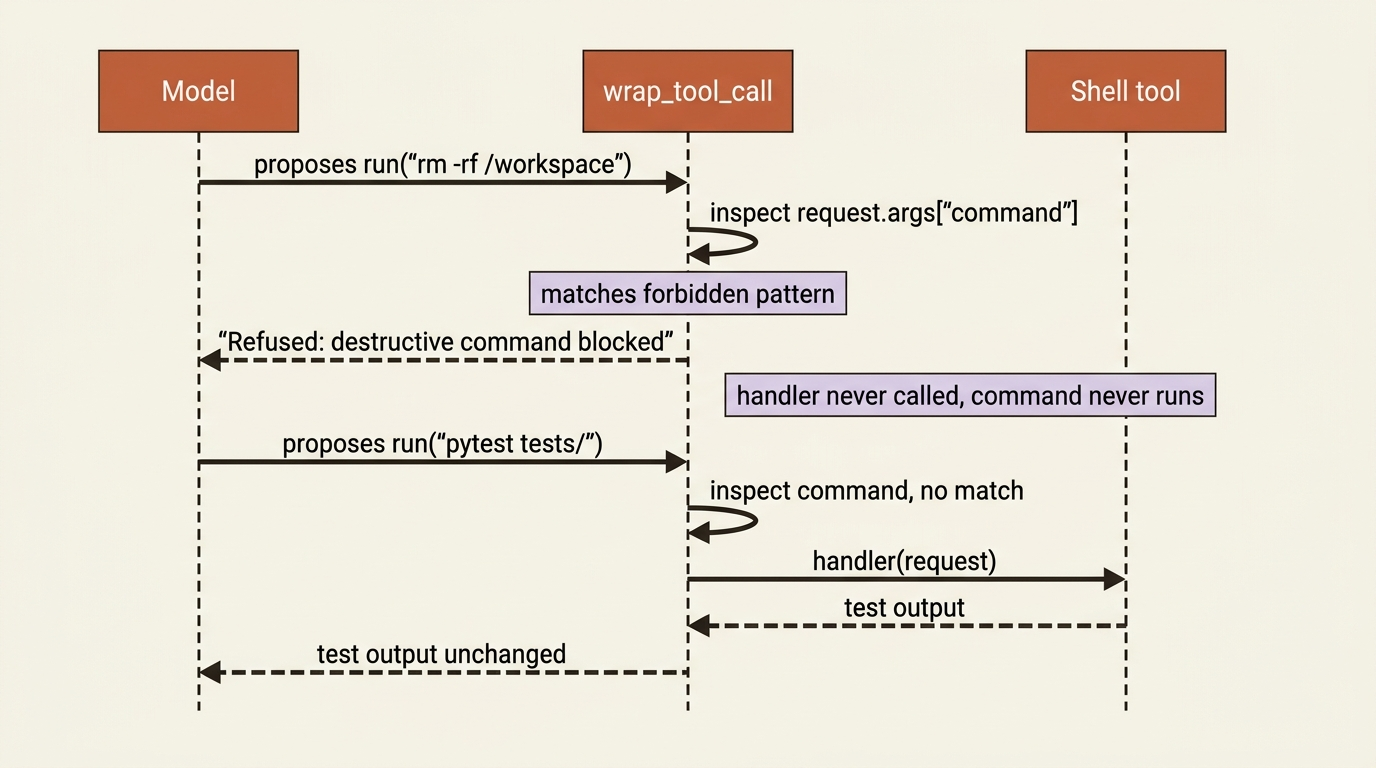
Notice why this is stronger than a prompt rule. It does not depend on the model choosing to obey. The check is deterministic code sitting directly on the execution path, so "please never run this" becomes "this cannot run." This is the right home for the one command from the top of this article.
In a real deployment you would match more carefully than a naive substring check. The shape of the solution is the lesson, not the matching logic.
Demo three: inject live context before each turn
The third classic use of middleware is injection. Your agent often needs facts that are true right now but were not true when you wrote the system prompt: the current date, the active git branch, the user's current plan tier.
Hardcoding those values is wrong. A static system prompt cannot hold them either, because it does not change per invocation. A before_model hook runs right before each model call, and it can add a message carrying that live context.
Injecting the current git branch and the date means the agent always knows which branch it is working on and can timestamp its notes, without you threading that information through every prompt by hand.
The harness also exposes a dynamic-prompt mechanism for the same goal, for when the thing you want to vary is the system prompt itself rather than an injected message. Reach for that when the change is prompt-level. Either way, the principle holds: context that changes per run gets injected at run time, not baked in.
The compression you are already getting
Here is something the agent has been doing for you all along without your knowing: managing its own context so a long run does not blow past the model's window. This is middleware too, and it ships built in.
When the conversation approaches the model's limit, the trigger is around 85% of the input-token budget, the SummarizationMiddleware compresses older messages into a structured summary. It keeps the recent turns intact, and it preserves the full original conversation to the filesystem, so nothing is truly lost.
A related mechanism, offloading, kicks in when a single tool result is huge, over a 20,000-token threshold. Instead of letting that one result flood the context window, the harness writes it to the backend and replaces it in context with a short preview and a path the agent can re-read on demand.
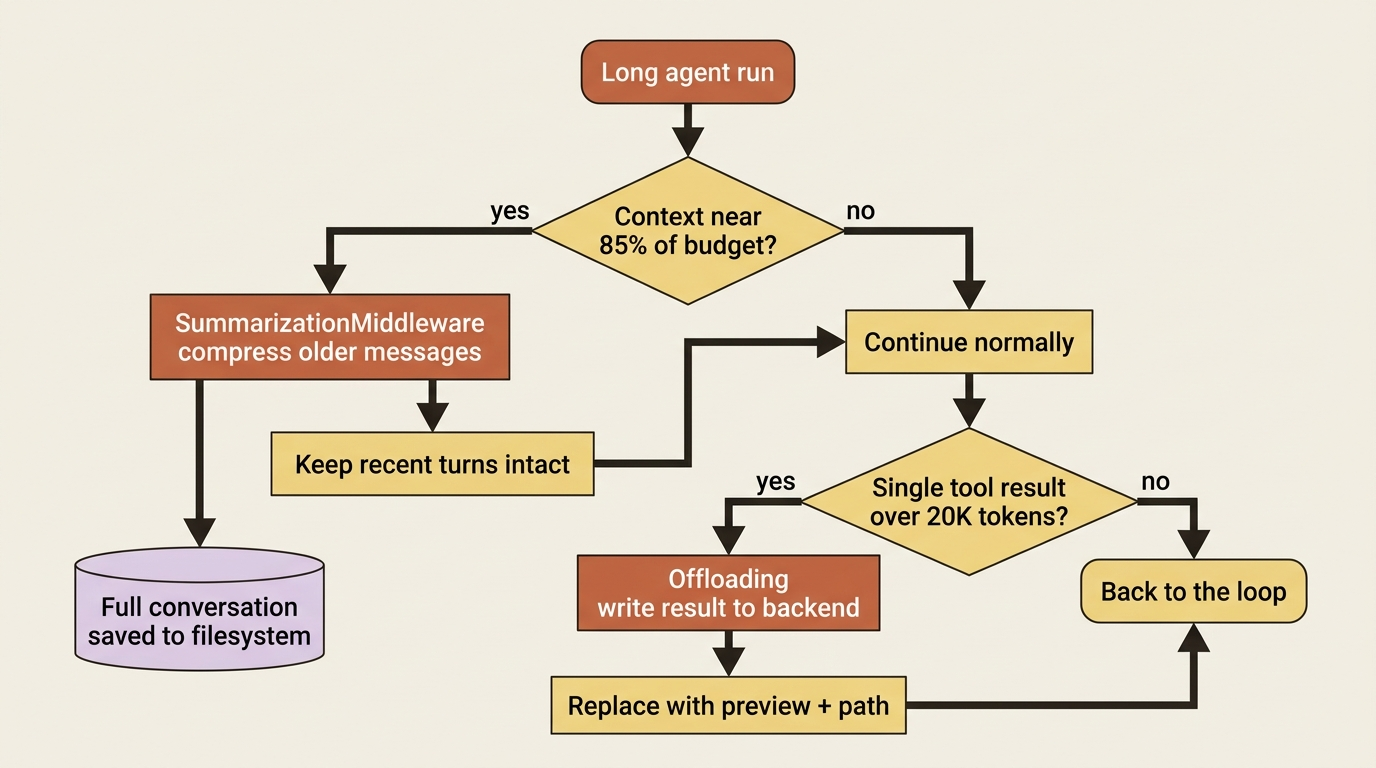
Together, these two mechanisms are why a deep agent can run for many steps without you manually trimming history.
If you watched the agent's token stream in an earlier part of building it, you would have seen summarization as a visible side effect. Summarization is itself a model call, so its tokens show up tagged with an lc_source of "summarization". Now you know what was producing them.
If you want more control over when compression happens, Deep Agents exposes a summarization tool, via create_summarization_tool_middleware, that lets the agent choose to summarize at a natural break, such as between tasks, rather than only when it hits the limit. Enabling that tool does not switch off the automatic 85% trigger. It adds a second, agent-chosen path on top of it.
The two traps middleware sets for you
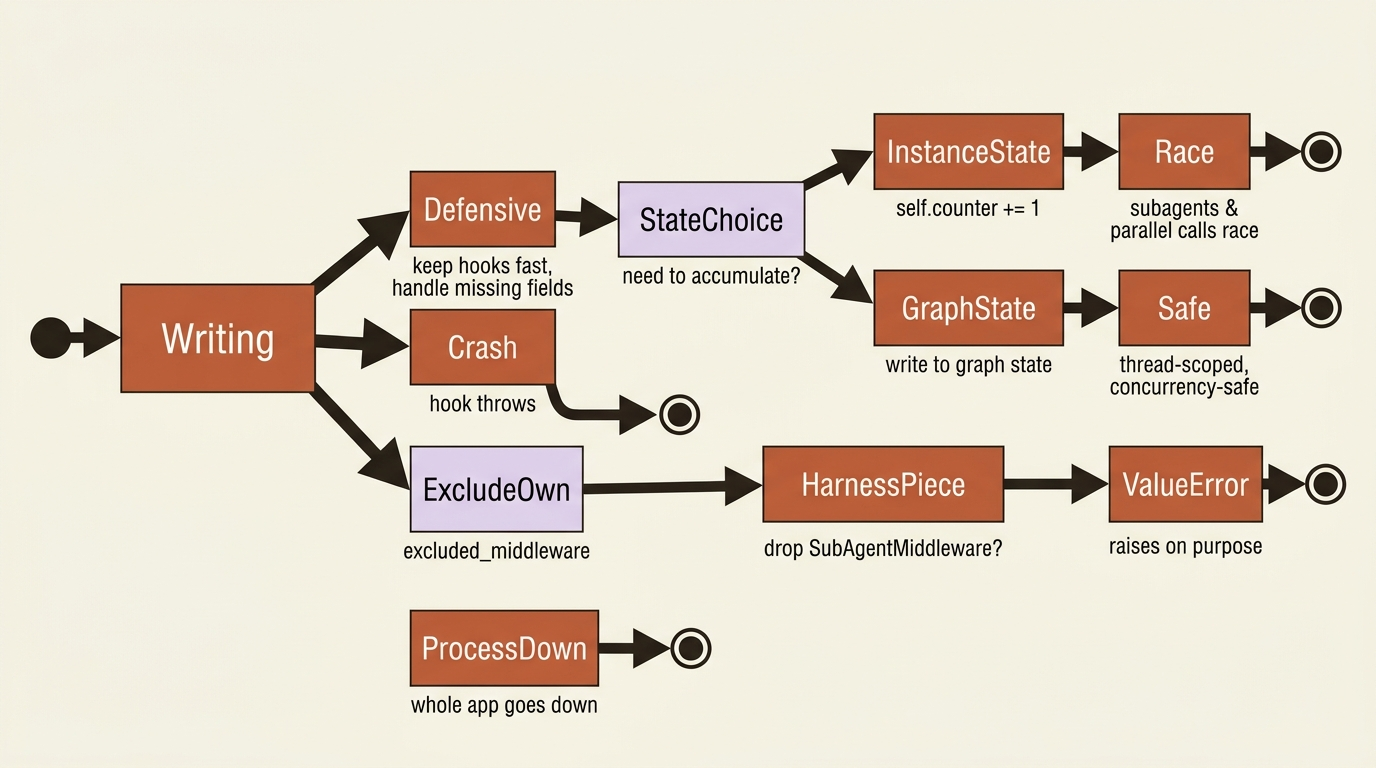
Middleware runs in your process. Some of it is load-bearing scaffolding you are not allowed to strip. Two distinct traps live here, and missing either one will hurt.
The first trap is operational. Because middleware is your code running in your process, a middleware that throws an exception takes down your application, not just the agent turn. A hook that calls a flaky logging service, or assumes a field that is sometimes absent, will crash the whole run.
Keep middleware defensive and fast. And be careful with state. There is a specific, easy-to-miss rule here: do not store mutable state on the middleware instance, such as a self.counter += 1 inside a hook. Subagents, parallel tool calls, and concurrent invocations all run at once, and they will race that counter. If you need to accumulate something across hook calls, write it to graph state instead. Graph state is scoped to the thread and safe under concurrency.
The second trap is structural. A few middleware are required scaffolding for the harness itself, and trying to exclude them fails loudly. The most common version of this mistake is wanting to run without subagents and reaching for excluded_middleware to drop SubAgentMiddleware. That raises a ValueError on purpose, because the harness depends on it. The same is true of FilesystemMiddleware and the internal permission middleware.
The supported way to disable the default subagent is the harness profile knob, general_purpose_subagent set to disabled, combined with passing no synchronous subagents. The lesson for now is simple: excluded_middleware is for middleware you added, not for the harness's own load-bearing pieces.
Do this today
- Write an audit middleware with
@wrap_tool_call. Have it log the tool name and arguments before callinghandler, then return the result unchanged. Run your agent and confirm every action appears in the log. - Turn that audit hook into a guardrail. Add one
ifcheck that, for a pattern you never want to run, returns a refusalToolMessage(carrying the originatingtool_call_id) instead of callinghandler. Watch the agent receive the refusal and adapt instead of crashing. - Add a
before_modelhook that injects the current date and git branch. Confirm the agent can reference both without you putting them in the prompt. - Audit your middleware for instance state. Find any
self.something += 1or mutable attribute set inside a hook, and move it to graph state. This is the bug that only appears under concurrency, which is the worst time to find it. - Never call
excluded_middlewareon a harness middleware. If you want fewer subagents, use the profile knob instead.
Where this leaves you
You can now reach into the agent's loop and shape it. You know the four hook points and which job each one fits: before_model for injecting live context, wrap_tool_call for auditing and for guardrails the model cannot evade, and wrap_model_call and after_model for working with the model exchange directly.
You understand that the context compression you have been getting for free is itself built-in middleware, and that you can steer it. And you know the two traps: middleware crashes your process, so keep it defensive and put accumulating state in graph state, and the harness's own middleware is not yours to remove.
The deeper shift is this. A prompt asks. Middleware enforces. The moment you have a requirement that must hold, regardless of what the model reasons its way into, you have left the territory of configuration and entered the territory of control. That is the layer that turns a clever assistant into a system you can actually trust in production.
So far everything has happened on your laptop, in one process, with local state. That is the right place to build an agent. It is the wrong place to ship one. The next step is taking the deep agent off your machine: hosting it as a long-running service, isolating it so it cannot hurt your host or your other users, and reasoning carefully about the threat model of an agent that takes real actions on input you do not control.
This is Part 9 of "Building with LangChain Deep Agents," a 13-part guide to building production-ready AI agents.