
You Cannot Deploy a Long-Running Graph Like a Lambda
Why a deep agent is a stateful service, not a stateless function, and how that single fact dictates every deployment decision from sandboxing to multi-tenancy to the prompt-injection threat model.
A deep agent is a stateful process with a filesystem, a checkpointer, and maybe a live sandbox. Deploying it means choosing where it runs, how it isolates per user, and how it survives input you do not control.
In this article: You will learn why a deep agent is a stateful service rather than a stateless function, and why that one fact reshapes every deployment decision. We cover the two routes to production, how to choose an execution environment, why sandbox-as-a-tool beats agent-in-sandbox, how the async graph factory wires isolation to a thread, how to make a deployment multi-tenant safely, and the prompt-injection threat model you cannot ship without.
Picture the 3 a.m. page. Your agent has been live for a week. It has been great. Then one user's task spins up a sandbox, the agent's code allocates an enormous array in a loop, and the sandbox eats every byte of memory on the host. Because you ran the agent's code directly on your server instead of isolating it, the host goes down, and it takes every other user's session with it.
Nobody attacked you. One ordinary task plus one missing boundary equals an outage.
Everything you build on a laptop runs the same way: one process, an in-memory checkpointer, a backend pointed at local state, and you as the only user. That setup is exactly right for building. It is exactly wrong for shipping, and not for the reasons most tutorials warn about. A deep agent is not a stateless function that you can drop behind an API gateway and forget. It is a long-running, stateful process. It holds conversational state on a thread, it has a filesystem through its backend, it may run a live sandbox, and it takes real actions based on input that you do not control. Each of those facts changes how you deploy a LangChain deep agent. This article turns the thing on your laptop into something you can put in front of strangers without losing sleep.
Why "stateless function" is the wrong mental model
The architectural facts that make a deep agent useful, namely persistent state, a filesystem, and durable execution, are the same facts that rule out treating it like a Lambda. Deployment starts by accepting that it is a stateful service.
A stateless API handler is easy to deploy because it has no memory. Every request is independent, you can spin up a hundred copies, and a crash loses nothing. A deep agent is the opposite on every count. It remembers, because the checkpointer persists each thread. It has a working filesystem, because the backend gives it one. It runs for a long time, sometimes minutes, because the agent loop keeps going until the task is done, and LangGraph's durable execution means a mid-run crash resumes from the last checkpoint rather than starting over.
Those are features. They are also the reason you cannot just pip install your agent into a serverless function and call it shipped.
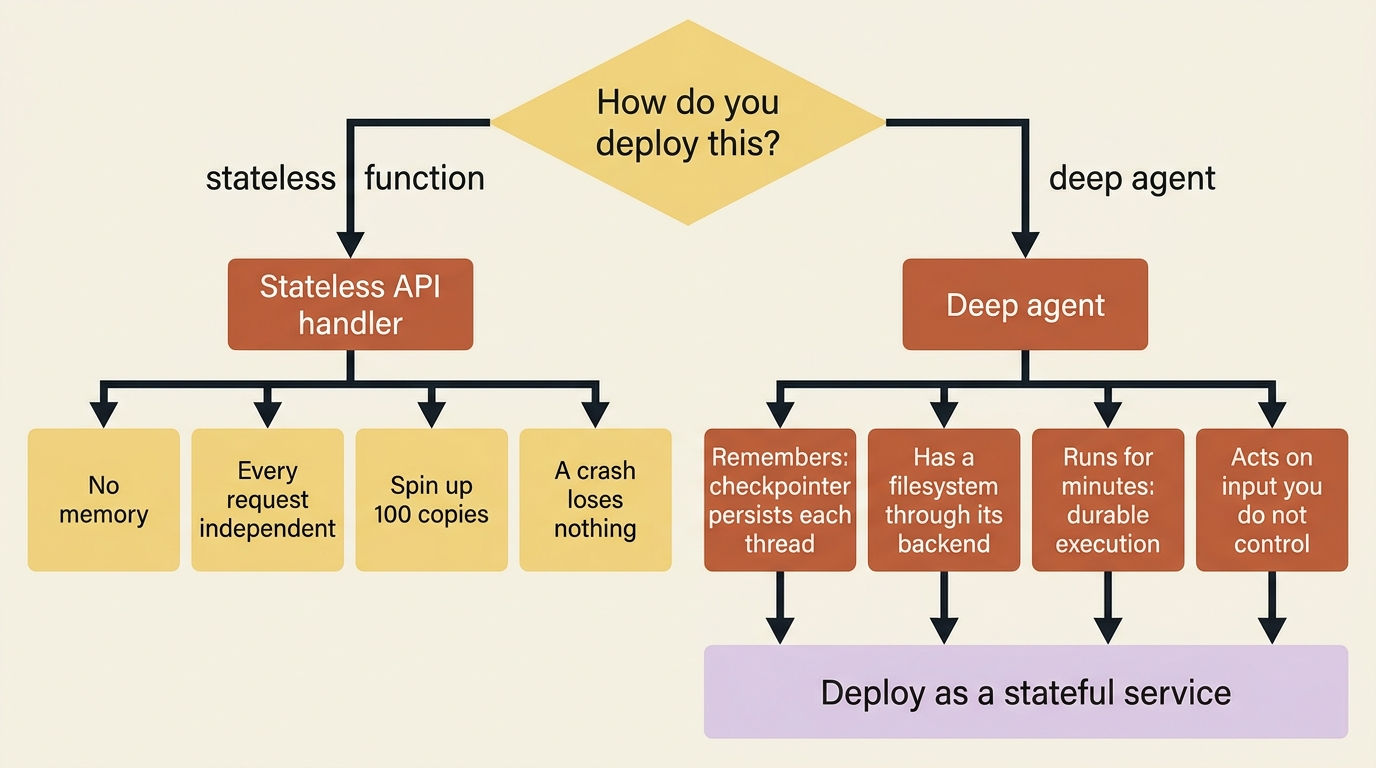
So the deployment question is not "how do I make this stateless." It is "where does the state live, and who manages the infrastructure for it." Three primitives organize the answer:
- A thread is a conversation, identified by a
thread_id. - A user is who the conversation belongs to, which drives isolation.
- An assistant is a configured version of your agent: a particular graph plus its settings, which is what callers actually invoke.
Production deployment is mostly about provisioning the infrastructure that these three need, namely a checkpointer, a store, run management, and authentication, without hand-building it.
Two paths to a deployed agent
There are two routes to production, and they trade convenience against control. The same agent code works either way.
The managed route runs your agent on LangSmith's infrastructure. It provisions the pieces that a deployed agent needs, namely assistants, threads, runs, a store, and a checkpointer, plus authentication, webhooks, cron jobs, and observability. You do not stand any of it up yourself. At the time of writing there is an API-first managed offering in private preview, and alongside it the more established LangSmith Deployment path for when you need custom application code, custom routes, or advanced auth. Because the managed surface is moving, treat the exact product name and access path as something to confirm against current docs rather than memorize. The durable point is that a managed path exists, and it hands you the stateful infrastructure ready-made.
The self-hosted route builds a standalone server image that you run wherever you like. The mechanism is a langgraph.json at your project root that tells the platform how to build and run the agent: which dependencies to install, which graph to expose by mapping an ID to your agent.py:agent, and which env file to load. You build an image from that with langgraph build and deploy it like any other container.
A minimal langgraph.json is small enough to read at a glance:
{
  "dependencies": ["."],
  "graphs": {
    "agent": "./agent.py:agent"
  },
  "env": ".env"
}
That declares three things: install the current directory as a package, expose the compiled agent in agent.py under the ID agent, and load secrets from .env. From here, langgraph build produces the deployable image.
The key reassurance: your agent code does not change between the two paths. The create_deep_agent(...) you have been writing is the same. Only the surrounding infrastructure differs.
Choosing where the agent's code runs
The execution environment hinges on one question: does your agent run code, or only manipulate files?
If it only reads and writes files, a filesystem-style backend, namely a thread-scoped or cross-thread store, is sufficient, and there is no shell to worry about. But a code-maintenance agent whose entire purpose is to run pytest and prove a fix runs code. That means it needs a sandbox: an isolated container that provides both a filesystem and the execute tool, where the agent's commands run without touching your host.
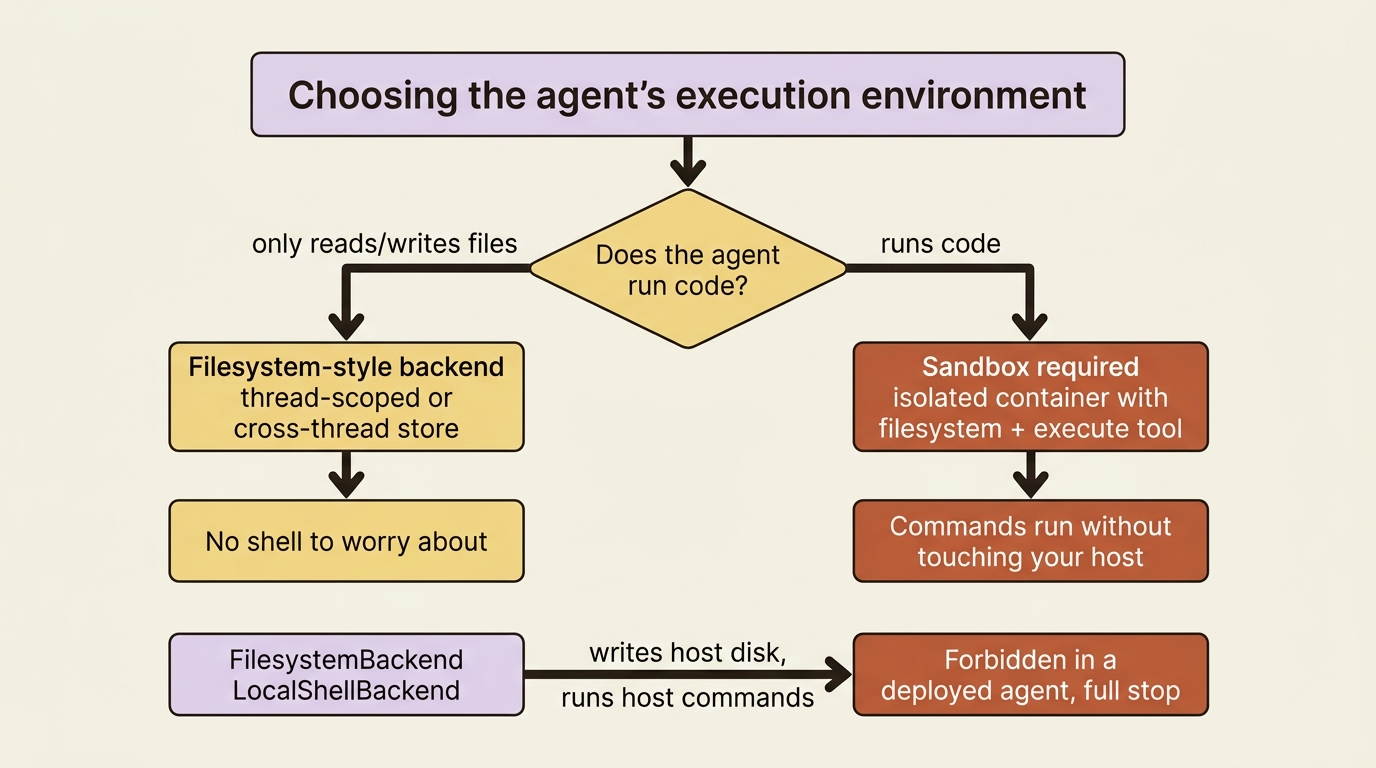
Here is the rule that matters more in production than anywhere else. FilesystemBackend and LocalShellBackend read and write your host's actual disk and run commands directly on your machine. They are fine on your laptop and forbidden in a deployed agent, full stop. In production, those backends mean the agent, driven by input from users you do not trust, has a direct line to your server's filesystem and shell.
Use a sandbox instead. The isolation is not just defense against attackers. It is also what saves you from the 3 a.m. memory blowup, because when the agent's code exhausts memory or crashes inside a sandbox, only the sandbox dies and your server keeps serving everyone else.
Where the agent sits relative to the sandbox
There are two patterns, and production is where the choice has teeth.
In the agent-in-sandbox pattern, you build an image with your agent installed, run it inside the sandbox, and talk to it over the network. It mirrors local development closely, but it forces your API keys to live inside the sandbox, which is a real risk, since the agent can read any file or env var in there. Updating the agent means rebuilding the image.
In the sandbox-as-a-tool pattern, the agent runs on your server and reaches into the sandbox only to execute code through tool calls. Your keys stay outside the sandbox, you update agent code without rebuilding anything, a sandbox crash never loses agent state, and you can run work in several sandboxes in parallel. The cost is network latency on each execution call.
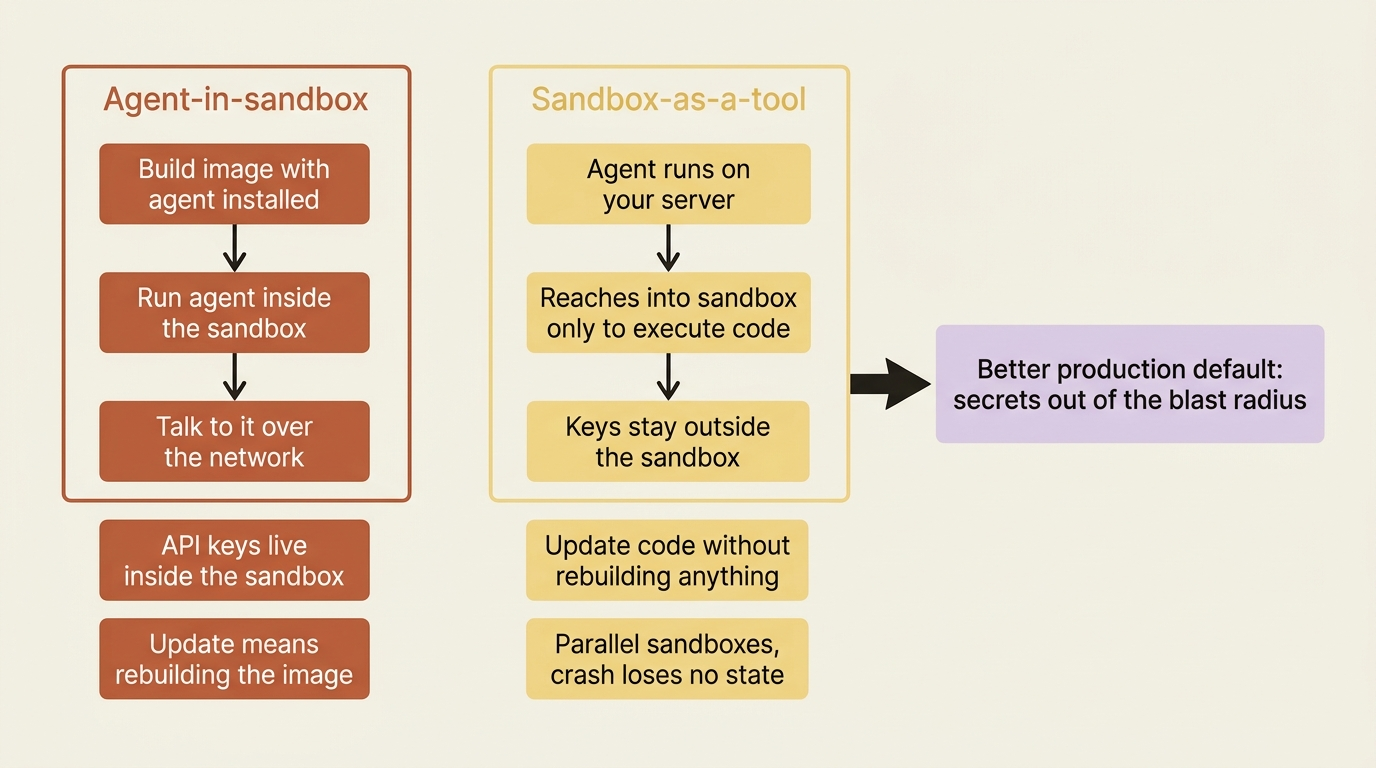
For most production deployments, sandbox-as-a-tool is the better default, precisely because it keeps secrets out of the blast radius and decouples the agent's state from the disposable execution environment. Connecting one is a backend swap:
from deepagents import create_deep_agent
from langchain_daytona import DaytonaSandbox
from daytona import Daytona

sandbox = Daytona().create()  # ①
backend = DaytonaSandbox(sandbox=sandbox)  # ②

agent = create_deep_agent(
    model="anthropic:claude-sonnet-4-6",
    backend=backend,  # ③
    system_prompt="You are a code-maintenance agent with sandbox access.",
)
① The Daytona client provisions a fresh remote sandbox, an isolated container with its own filesystem and shell, separate from your host.
② The sandbox is wrapped in a DaytonaSandbox backend, which exposes it to the agent through the same backend interface you have used since Part 4.
③ Passing that backend to create_deep_agent is the entire wiring change; the agent gains the execute tool against the sandbox while the rest of the call is unchanged from a local run.
Note: The full extracted listing at code/langchain_deepagents/part-10-deployment/listings/01-daytona-sandbox-backend.py shows the runnable form.
The agent now has the execute tool backed by a remote Daytona sandbox, so it can finally run its tests, and it does so in an isolated container instead of on your host. Daytona is one provider of several. The ecosystem includes Daytona, Modal, Runloop, E2B, and AWS AgentCore, among others, and they swap in by changing the backend, not the agent. Remember to shut sandboxes down when a task is finished, because they cost money until they do.
Sandbox lifecycle and the async graph factory
A deployed agent has to decide how long a sandbox lives, and there are two natural answers.
Thread-scoped gives each conversation its own sandbox: the first run creates it, follow-ups in the same thread reuse it, and a new thread starts clean. That fits a data-analysis bot where every conversation should begin fresh.
Assistant-scoped shares one sandbox across all conversations, which fits a coding assistant that keeps a cloned repo and installed dependencies warm so that it does not re-clone every time.
The wrinkle is that a static, pre-built graph cannot know which sandbox to use, because the answer depends on the thread_id or assistant_id, and those only exist at invocation time. The solution is an async graph factory. Instead of exporting a finished agent, you export an async function that receives the runtime config, reads thread_id or assistant_id out of config["configurable"], looks up or creates the matching sandbox, and builds the agent around it. The factory is async because creating a sandbox is a network operation.
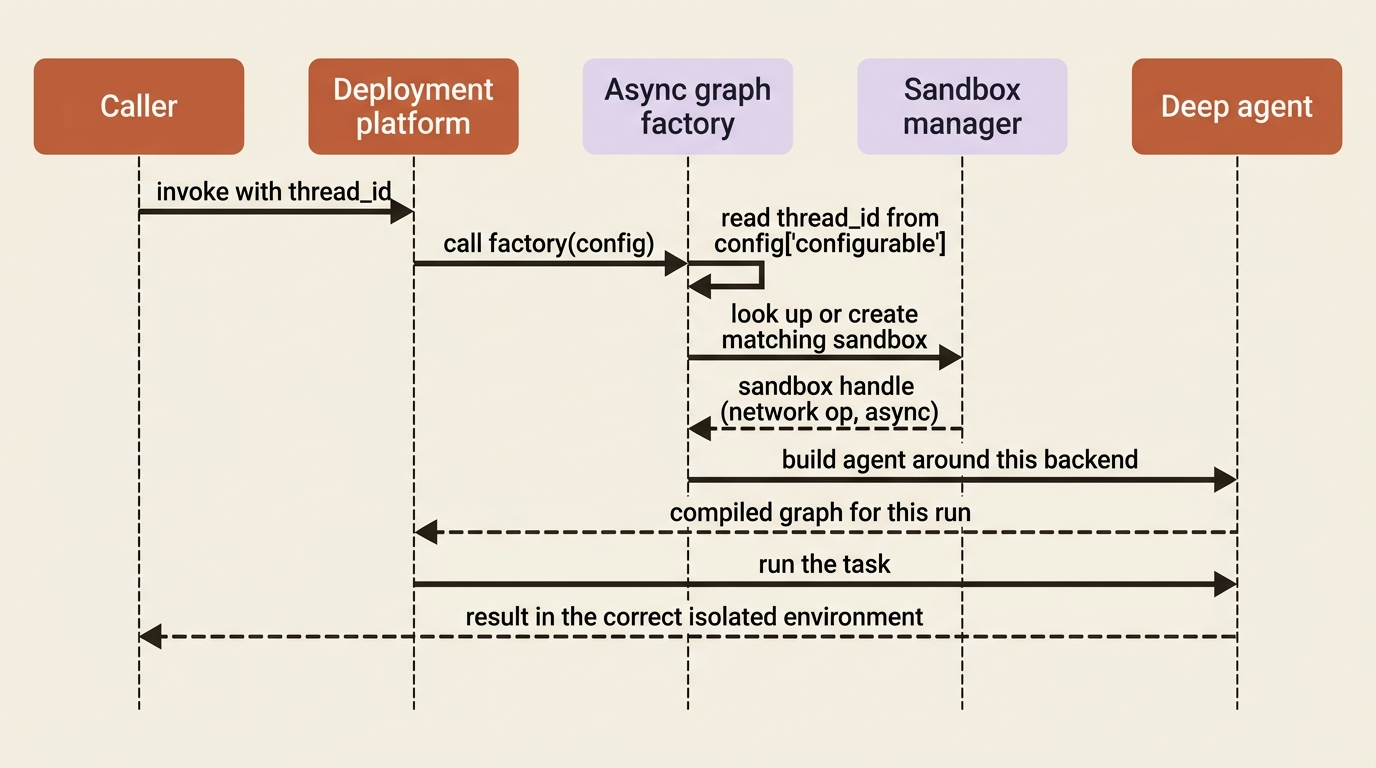
This is the one structural change that deployment imposes on your code, and it exists specifically so that each run resolves to the correct isolated environment.
Multi-tenancy: keeping users out of each other's data
The moment you have more than one user, isolation stops being optional. Three things have to be scoped per user, and you have the tools for all of them.
- Threads must be per-user, so that one person cannot read another's conversation.
- Sandboxes should be per-user, often per-thread, so that one tenant's code and files never share an environment with another's.
- Cross-thread storage must be namespaced per user, which is exactly the job of the namespace factory: set it to key on the user's identity, and each user gets an isolated slice of the store.
Skip that namespace, and every user shares one pile of memory, which is a privacy breach that passes all your single-user tests. On top of scoping, role-based access control governs who may do what. The throughline is least privilege applied to tenancy: every per-user thing carries the user's identity, and nothing is shared unless you decided on purpose that it should be.
Guardrails for an agent that runs unattended
An agent in production runs autonomously, which means its failure modes run autonomously too. Three guardrails matter, and all three are middleware pointed at production concerns.
- Rate limiting here means capping the agent's own model and tool usage within a run, so that a confused agent cannot burn your model budget by looping. This is separate from gateway rate limiting on incoming requests.
- Error handling means the run survives a flaky tool or a transient model error rather than crashing the user's session, which is where resilience middleware, namely retries and fallbacks, earns its place.
- Data privacy means controlling what sensitive content the agent logs or sends onward, which can be a middleware that inspects and redacts.
The hooks that you write for a local agent are the same hooks that keep a deployed agent inside its limits.
The threat model you cannot ignore
The single most important production fact is that your agent takes dynamic actions based on dynamic input, which makes prompt injection a real and standing threat, not a hypothetical.
An attacker does not need access to your code. They need only to get text in front of your agent: a malicious instruction buried in a file the agent reads, a web page it fetches, an issue it pulls from a tracker, or a document a user uploads. If the agent treats that text as instructions, it can be steered into running commands, leaking data, or writing somewhere it should not.
There is no single switch that turns this off, which is why the answer is defense in depth.
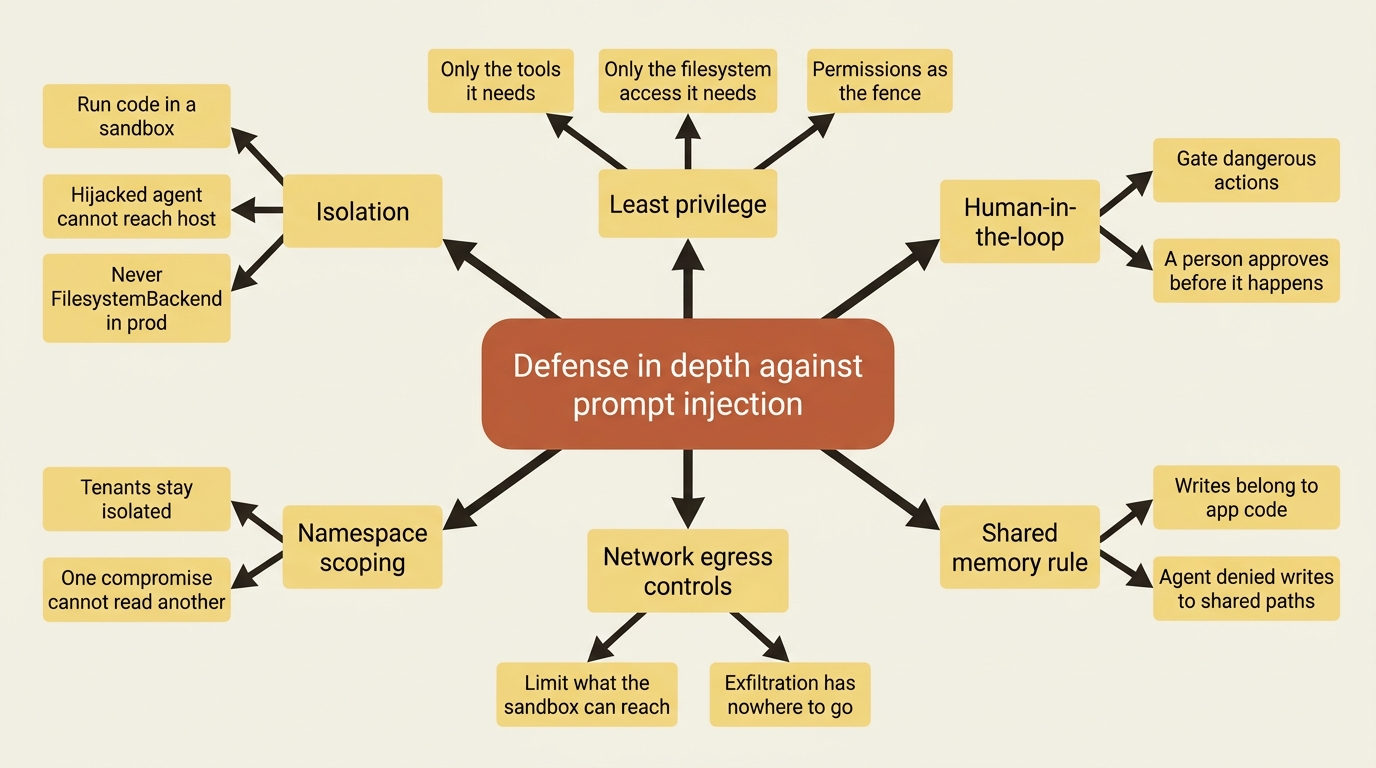
The layers stack like this:
- Isolation: run code in a sandbox so that a hijacked agent cannot reach your host, and never use
FilesystemBackendorLocalShellBackendin production. - Least privilege: give the agent only the tools and only the filesystem access that it needs.
- Human-in-the-loop: gate genuinely dangerous actions behind an approval flow so that a person sees them before they happen.
- Namespace scoping: keep tenants isolated so that a compromise of one cannot read another.
- Network egress controls: limit what the sandbox can reach so that exfiltration has nowhere to go.
And one specific rule is worth restating, because it is so easy to get wrong: write access to shared memory belongs to your application code, not the agent. If one user's agent can write to memory that another user's agent reads, that shared memory is an injection channel. Keep the pen in app code, and deny the agent writes to shared paths.
No single layer is sufficient. Together they are how you run an agent on untrusted input and sleep through the night.
Do this today
- Add a
langgraph.jsonto your project root. Even before you deploy, declaring dependencies, the graph mapping, and the env file forces you to name how your agent is built. - Audit your backend. If
FilesystemBackendorLocalShellBackendappears anywhere in code headed for production, replace it with a sandbox backend now. - Switch to sandbox-as-a-tool. Run the agent on your server and reach into a sandbox through tool calls, so your API keys stay out of the blast radius.
- Convert your export to an async graph factory if your sandbox lifecycle depends on the thread or assistant. Read
thread_idfromconfig["configurable"]and build the agent around the right sandbox. - Write the namespace factory before your second user signs up. Key cross-thread storage on the user's identity so that no two tenants ever share a slice of the store.
Where this leaves you
A deep agent is a stateful service, not a stateless function. Once you accept that, every deployment decision follows: you choose between a managed path and a self-built image, you pick a filesystem backend for file-only work and a sandbox the instant the agent runs code, you prefer sandbox-as-a-tool to keep secrets safe, you wire isolation to a thread with an async graph factory, you scope every per-user thing so tenants stay separate, and you stack defense-in-depth layers because prompt injection is a standing threat, not a maybe.
The result is an agent you can put in front of strangers. It runs its tests in an isolated sandbox, serves users without mixing their data, and survives a bad input instead of being commandeered by it.
There is still one thing you cannot do well, and it is the thing you will want most the first morning after launch: see what the agent actually did. A deployed agent is a black box until you can trace its planning, its tool calls, and its subagent delegations. That is the next problem worth solving, because an agent you cannot observe is an agent you cannot trust at scale.
This is Part 10 of "Building with LangChain Deep Agents," a 13-part guide to building production-ready AI agents.