
The Silent Failure That Ends a Good Agent Launch
A deployed agent fails silently on a new model unless you give it eyes (LangSmith tracing) and a portable package (harness profiles); this article shows both.
Your agent worked perfectly on your laptop. Someone ran it on a cheaper model, and it quietly stopped planning. No error fired. Here is how LangSmith tracing and harness profiles close that gap for good.
In this article: You will learn how to make a deployed Deep Agent observable and portable. We cover LangSmith tracing that turns a black-box run into a searchable record, structured output so downstream code consumes typed data instead of parsing prose, per-run cost visibility, OpenTelemetry export for teams with an existing stack, and harness profiles that make one agent module behave correctly on any model. By the end you can hand your agent to a teammate and trust that it runs.
Here is the failure that ends a good launch. Your agent worked perfectly on your laptop, on the model you developed against. You ship it, someone runs it on a different model to save cost, and it quietly misbehaves. It stops planning, or it ignores a convention, or it floods the context. Nobody gets an error. The traces you did not set up would have shown you the divergence in thirty seconds, and the profile you did not write would have made the agent behave correctly on the new model in the first place. Two missing pieces, one silent failure.
This article is about closing that gap. A capable agent accumulates a lot of moving parts: custom tools, subagents, middleware, project skills, backends, permissions, and human-in-the-loop gates. Two questions follow naturally once you have all of it. First, how do you see what the agent is doing in production? Second, how do you bundle it so the next person, the next repo, or the next model gets the whole thing working without re-deriving your wiring?
Observability comes first, because you need eyes before you ship. Packaging comes second, because reuse only matters once you have something worth reusing. We will work both questions against a running example, a code-maintenance agent called buggy-shop that reads a repo, plans a fix, and runs its own tests.
Observability: stop flying blind
A deployed agent is a black box until you trace it. With Deep Agents, the native path is LangSmith tracing, and you turn it on with environment variables and nothing else.
A deep agent makes a lot of decisions you never see: which tools it called, in what order, what it planned, which subagent it delegated to, and how many tokens each step cost. On your laptop you could read the stream as it scrolled by. In production there is no stream to read. You need a record you can search after the fact, and the native answer is LangSmith tracing.
The remarkable part is the setup cost, which is essentially zero. You set a couple of environment variables, and the agent's entire execution shows up as a structured, nested trace.
export LANGSMITH_TRACING="true"
export LANGSMITH_API_KEY="lsv2_..."
export LANGSMITH_PROJECT="buggy-shop"   # optional; groups traces
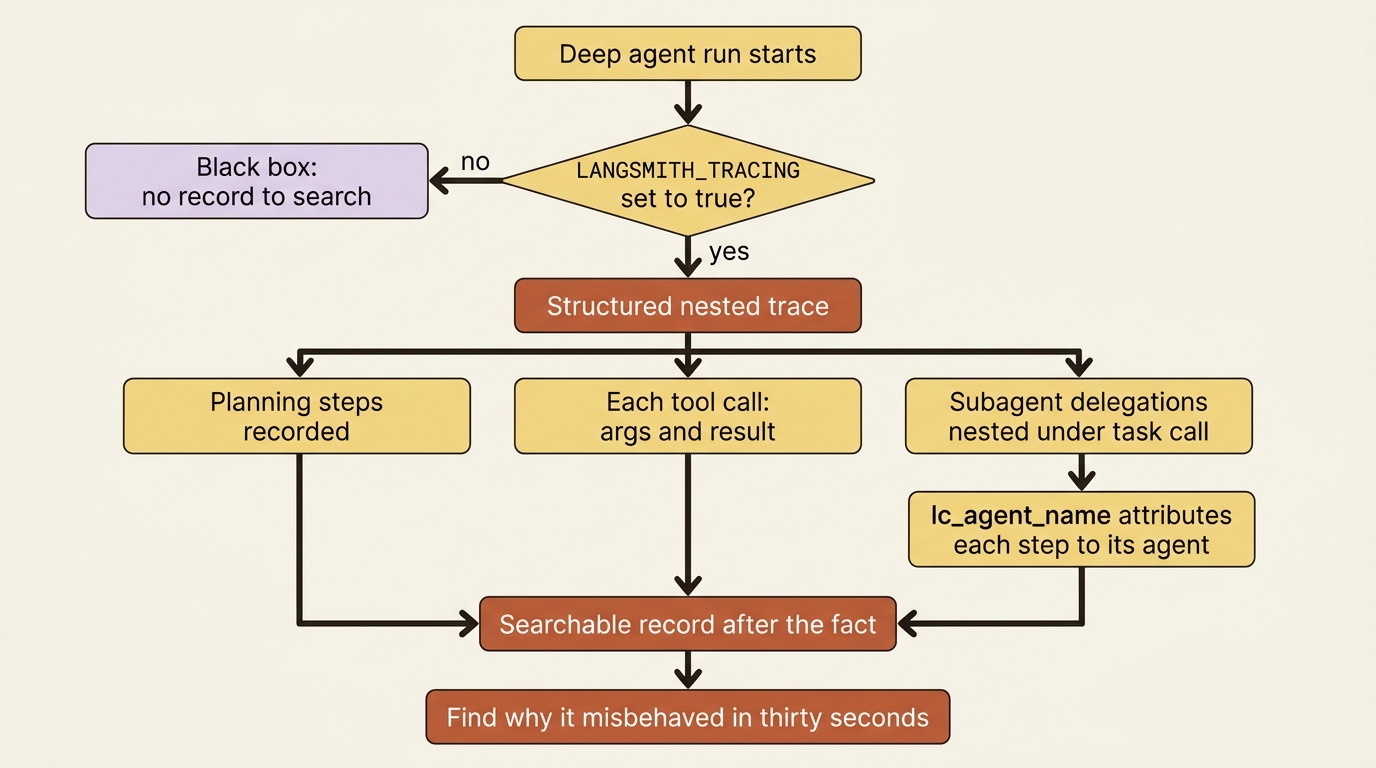
Here is what that buys you. Every run now records its planning steps, each tool call with its arguments and result, and each subagent delegation. The delegations are nested, so a subagent's work appears under the task call that spawned it rather than as a confusing flat list. Deep Agents tags each step with lc_agent_name metadata. That tag is what lets the trace attribute each step to the agent that produced it, so you can see at a glance that the reviewer subagent actually did its job.
The first time buggy-shop does something surprising in production, this trace is where you find out why. It cost you three lines of environment config. That is the cheapest insurance in the framework.
Structured output: results your code can actually use
Tracing is for humans reading after the fact. Structured output is for the code downstream of your agent.
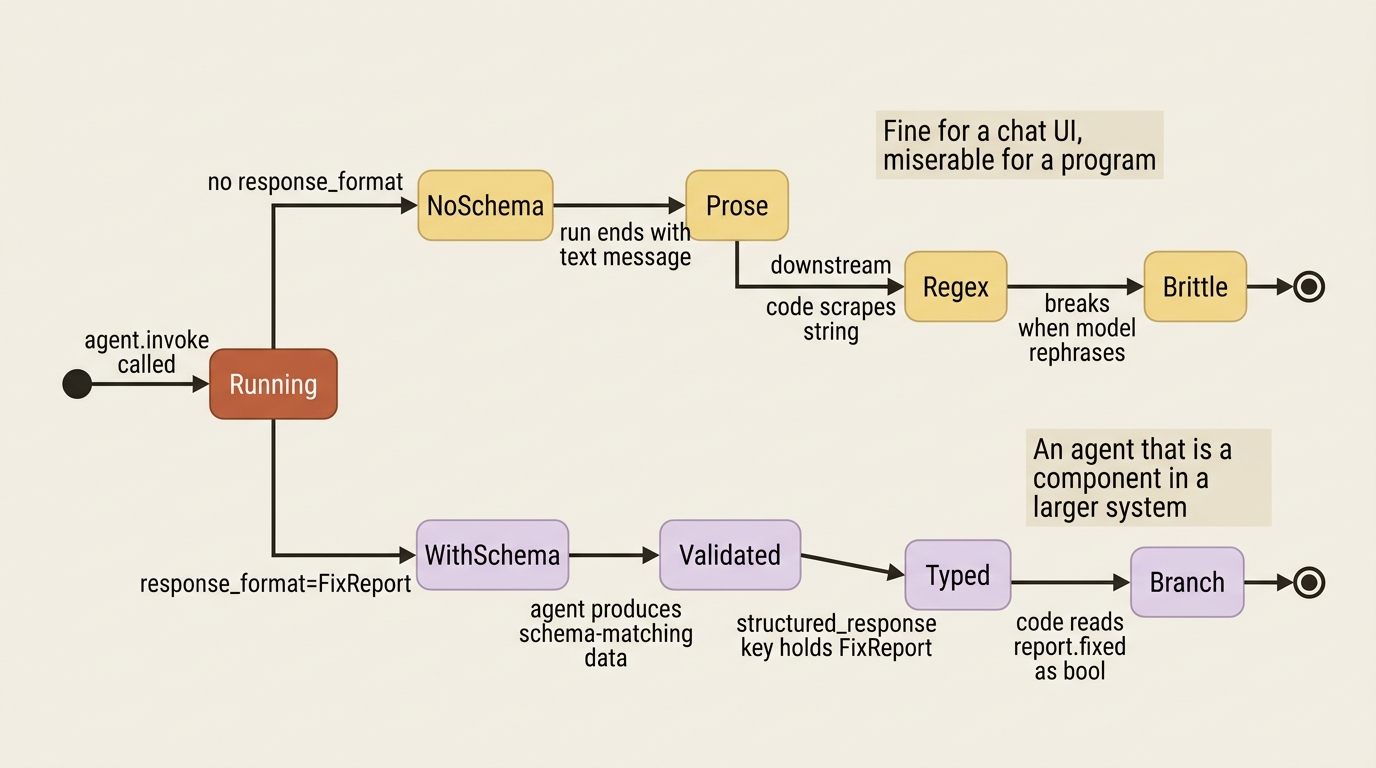
By default a run ends with a text message. That is fine for a chat UI and miserable for a program that needs to know, specifically, whether the fix passed and what the verdict was. Scraping a verdict out of prose with a regex is brittle, and it breaks the first time the model rephrases itself.
You fix that by handing the agent a schema through response_format. When the run finishes, the agent produces data matching that schema, validated, and returns it in the structured_response key of its state.
from pydantic import BaseModel, Field
from deepagents import create_deep_agent

class FixReport(BaseModel):  # ①
    """The outcome of a bug-fix attempt."""
    fixed: bool = Field(description="Whether the failing test now passes")  # ②
    file_changed: str = Field(description="Path of the file that was edited")
    summary: str = Field(description="One-line description of the fix")

agent = create_deep_agent(
    model="anthropic:claude-sonnet-4-6",
    tools=[run_tests],
    response_format=FixReport,  # ③
)

result = agent.invoke({"messages": [{"role": "user", "content": "Fix the failing test."}]})  # ④
report = result["structured_response"]  # a validated FixReport, not a string  ⑤
① The schema is an ordinary Pydantic model, so the contract for the run's result lives in plain typed Python.
② Each field carries a description, which the agent reads as guidance for what to put there when it fills the schema.
③ Passing the model to response_format is the one wiring step that turns a prose-ending run into a schema-ending one.
④ The run is invoked normally; structured output changes what comes back, not how you call the agent.
⑤ The validated object is read from the structured_response key of the result state, not parsed out of a text message.
Here is what just happened. Instead of scraping "I fixed the pagination bug in utils.py and the tests pass now" out of prose, your code reads report.fixed as a boolean and report.file_changed as a path. This is the difference between an agent that talks to a person and an agent that is a component in a larger system. For buggy-shop running as part of a CI pipeline, structured output is what lets the pipeline branch on the result, fail the build, or open a follow-up ticket.
Subagents support the same mechanism on their own config. A reviewer subagent can hand its parent a structured verdict rather than a paragraph, so the parent agent does not have to parse the reviewer's prose either.
Note: The full extracted listing at code/langchain_deepagents/part-11-observability-packaging/listings/01-structured-output.py shows the runnable form.
Cost and tokens: knowing what a run costs
An agent that loops is an agent that spends. The same trace that shows you what the agent did also shows you what it cost.
Observability is not only about correctness. It is about affordability. LangSmith surfaces token usage and cost per run, broken down by step and by model. That breakdown turns "our agent bill went up" from a mystery into a trace you can sort by cost.
This matters doubly for a multi-model deployment. A subagent running on an expensive model can quietly dominate the bill while the main agent looks cheap, and without a per-step breakdown you would never know which one to optimize. You do not need extra instrumentation for this. Cost visibility rides along with the tracing you already turned on.
OpenTelemetry: when you already have a dashboard
LangSmith is the native path, but plenty of teams already run an observability stack and do not want a second one.
Because a Deep Agent runs on LangGraph, its telemetry can be exported over OpenTelemetry (OTLP) to a collector you already operate. Agent traces then nest under your existing application spans rather than living in a separate silo. If your team runs Datadog, Honeycomb, or Grafana, the agent's work shows up where you already look.
The framing here is honest about priority. LangSmith is the path of least resistance and the tool built for this specifically. OTel export is the right call when "use what we already have" outweighs "use what is purpose-built." Either way the signal is the same; only the destination changes. The integration surface evolves, so confirm the exact configuration against current docs, but the capability is there.
Packaging: from scattered wiring to one unit
Now the second question. You have all these pieces. How do you hand them over?
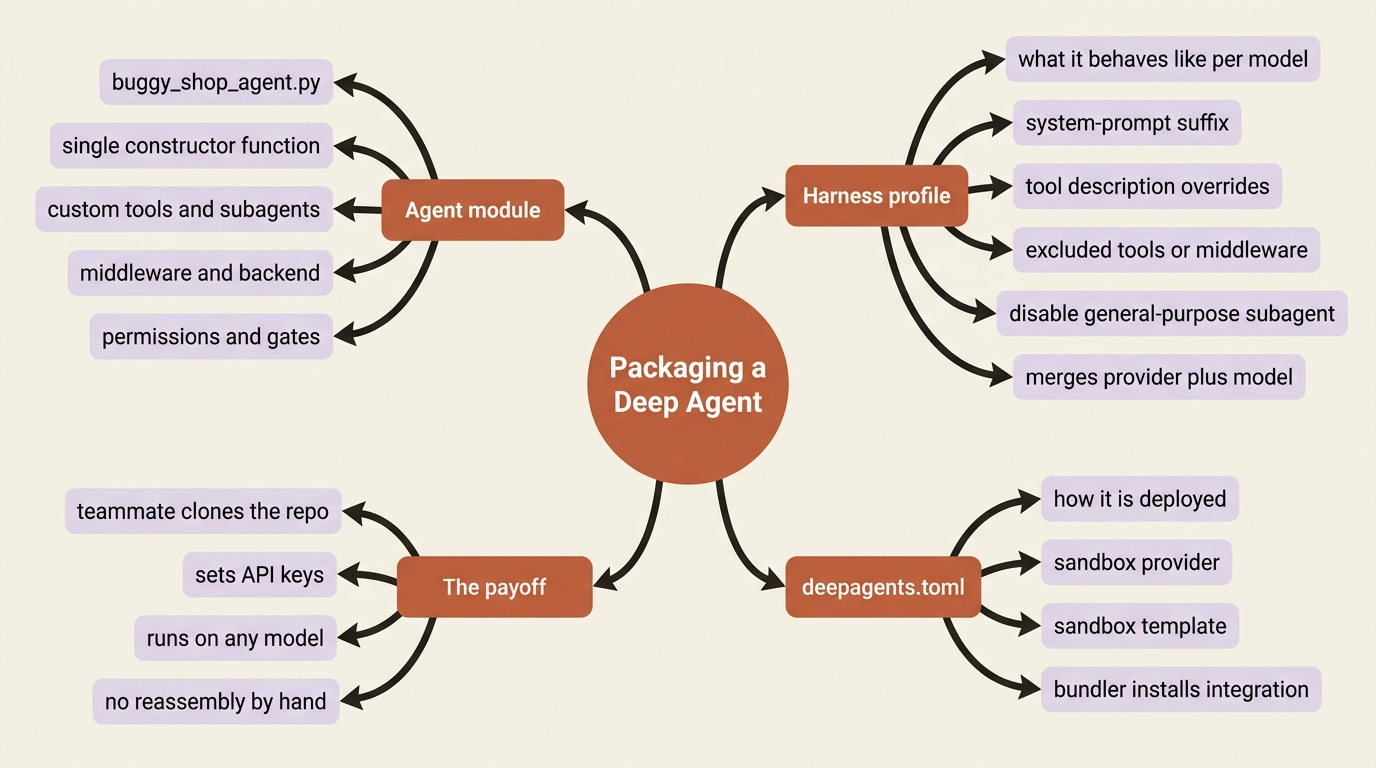
If you came from another agent framework expecting a plugin file, a manifest you point at so everything loads, Deep Agents does not work that way, and that is the honest thing to say. There is no plugin.json equivalent. Packaging here is more ordinary and, frankly, more Pythonic. You collect the agent's parts into a module that constructs and returns the configured agent, and you use a couple of mechanisms to make that module portable across models and deployments.
The most useful of those mechanisms is the harness profile, and it solves exactly the silent-misbehavior failure from the top of this article.
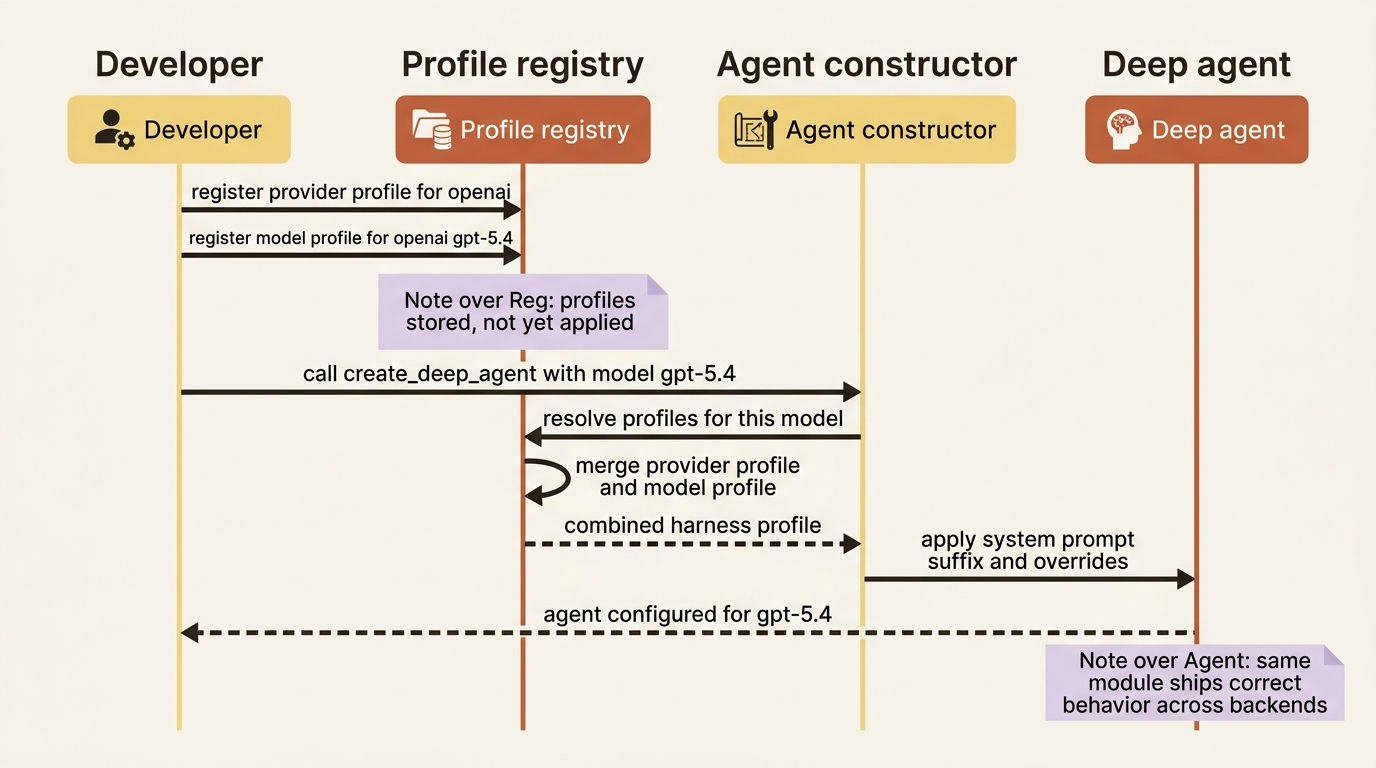
A harness profile is a declarative bundle of adjustments: a system-prompt suffix, tool description overrides, excluded tools or middleware, and general-purpose subagent edits. Deep Agents applies the profile automatically whenever a given provider or specific model is selected. You register it once against a provider key like "openai" or a model key like "openai:gpt-5.4", and from then on create_deep_agent applies it when that model is in play, without you touching the call site.
from deepagents import HarnessProfile, register_harness_profile

register_harness_profile(
    "openai:gpt-5.4",
    HarnessProfile(system_prompt_suffix="Batch independent tool calls in parallel."),
)
Here is what that does. Whenever the agent runs on gpt-5.4, it gets that extra instruction appended. A model that needed a nudge your development model did not now behaves correctly without a forked codebase. This is the answer to "it worked on my model": you encode the per-model adjustment as a profile, and the same agent module ships correct behavior across backends.
Profiles also merge. A provider-level profile plus a model-level one combine at resolution time, so you can set broad rules for a provider and narrow ones for a specific model. Profiles can be loaded from YAML, or even shipped as installable plugins through entry points, which is the closest thing Deep Agents has to a reusable extension package.
One concrete payoff is worth calling out. The harness profile is also where you cleanly disable the default general-purpose subagent, by setting its general_purpose_subagent to disabled. This is the supported alternative to excluding SubAgentMiddleware, which raises an error if you try to remove it directly.
A note on freshness: harness profiles are marked beta. Confirm the API shape and the name against current docs before you ship. The packaging argument does not depend on profiles being perfect. If the API has shifted, the core advice still holds: collect your pieces into a module, and encode per-model tweaks declaratively.
A second config file, for deployment
Packaging is not only about the agent's behavior. It is also about its deployment.
Deep Agents uses a deepagents.toml file to declare deployment configuration, notably the sandbox provider and template your agent should run against. The bundler reads that file to install the right integration package and wire the sandbox in for you, rather than your hardcoding it.
The point for reuse is separation of concerns. The agent module says what the agent is. The harness profile says how it should behave per model. The deepagents.toml says how it should be deployed. Hand all three to a teammate and they have what they need without reading your mind.
Bringing buggy-shop home
Here is the payoff. Over its lifetime, buggy-shop accumulates pieces in your editor: a run_tests custom tool, a reviewer subagent, an audit-logging middleware, a run-and-fix-tests skill, an AGENTS.md memory file, a composite backend, and permissions with an interrupt_on gate.
Packaging means collecting all of that into one module, say buggy_shop_agent.py, that exposes a single function returning the fully wired agent. You register a harness profile for any model-specific tuning, and you add a deepagents.toml for the sandbox.
The result is concrete, and it is the entire point. A teammate clones the repo, sets their API keys, and runs the same capable agent you built, on whatever model they choose, without reassembling a single piece by hand. One module, one constructor, portable.
The troubleshooting checklist you will actually reach for
Three failures account for most of the support questions, and each has a first thing to check.
A skill is not loading. The cause is almost always that the SDK only loads skill sources you explicitly pass. It does not scan the CLI's directories. Confirm you passed the skill's source path in skills=, and that, on the default backend, you seeded the file in through invoke(files={...}). Check the source path before you check anything else.
A namespace is not isolating, so users see each other's memory. The cause is a missing or wrong namespace factory on a StoreBackend. This is the gotcha that passes every single-user test, because isolation only fails when a second user shows up. Confirm the factory keys on the user's identity, and confirm that you actually set it, because the legacy default shares storage across everyone on the same assistant.
A trace is not appearing. Confirm LANGSMITH_TRACING is "true" and LANGSMITH_API_KEY is set in the environment the agent actually runs in, which in a deployment is not your shell. A trace that works locally and vanishes in production is usually an environment variable that did not make it into the deployed container.
Do this today
- Turn on tracing. Set
LANGSMITH_TRACING,LANGSMITH_API_KEY, andLANGSMITH_PROJECT, then run your agent once and open the trace. You now have a searchable record of every run. - Add a
response_formatschema to one agent that feeds downstream code. Replace the regex that parses its prose with a typed field read offstructured_response. - Sort one trace by cost in LangSmith. Find the step or model that dominates the bill, and decide whether the cap from your loop controls is set right.
- Write one harness profile for a model other than your development model. Register a
system_prompt_suffixand confirm the agent picks it up when that model is selected. - Create a
deepagents.tomlthat declares your sandbox provider, and move that config out of your agent code.
See it, then ship it
Observability gives you eyes. LangSmith tracing shows the full nested picture, structured output lets downstream code consume typed results, cost and token visibility rides along for free, and OpenTelemetry export covers teams with an existing stack. Packaging gives you portability. Harness profiles make the agent behave correctly on any model, deepagents.toml carries deployment config, and a single module collects everything your agent became.
The silent failure at the top of this article is not bad luck. It is the predictable result of shipping an agent you cannot see, in a package nobody else can run. Trace it so you can see it. Profile it so it behaves the same everywhere. Bundle it into one module so a teammate runs it tomorrow without reading your mind.
An agent worth building is an agent worth shipping. The difference between the two is eyes and a package.
This is Part 11 of "Building with LangChain Deep Agents," a 13-part guide to building production-ready AI agents.